
- Comment / uncomment selected text (Ctrl + /)
- Make FOLD from selected text
- Format indentation
- Motion points inside folds - warning and inserting of new points
- Signal descriptions panel - descriptions not found
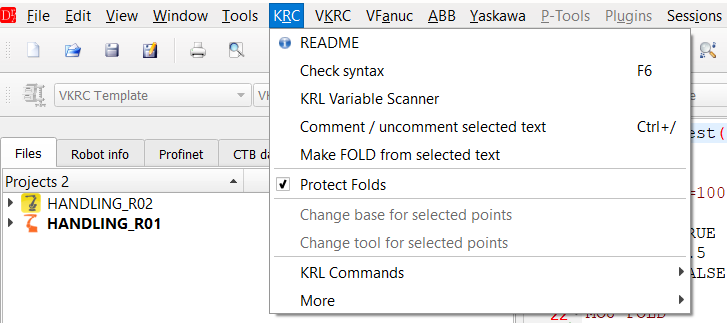
KRC » Comment / uncomment selected text (Ctrl + /) and Make FOLD from selected text
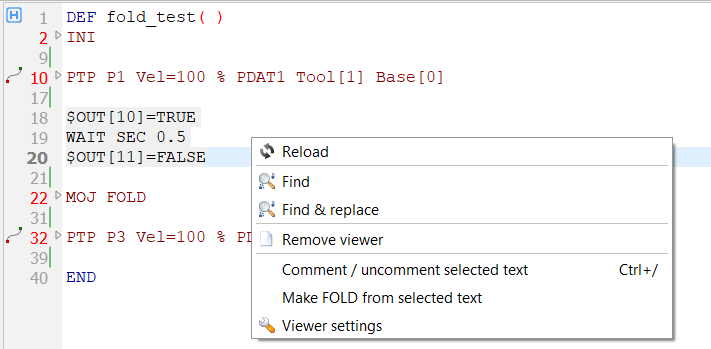
The same functions in the context menu of the editor
▲ Comment / uncomment selected text
Ctrl + / comments (;) or uncomments the current line or all lines of the selection.
- All selected lines get the same state: if at least one line is not commented, all lines are commented; if all lines are commented, they are uncommented. Empty lines are skipped.
- A selection which ends at the beginning of a line does not include this line.
- When a fold header is selected, the whole body of the fold is commented / uncommented (also when the fold is collapsed). The lines ;FOLD, ;ENDFOLD and the parameter lines of inline forms (;%{...}, ;Params) are never changed, so the fold stays complete.
- The program frame (DEF, END, DEFDAT, ENDDAT, & header lines) is not changed.
- With Protect Folds on, single lines inside a fold are skipped - select the fold header to change the whole fold. The status bar shows how many lines were changed and why lines were skipped.
- The selection stays, so the same lines can be uncommented with the next Ctrl + /. Edit » Undo reverts the whole change in one step.
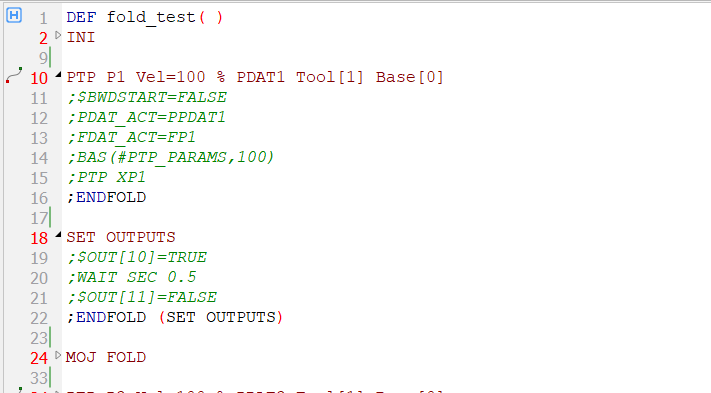
The bodies of the folds P1 and SET OUTPUTS commented - the fold lines are not changed
▲ Make FOLD from selected text
Puts the selected lines into a new fold:
;FOLD name
... selected lines ...
;ENDFOLD (name)
The dialog asks for the name of the fold. The name can be empty (a fold without name) and can not contain
;. The field Result shows the new fold lines, below is the number of lines put into the fold.
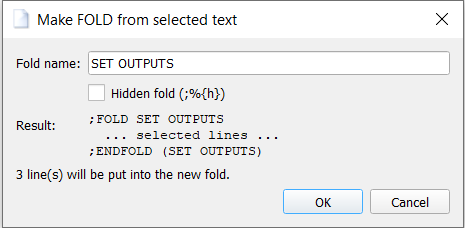
Make FOLD from selected text - name of the new fold
| Option | Description |
|---|---|
| Fold name | Text shown in the collapsed fold. Empty - fold without name. |
| Hidden fold (;%{h}) | Adds the attribute H: ;FOLD name ;%{h}. A hidden fold is not shown to the operator on the SmartHMI and can not be changed there (it is used for the hidden parameters of inline forms). Unchecked by default - a user fold normally has no attribute. The last choice is remembered. |
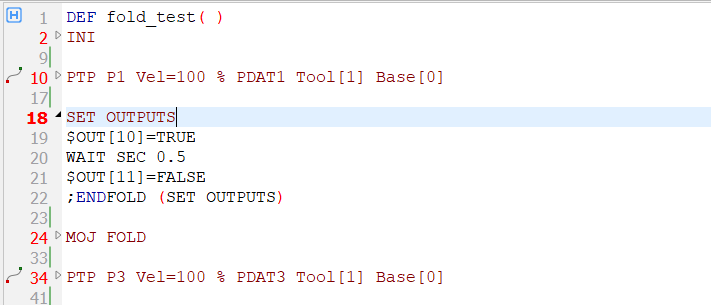
The new fold SET OUTPUTS
The fold is not created when:
- nothing is selected,
- the selection crosses a fold - it contains ;FOLD or ;ENDFOLD without its pair (select whole folds or only lines between them),
- the selection contains a motion point or a part of it (PTP / LIN / CIRC, FDAT_ACT / PDAT_ACT) - see Motion points inside folds,
- the selection contains DEF / END or the first line of the program.
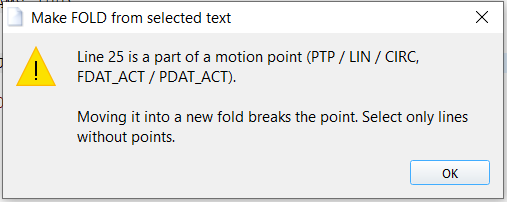
The selection contains a part of a motion point - the fold is not created
▲ Format indentation
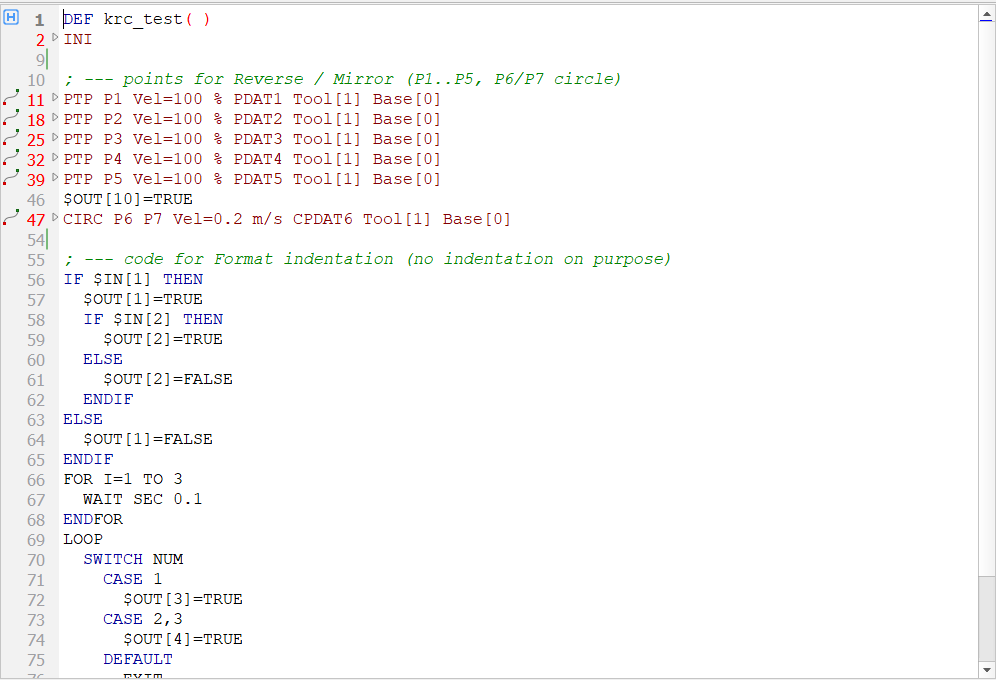
KRC » Format indentation (also in the context menu of the editor) sets the indentation of the selected lines - or of the whole program, when nothing is selected - by the KRL control structures:
- one level for IF / ELSE / ENDIF, FOR / ENDFOR, WHILE / ENDWHILE, LOOP / ENDLOOP, REPEAT / UNTIL, SPLINE / PTP_SPLINE / ENDSPLINE; SWITCH: CASE and DEFAULT one level deeper, their instructions two levels,
- DEF / END, DEFFCT / ENDFCT, DEFDAT / ENDDAT and the instructions of the program body stay in the first column,
- user folds are formatted with their content; folds of inline forms (motions, commands) are moved as a whole - their hidden lines are not changed,
- empty lines lose their spaces; the size of one level comes from Indentation size / mode of the editor settings (the same as Edit » Insert indent),
- when the structures are not balanced (e.g. IF without ENDIF), the status bar shows a warning.
▲ Motion points inside folds
A motion point (the fold of an inline form with PTP / LIN / CIRC) is recognized only on the top level of the program. A point inside another fold is not in the point table and its coordinates can not be edited. For safety, motion points should not be put into folds:
- Check syntax shows the warning 2511 Motion point inside another fold at such a point, with the name and the line of the outer fold.
- Make FOLD from selected text does not accept a selection with motion points.
- A new motion point (point editor, KRL commands PTP / LIN / CIRC) inserted while the cursor is inside a fold is put after this fold (also after folds nested in folds). The status bar shows a message.
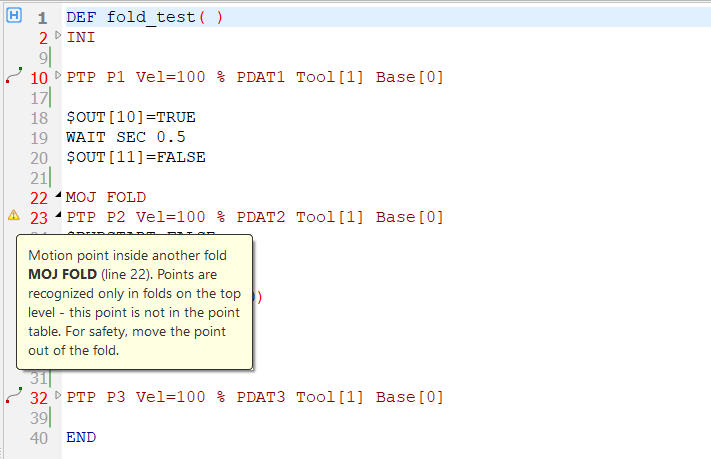
Warning 2511 - a motion point inside the fold MOJ FOLD
▲ Signal descriptions panel
The panel of signal descriptions (long texts) shows Not found with a warning icon when no descriptions were found for the robot, instead of a loading indicator.
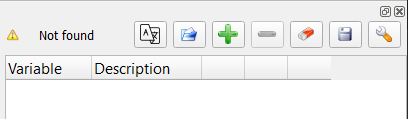
No signal descriptions found