
- What the scanner shows
- Starting the scanner
- Tabs and columns
- Options
- Filter, opening a declaration, export
▲ What the scanner shows
The KRL Variable Scanner is the object browser of a KUKA robot: it reads all *.dat files of the robot archive (optionally also the *.src files) and lists every declaration in a tree - file » declaration. You see at a glance where a variable, signal, structure or subprogram is declared, with its type, value and line, and which global names are declared more than once with different definitions.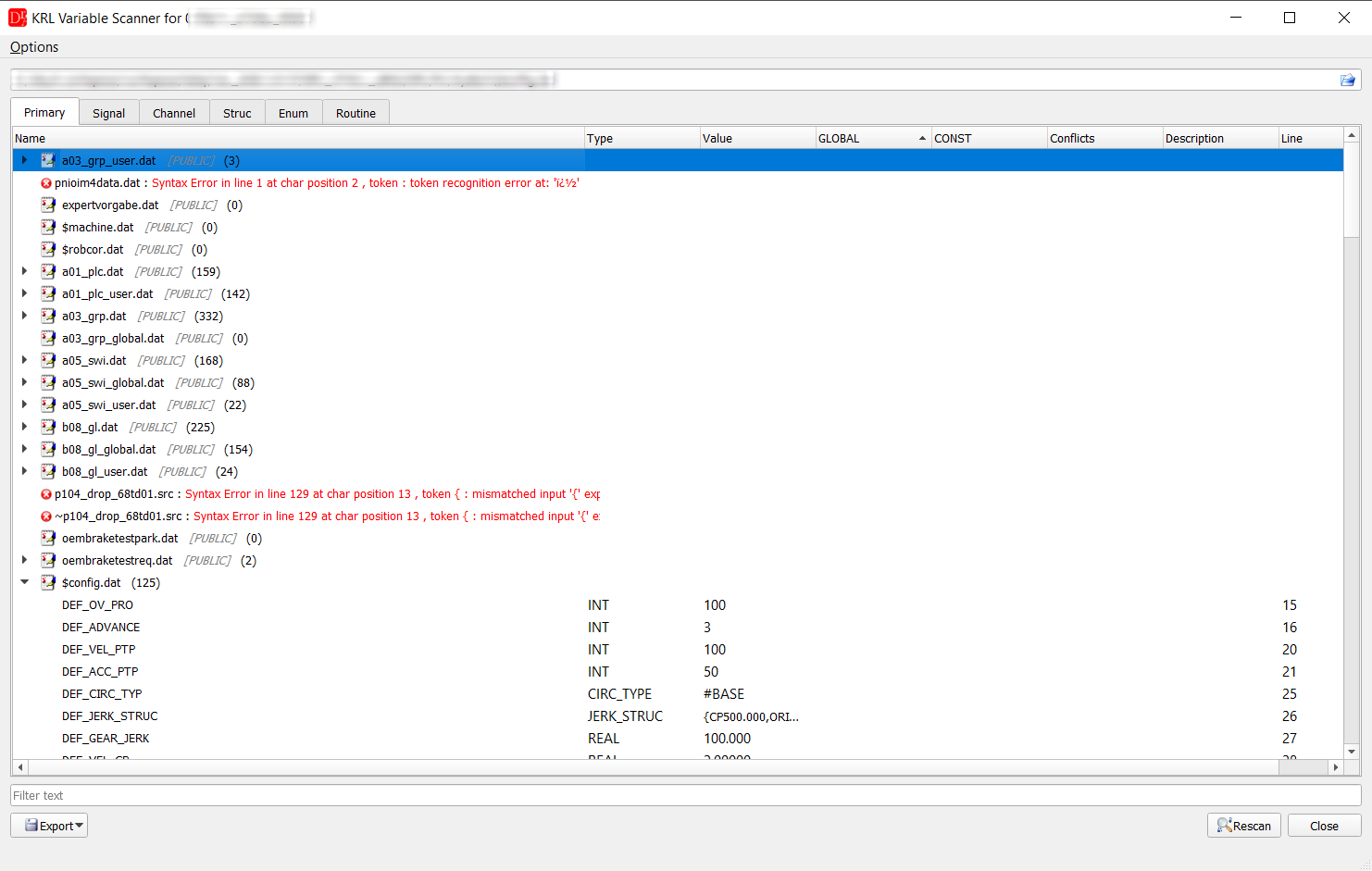
KRL Variable Scanner of a KRC archive: files with the number of declarations, files with a syntax error
in red, the declarations of $config.dat with type, value and line. The robot name and the path are hidden in the picture.
▲ Starting the scanner
Set a KRC or VKRC robot as the active project (project tree » Set active robot) and choose KRC » KRL Variable Scanner (for VKRC: VKRC » KRL Variable Scanner). The scanner takes $config.dat of the active robot and scans the whole archive (three folders above KRC\R1\System).Another archive can be scanned without opening it as a project: choose another $config.dat with the button in the path field, or drag a $config.dat or a ZIP archive of the robot onto the window, then Rescan. Backup copies of the editor (~name.src, ~name.dat) are skipped.
▲ Tabs and columns
| Tab | Contents | Columns |
|---|---|---|
| Primary | variables (DECL, also arrays) | Name, Type, Value, GLOBAL, CONST |
| Signal | SIGNAL declarations | Name, From, To (e.g. $IN[1] TO $IN[8]) |
| Channel | CHANNEL declarations | Name, Interface, Var |
| Struc | STRUC types | Name, Members |
| Enum | ENUM types | Name, Enumerators |
| Routine | subprograms and functions (DEF, DEFFCT) from *.src | Name, Type, Params, Kind |
- GLOBAL - declared with GLOBAL; everything in $config.dat is global automatically.
- Conflicts - the same name is declared global in several places with different definitions (type or value). In KRL all global names share one name space, so such a declaration is a real collision.
- Description - the long text of the variable or signal (signal descriptions of the robot), when loaded.
- Line - line of the declaration in the file.
▲ Options
- Scan for global variables only - only $config.dat and declarations with GLOBAL in public *.dat files.
- Scan for all variables - all declarations of all *.dat files.
- Scan *.dat files / Scan *.src files - which files are read. With *.src the Routine tab is filled and local declarations inside the routines are listed as well; without it the Routine tab stays empty.
▲ Filter, opening a declaration, export
- Filter text under the tables filters all tabs at the same time.
- A double click on a file opens it in the editor, a double click on a declaration opens the file at the line of the declaration.
- The context menu of the tree has Expand all and Collapse all.
- Export » Export to CSV... / Export to XLSX... writes all tabs into one file with the category, all columns and the file of every declaration.
Use the Conflicts column before a commissioning or after merging programs from several robots: a global
variable declared twice with different types or values leads to errors when the programs are loaded on the controller.