 DReS - Path Tools: TCP path length, motion time and seam checks (YouTube, English)
 DReS - Path Tools: Bahnlänge, Fahrzeit und Nahtprüfung (YouTube, Deutsch)
- Path length of selected motions / from first to last selected point
- Estimated motion time
- Arc information
- Point deviation from neighbours
- Check approximation
- Find long segments
- Check switch points (BS Schaltpkt, PS, TRIGGER WHEN PATH)
- Insert point on path at distance
- Export path to CSV
- ABB and Yaskawa - motions, speed, approximation, limits
- How the path is calculated and how accurate it is
- How accurate is the motion time?
- Licence and demo mode
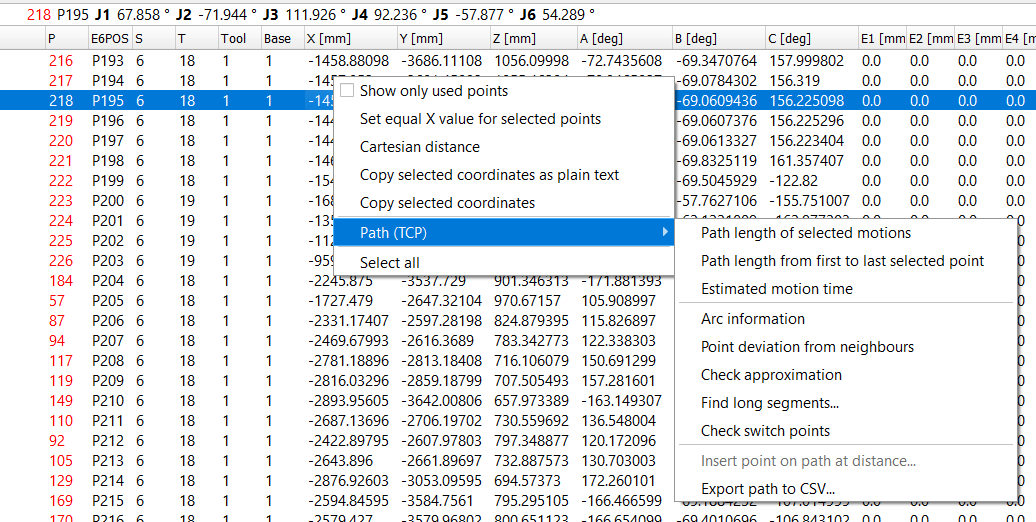
VKRC glue program: points P13 and P195 selected, context menu of the point table with the submenu Path (TCP).
▲ Which motions are used
The path follows the motions in the order of the file: every motion fold (VKRC, KRC), motion line (Fanuc, Yaskawa) or motion instruction (ABB) is one step, from the target point of the previous motion to its own target point. Subprogram calls, loops and jumps are not followed. A point used several times in the program appears several times on the path.
Functions that work on a range (motion time, approximation, long segments, switch points, CSV) use the part of the program from the first to the last use of the selected points. With fewer than two selected points they use the whole program.
▲ Path length of selected motions
Select two or more points that are used one after another in the program (e.g. the points of one glue seam) and choose Path (TCP) » Path length of selected motions. The window shows every motion with
- Length - length of the real path, with the approximation curves,
- Geometry - length without approximation (as with Genau = 0, VE = 0 %, FINE),
- Quality - exact, approx. or estimate (see below; this is not a setting, it follows from the motion data: approximation in mm gives approx., VE% / CNT / PTP approximation give estimate),
- s - cumulative length from the first selected point.
Sum of selected rows - in the result windows of the path length, motion time, long segments and CSV export you can select rows with the mouse (click, Shift+click, Ctrl+click). The line above the table shows at once the number of selected rows and their summed length and time, e.g. the length and the time of one part of a seam.
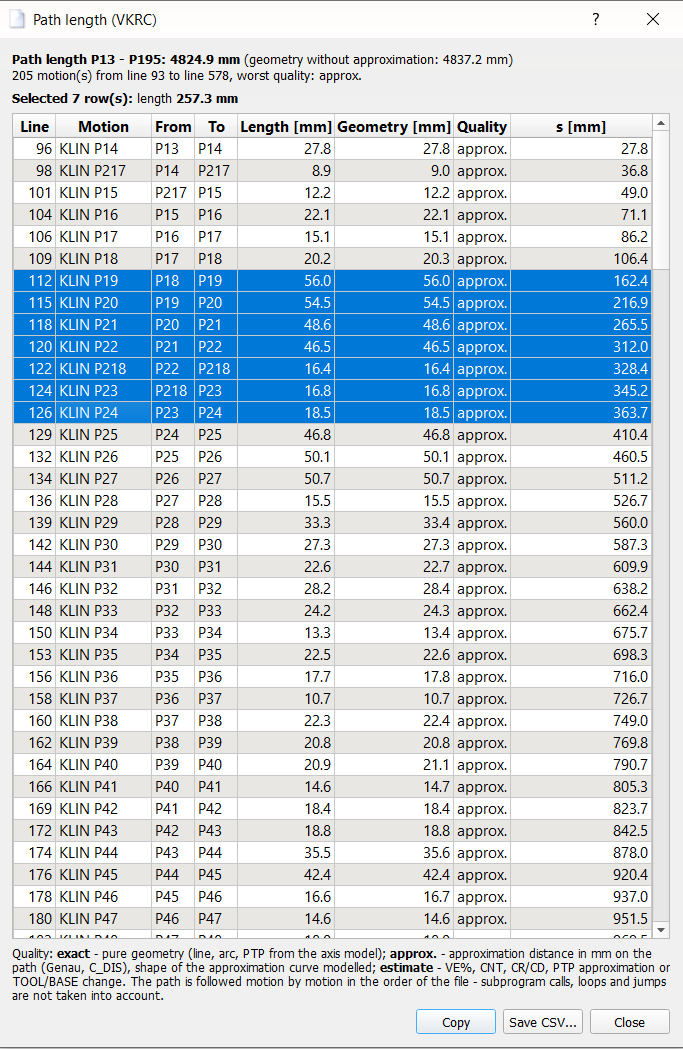
Path length P13 - P195: 205 motions, 4824.9 mm along the path (4837.2 mm without approximation); 7 rows selected - their length 257.3 mm is shown above the table.
▲ Path length from first to last selected point
It is enough to select the first and the last point, e.g. the start and the end of a seam. The whole path between them is measured, including all points that are not selected.
▲ Estimated motion time
For every motion the time is calculated from the path length and the programmed speed:
- VKRC: VB of LIN, CIR, KLIN, KCIR, SLIN, SCIR [mm/s],
- KRC: Vel of LIN and CIRC from the LDAT [m/s],
- Fanuc: mm/sec, cm/min, inch/min of L and C,
- ABB: speeddata vN = N mm/s (see ABB),
- Yaskawa: V= in mm/s of MOVL and MOVC (see Yaskawa).
- Time at programmed speed - as if the robot moved all the time at the programmed speed. This is the lower bound.
- With acceleration and braking - additionally the robot starts and stops with a constant path acceleration (default 2 m/s²) at every point without approximation. Short motions that never reach the programmed speed are calculated with a triangular speed profile.
Path_Tools, key CP_Acceleration_mm_s2.
Fanuc: motion planner. For Fanuc programs the planner uses the axis velocities $JNTVELLIM and the acceleration times $ACCEL_TIME1/2 from SYMOTN.VA of the backup: J motions are synchronous (the axis with the longest time at the programmed %), L / C take the path length and the speed (mm/sec, cm/min, inch/min, deg/sec), motions with sec / msec take the time written in the program. The acceleration time (scaled by ACC) is added where the robot stops: completely at FINE / CNT0, partly at CNTn, not at CR / CD. The axis data are read by the robot configuration of the editor (one place for all functions); without them default values are used and the summary says so.
VKRC and KRC: motion planner. For VKRC and KRC programs the window has a third value and a column Planner [s]: the time of every motion calculated by the motion planner of DReS (the same as in the Robot Cell Simulator). The planner includes all motions, also PTP (synchronous axes with the axis velocities and accelerations from $machine.dat of the robot archive), LIN and CIRC with their approximation. The summary shows the total time of the planner and the source of the axis data; without $machine.dat default axis velocities are used and the summary says so. A motion that cannot be planned (point not reachable) is shown as - and counted in the summary. Motions without a speed in mm/s (PTP in %) get the time of the planner also in the column Time [s] and in the first two totals, so these totals cover the whole selection; the summary says how many motions come from the planner. KRC: the points of the inline forms (PDAT / LDAT, FDAT, E6POS / E6AXIS, also global points of $config.dat) are converted for the planner, C_DIS / C_PTP / C_VEL / C_ORI become an approximation from APO_DIST (C_VEL / C_ORI only as an estimate); motions without point data split the range and are not planned. The velocity is the one the robot really uses: the value of BAS(#PTP_PARAMS, v) / BAS(#CP_PARAMS, v) in the fold (or Vel in the fold header), not VEL of PDAT / LDAT – folds of technology packages (e.g. ServoGun Swi Spotpoint) have no VEL in PDAT. A spot weld point is an exact stop (the approximation of the auxiliary point inside the fold is not used); the weld time itself is not included.
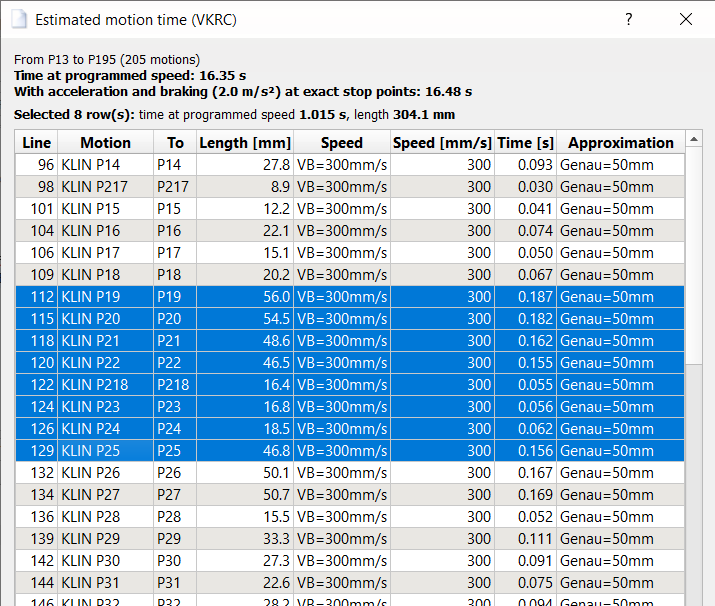
Estimated motion time of a VKRC program with PTP and LIN motions: the 8 PTP motions (VB in %) get the
time of the motion planner in the column Time, so the totals cover the whole program (3.07 s, planner 3.32 s);
4 selected rows: 0.480 s, 279.4 mm, planner 0.730 s. The source of the axis data is hidden in the picture.
▲ Arc information
For every circular motion (CIR, KCIR, SCIR, CIRC, C, MoveC, MOVC) whose target or auxiliary point is selected: radius, angle, arc length, chord, centre point and the position of the auxiliary point along the arc (50 % = in the middle). Remarks warn about
- an auxiliary point close to the start or target point (the circle then reacts strongly to small errors, e.g. after touch up),
- almost collinear points (very large radius),
- arcs longer than 180° and very small radii.
C P[a] : P[b] P[a] is the via point and P[b] the target; for ABB MoveC the CirPoint is the
auxiliary point; for Yaskawa MOVC see below.
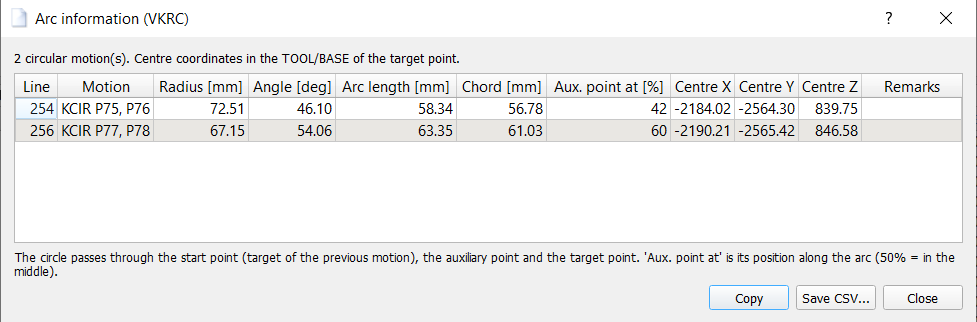
Two KCIR motions of a VKRC glue seam: radius, angle, arc length, chord, position of the auxiliary point and centre.
▲ Point deviation from neighbours
Distance of the selected point from the straight line through the previous and the next point, and the change of direction in the point. A point on a straight seam should have a deviation close to 0 - this helps to find points that "jump out" after touch up. The columns Previous, Point and Next show the three points in the order of the path.
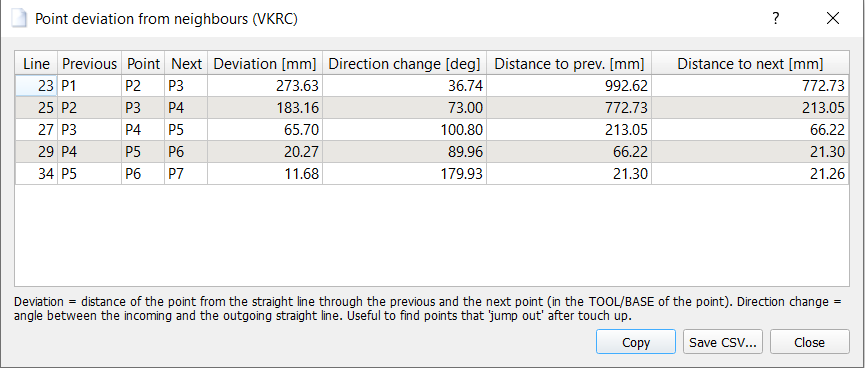
Five selected points: deviation from the straight line through the neighbours, change of direction and the distances to the neighbouring points.
▲ Check approximation
The controller never starts the approximation earlier than in the middle of the neighbouring motions. If Genau (VKRC), C_DIS (KRC) or CR / CD (Fanuc) is larger than half of the incoming or outgoing motion, it is reduced - silently. The path then passes closer to the point than programmed, and the length and the time change. The window lists all points with the approximation given in mm, and marks the points where the programmed distance cannot be reached. VE % and CNT are not checked.
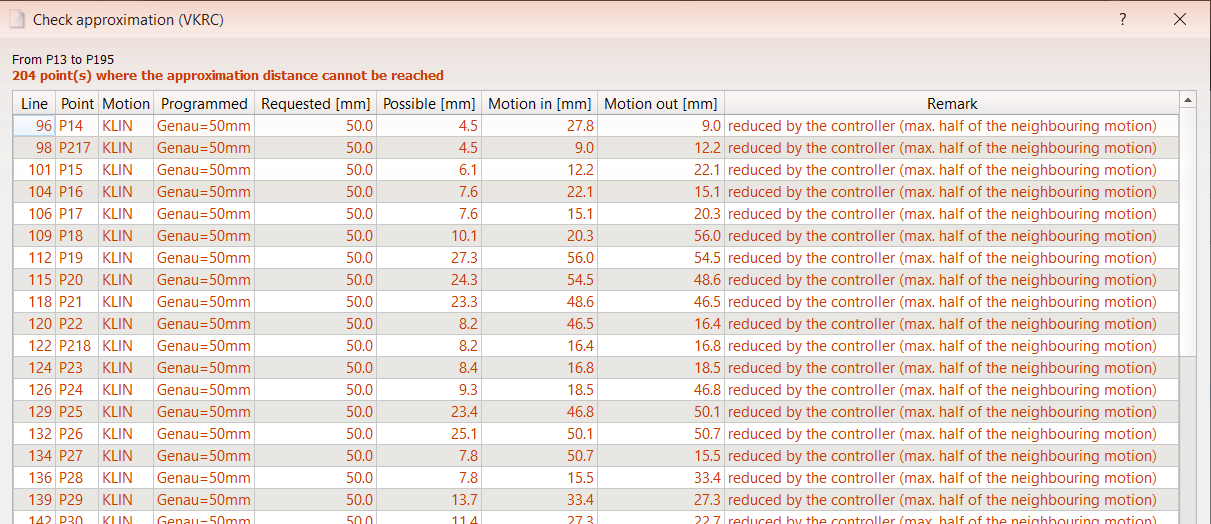
Genau = 50 mm at motions of 10 - 50 mm: the controller reduces the approximation at 204 points.
▲ Find long segments
Lists the motions longer than the given length (default 50 mm - the usual maximum distance between glue points). The length is the geometric length without approximation. For VKRC and KRC the table also has the columns Planner [s] – the motion time from the motion planner of the robot (with approximation) – and Average [mm/s] (length / time), so a long but fast PTP can be told from a short slow LIN; the sum row adds up the times.
▲ Check switch points
Switch points with a distance in mm are compared with the length of the motion they lie in:
- VKRC:
BS A1544 ( EIN ) = !E15 Schaltpkt: -5 [mm]: -50[ms], - Fanuc:
PS +20mm -0.05sec GO[11]=(2), - KRC:
TRIGGER WHEN PATH = -20 DELAY = 0 DO ..., - VKRC point with
SPSTrig=n[1/100 s]: the SPS_TRIG branch starts n*10 ms before the point (in the fold TRIGGER WHEN DISTANCE=1 DELAY=-n*10 DO SPS_TRIG(...)); it is checked like a time shift (see below) – an error when n*10 ms is longer than the motion to the point.
Time shift. The time part of a switch point (VKRC [ms], Fanuc sec, KRC DELAY) is checked with the motion planner (VKRC, KRC, Fanuc): the time from the switch point on the path to the target point is the time of the motion in proportion to the distance, plus the shift. The window shows the delay, this time and the time of the motion; a switch point that the shift moves out of its motion, or to the other side of the point, is an error.
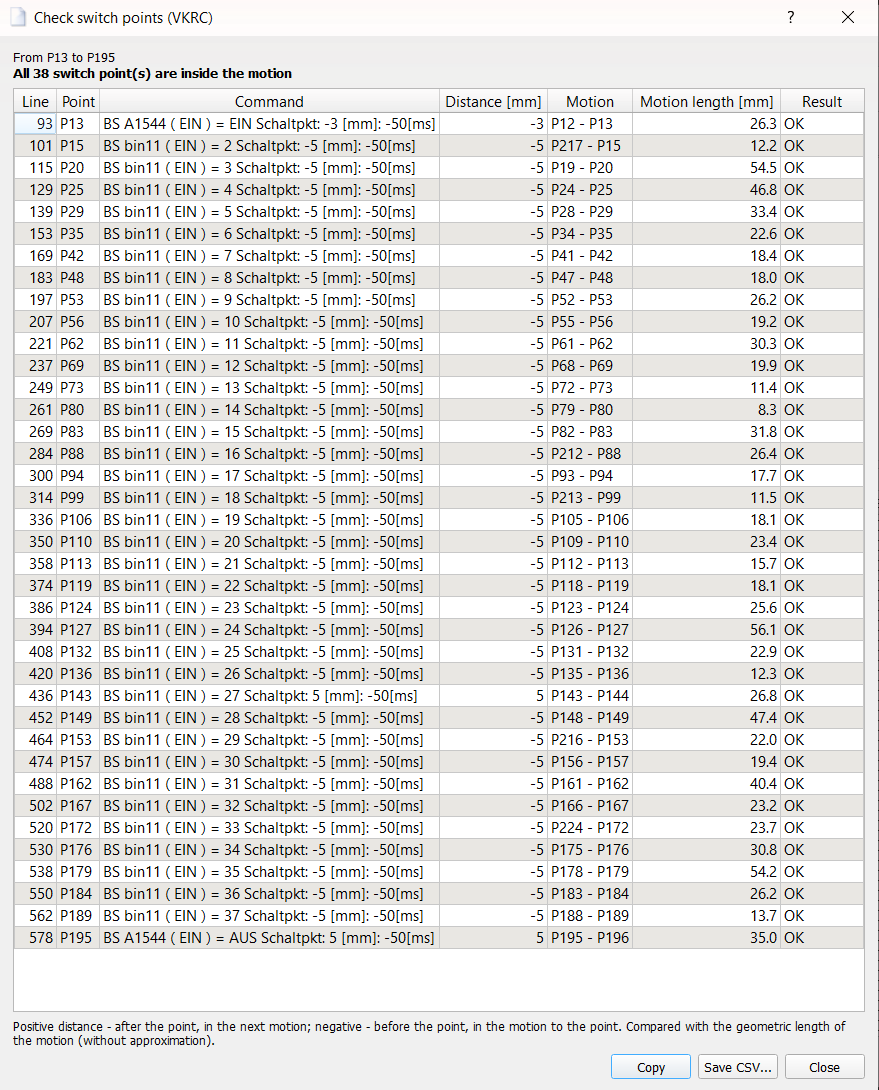
All 38 switch points of the seam lie inside their motions.
▲ Insert point on path at distance
Select one point and choose Insert point on path at distance.... The new point is placed on the motion after the selected point, at the given distance from it (the dialog shows the length of the motion; the default is the middle). The position lies exactly on the straight line, the orientation is interpolated between both points (as the robot does it on a LIN motion), the linear axis E1 is interpolated, too.
- VKRC: a new motion fold is inserted with the motion type and the data of the next point (KLIN / LIN / SLIN, VB, Genau / VE, ACC, TOOL, BASE) and the next free point number.
- KRC and Fanuc: the same window as for Insert motion point opens with the
calculated coordinates (choice cartesian / axis point, point editor); the point is inserted
with Apply, Cancel leaves the program unchanged. For Fanuc the new motion takes over
the motion type, speed, termination and options of the divided motion (e.g.
L ... 200mm/sec CD10 ACC100 RTCP); time and distance switch options (TB/TA/DB ...,P-SPS,DO[],CALL) andSkipare not copied, so the logic of the old point is not executed twice. - ABB: only in linear motions. A new robtarget is declared at module level (name from the point name template of the point editor) and a copy of the instruction with all its arguments is inserted.
- Yaskawa: only in MOVL motions. A new teach position C... (same data type PULSE / RECTAN as the target)
and a MOVL line with the V and PL of the divided motion are inserted. Lines with a station
(
+MOVJ EC...) get a station position interpolated between the two lines.
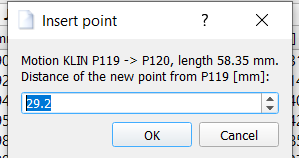
Insert a point 29.2 mm after P119 on the motion P119 - P120 (58.35 mm).
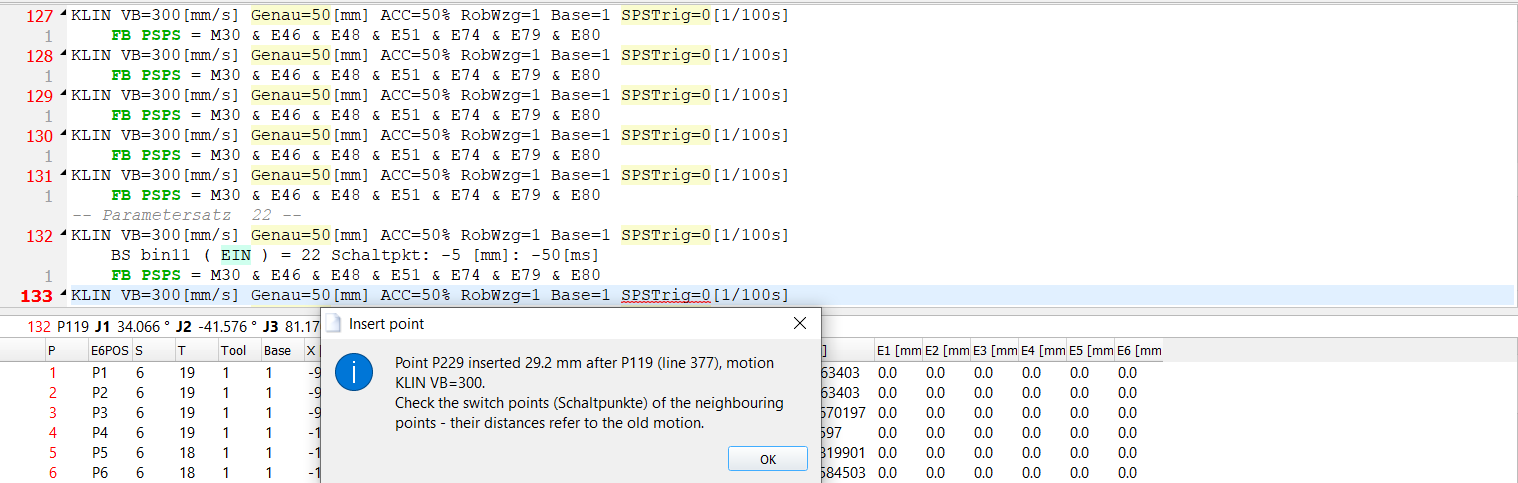
VKRC: the new fold KLIN P229 (line 133) with the data of the seam; its deviation from the path is 0.00 mm.
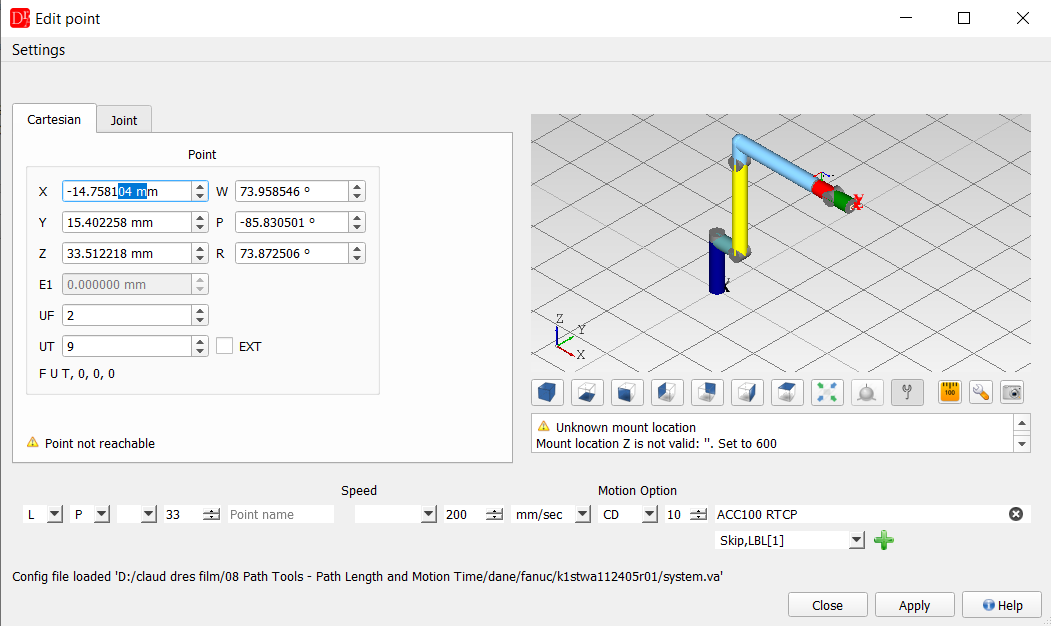
Fanuc: point editor with the calculated coordinates and the motion L P[33] 200mm/sec CD10 ACC100 RTCP.
▲ Export path to CSV
Table of all motions of the range with the segment lengths, the cumulative length s, speed, approximation and time - for documentation or further analysis in Excel. With the motion planner (VKRC, KRC, Fanuc) motions without a speed in mm/s (PTP / J in %) get the planner time in the column Time [s], and the column Planner [s] shows the planner time of every motion.
▲ ABB (robtarget table)
- Motions: MoveL, MoveC, MoveJ, MoveAbsJ and the other motion instructions recognized by the editor (TriggL, ArcL, MoveLDO ..., VW MoveLIN / MoveCIRC / MovePTP, user procedures such as RF_LIN / RF_CIRC). An instruction with a second robtarget is a circle (MoveC: CirPoint = auxiliary point). User procedures are estimates, because their other arguments may move the target.
- Targets: declared in the module (also LOCAL and on several lines) or written as literals. Offs() / RelTool() and targets of other modules are not supported.
- Speed and zone: speeddata vN = N mm/s (vmax and user speeddata are not known), zonedata zN = N mm (z0 = 0.3 mm), fine = stop point; \V and \Z are not used.
- Coordinates in the tool / wobj of the motion; another tool / wobj is converted with the tooldata / wobjdata of the system (system.xml) - not for a robot on a linear unit or a work object moved by a mechanical unit.
- MoveJ: TCP path of the interpolated axis values (inverse kinematics with the confdata); MoveAbsJ: forward kinematics of the jointtarget.
- Fixed: for a robot on a track the forward kinematics moved E1 along X of the robot base instead of X of the track (wrong by 2·E1 with a turned base frame).
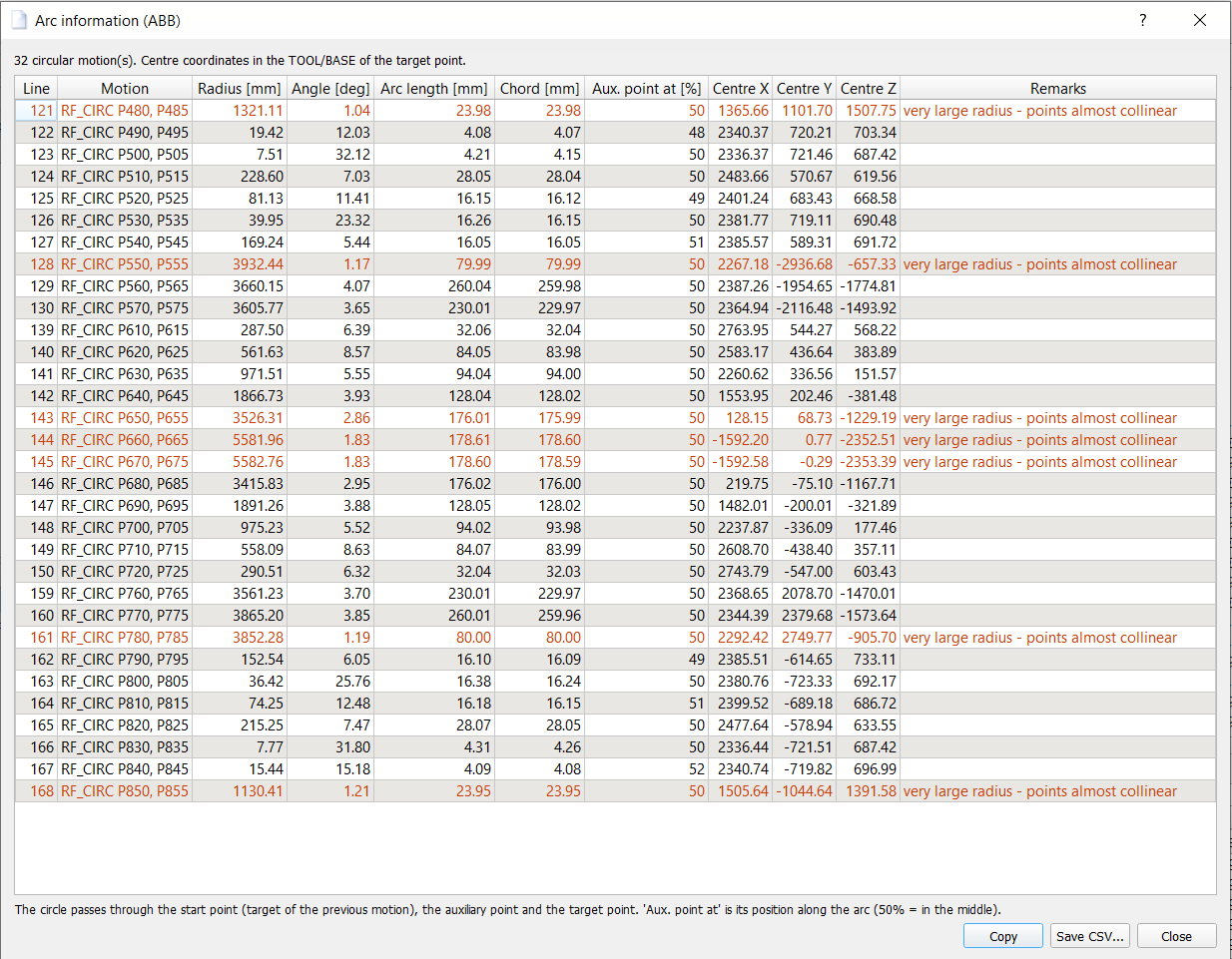
ABB: Arc information of the user procedure RF_CIRC (Process Simulate download) – an instruction with a second robtarget is a circle; arcs with an almost straight path are marked.
▲ Yaskawa (robot point table)
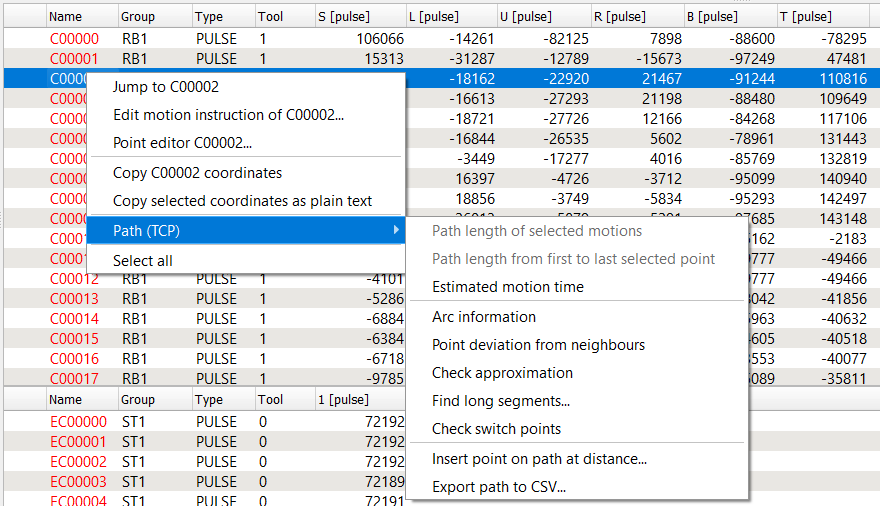
Yaskawa: context menu Path (TCP) of the point table of the robot (job of a VW DX200 robot with a turntable).
- Motions: MOVL (linear), MOVJ (joint; TCP path from the interpolated axis values), MOVC (circular), MOVS / SMOV* (other, estimate).
- MOVC: consecutive MOVC points P0..Pn (at least 3): the motion to P0 is linear, the motion to Pk (k < n) is the arc through Pk-1, Pk, Pk+1, the last motion the arc through Pn-2, Pn-1, Pn.
- Speed: V= in mm/s (without V= the previous V of the job); VJ= (%) and VR= (deg/s) are not in mm/s.
- Approximation: PL0..PL8 with the nominal distances 0 / 12.5 / 25 / 50 / 100 / 200 / 300 / 400 / 500 mm (estimate, the real rounding depends on the speed).
- Positions: PULSE positions are converted with the Yaskawa kinematics (model from the kinematics XML file, pulses from RC.PRM / SV.PRM, axis ranges from the soft limits of SC.PRM; SC.PRM of the YRC1000 is now read correctly). RECTAN positions in the ROBOT / BASE / USER frame (UFRAME.CND), tool from TOOL.CND.
- Not calculated (with a message): robot on a base axis (gantry / track), installation other than floor / ceiling, position variables P..., TOOL / MTOOL frames.
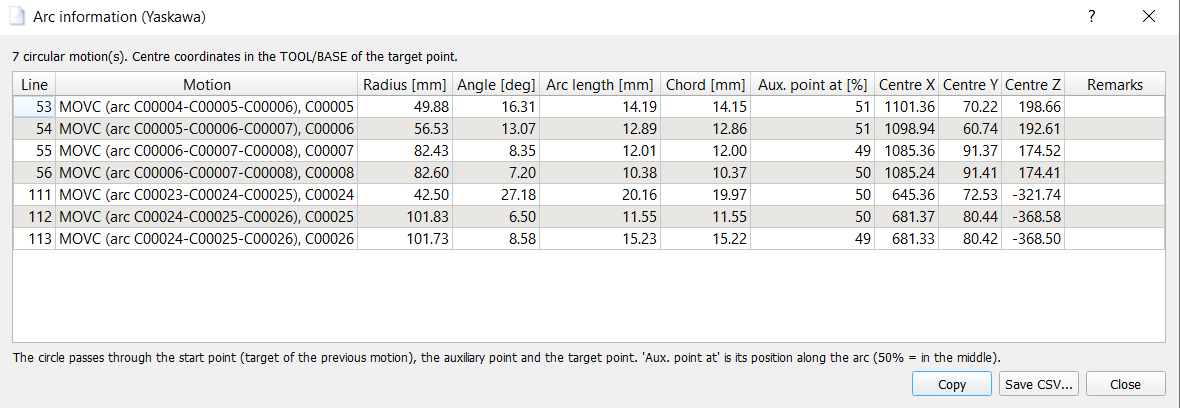
Arc information: MOVC arcs C00004 … C00008 – each motion is a part of the circle through the previous, its own and the next MOVC point (the last one through the last three points).
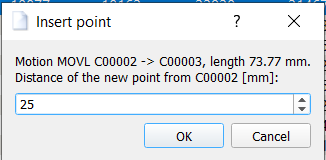
Insert point on path at distance in the MOVL motion C00002 → C00003: 25 mm after C00002.
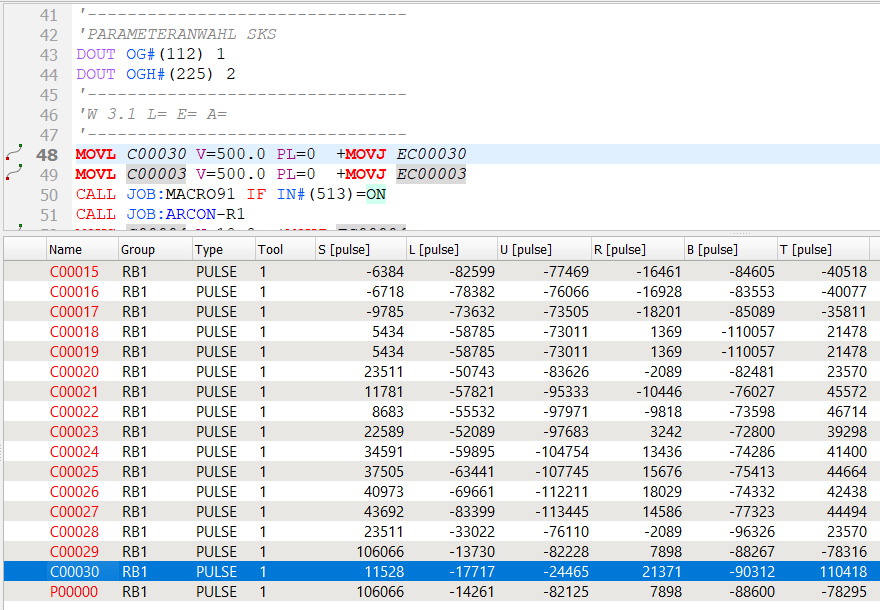
Result: the new line MOVL C00030 V=500.0 PL=0 +MOVJ EC00030 before the divided motion – V and PL of the divided motion, the turntable position EC00030 interpolated.
▲ How the path is calculated and how accurate it is
| Motion | Model | Accuracy |
|---|---|---|
| LIN, KLIN, SLIN, L, MoveL, MOVL | straight line | exact |
| CIR, KCIR, SCIR, CIRC, C, MoveC | circle through the start, auxiliary and target point | exact |
| MOVC (Yaskawa) | circle through three consecutive MOVC points (see Yaskawa) | exact |
| PTP, KPTP, SPTP, J, MoveJ, MoveAbsJ, MOVJ | straight line in joint space (synchronous PTP), TCP path from the forward kinematics every ≤ 0.5° | good, requires the kinematics in the robot configuration |
| Genau [mm], C_DIS, zN | corner replaced by a curve from the distance d before to d after the point, d limited to half of the neighbouring motions | approx. - KUKA does not publish the shape of the curve; the difference to a tangential arc is 0.01 mm at 30°, 0.2 mm at 60° and about 1 mm at a 90° corner (d = 20 mm) |
| VE %, CNT, CR / CD, C_VEL, C_ORI, PL, PTP approximation | same curve, distance estimated | estimate - the real rounding depends on speed and acceleration |
The length is calculated in the TOOL / BASE (UT / UF) of the target point of every motion - with a stationary gun (external TCP) this is the path on the part. Motions with a change of TOOL or BASE are calculated without approximation and marked as estimate.
Not modelled: a stop of the advance run (e.g. WAIT FOR, WARTE BIS), which cancels the approximation, spline motions (SPL), CIRC with circle angle CA, Fanuc INC, Offset / Tool_Offset / VOFFSET (estimate), UF:F / UT:F.
For a typical glue seam (KLIN / KCIR, Genau ≈ VB / 5, small changes of direction) the model differs from the programmed geometry only in the approximation curves, so the error of the length is expected to be well below the error of the former point-to-point (chord) measurement. It has not yet been compared with a trace of a real robot.
▲ How accurate is the motion time?
The motion time is an estimate, not a cycle time. The real robot controller plans every motion with acceleration and jerk limits, axis speed limits, reduced speed during reorientation and in the approximation, and a program contains waits, handshakes with the PLC and technology times. The estimate is closest to reality for long CP motions (glue, sealing) at constant speed; for short motions the real time is longer.
The path tools do not calculate a cycle time. They give a fast, transparent estimate directly in the editor - useful to compare variants, to find slow parts of a seam and to check a program before the robot is available.
▲ Licence and demo mode
The path tools use the licence of the editor of the robot: VKRC for VKRC programs, KRC for KRC programs, VFanuc for Fanuc programs, ABB for ABB programs and Yaskawa (YASKAWA) for Yaskawa jobs. Insert point on path at distance uses the licence of Add point in the Robot View (VKRC, KRC, Fanuc) or the licence of the editor (ABB, Yaskawa).
Without the licence the path tools work in demo mode:
- every function calculates at most the first 25 motions of the selected range (the result window says how many motions were calculated and how many the range has),
- Copy, Save CSV... and Export path to CSV... are not available.