On a robot with a large or double gripper, many clamp groups and several interlocking partners this condition quickly becomes long and hard to read - and it reaches the limit of 11 operands. The VW standard therefore uses a Sammelmerker: a part of the condition is combined into one merker, which is defined in the merker initialisation makro (Makro50). The merkers M1 - M30 are reserved for this purpose ("Zusammenfassung Fahrbedingungen").
Define Sammelmerker does this in one step: it defines the new merker in the makro and replaces the group in every online condition of the current file or of all open Folgen and UPs. The function is available in the menu VKRC and VFanuc.
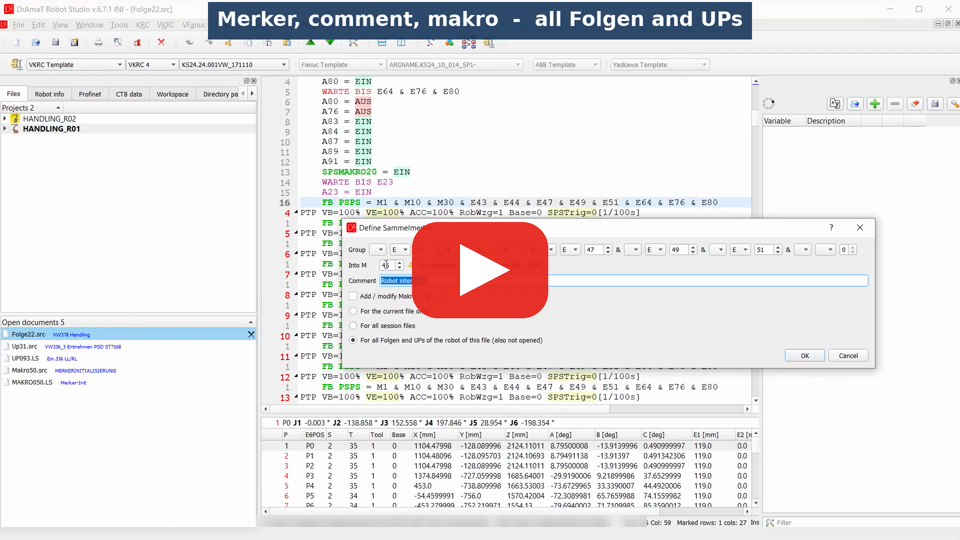
 DReS - Define Sammelmerker: clear online conditions for KUKA and Fanuc (YouTube, English)
 DReS - Sammelmerker definieren: übersichtliche Fahrbedingungen für KUKA und Fanuc (YouTube, Deutsch)
See also: DReS - Online Conditions for KUKA and Fanuc - Add or Remove FB PSPS and Define Sammelmerker (YouTube, English)
DReS - Fahrbedingungen für KUKA und Fanuc - FB PSPS ergänzen oder entfernen, Sammelmerker anlegen (YouTube, Deutsch)
DReS - Online Conditions for KUKA and Fanuc - Add or Remove FB PSPS and Define Sammelmerker (YouTube, English) DReS - Fahrbedingungen für KUKA und Fanuc - FB PSPS ergänzen oder entfernen, Sammelmerker anlegen (YouTube, Deutsch)- Example: robot with a large gripper
- How to use it
- Dialog
- Which online conditions are changed
- Definition in the makro
- Fanuc: TC_ONLINE with OR and negated brackets
- Syntax check of the online condition
- Messages
- Tips
A handling robot with a multi gripper for two part types. The gripper has eight clamp groups, every clamp group has several cylinders and every cylinder has two sensors (open / closed). In many points the robot also waits for five robot interlocks and three station releases. Without merkers a single point would need more than forty signals. The program uses Sammelmerker on three levels - sensors, clamp groups, state of the gripper:
-- Clamp group 1 OPEN --
M31 = E579 & !E580 & E581 & !E582 & E583 & !E584 & E585 & !E586
-- Clamp group 1 CLOSED --
M32 = !E579 & E580 & !E581 & E582 & !E583 & E584 & !E585 & E586
...
-- Gripper open --
M10 = M31 & M33 & M35 & M37 & M40 & M41 & M43 & M45
and still the online condition of a point uses all 11 operands:
FB PSPS = M1 & M10 & M30 & E43 & E44 & E47 & E49 & E51 & E64 & E76 & E80
The five robot interlocks appear together in many points. After Define Sammelmerker
(group E43 & E44 & E47 & E49 & E51 into M25):
Makro50:
-- Robot interlocks --
M25 = E43 & E44 & E47 & E49 & E51
Every point with the group:
FB PSPS = M1 & M10 & M25 & M30 & E64 & E76 & E80
The point is readable again, there is space for further conditions, and a change of the interlocks is
made in one place.
▲ How to use it
- Open a Folge or an UP (VKRC: .src, Fanuc: .ls). The makro is found through the project of the robot, so open the program from the project tree.
- Select the group in any online condition, e.g. E43 & E44 & E47 & E49 & E51. The whole line can be selected as well - FB PSPS =, TC_ONLINE, the line number, outer brackets and ; are ignored. Without a selection the last group is proposed.
- Menu VKRC » Define Sammelmerker or VFanuc » Define Sammelmerker.
- Check the group, choose the new merker, a comment and the makro, then press OK.
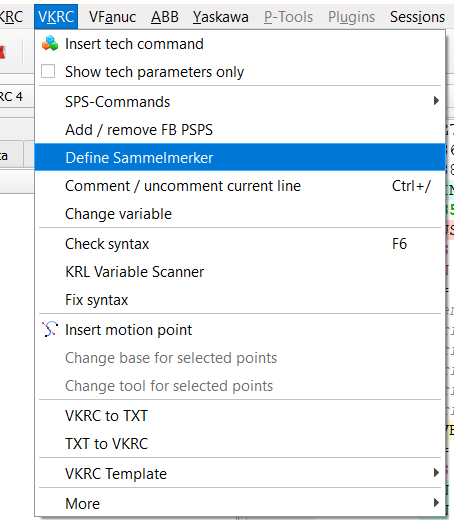
Group selected in FB PSPS, menu VKRC » Define Sammelmerker.
▲ Dialog
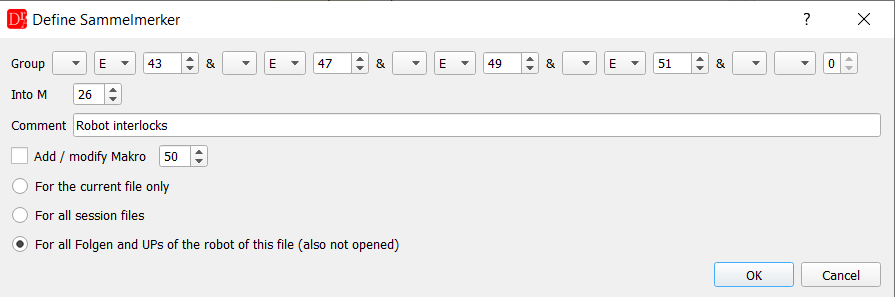
The group is taken over from the selected text: four operands into M26, for all Folgen and UPs of the robot of this file.
| Field | Description |
|---|---|
| Group | Operands of the group, combined with AND (VKRC &, Fanuc AND), each one optionally negated with !. Operands: VKRC E, A, M, F, T, S - Fanuc DI, DO, M, F. A new field appears when the previous one is filled; an empty type ends the group. The group is filled from the selected text. If the selection can not be taken over (e.g. it contains OR or an unknown operand), or it has more operands than the dialog allows, a warning is shown above the group. |
| Into M | New merker. The last used number is proposed, the standard range is M1 - M30. Any other number of the controller can be entered - a warning with the standard range is shown next to the field. |
| Comment | Comment written above the definition in the makro (default: "Sammelmerker"). |
| Add / modify Makro | Write the definition into the makro with this number (0 - 999, default 50). VKRC: Makros\makroNN.src of the robot, Fanuc: MAKRONNN.LS in the language folder of the backup. |
| For the current file only / For all session files | Replace the group in the current program or in all open Folgen and UPs. |
| For all Folgen and UPs of the robot of this file | Replace the group in all Folgen and UPs of the robot the current program belongs to (not the active project), also in programs which are not opened (VKRC: folders Folgen and UPs, Fanuc: FOLGE*.LS and UP*.LS in the program folder). Online conditions are only in motion points, so other programs are not checked. Programs which contain the group are listed, opened and changed in the editor - they are not saved automatically. |
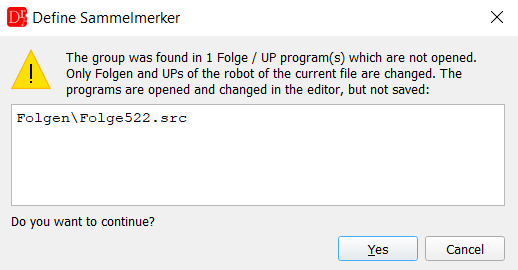
All Folgen and UPs of the robot: programs with the group which are not opened are listed before they are opened and changed.
The dialog does not close with an empty group or when the new merker is itself a part of the group.

A merker outside the standard range is possible, but marked with a warning.
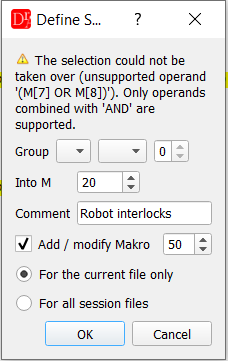
Selection (M[7] OR M[8]) AND DI[14]: only operands combined with AND can be taken over into the group.
▲ Which online conditions are changed - Only online conditions which contain all operands of the group on the top level, combined with AND. The order of the operands does not matter and other operands can be placed between them - e.g. the group E41 & E42 & E43 is also found in E41 & E43 & E42 and in E41 & E42 & M2 & E43. The new merker is put in the place of the first replaced operand; with the option to reorder the online condition the operands are sorted as usual.
- Brackets with OR, e.g. (M2 + M4) or (M[7] OR M[8]), are one operand of the condition and stay unchanged. Brackets with AND only belong to the top level.
- Before any change the program checks whether the new merker is already used in an online condition and shows these lines; Cancel stops the whole operation.
- The changed lines are highlighted in yellow and marked on the scroll bar. All changes in one program are one undo step (Ctrl+Z).
- If an online condition still has more than 11 operands after the change, the lines are listed in a warning.
- If the group is not found in any online condition, a message is shown - the definition in the makro can still be written.
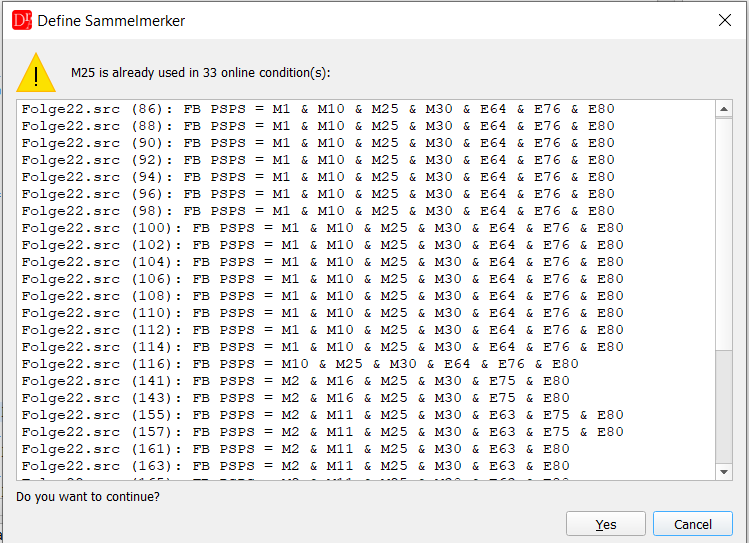
The new merker is already used - all lines with it are listed before anything is changed.
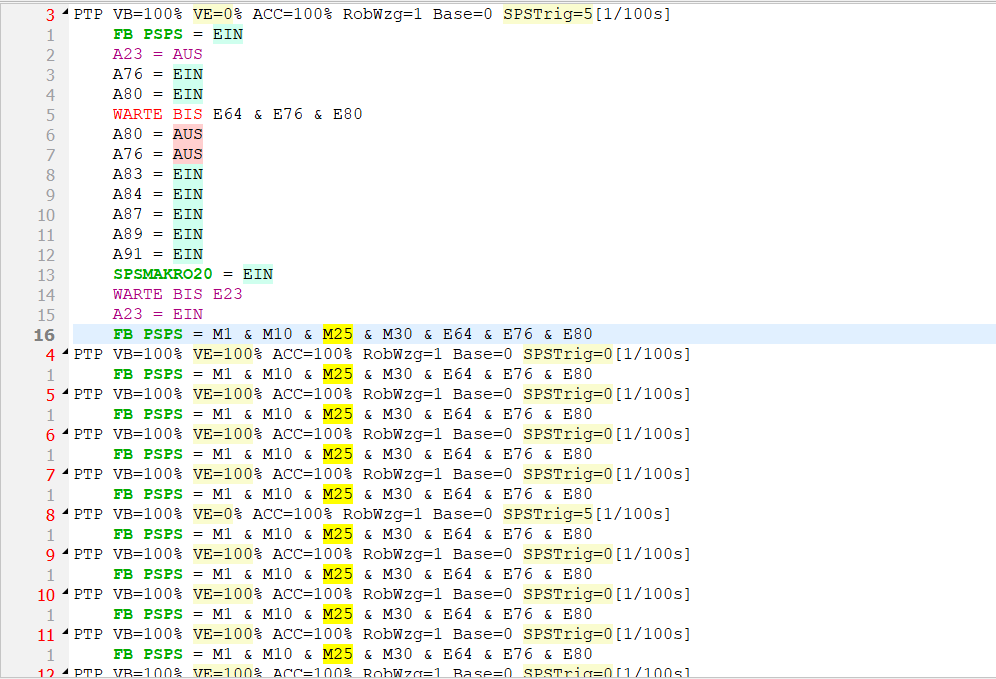
11 operands reduced to 7 in every point with the group - M25 highlighted, markers on the scroll bar.
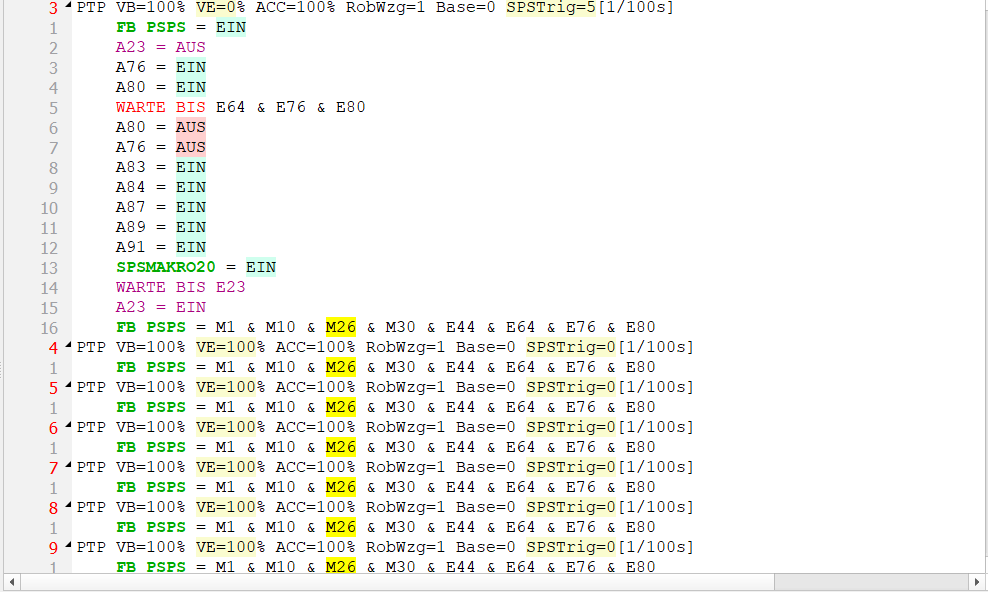
All Folgen and UPs of the robot: a Folge which was not opened is opened and changed. The group E43 & E47 & E49 & E51
is found although E44 stands between its operands.
▲ Definition in the makro The makro is opened in the editor (or activated, if it is already open). The definition is added at its end, with the comment above it, in the format of the controller:
VKRC: -- Robot interlocks --
M25 = E43 & E44 & E47 & E49 & E51
Fanuc: ! Robot interlocks ;
M[20]=(DI[41] AND DI[45] AND DI[53]) ;
If the makro already defines this merker, all lines with its definition and the new definition are
shown and the program asks before overwriting:
- Yes - only these lines are replaced (their indentation is kept). The rest of the makro stays unchanged.
- No - the makro is not changed, the existing definition is selected.
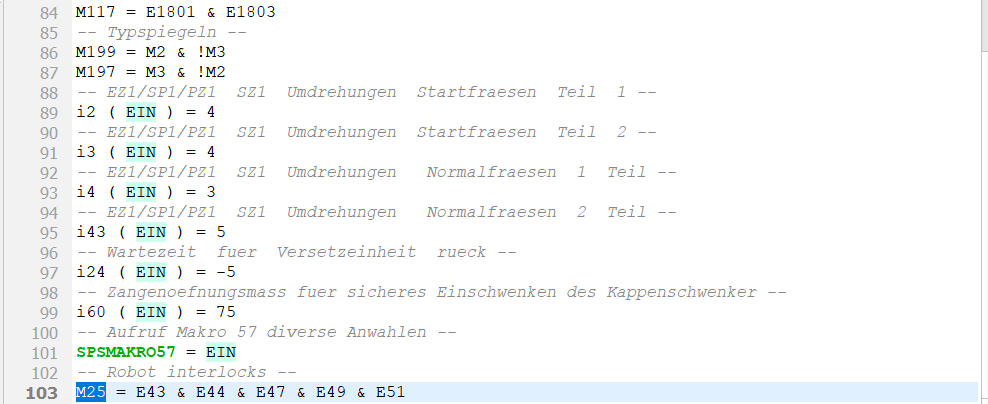
The comment and the definition M25 = E43 & E44 & E47 & E49 & E51 are added at the end of the Makro50.
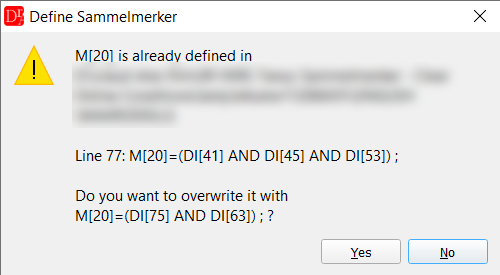
An existing definition is replaced only after confirmation.
▲ Fanuc: TC_ONLINE with OR and negated brackets The Fanuc controller has no priority of AND before OR - combinations have to be put in brackets. TC_ONLINE conditions with nested brackets, OR and negated brackets are fully supported:
TC_ONLINE ((M[7] OR M[8]) AND DI[14] AND DI[24] AND M[32] AND M[34] AND M[36] AND DI[75]
AND DI[63] AND !DI[64] AND DI[41] AND DI[45] AND DI[53]) ;
TC_ONLINE ((M[7] OR M[8]) AND DI[14] AND DI[24] AND M[32] AND M[34] AND M[36] AND DI[75]
AND DI[63] AND !DI[64] AND M[20]) ;
A bracket with OR, e.g. (M[7] OR M[8]), or a negated bracket, e.g. !(DI[4] AND DI[5]), is one
operand of the condition and stays untouched. The negation is written as !, like in the program.
Long texts of the signals (DI[41:...]) are ignored when the groups are compared and are not written into the changed line.
The same rules are used when the online condition is reordered by the options of the Fanuc editor.
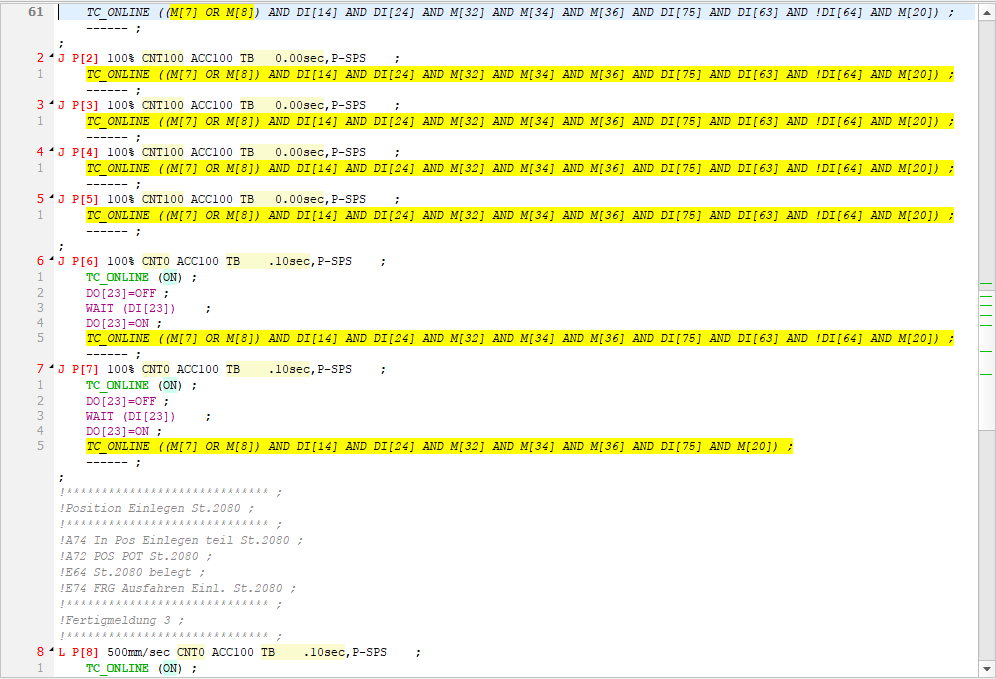
Fanuc: the bracket with OR stays, the selected signals become M[20].
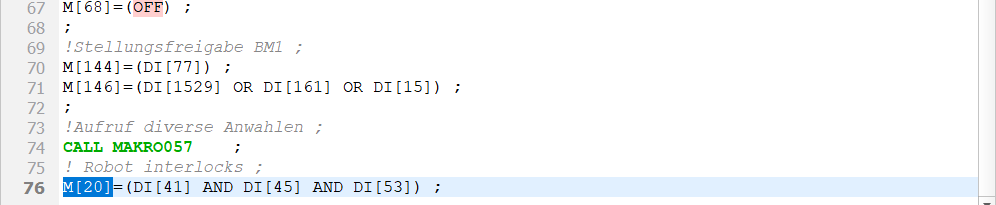
The new definition with its comment at the end of MAKRO050, selected in the editor.
▲ Syntax check of the online condition VKRC: FB PSPS and FB ONL are checked for
- a missing logical operator, e.g. E1 E2 or E1 (E2 + E3),
- a double or missing operand, e.g. E1 & & E2, E1 &,
- unknown operands or characters, e.g. E-5,
- missing or empty brackets,
- a negated bracket !( ... ), which VKRC does not support.

A missing operator is reported with its position.
▲ Messages | Message | Meaning |
|---|---|
| Define at least one operand of the group. | The group in the dialog is empty. |
| M.. cannot be a part of its own group. | The new merker is one of the operands of the group. |
| The selection could not be taken over (...) | The selected text is not a group of operands combined with AND. |
| M.. is already used in n online condition(s) | The new merker is already an operand of these lines; continue or cancel. |
| The group ... was not found in any FB PSPS / TC_ONLINE | No online condition contains all operands of the group. |
| FB PSPS / TC_ONLINE still contains more than 11 operands | List of lines which are still over the limit of the standard. |
| M.. is already defined in ... | The makro has a definition of this merker; overwrite it or keep it. |
| Could not find ... / Could not open ... | The makro or the makro folder of the robot was not found. |
- Start with groups which appear in many points: interlocks of one partner, the state of the gripper (all clamp groups open / closed), part checks of one part type.
- Sammelmerker can be built on other merkers - clamp group » gripper state » online condition.
- According to the standard the merkers are defined in Makro50; with more than 60 active merkers they are split into the type makros 51 - 54.
- VKRC: the merker definitions (Makro50) have to be repeated at the start of an UP, so that a manual selection or a dry run of the UP works.
- Save the changed programs and the makro together.