Select a ZIP archive or system.va of an unzipped archive for both robots and press Compare.
A ZIP archive is unzipped to a temporary directory which is deleted automatically. When the robot names differ, the plugin asks before comparing.
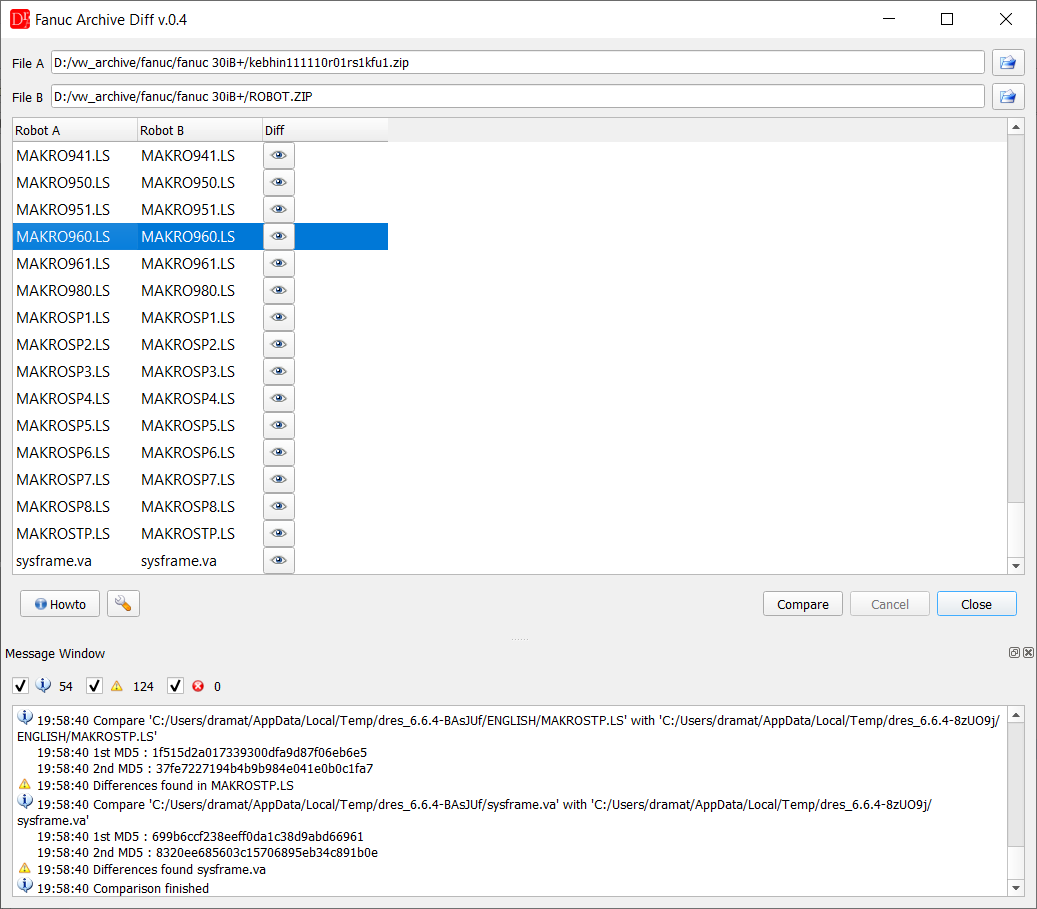
Programs with differences have the Show diffs button which opens Fanuc Diff
Programs (*.ls) of both archives are matched by name; files present in only one archive are reported as missing on the other side, the message window lists every compared file with its checksum.
The Show diffs button opens the Fanuc Diff window for the program.
In the settings (wrench button) the user can choose which files are compared and add further files (e.g. sysframe.va).
You may also refer to Compare Files for the comparison of any files.
Interlocks and technology points
After Compare the tab Interlocks & tech points lists removed or moved collision requests, Makro20 calls, releases, station interlocks and technology points, shortened interlock zones and new rule violations, with export to HTML, CSV and XLSX - see Archive Diff - interlocks & technology points. Video:
 English /
  Deutsch.
Compare with the offline version... - compares the points of archive B (from the robot) with archive A (offline version) by their values with tolerances: touched up and moved points, other CONFIG, speed, UF / UT and commands (archive folders, not ZIP); see Compare with the offline version.