
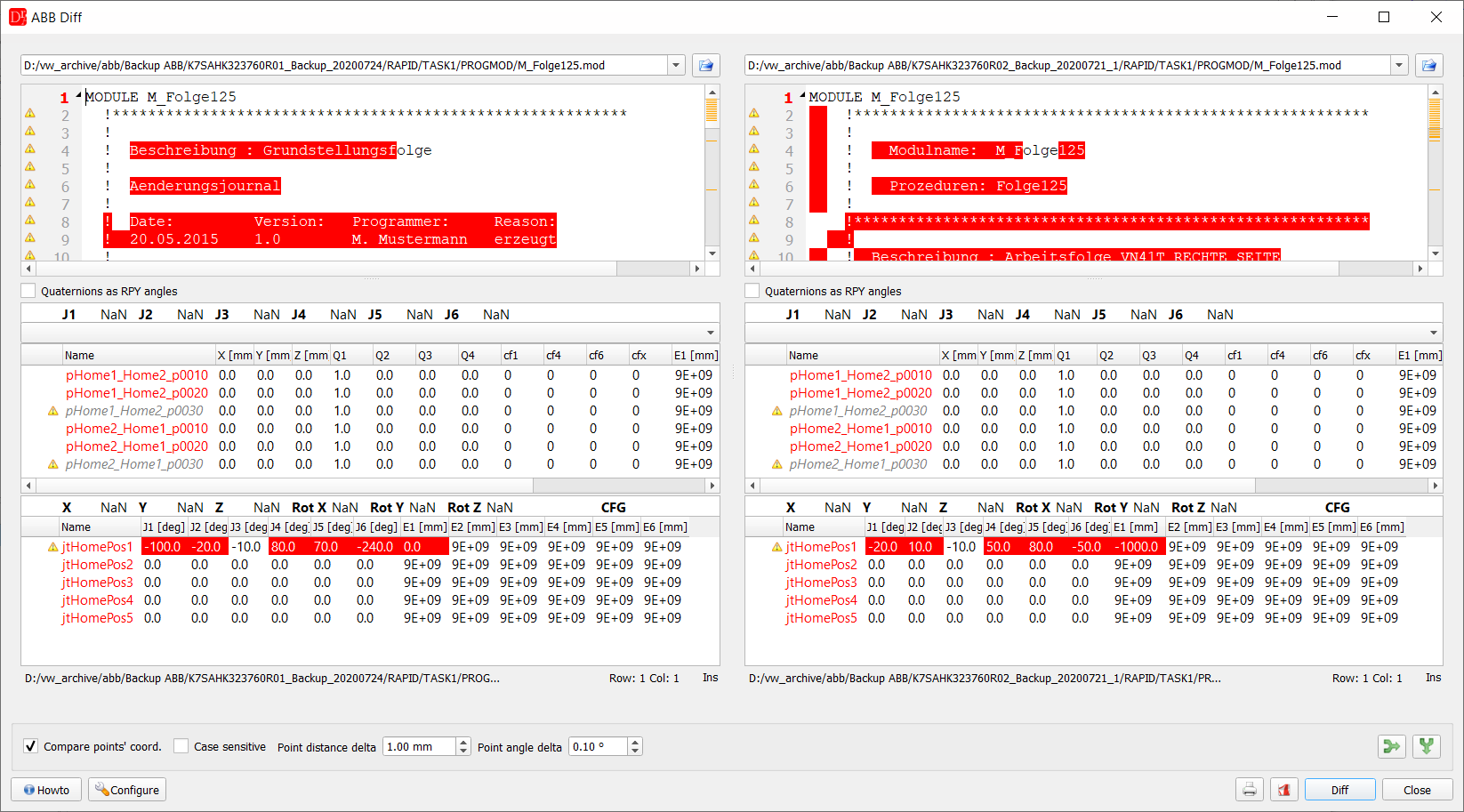
M_Folge125.mod of two robots - text differences and the robtarget / jointtarget tables
The ABB Diff extension (menu ABB » Compare ABB programs) compares commands of ABB RAPID module (*.mod, *.sys) programs.
Simply choose two files and press the Diff button to show all differences.
The actual comparison result can be printed or saved into a PDF file.
Differences are highlighted directly in the compared text, and collapsible folds stay marked in the left margin after the comparison, exactly as they are in the normal ABB module editor.
Right-click on either side of the comparison to expand or collapse folds - individually for the left or right file, or for both files at once.
The Compare points' coord. checkbox additionally compares the coordinates of robtarget and jointtarget points declared in both files, matched by point name.
Differing values are highlighted directly in the point tables, and a warning icon marks any point missing a match on the other side.
The Point distance delta / Point angle delta fields set how much a coordinate value may differ before it is treated as a real difference - the same tolerance used by the ABB point table in the main editor (see Settings » ABB » Others).
The height of the point tables can be changed by dragging the border between the text and the tables.
You may also refer to the ABB Archive Diff plugin for the comparison of whole backups.