
The window
Help > License info shows all licenses of the HASP key in one tree. At the top: the number of the license key, Licensed to, the key type, the date of production and the number of available licenses – in orange how many of them end within 30 days.
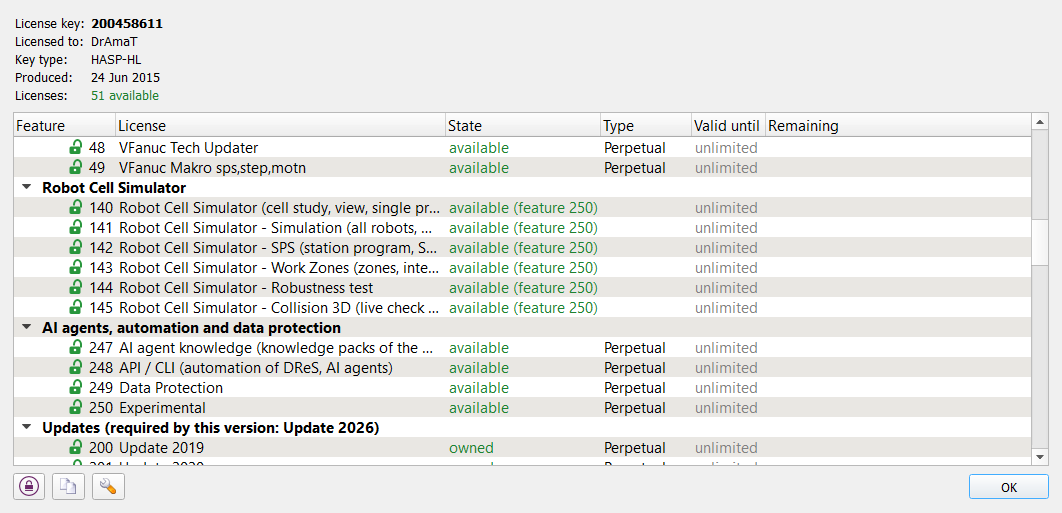
The licenses are in groups:
- Editor and robot types – the editor, the robot types and the plugins;
- Robot Cell Simulator – features 140 to 145 (see Robot Cell Simulator – Licenses);
- AI agents, automation and data protection – 247 AI agent knowledge, 248 API / CLI, 249 Data Protection;
- Updates – the update licenses of the years; the title names the update that this version of DReS needs (bold in the list);
- Volkswagen – only in the VW version or when they are on the key;
- Other features on the key – features this version does not know;
- Knowledge packs of the AI agents (*.mdk) – every installed pack with its state (see below).
Columns: Feature (number with a lock), License, State, Type, Valid until and Remaining (days; orange when 30 days or less, red when expired). A long name or reason is shown in full in the tooltip. Buttons at the bottom: Admin Control Center of Sentinel with the features of the key, copy the features string to the clipboard (for a request to dramat.eu) and the license settings.
State and type
| State | Meaning |
| available | the license is on the key and in use |
| available (privileges file) | a trial unlocked by a privileges file; it ends with the session |
| available (feature 250) | not on the key, granted by a test or vendor key |
| owned | an update license on the key (only the update needed by this version is in use) |
| expired | the date or the period of the license is over |
| on the key - not active | on the key, but the program cannot use it now |
| disabled | switched off on the key |
| not licensed | not on the key |
| only in the VW version | a license of the Volkswagen version |
Types: Perpetual (no end, unlimited), Until a date, Trial and Time period (with Valid until and the remaining days), Executions (remaining number of starts).
Update licenses
Each year of updates is a feature of its own: Update 2019 = 200, …, Update 2026 = 207 (feature = 200 + year − 2019). The program needs the update of its release year; the knowledge packs of the AI agents need the update of their own year (see below).
Knowledge packs of the AI agents (license 247)
The knowledge of the AI agents of the editor and of the Robot Cell Simulator is installed only as knowledge
packs (*.mdk): signed and encrypted files that cannot be read or changed outside DReS. A pack is loaded
only when the key has
- the license 247 AI agent knowledge and
- the update license of the year of the pack – the year is written in the signed pack. A pack of a newer release copied into an older installation is not loaded without the update of its year.
The group Knowledge packs of the AI agents (*.mdk) lists every installed pack: available or locked, the year (Update 2026) and the reason, e.g. License 247 - AI agent knowledge ... not found or The knowledge pack of 2026 requires the license Update 2026 (feature 207).
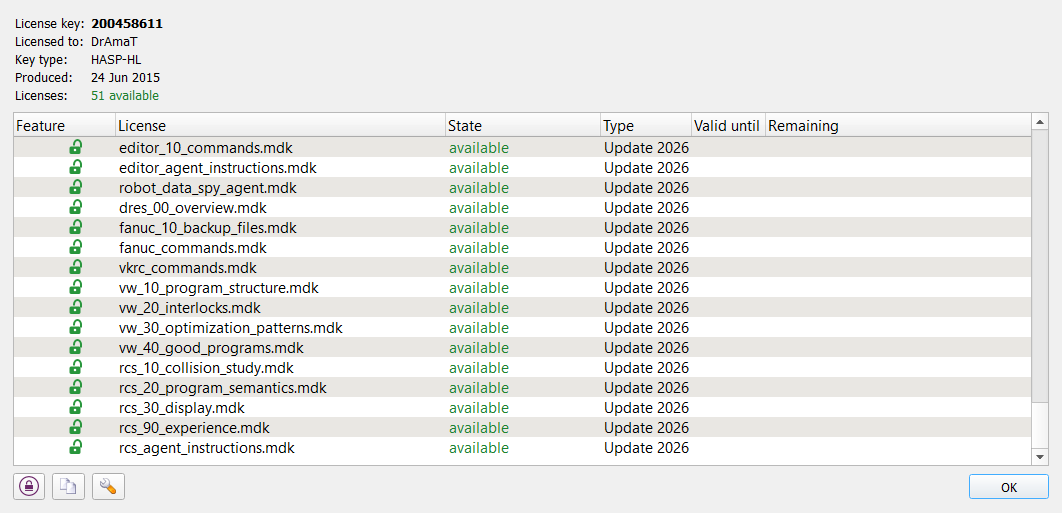
The chat command /knowledge of the AI Agent window shows the same packs with their version and a short
description.
When a pack is locked, the AI Agent window works without this knowledge: the pack is red in the list of the knowledge
files of the settings (reason in the tooltip) and the summary of the knowledge says Not loaded: file (reason).
Buy or renew the missing license (247 or the update of the year) at dramat.eu.
Your own knowledge files (*.md) need no license. Details: AI Agent
window – knowledge packs.
VeRa voice control (license 248)
The voice control VeRa needs the license 248 API / CLI. Without it VeRa does not start and the status bar shows VeRa: not started - license 248 - API / CLI ... not found.
API
The command license of the editor API (reading, no license needed) gives the same
data: {"cmd":"license","details":true} returns licenses (fid, name, onKey, available, expired,
privilegesFile, viaExperimental, type, start, end, daysLeft, executions), key {id, type} and
knowledgePacks (file, year, available, error).
See also: How to update the license key, Robot Cell Simulator – Licenses.