 DReS - Glue Programs - Renumber Parameter Tables, Set Genau and CD in Seconds (YouTube, English)
 DReS - Klebeprogramme - Parametertafeln neu nummerieren, Genau und CD in Sekunden setzen (YouTube, Deutsch)
- Renumber the glue Schaltpunkt - renumbers the parameter tables (Parametertafel) switched on the path with PS ... GO[11]=(n)
- Set CD for the glue points - sets the corner distance CD of the glue points from their speed and checks the points before and after the seam
- Add comment for Schaltpunkt - writes a comment with the parameter table number above every point with a parameter table command
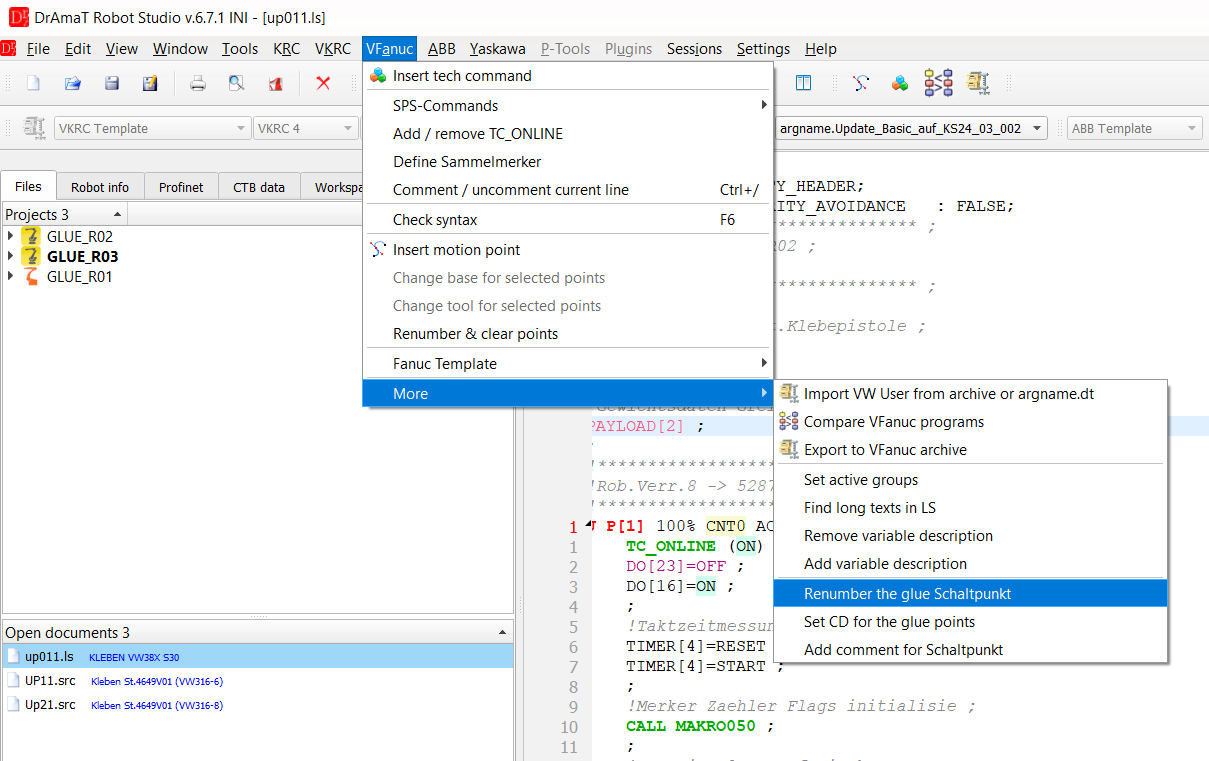
Menu VFanuc » Point tools with the glue functions.
The functions work in Folge and UP programs (*.LS) opened in the VFanuc editor, written in the
English version of the robot language (GO, DO, CALL, IF). They support up to three
glue controllers KL1, KL2 and KL3. At the end a window shows what was changed. The program is not
saved - check the changes and save the file yourself. The changes cannot be reverted with Undo (the editor
clears the undo history after changing the point data); to discard them, close or reload the file without
saving.
▲ Rules of the VW standard used by the functions
- The glue controller gets the parameter table number from a group output: GO[11] for KL1, GO[12] for KL2, GO[13] for KL3. Before the seam the first parameter table is set with a normal command (e.g. GO[11]=1 or CALL VW_USER(TECH2,KL,Steuerung1,...,Parametertafel=1,...)). The next ones are switched on the path with the path switching function of a point, e.g. PS -15mm -0.05sec GO[11]=(2).
- Parameter tables are numbered in the programming direction, ascending and without gaps.
- Glue points are programmed as linear (L) or circular (C) motions with the corner distance CD of about 1/10 of the speed, e.g. 200mm/sec CD20.
- A working point - a point where a makro or a subprogram is called - is not approximated.
▲ Renumber the glue Schaltpunkt
The function searches the point commands for the parameter table commands PS ... GO[xx]=(n) (also BS and group outputs with a comment like GO[11:Parameter]) of the selected glue controllers and gives them consecutive numbers. Only the number is changed - the switching distance, the delay time and the rest of the line stay as they are.
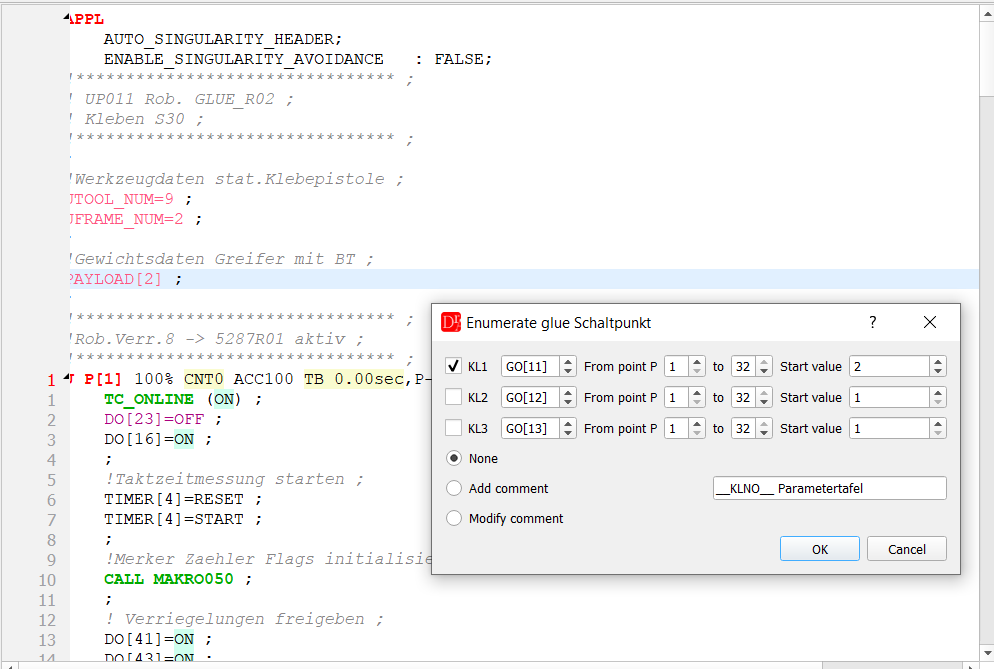
Dialog Enumerate glue Schaltpunkt - KL1 with GO[11], start value 2 proposed from GO[11]=1 before the seam.
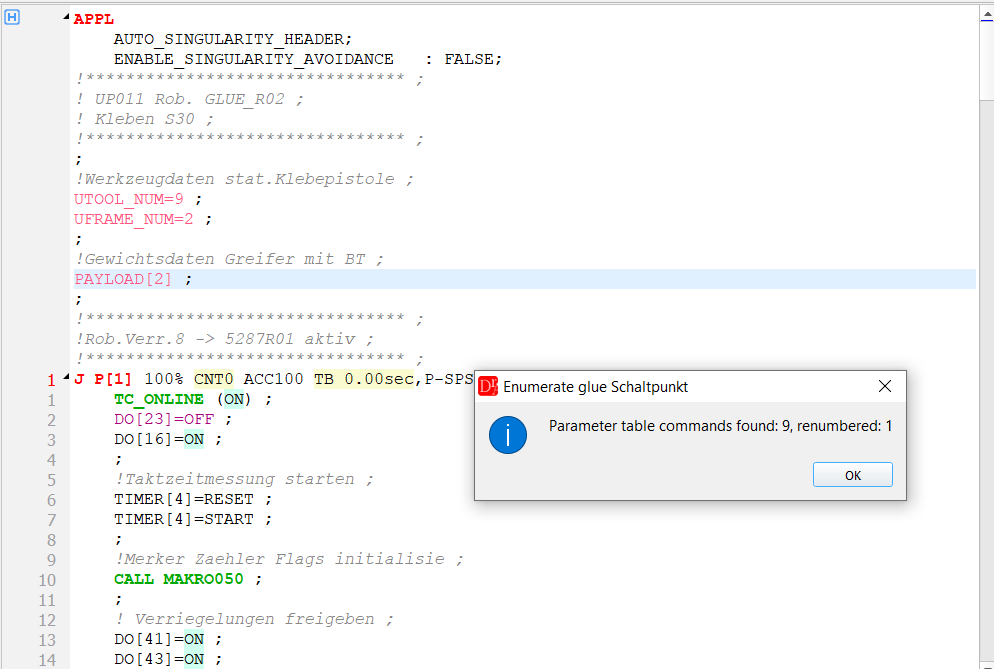
Result: 9 parameter table commands found, 1 renumbered - a typing error GO[11]=(44) is corrected to GO[11]=(4).
| Field | Meaning |
|---|---|
| KL1 / KL2 / KL3 | glue controllers whose parameter tables are renumbered |
| GO[xx] | group output with the parameter table number of this controller. Default: GO[11], GO[12], GO[13]. The values are saved in the settings and used also by Add comment for Schaltpunkt. The same output cannot be selected for two controllers. |
| From point P ... to | only parameter table commands of points with these numbers P[n] are changed (for a circular motion the target point counts) |
| Start value | number of the first parameter table command. The editor proposes the number of the parameter table set before the first PS command + 1 (for GO[11]=1 it proposes 2), so the numbering continues without a gap. |
| None / Add comment / Modify comment | optional comment above every point with a parameter table command, see Comments |
| Comment text | text of the comment; the parameter table number is added at the end. The keyword __KLNO__ is replaced by KL1, KL2 or KL3. |
Example - KL1, start value 2:
Before:
L P[13] 100mm/sec CD10 ACC100 TB   0.00sec,P-SPS RTCP    ;
    PS -15mm -0.05sec GO[11]=(7) ;
    PS -1mm -0.05sec DO[1544]=(!DI[15]) ;
After:
L P[13] 100mm/sec CD10 ACC100 TB   0.00sec,P-SPS RTCP    ;
    PS -15mm -0.05sec GO[11]=(2) ;
    PS -1mm -0.05sec DO[1544]=(!DI[15]) ;
▲ Set CD for the glue points
The function changes only the glue seams. A seam goes from the point where the glue gun is switched on to the point where it is switched off, e.g.:
L P[6] 100mm/sec CD20 ACC100 TB   0.00sec,P-SPS RTCP    ;   ← point before glue start
L P[7] 100mm/sec CD10 ACC100 TB   0.00sec,P-SPS RTCP    ;   ← seam start
    PS -0mm -0.05sec DO[1544]=(!DI[15]) ;
L P[8] 100mm/sec CD10 ACC100 TB   0.00sec,P-SPS RTCP    ;   ← seam end
    PS +1mm -0.05sec DO[1544]=(OFF) ;
L P[9] 100mm/sec CD20 ACC100 TB   0.00sec,P-SPS RTCP    ;   ← point after glue end
The gun outputs are DO[1544] (KL1), DO[1608] (KL2) and DO[1672] (KL3). A program without these outputs uses the glue macros: the seam goes from CALL MAKRO180 / 190 / 200 to CALL MAKRO181 / 191 / 201. The moves between the seams (e.g. L P[21] 2000mm/sec CD10) are not changed. The corner distance of the linear (L) and circular (C) motions with CD is:
in the seam:                                    CD [mm] = speed [mm/sec] / divisor
point before glue start, 1 point after glue end: CD [mm] = speed [mm/sec] * percent / 100
The result is always rounded to an integer value. With the defaults (divisor 10, 20 %) 100mm/sec gives CD10 in the seam and CD20 before and after it.
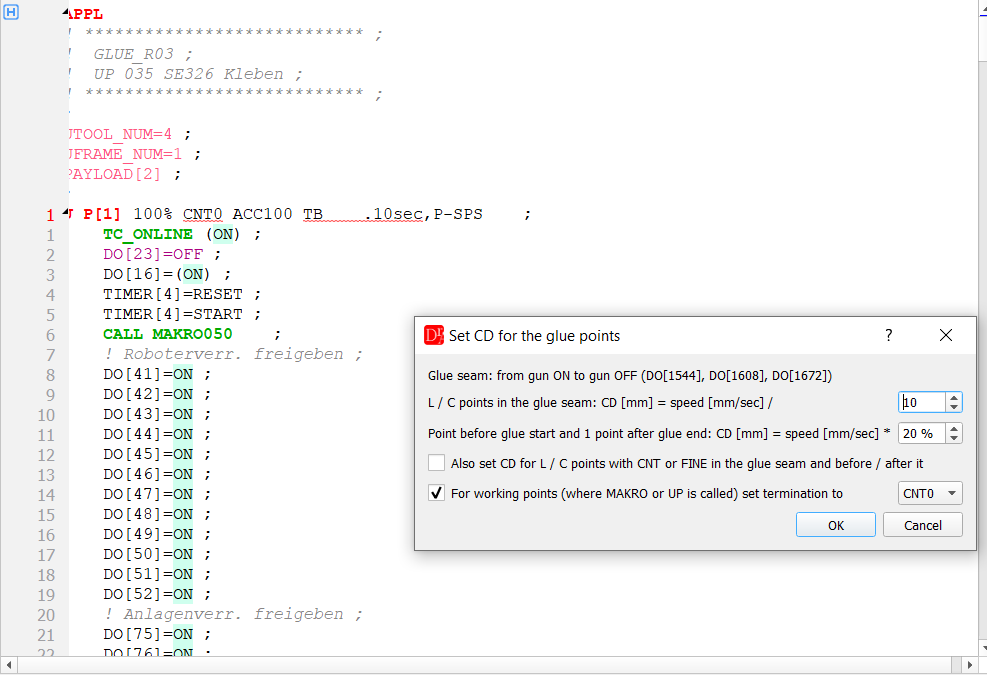
Dialog Set CD for the glue points - divisor 10, 20 % before and after the seam,
working points CNT0.
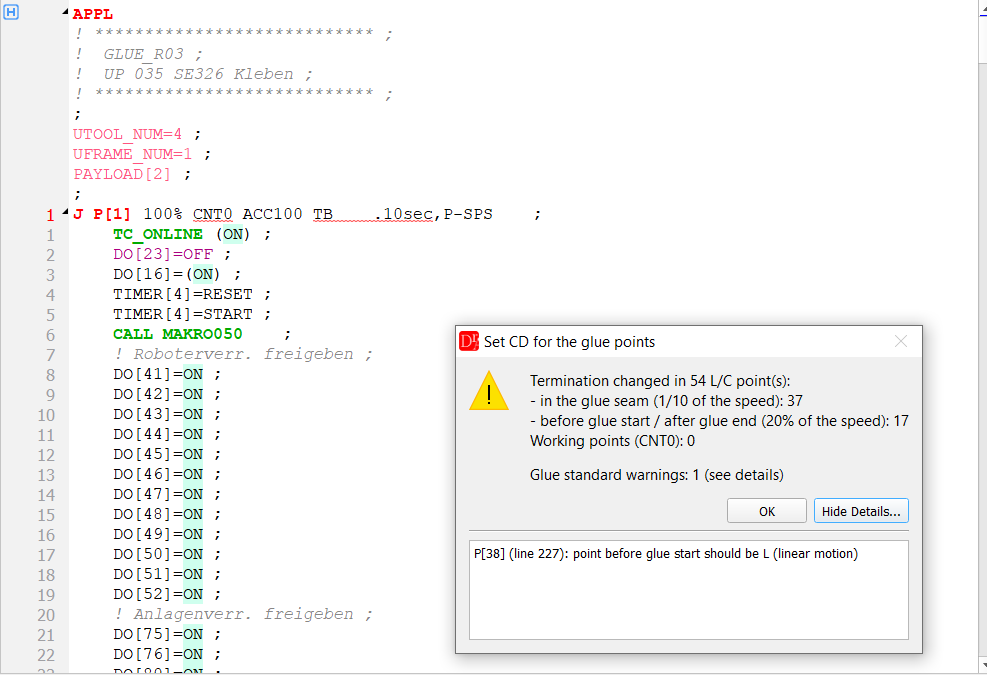
Result: 37 points in the seams CD5 → CD10, 17 points before and after
the seams CD5 → CD20; one standard warning: the point before a seam is a joint motion.
| Field | Meaning |
|---|---|
| L / C points in the glue seam: CD [mm] = speed [mm/sec] / | divisor, 1 ... 100, default 10 |
| Point before glue start and 1 point after glue end: CD [mm] = speed [mm/sec] * | percent, 1 ... 100, default 20 |
| Also set CD for L / C points with CNT or FINE in the glue seam and before / after it | points of the seam and the points before and after it that use CNT or FINE get CD too. Without this option only points that already use CD are changed. |
| For working points (where MAKRO or UP is called) set termination to CNT0 / FINE | a point that calls a makro or a subprogram (CALL MAKROxx, CALL UPxx, also inside IF ...) in its point commands or in the program lines after it, up to the next motion, gets CNT0 or FINE instead of CD. |
The settings are saved. Only the termination in the motion line changes. Motions with the speed in another unit than mm/sec (e.g. a register) are skipped and counted in the summary. Joint motions (J) are not changed.
Glue standard check. The function also checks the points around every seam and shows the problems as warnings in the summary (button Show Details...):
- the point before the glue start or after the glue end is not a linear motion (L)
- there is no point before the glue start or after the glue end
- the point before the glue start or after the glue end uses CNT / FINE instead of CD
- the calculated CD is bigger than the allowed range (CD0 ... CD100) - e.g. a fast approach 2000mm/sec before the glue start; the point gets CD100
▲ Add comment for Schaltpunkt
The function writes a comment above every point with a parameter table command, e.g.:
!KL1 Parametertafel 2 ;
L P[13] 100mm/sec CD10 ACC100 TB   0.00sec,P-SPS RTCP    ;
    PS -15mm -0.05sec GO[11]=(2) ;
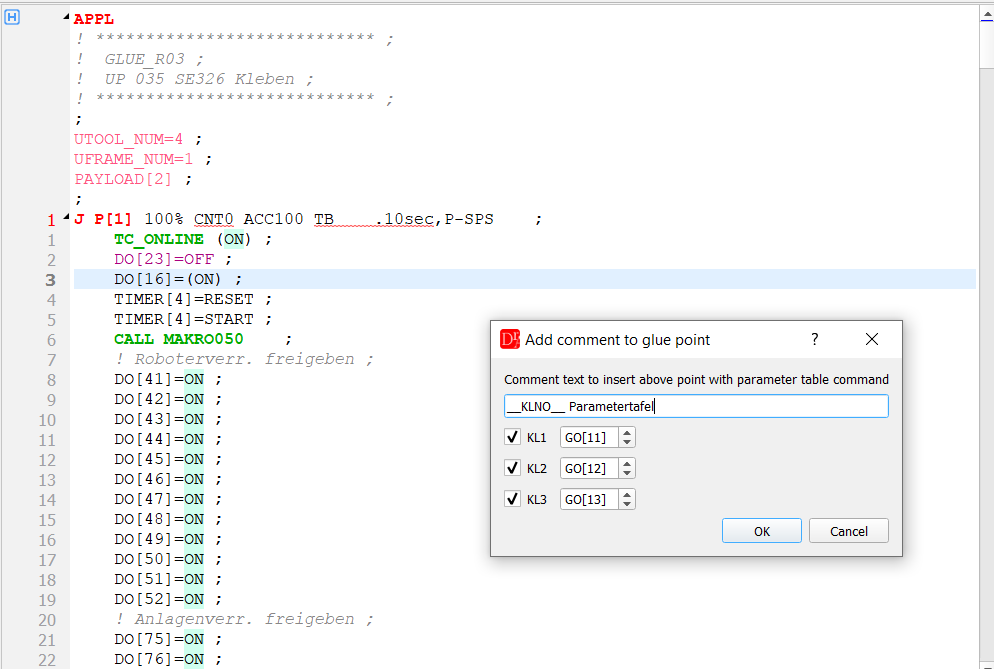
Dialog Add comment to glue point.
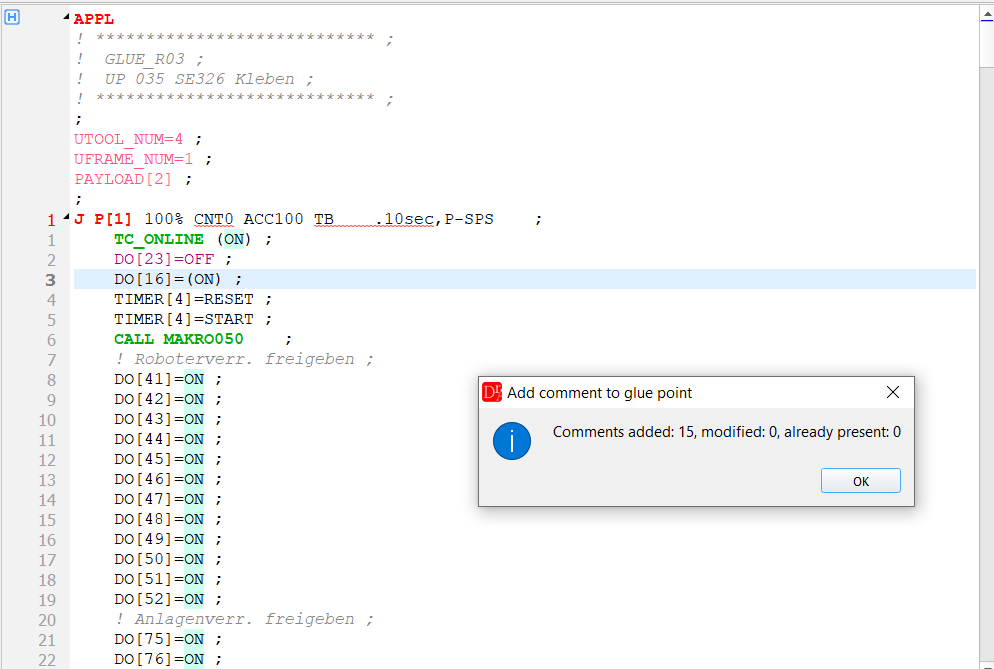
Result: 15 comments added, e.g. !KL1 Parametertafel 2 ; above P[13]. A second call adds nothing.
In the dialog enter the comment text (__KLNO__ is replaced by KL1, KL2 or KL3),
select the glue controllers and check their group outputs (the same settings as in
Renumber the glue Schaltpunkt). The number in the comment is the number of the
parameter table command of the point. Keep the comment text short - the teach pendant shows only a limited
number of characters of a comment line.
▲ Comments
- A comment is written directly above the point, one comment per point and glue controller - also when the point has more parameter table commands.
- Comments are not duplicated: if one of the comment lines directly above the point has the same text, the comment is left as it is. A comment with the same text and another number is corrected.
- Add comment (renumbering) adds missing comments and corrects existing ones, Modify comment only corrects existing comments.
- The number may follow the text after spaces or an underscore (e.g. ! Parametersatz_27 ;) and may be followed by additional text (e.g. !Parametersatz 27 STP ;). When the number is corrected, the separator and the additional text are kept. The comparison of the text ignores upper / lower case.
▲ See also
- VKRC glue functions - the same functions for VKRC programs
- Path tools » Check switch points - switching distances of the PS commands compared with the length of the motions