
A simulation at 100 % shows one order of the robots – the one that usually happens on the line. A motion without interlock in an area shared with another robot is then often safe only because of this order. On the line the order changes: a robot stops at a weld point with an error, a part sensor does not come, a robot goes to tip dressing every n cycles, a robot runs slower. The tab Robustness test (after Simulation) runs a series of simulations of the station with such changes – from a plan or from a random generator, for one hour or over night – and writes into one report: collision risks, contacts of the 3D models, deadlocks, wait chains and whether the station returns to its cycle time.
Contents: 1. Before the test · How the robots run · 2. The tab and its options · Work zones or 3D contacts · 3. Plan file · 4. Running the test · 5. Reading the results · 6. Report · 7. Command API
1. Before the test
- Load the station and choose the program of the Simulation tab (e.g. Folge 81). The test uses the program, the SPS program and the options of the Simulation tab.
- SPS program (tab SPS): the robots are started like on the line (Folgenstart, waiting for the station). A plan saved with its SPS part brings the SPS program back when it is loaded.
- Work zones (tab Work Zones) of the programs of the Folge: without them the test does not see the shared areas – Slow in the zones and the Delay test do nothing and no zone collision risk is found. Cubes are fast, Triangles of the 3D models follow the real shape of the robots (fewer cases at the edge of an area).
- Optionally Live 3D collision check on the Simulation tab: the 3D models of the robots and tools are checked during the whole test (slower, best with the speed 100 %). It works from the start of every simulation – leave it switched on during the whole test.
How the robots run in the test
- All robots run the same Folge – the program of the Simulation tab, with the SPS program the Folge of the station block of each robot. Every step is one run on all robots with N+1 SPS passes (one start pass and N measured cycles).
- The steps change only the timing: speed of a robot, stops in points, slow motion in the shared areas, start jitter, service programs every N cycles. So other orders of the motions of the same Folge occur than in the simulation at 100 %.
- UP calls as on the Simulation tab (UP calls, Program rules): an excluded UP (e.g. tip dressing) does not run; a service program of the table Service programs runs every N cycles even when it is excluded. With All UP calls every UP of the Folge runs in every cycle and the rules Exclude UP are ignored during the test (the settings of the Simulation tab stay) – for the collision map every UP may run.
- The delay test (MISSING) takes every motion without interlock from the run (with All UP calls also from the UPs) and every partner in the shared area, and delays the partner or the robot itself – a systematic check of the combinations of the motions of the Folge instead of random ones.
- The work zones (shared areas, red / yellow) come from all motions of the Folge and of all its UPs, independent of the order (How the robots run in the simulation).
2. The tab and its options
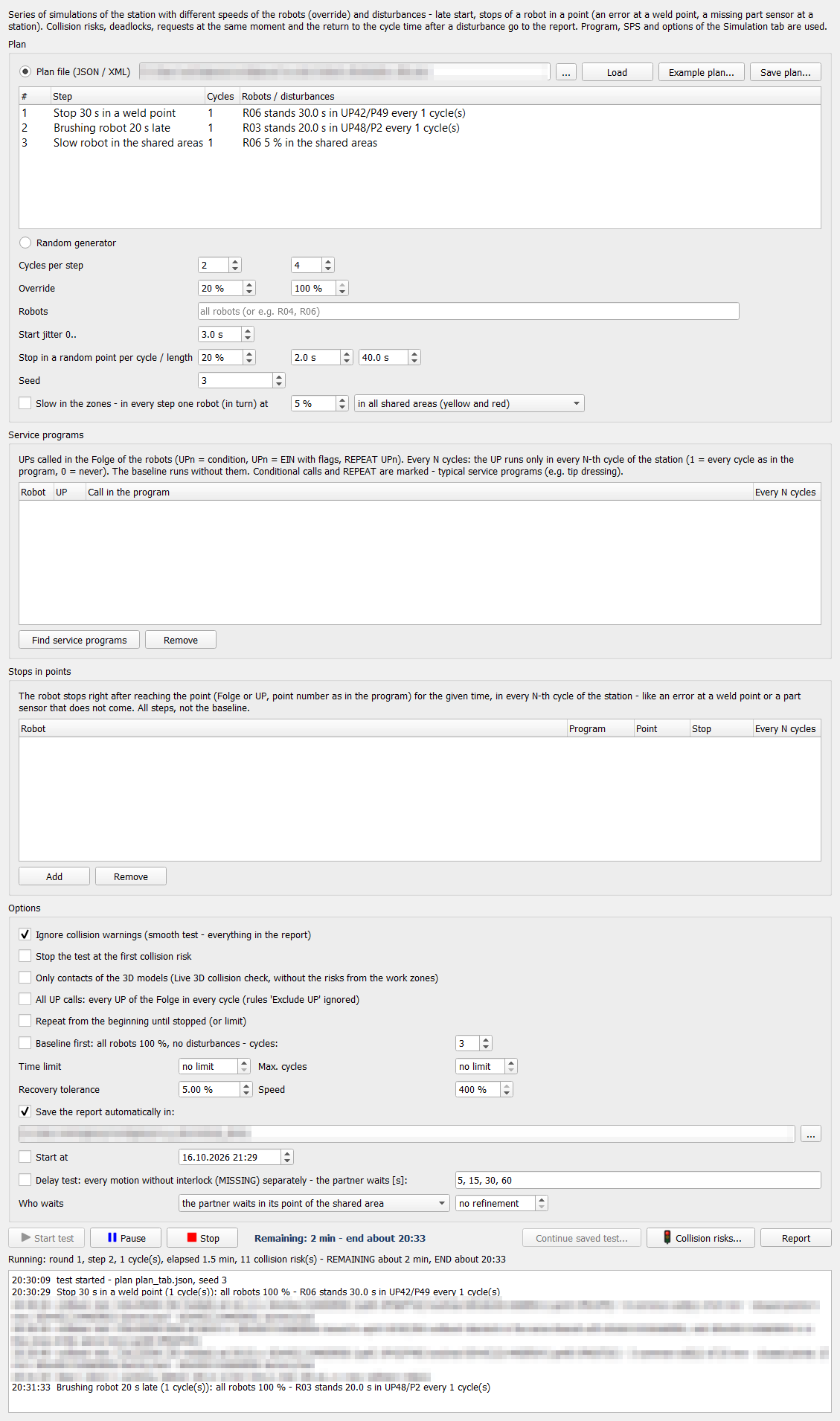
Plan – where the steps come from. A step is one simulation of the station with a number of cycles and its settings.
| Field | Effect |
|---|---|
| Plan file (JSON / XML), ..., Load | the steps of the file (list below); when loading, the program asks which parts to load (service programs, stops, SPS program, program of the Simulation tab) |
| Example plan... | writes a plan with all options and loads it |
| Save plan... | saves the plan with all settings of the tab; asks which parts to save (also the SPS program) |
| Random generator | steps without a file, one after the other until the end of the test: |
| Cycles per step (min, max) | random number of cycles of every step |
| Override (min, max) | random override of the robots in every cycle – only their motions are slower, process times (welding, WARTE BIS) stay, the station clock goes on |
| Robots | robots with the random override (empty = all), e.g. R04, R06 |
| Start jitter 0.. | every robot waits a random time after Folgenstart – another order of the robots in the shared areas |
| Stop in a random point per cycle / length | probability per cycle that a robot stops in a random point of its program for a random time (min, max); never in HOME, at most one stop per cycle of the station |
| Seed | the same seed repeats the same test; random = new seed (written in the report) |
| Slow in the zones ... at x %, in all shared areas (yellow and red) / only in the red areas | in every step one robot (in turn) moves with x % only in the motions into areas shared with other robots, the rest of its program and the other robots at 100 % (the random override is not used). Yellow (with interlock): the slow robot holds the interlock longer – the partner has to wait (wait chains, blocking). Red (without interlock): the partner drives in while the slow robot is still there – a collision risk when only the order of the robots protects the motion. The SmartPad of the robot shows now x % (shared area). |
Service programs – Find service programs lists the UP calls of the Folge of every robot (UPn = condition, UPn = EIN with flags, REPEAT UPn; conditional calls and REPEAT are marked – typical service programs such as tip dressing). Every N cycles: the UP runs only in every N-th cycle of the station (1 = every cycle as in the program, 0 = never). The baseline runs without them.
Stops in points – Add a row: robot, program (Folge or UP), point number as in the program, stop time, every N cycles. The robot stops right after reaching the point – like an error at a weld point or a part sensor that does not come. Valid in all steps, not in the baseline.
Options
| Field | Effect |
|---|---|
| Ignore collision warnings | the simulation does not pause at a collision risk, everything goes into the report (test without supervision); the 3D view is saved as a picture when a case is found first |
| Stop the test at the first collision risk | the test ends at the first case |
| Only contacts of the 3D models | the Live 3D collision check is switched on at the start; only real contacts and close approaches of the 3D models go into the report, the risks from the work zones are skipped – not a full test, see Work zones or 3D contacts |
| All UP calls | every UP of the Folge in every cycle, the rules Exclude UP ignored during the test (settings of the Simulation tab unchanged) |
| Repeat from the beginning | the plan again until stopped or a limit |
| Baseline first ... cycles | all robots 100 % without disturbances first – reference cycle time for the return to synchronisation; cases found here happen also without disturbance |
| Time limit, Max. cycles | end of the test (no limit = until stopped) |
| Recovery tolerance | a cycle is back in synchronisation when the station cycle is at most the baseline + this tolerance |
| Speed | simulation speed during the test (400 % = fastest; the times are simulation times). The Live 3D check with a fixed step (default 20 ms, Live 3D collision check) gives the same result at every speed – 400 % only makes the test shorter; the log shows for every run the largest move of a model between two checks near a partner. |
| Save the report automatically in | folder of the report and of the progress file |
| Start at | start at a time, e.g. in the night |
| Delay test (MISSING) ... the partner waits [s] | instead of the steps: after the baseline, for every motion without interlock into an area shared with a partner, the partner stops in its point of the shared area (the one nearest to the motion) for the given times one after the other, until a collision risk appears. Result per motion: the shortest delay with a collision – up to there the order of the robots protects it – or none up to x s. Long test (over night). |
| Who waits | the partner waits in its point of the shared area – the partner is still in the area when the robot comes; the robot waits before the motion (enters later) – the robot stops in the point before the motion without interlock, the partner may already be in the area; both, one after the other. |
| Refinement [s] | after the first delay with a collision: halving between the last delay without collision and this one, until the difference is at most this value – the shortest delay more exactly (more simulations); no refinement = only the delays of the list |
Work zones or 3D contacts – what does each check find?
The test checks two different things. Neither of them contains the other – a full test uses both (option Only contacts of the 3D models off).
- Work zones (collision risk without interlock, MISSING): a robot moves without interlock into an area shared with a partner while the partner is in this area at the same time. The 3D models do not have to touch in this run – e.g. one robot is just leaving the area while the other one enters it, half a metre apart. Today the order of the robots protects the motion; when one of them is late (a stop at a weld point, a missing part, another override) the same pair collides. The missing interlock would protect the motion always – without it the safety depends only on the timing.
- Contacts of the 3D models (Live 3D): the models of the robots and tools really touch (or come closer than the safety distance) – but only in the timing of this run. A motion without interlock that does not lead to a contact in this run stays invisible. On the other hand the 3D check also finds contacts that the work zones do not show as an error: both robots hold their interlocks and still touch (interlock zone too small, released too early or requested too late), or the work zones show no shared area there (approximation of a tool or of the zones).
| Situation | Work zones (MISSING) | 3D contacts |
|---|---|---|
| no interlock, no contact in this run (safe only by the order of the robots) | ✔ | – |
| no interlock, contact in this run | ✔ | ✔ |
| both robots with interlock, the models still touch | – | ✔ |
| outside the shared areas (approximation of a tool or of the zones) | – | ✔ |
Example from a test of a station with five robots: 57 cases, of them 26 contacts of the 3D models – the other 31 were motions without interlock without a contact in these runs. With Only contacts of the 3D models these 31 cases would be missing in the report. The column Cause of the report and of the window shows which of the situations a case is.
When only the 3D contacts? When the motions without interlock are known (e.g. from Check interlocks) and you want to see only those that really end in a contact. The Delay test (MISSING) goes one step further: it shifts the timing of the robots on purpose and shows for every motion without interlock from which delay the robots collide.
3. Plan file (JSON or XML)
The robots are named by a part of their name (R04, 0001R04). Every key is optional.
{
  "seed": 3, "repeat": false, "ignoreCollisions": true, "stopOnCollision": false,
  "baseline": true, "baselineCycles": 1,
  "speed": 100, "timeLimitMin": 0, "maxCycles": 0, "recoveryTolerance": 5,
  "report": "D:/tests/psz",
  "startAt": "2026-10-16T22:00:00",
  "steps": [
    { "name": "R06 5 % in the shared areas", "cycles": 1,
      "zoneSlow": { "override": 5, "robots": ["R06"], "areas": "shared" } },
    { "name": "R06 stops 30 s in UP42/P49", "cycles": 1,
      "holdAt": [ { "robot": "R06", "point": "UP42/P49", "sec": 30, "everyCycle": 1 } ] },
    { "name": "R04 50 %", "cycles": 2, "override": { "R04": 50 } },
    { "name": "Random", "cycles": 4, "random": { "override": [20, 100], "robots": ["R01", "R04"] },
      "startJitter": 3, "pause": { "prob": 0.2, "sec": [2, 8], "robots": ["R03"] } }
  ],
  "services": [ { "robot": "R06", "up": 101, "everyCycle": 10 } ],
  "stops":    [ { "robot": "R06", "point": "UP42/P29", "sec": 20, "everyCycle": 5 } ]
}
The same in XML:
<RobustTest seed="3" baseline="true" baselineCycles="1" speed="100" report="D:/tests/psz">
  <Step name="R06 slow" cycles="1"><ZoneSlow override="5" robots="R06" areas="shared"/></Step>
  <Step name="R06 stops" cycles="1"><HoldAt robot="R06" point="UP42/P49" sec="30" everyCycle="1"/></Step>
  <Step name="R04 50 %" cycles="2"><Override robot="R04" percent="50"/></Step>
  <Step name="Random" cycles="4"><Random min="20" max="100" robots="R01,R04"/>
    <StartJitter sec="3"/><Pause prob="0.2" min="2" max="8" robots="R03"/></Step>
  <ServiceUp robot="R06" up="101" everyCycle="10"/>
  <Stop robot="R06" point="UP42/P29" sec="20" everyCycle="5"/>
</RobustTest>
| Key | Meaning |
|---|---|
| seed | seed of the random values; 0 = new seed (written in the report) |
| repeat | plan again from the beginning until stopped or a limit |
| ignoreCollisions | true: no pause at a collision risk, everything into the report |
| stopOnCollision | the test ends at the first collision risk |
| baseline, baselineCycles | baseline run 100 % without disturbances first |
| speed | simulation speed during the test (1..400 %) |
| timeLimitMin, maxCycles | end of the test (0 = no limit) |
| recoveryTolerance | back in synchronisation: station cycle at most baseline + this tolerance [%] |
| report | folder of the report and of the progress file |
| startAt | start time (ISO date and time) |
| steps[].name, cycles | name in the list and in the report, cycles of the step |
| steps[].override | robot → override [%] during the whole step; the other robots 100 % |
| steps[].random | override [min, max] in every cycle, for all robots or robots |
| steps[].startJitter | start jitter 0..x s after Folgenstart |
| steps[].pause | stop in a random point: prob (0..1 per cycle and robot), sec [min, max], robots (empty = all); never in HOME, at most one per cycle |
| steps[].zoneSlow | override [%] of robots only in the motions into shared areas; areas: "shared" (yellow and red, default) or "red" (only without interlock) |
| steps[].holdAt | stops in points during the step: robot, point ("UP42/P49" in a UP, "P12" in the Folge), sec, everyCycle |
| services | service programs: robot, up (number), everyCycle (1 = as in the program, 0 = never) |
| stops | stops in points in all steps (like holdAt) |
| missingTest | delay test instead of the steps: delays [s] one after the other, cycles per try, who: "partner" (default), "robot" or "both", refine [s] (0 = no halving) |
| only3d | only contacts and close approaches of the 3D models into the report (Live 3D switched on) |
| allUps | every UP of the Folge in every cycle, Exclude UP ignored during the test |
| steps[].raceOrder | interlock priority during the step (variant B of a request race): [{"zone": 4, "first": "R06", "second": "R03", "mode": "order"}] – like the SPS block Interlock priority; second empty = every partner, mode "order" = order in every cycle (use it for variant B: the robot first is always first, also when it is late because of other zones), "window" with "window": 2 = priority within a time window (the second robot waits at most the window from its own request, then the order changes – only for requests at almost the same moment); a rule for a zone replaces the SPS blocks of this zone during the step; not in the baseline run. The result of the step has requestRaces, raceOrder, raceRules (all rules of the step: SPS, plan, API, auto), raceRuleLog and raceAutoRules (order kept at a race, Interlock priority: the blocks added in the baseline run keep the order in the next steps). Results of variant B on a real station: see Request races and variant B |
| generator | instead of the steps: random steps with cyclesMin, cyclesMax and the keys of a step (random, startJitter, pause, zoneSlow); with zoneSlow one robot after the other is slow, the others at 100 % |
4. Running the test
- Start test – or at a time (Start at).
- Pause stops the station clock (all robots), the test continues with the same button.
- Stop ends the test, the report is written with the cycles finished so far.
- Continue saved test... – after every step the progress is saved in the report folder (rcs_robust_progress.json); a test stopped or interrupted continues from the next step.
- Collision risks... – the cases found so far (Ignore, robots to the points, programs in the editor).
- Report writes the report of the test so far and opens it (when Open a saved report (HTML, PDF) in the default program is on in the plugin settings).
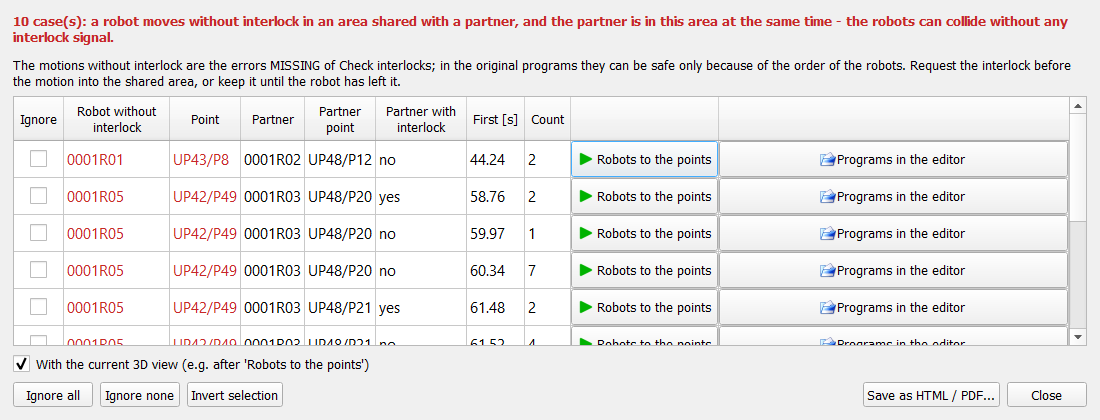
The log under the buttons and the console show every step: overrides, disturbances, cycle times, collision risks.
Next to the buttons: Remaining: x min – end about hh:mm – average time of the finished steps (or cycles in the current step) times the remaining steps; in the delay test the remaining tries of the motions; with a time limit at most up to the limit. Before the end of the first step: estimated after the first step; a plan without end (Repeat, random generator without limit): unknown. The same in the status line of the plugin and in the API (remainingMinutes, estimatedEnd).
Interrupt and continue a test
- Stop (or close DReS, or the computer goes off) – the report of the cycles finished so far is written.
- Later: load the same station, keep the same report folder on the tab (field Save the report automatically in) and press Continue saved test... (API: robust_test {"action": "resume"}).
- The test takes the plan and the options from the progress file (not from the tab), continues with the next step and counts the time, cycles and collision risks on. The random values continue with the same seed.
- Delay test (MISSING): the list of the motions without interlock, the delay reached for every motion and the halving are saved – the test continues at the same motion with the same delay instead of starting with the first one.
Saved after every step – a step interrupted in the middle is repeated. The estimated end in the status line counts from the continued state.
5. Reading the results
Which test kind finds which collisions on a real station (fixed plan, random generator, AI agent plan, delay test): Comparison of the test kinds.
| Kind | Meaning |
|---|---|
| Collision risk (work zones) | a robot moves to a point without interlock in an area shared with a partner, and the partner is in this area at the same time. The area is the volume of the whole motion (arm and tool) – a risk: here only the order of the robots protects the motion. It is not a contact of the models. |
| Collision (3D models), point marked 3D | Live 3D collision check: the surfaces of the 3D models of two robots share a cell at the same moment – the models really touch (accuracy about the cell size). With a dummy tool (sphere and body from the flange to the TCP) the tool is an approximation. |
| Close approach, 3D x mm | Live 3D: no contact, but closer than the safety distance (warn below). |
- A case only in a step with a disturbance, not in the baseline: the motion is protected only by the order of the robots. It is a real risk when this disturbance can happen on the line (a robot stops in a point, a part sensor, a service program). Solution: an interlock (request before entering the area, release after leaving it).
- A case already in the baseline that does not happen on the line: most likely the approximation of a dummy tool or of the work zone – check the parts in the closest approach of the Live 3D check (dummy tool, dummy body flange-TCP) and load the 3D models of the real tools.
- Slow in the zones is an artificial disturbance (on the line the override is valid for the whole program of a robot); a case found with it shows where the order protects a motion – confirm it with a stop in the point (Stops in points) before changing the program.
6. Report
HTML, PDF and JSON with the date in the name (rcs_robust_yyyyMMdd_HHmm) in the report folder. The saved report opens in the default program only when the option Open a saved report (HTML, PDF) in the default program is on (plugin settings > Simulation, default on; API report_open) – switch it off when an AI agent or a script runs the test. Contents:
- summary: baseline, minimum / maximum station cycle, number of collision risks, runs with an error (deadlock), requests at the same moment (RACE) and wait chains;
- chart of the station cycle per cycle over the whole test – red: cycles with a disturbance, green line: baseline;
- table of the steps: overrides, disturbances (robot, kind, seconds, cycle), cycle times, waiting, return to the cycle time, new collision risks, errors;
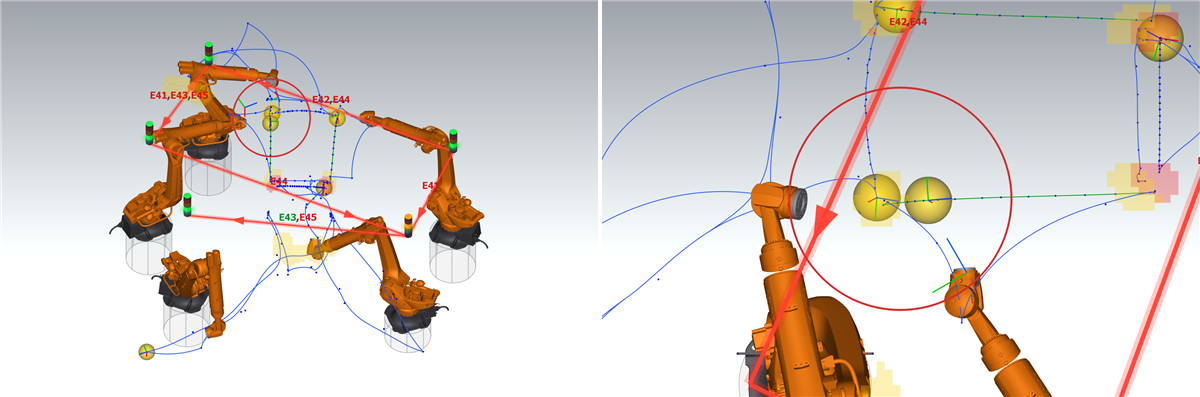
- collision risks of all steps, each case as one block: robot without interlock and point, partner and point, how often and in how many steps, speeds of the robots and axes when found first, two pictures side by side: the view of the simulation and a view from above with the place of the collision in a red circle (3D contact: the point of contact, zone risk: between the TCPs of both tools); the camera goes back to the view of the simulation after the pictures;
- contacts of the 3D models: own section with the parts that touch (arm, tool, dummy tool) and the distance;
- delay test (MISSING): shortest delay with a collision per motion;
- log of the test.
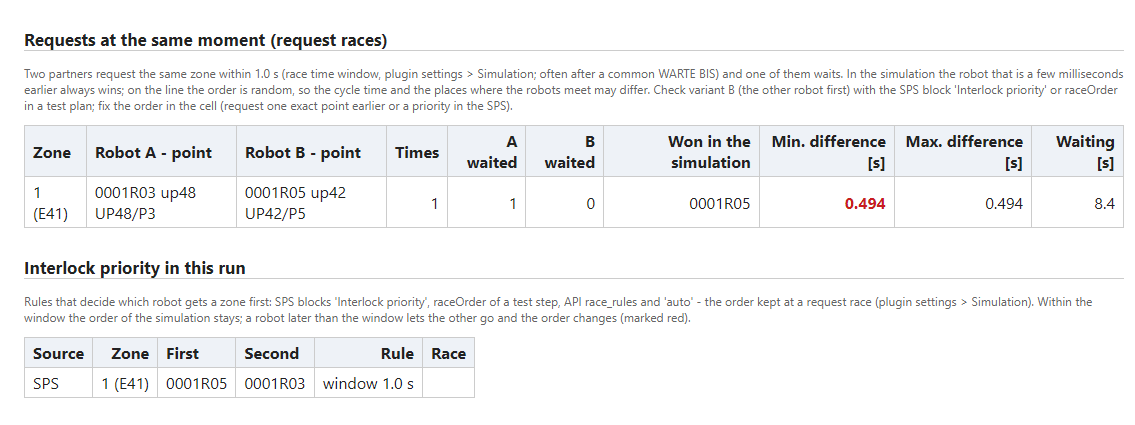
The section Request races and interlock priority of the report lists for every step the request races (zone, both robots with the points, how often, the smallest time difference, the winner), the rules of the step (SPS blocks Interlock priority, raceOrder, API, auto – order kept at a race) and every use of a rule; a line in red means that a robot was later than the window and the order of the robots changed in this step (not by chance, but by the disturbance). Above the table: number of races, of rules added at a race and of order changes. Results: see Request races and variant B.
The times report of a single run (Times > Report) has the same information in two sections, Requests at the same moment (request races) and Interlock priority in this run:
7. Command API
{"cmd": "robust_test", "action": "load", "file": "..."} (parts: services, stops, sps, program – true / false), "save", "find_services", "start", "pause", "continue", "stop", "resume" (continue a saved test), "status" (active, finished, step, cycles, collision risks, minutes, report), "risks" (cases with robot, point, partner, count, first time and step), "report" (also "progress": "<folder>" – report of a saved test). Live 3D: {"cmd": "live_check", "on": true, "cell": 20, "capsule": 60, "range": 200, "warn": 50} – the answer has the closest approach of every pair (closest). Work zones: {"cmd": "zones", "programs": ["folge81"], "mode": "triangles"}. The test ends when status.active is false. See Command API.