
The Robot Cell Simulator can be controlled by commands from outside – the same steps as in the window (load a simulation, run, report, work zones, check interlocks), without dialogs. Use it for nightly regression tests of a station, for comparing variants of programs by a script and for an AI agent that runs the studies.
Switching on
The API is off by default. It is switched on in the settings of the simulator (Extras > Settings..., tab AI Agent: Command API of the Robot Cell Simulator for the AI agent and scripts) or by the environment variable DRES_RCS_API=1 when DReS starts. The same tab shows the path of the client script (default template\RCS\AIAgent\rcs_api.ps1 in the installation directory). It starts when the window of the Robot Cell Simulator is opened (Plugins > Robot Cell Simulator); the console shows Command API of the Robot Cell Simulator listening on \\.\pipe\DReS_RCS_API. Only the user who started DReS can connect (local pipe, no network).
License: the command APIs of the editor and of the Robot Cell Simulator need the additional license API / CLI (control of DReS and the simulator by other programs, scripts and AI agents). Without it only reading commands work (e.g. status, run_data, view, robust_test with status / risks, ui_list, ui_shot, recent_files), the other commands answer with an error about the missing license, and the settings of the command APIs are locked. The voice control VeRa works without this license.
Commands
One JSON object per line in both directions, e.g. {"cmd":"status"}. Every answer contains
"ok": true / false and "error" when the command failed. While a command runs, message boxes are
not shown – the default answer is used and the message is written to the console.
Flag "anon": true (any command): the names are translated – R1, R2 …, <file N>
and <name> in the command are replaced by the real robot names and file paths before the command runs, and in the
answer the robot names, file paths and plant identifiers are replaced by these identifiers. Used by the
AI Agent window in the anonymous mode and its MCP server (environment
DRES_AI_ANON=1); e.g. {"cmd":"robot","robot":"R2","goto":"UP42/P5","anon":true}.
| Command | Parameters | What it does |
|---|---|---|
| ping | name of the plugin | |
| status | loading (simulation file), preparing (programs parsed in the background), running, loop / loops, robots, speed, SPS, last errors (lastRunError, lastLoadMissing, robotNameWarnings), measuredCycles, uiPending (UI commands not executed yet) and modal (title of an open modal window); simTime (clock of the simulation, s), robustTest (a robustness test runs); during a run also elapsedSeconds (real time since the start of the run), simSeconds (simulation time of the run), effectiveSpeed (% = simulation time / real time, with the waiting for the Live 3D check), loopSeconds (real time of one loop, from the 2nd loop), remainingSeconds and estimatedEnd (until the end of all loops; missing in the 1st loop) and robotsProgress (robot, running, loop, loops) | |
| load | file, newScene (true) | loads a simulation file with everything it contains (like the default choice of Load simulation); asynchronous – wait until status is idle |
| recent_files | – | reading, no license needed: {"ok":true,"simulations":[...],"studies":[...],"current":"<Simulation_File>"}
– simulations: the last 15 loaded simulation files (also loaded through the API), newest first, only
existing files (menu Simulation > Recent simulations); studies: the
recent studies (File > Recent files); current: the simulation file loaded now. Load one of them with
load – the AI agent takes a file the user names from here, it does not search the disk |
| set | speed, folge, up, loops, sps | values of the Simulation tab (not while the simulation runs); up: N selects UP N instead of a Folge; answer (also without keys = only read): programType ("folge" | "up"), number, loops, sps – the current values of the tab (the AI agent reads the Folge of the station this way) |
| fast_run | program ("folge125" or "up42"), loops | like the Fast Run buttons, always without the SPS |
| run | folge or up, loops, speed, sps | Run on all robots; up: N runs UP N instead of a Folge; asynchronous. Missing work zones are calculated first |
| stop | stops all robots | |
| sim_options | without keys: read; keys: see below | options of the Simulation tab like in the GUI; locked while the simulation runs (error). Answer: all values and locked |
| sim_action | action: "pause", "resume", "quitt", "check_interlock_map" | Pause / Resume of the clock of the station, Continue (Quitt), Check interlock map (the table opens in a window, read it with the ui_* commands) |
| live_check | on, cell, capsule, range, warn, thread, parallel, grid, stepMs | Live 3D collision check (works from the next start); answer: the values and closest – the closest approach of every pair: robot, where, part, partner, partnerWhere, partnerPart, distance, t, rangeMm, joints, partnerJoints – and stats of the last run (checks, checkMsP50 / P95, gapAvgS / gapMaxS, nearMoveMaxMm / nearMoveP95Mm, clockWaitS, recommendedStepMs, maxSpeedWithoutWait) |
| view | robotNamesOnFloor, robotLabels, axes, perspective, recordedPath, nullPoint, grid, consolesAndLinearUnits, simulationTcp, whiteBackground, pointLabels, programPaths (true / false); fitAll, viewAll (true); standardView ("default" | "top" | "bottom" | "left" | "right" | "front" | "back"), coordinateSystemSize (60..400 px), allRobotsPath ({kind: "folge" | "up", number, withSubprograms} or false) | also the context menu of the 3D view: point labels, show / hide the paths of the tab Programs, size of the coordinate system, the path of one Folge / UP for all robots (false = hide it); standardView like Navigation > Standard View; switches of the menu View (and white background, Fit All / View All): names of the robots on the floor, labels over the robots, axes, perspective, recorded path, null point, grid, consoles and linear units, TCP of the tool in the simulation; without keys: read (also without the license API / CLI). Answer: the state of every switch |
| report | file, html, pdf, xlsx, shot, ganttAll, ganttRange, rangeFrom, rangeTo, ganttPrAct, compareFile | report of the times like Report...; always also the data of the run *.rcsrun.json; the API never opens the report in a browser |
| report_open | open (true / false) | option Open a
saved report (HTML, PDF) in the default program (Plugin settings > Simulation, default on) for the times
report, the Robustness test report and the collision risk report; off = the files are only saved – recommended
when an AI agent or a script makes the reports. Without open: read (also without the license API / CLI); setting
needs the license API / CLI. Answer: {"ok":true,"open":false} |
| run_data | file (optional) | the data of the run (as in *.rcsrun.json) in the answer |
| zones | programs (["folge81", ...]), mode ("cubes" | "triangles"), grid (mm, a value of the list: 50, 100, 150, 200, 300), radius (mm), withTool, withSubprograms (true / false), calculate (true), clear (false) | Work Zones: checks these programs of all robots and calculates the zones; mode, grid, radius, withTool, withSubprograms like the fields of the group Calculation; calculate: false only sets the fields, clear: true removes the zones from the 3D view (button Clear). Answer: robots, mode, grid, radius, withTool, withSubprograms |
| docking | enabled (true / false), distance (mm), put / take {name ("MAKRO" | "UP" | "A" | ...), number, condition ("EIN" | "TRUE" | ...)}, detachAll, attachDefaults (true), run (number of the UP) | tab Auto-Docking: tool change at the docking points, the commands put down the tool (DS abdocken) and take the tool (DS andocken), max. distance of the tool from the flange, Detach all tools from all robots (without the question) / Attach default tools to all robots, run = Tool change on all robots with this UP; refused while a simulation runs; without keys: read |
| sps_program | xml, file (.xml), newFromRobots (true), saveFile (.xml), open (true) | SPS program of the station (tab SPS, SPS editor): sets it from XML or a file, newFromRobots like New from the robots of the cell (without the question), saveFile writes it, open opens the editor window like Edit SPS program... (while a simulation runs only to look at it: live states of the blocks, also the Interlock priority blocks added at a request race); answer: xml, blocks, check (result of Check before the run), with open also opened and readOnly (true while a simulation runs) |
| race_rules | window (s, 0.1..5), message (true / false), lock (true / false), rules [{zone, first, second, mode ("window" | "order"), window (s, 0.1..30, default 2)}], clear (true) | request races of interlock zones (two robots request the same zone within window seconds, default 1 s; Plugin settings > Simulation), message = window with the races at the end of a station simulation, lock = keep the order of the robots at a request race (rule "auto" and an Interlock priority block with a comment in the SPS program); rules = interlock priority like the SPS block Interlock priority (SPS) for the next simulations, also without the SPS (second empty = every partner, mode "window" = priority within a time window: the second robot waits at most window seconds from its own request, then goes and the order changes – only for requests at almost the same moment; "order" = order in every cycle: the second robot always after the first one, also when the first one is late because of other zones – use it for variant B); a rule for a zone replaces the SPS blocks of this zone (variant B, e.g. {"zone": 4, "first": "R06", "second": "R03", "mode": "order"}), clear removes them. Answer: window, message, lock, rules (API), spsRules (blocks of the SPS program), autoRules (rules from the races of the last run with whereFirst, whereSecond, difference), races [{zone, robotA, whereA, robotB, whereB, count, minDifference, maxDifference, lostA, lostB, waited}] of the last run, log (every use of a rule), pendingBlocks (number of Interlock priority blocks added at races that wait for the decision at save: keep or remove); without keys: read |
| sim_display | lamps {motion, process, warte, interlock, folgenstart, loopEnd: "green" | "orange" | "red" | "blue" | "off"}, console {loops, up, dwell, warte, folgenstart, interlock, io, motion, sps, timers (true / false), debug, flushMs, maxLines, remindSec} | the windows State lamp... and Console messages... of the tab Simulation, also during a simulation; without keys: read |
| export | what ("times" | "motionTimes"), file (.csv) | CSV like Export... of the tab Times and of the motion times of the tab Motion; the collision matrix and Check interlocks: collision_matrix and check_interlocks give the data as JSON |
| zones_view | show, overlapOnly, pathColors (true / false), transparency (10..95 %) | group Display of the Work Zones tab: show the work zones, only the shared areas, the program path in interlock colors, transparency; without keys: read (also without the license API / CLI) |
| motion_options | planner (true / false), override (%), ptpRamp (s), pathAcc (mm/s², 0 = from the robot archive), oriVel (°/s), approximation, showPath (true / false), defaults (true) | tab Motion: real motion (motion planner), its parameters (program override, PTP acceleration time, path acceleration, orientation velocity, approximation of the corners), the real path in the 3D view; defaults = button Default values; refused while a simulation runs; without keys: read |
| check_interlocks | findings of Check interlocks as data (severity, code, robot, partner, point, message, suggestion; see What RCS checks) and comments: missing comments above points with a request / release (row, robot, point, interlock, release, comment from the template, note) | |
| robot | robot (part of the name, e.g. "R06"), override (1..100), pause (true / false), axes ([A1..A6, E1]), ms, run ("UP42" | "folge81"), point (1), stop (true), goto ("UP43/P8" | "folge81/P12") | override and pause of one robot also during the simulation of the station (like the SmartPad); run = the program of this robot only (like Run program of the tab Programs) from the point point (the robot moves there first); stop = stops only this robot; goto = the robot stands in this point of the program (the point is selected in the tab Programs), the program is not started – e.g. to check the tool in a weld point (only when the simulation is stopped; answer at); axes like the sliders of the tab Robot Axis (degrees, E1 in mm; only when the simulation is stopped; ms > 0 = smooth motion); answer: robot, running, paused, override, axes and tool {id, name, x, y, z, a, b, c} (the tool on the flange and its mounting position; missing without a tool) |
| tool_model | robot (part of the name), file (.jt), pos {x, y, z (mm), a, b, c (°)}, fixture (true), id | a tool model from a JT file on the flange of a robot (like Insert JT File + Attach to robot..., see Tools on the robots): pos = origin of the model relative to the flange (KUKA ABC; default 0 = the model is in the flange frame); the model replaces the tool on the flange (e.g. a dummy tool); fixture: true = an additional part on the flange instead of the tool. Without file and id: only a new position of the tool model already on the robot; id = new position of this model. Not while the simulation runs. Answer: id, robot, tool (true = tool, false = fixture) |
| signals | robot (part of the name or "all"), set ({"A76": 1, "E80": 0}), release (true or ["A76", ...]), always ({"M95": 1 | 0 | -1}), read (["E80", ...]), eval ("E80 & E76") | signals E / A / F / M like the signal menu of the SmartPad and of the window Signals E / A of the robots: set = set by hand (stays until released), release = back to the simulation (true = all signals of the robot set by hand), always = fixed value in the signals file (only M / F; -1 removes it); answer: values {robot: {signal: {value, forced}}}, eval |
| dummy_tool | robot, shape ("sphere" | "box"), r, dx, dy, dz, x, y, z (mm), a, b, c (°), position ("flange" | "tcp"), remove (true), allRobots (true), attach (true) | window Dummy tool of a robot: the given values are saved and the dummy tool is attached (a tool on the flange is detached); remove removes it, allRobots puts the same dummy tool on all robots (without the question); without values: the saved values |
| insert_interlocks | mode ("stop" | "request"), stopText, requestText, releaseText, apply (false), rows ([0, 2, ...]) | Work Zones > Insert interlocks... without the window: the proposals for every entry into a shared area without interlock (answer rows: row, robot, partner, area, changes, note, ok); apply: true writes the checked rows (default the rows with ok) into the programs in the editor - check and save them, then calculate the work zones again; answer also inserted, changedFiles |
| save | file (.xml), cell, robots, jt, docked, dummy, sps (true / false), raceBlocks ("keep" | "remove", default "keep") | Simulation > Save simulation... without the windows: the settings of the simulation always, the parts of the cell layout as given (default: what the scene contains); raceBlocks = what to do with the not confirmed Interlock priority blocks that the simulation added at request races, when the SPS program is saved (remove removes them from the SPS program, like Save without the blocks, Simulation file). Answer: file, raceBlocks ("none" | "kept" | "removed"), raceBlocksCount |
| zone_steps | robot, program ("folge81") | for every point of the program (with the called UPs) from the work zones: robots met in a shared area (contact), motions without interlock (unprotected), interlocks active in the motion and after the point |
| collision_ignore | key (case of collisionCheck.conflicts), ignore (true / false) – or clear (true), all (true) | collision risks that do not pause the simulation any more (Ignore in the window); clear empties the list (Ignore none), all ignores every case of the current simulation (Ignore all); answer: ignored keys |
| collision_case | key (any key of a case, e.g. from run_data or robust_test risks), action ("points" | "editor") | the buttons of a row of the collision risk window: points = both robots to their points (only when the simulation is stopped or paused; in the pause they move smoothly and Continue moves them back), editor = both programs in the editor at the points |
| collision_report | file (.pdf or .html), view (true / false, default true), test (true / false) | saves the collision cases like the button Save as HTML / PDF of the window: during a robustness test (or test = true) all cases of the test, otherwise the cases of the last simulation; neighbouring points of one place as one case (plugin settings, Collision report) |
| robust_test | action, see below | Robustness test (Robustness test); every answer contains the status: active, paused, finished, step, totalCycles, collisionRisks, minutes, report, remainingMinutes and estimatedEnd (estimated remaining time and end of the test; missing when not known yet) |
| insert_comments | rows (numbers "row" of comments, empty = all), texts (own texts of these rows, optional) | inserts the missing comments of the last check_interlocks into the programs in the editor without saving (inserted, log) |
| collision_matrix | scope ("checked" = programs checked in Work Zones, default; "archive" = whole robot archives) | collision matrix as data: robots with their interlocks (requests, releases, partners, requests without partner), robot pairs (interlocks, state, shared / red m3 when the zones are calculated) and the signal logic errors (robot, point, line, code, message) - no zone calculation needed |
| anon_study | file (result; the key is written next to it as <file>.key.json), check, run (true = include Check interlocks / the last simulation), show (true = show the summary window like the button), texts (true = with the interlock comments and long texts) | anonymised study for an AI assistant: robots R#, programs F#/U#, points P#, program steps with interlock events and contacts, shared volumes, Check interlocks and simulation – without names, coordinates or program text; answer with the files, statistics and leaks (parts of real names found in the file, must be empty). Needs calculated work zones |
| ai_import | text (answer of the AI with {"changes": [...]}) or file or changes (array), key (key file, default: the last exported one), apply (true = apply the rows with status ok), rows (indices to apply), check3d (true = after applying: work zones from the triangles of the 3D models, answer check3d with ok and the entries without interlock) | proposals of the AI agent translated to the robots and programs of the cell: rows with robot, program, point, action, changes in the program, note and status (ok / check / error); with apply: backup of the programs, changes saved, backupDir and log. Then run and ai_compare |
| ai_compare | key (optional) | station cycle, cycle and waiting time of every robot before the changes of the AI and in the last simulation (cycleDelta), expected values of the AI |
| ai_keep | keep the applied changes of the AI as the new starting point (next round: new anon_study, new key) | |
| ai_restore | original programs from the backup (editor windows of these programs are closed without saving) | |
| ai_chat | message, newChat (true), stop (true), last (20), anonymous (true / false) | the AI Agent
window (license API / CLI): message = a message like from the text field (while the agent works it waits in
the queue; error without API key or license); message "/reload" loads the knowledge files of the
agent again without a request to the model (like Refresh knowledge in the settings, the conversation stays; the
reasoning blocks of earlier answers are removed from the history; the transcript gets an entry with the summary);
message "/status", "/run folge=125 loops=1", "/view {json}" … = a
direct command run at once without the model (also while the agent works; the
answer is shown in the chat window, only an error goes into the transcript – from a script call the command
directly; /ai_chat is rejected); newChat = New chat; stop = Stop; last = number of the last entries
of the chat in the answer (0 = all); anonymous = the anonymous mode on / off
(like /anonymous on | off and the check box in the settings; a change starts a new chat). When
consentPending is true, the first message was held by the question send the real data? – answer with
message "yes" (real data), "anon" (anonymous mode on) or "no" (nothing is
sent). Answer: busy (the agent works), anonymous (mode on), consentPending (the question YES / ANON /
NO waits), transcript [{who (user | agent | tool | error | question), text, time}] |
sim_options – options of the Simulation tab
Without keys the command reads the options. With keys it sets them like a click in the GUI (also stored in the settings). While the simulation runs the options are locked and setting them gives an error. The answer always contains all values and locked (true while the simulation runs).
| Key | Value | Option in the GUI |
|---|---|---|
| stopAtCollisionRisk | true / false | Stop the simulation at a collision risk |
| loopSync | true / false | Start all together at 'Warte auf Folgenstart' |
| interlocks | true / false | Respect interlock signals (A8n / Makro20 / A4n) |
| autoQuitt | true / false | Quitt if all robots wait |
| stopOnBreakpoints | true / false | Stop on breakpoints |
| syncOncePerCycle | true / false | once per cycle (next to Stop at WARTE BIS:) |
| stopWaitFalse | true / false | Stop at 'WARTE BIS AUS' and wait for Continue |
| stopEveryWait | true / false | Stop at every 'WARTE BIS' and wait for Continue |
| printAxes | true / false | Show the axis values of every point in the console |
| toolDocking | true / false | Tool change at the docking points (Auto-Docking) |
| toolDockingDistance | number (mm) | Max. distance of the tool from the flange (Auto-Docking) |
| showState | true / false | Show the program state above the robots |
| collisionMap | true / false | Show collision map |
| collisionMapPosition | 0 floor, 1 above, 2 base | position of the collision map |
| upCalls | "none", "onlyEin", "all" | UP calls: Do not execute / Only unconditional calls / All calls |
| syncWaits | text, e.g. "E23; E80 & E76" | Stop at WARTE BIS: |
| redrawMs | 16, 50, 100, 250, 1000 | redraw the scene every ... ms (Live 3D options); can also be changed while the simulation runs |
| programRules | [{kind, value, ms, prAct, mode, overlap}] | table Program rules (replaces the whole table). kind: excludeUp, waitAtCommand, excludeMakro, excludeFbPsps, customCommand; mode: solo, before, after, reload |
template\RCS\AIAgent\rcs_api.ps1 '{"cmd":"sim_options"}'
template\RCS\AIAgent\rcs_api.ps1 '{"cmd":"sim_options","stopAtCollisionRisk":false,"upCalls":"all","syncWaits":"E23; E80 & E76"}'
template\RCS\AIAgent\rcs_api.ps1 '{"cmd":"sim_options","programRules":[{"kind":"waitAtCommand","value":"SERVOZANGE","ms":1200,"prAct":true,"mode":"after","overlap":400}]}'
template\RCS\AIAgent\rcs_api.ps1 '{"cmd":"live_check","on":true,"cell":30,"capsule":60,"range":200,"warn":50,"thread":true,"parallel":true,"grid":true,"stepMs":20}'
robust_test – actions
| action | Parameters | What it does |
|---|---|---|
| load | file or plan {...}; services, stops, sps, program (true / false, default true) | loads a plan; the parts choose what is taken from the file (service programs, stops in points, SPS program, program); plan = the plan as a JSON object in the command (format of a plan file, e.g. from the AI agent) – it is written to a temporary file and loaded from there; answer: file (this temporary file) |
| save | file; services, stops, sps, program | saves the plan with these parts |
| options | the keys of a plan file (seed, speed, ignoreCollisions, stopOnCollision, only3d, allUps, repeat, baseline, baselineCycles, timeLimitMin, maxCycles, recoveryTolerance, report, startAt, generator {...}, missingTest {...} or false), autoSave (true / false) | sets the options of the tab without a plan file - only the given keys change (generator and missingTest key by key); a plan source is needed: a loaded plan, generator or missingTest. Answer: plan (all options after the change) |
| find_services | fills the table of the service programs from the Folge of the robots; answer: services | |
| service | robot, up, everyCycle | adds or changes a row of the service programs; answer: services |
| stop_point | robot, point ("UP42/P29" or "P12"), sec (20), everyCycle (1) – or clear (true), remove (row 0..n-1) | adds a stop in a point, removes one row (remove, index as in the answer) or empties the table; answer: stops |
| start / resume | starts the test / continues a saved test | |
| pause / continue | pauses / continues the test | |
| stop | stops the test | |
| status | active, paused, finished, round, step, totalCycles, collisionRisks, baselineCycle, seed, stopReason, minutes, report, remainingMinutes and estimatedEnd (estimated remaining time and end of the test; missing when not known yet; after the time limit the rest of the current step, which always runs to its end); in the test of missing interlocks also missing (total, done, collisions); while the test runs also the current step: stepRunning, stepName, stepLoop / stepLoops (loop of the slowest robot / loops of the step), stepMinutes, timeLimitMinutes and timeLimitReached | |
| risks | findings of the whole test so far: robot, where, partner, partnerWhere, count, firstAt, firstStep, kind (zone | 3d | near), distance, parts, png | |
| report | progress: "<folder>" (optional) | writes the report; with progress the report of a saved test from its folder; answer: file |
Every option of the window (UI commands)
Besides the commands above, every control of the simulator is reachable – also in the dialogs, message boxes, settings and context menus – without screenshots: the answer contains the controls as data (type, label, path tab / group / dock, value, items, rows of tables and trees). The list of all menu actions and controls: Command API - reference. Each control gets a number (id) that stays the same while the control exists; a control can also be given by its label (+ window, path, type; first: true takes the first of several matching controls), a menu action by action (menu path). This is the target in the table below. Changes and clicks are executed right after the answer, so a dialog they open does not block the API: it appears in ui_windows (modal first) and status (modal, uiPending).
| Command | Parameters | What it does |
|---|---|---|
| ui_windows | all | open windows of the simulator (dialogs, message boxes with their text, menus) |
| ui_list | window, filter, hidden, labels, all | controls of the windows; hidden = also on tabs not shown; labels = also texts (QLabel); all = also windows outside the simulator |
| ui_actions | window, hidden | menu and toolbar actions with their path, e.g. Simulation > Load simulation... |
| ui_get | id | label | action | one control with all details (tooltip, all list items) |
| ui_set | target, value, enter; dockHeight, dockWidth (px); scroll | sets a check box, text, number, list item, slider or tab like the user;
scroll (without value) scrolls a text field or list: "top", "bottom", a number 0..1
or "find:text" (first place of the text at the top - also in read-only fields like the chat of the AI agent);
dockHeight / dockWidth with any control inside a docked panel (e.g. the Send button of the AI Agent window):
sets the size of this panel like dragging its edge; answer e.g. {"dock":"AI Agent","dockHeight":665,"dockWidth":1682,"ok":true};
error when the control is not in a docked panel or the panel is floating |
| ui_click | target | action | button, menu action, item of an open context menu |
| ui_view / ui_view_set | target, row ("0/2/1"), column; ui_view: maxRows (500), depth (32), expandedOnly; ui_view_set: check, value, select, add, expand, collapse, click, doubleClick, activate | reads or changes tables and trees (check programs in Work Zones, edit program rules, double click a finding) |
| ui_context | target, row, column | opens the context menu of a control or a row |
| ui_close / ui_key | window, accept / keys, text | closes a window, sends keys |
| ui_file | answer, answers, clear | answers for the next file dialogs (the dialog is not shown); empty = Cancel |
| ui_shot | target, file, parent | image of a window or control (only when a person should see it); parent: n levels up from the control (a group, or the whole content of a scrolled tab, also the part outside the visible area) |
| settings_get / settings_set | filter / key, value, remove; group (default RCS_Group) | settings of the simulator (RCS_Group), e.g. the macros prepared in the background or the program rules |
template\RCS\AIAgent\rcs_api.ps1 '{"cmd":"ui_click","action":"Extras > Settings..."}'
template\RCS\AIAgent\rcs_api.ps1 '{"cmd":"ui_set","label":"Macros prepared in the background","value":"20, 45, 46, 47, 50, 57"}'
template\RCS\AIAgent\rcs_api.ps1 '{"cmd":"ui_click","window":"settings","label":"OK"}'
template\RCS\AIAgent\rcs_api.ps1 '{"cmd":"ui_set","label":"Send","dockHeight":665}'
template\RCS\AIAgent\rcs_api.ps1 '{"cmd":"report_open","open":false}'
template\RCS\AIAgent\rcs_api.ps1 '{"cmd":"ui_file","answer":"C:/cells/station_folge81.xml"}'
template\RCS\AIAgent\rcs_api.ps1 '{"cmd":"ui_click","action":"Simulation > Load simulation..."}'
Starting the simulator without a click (editor API)
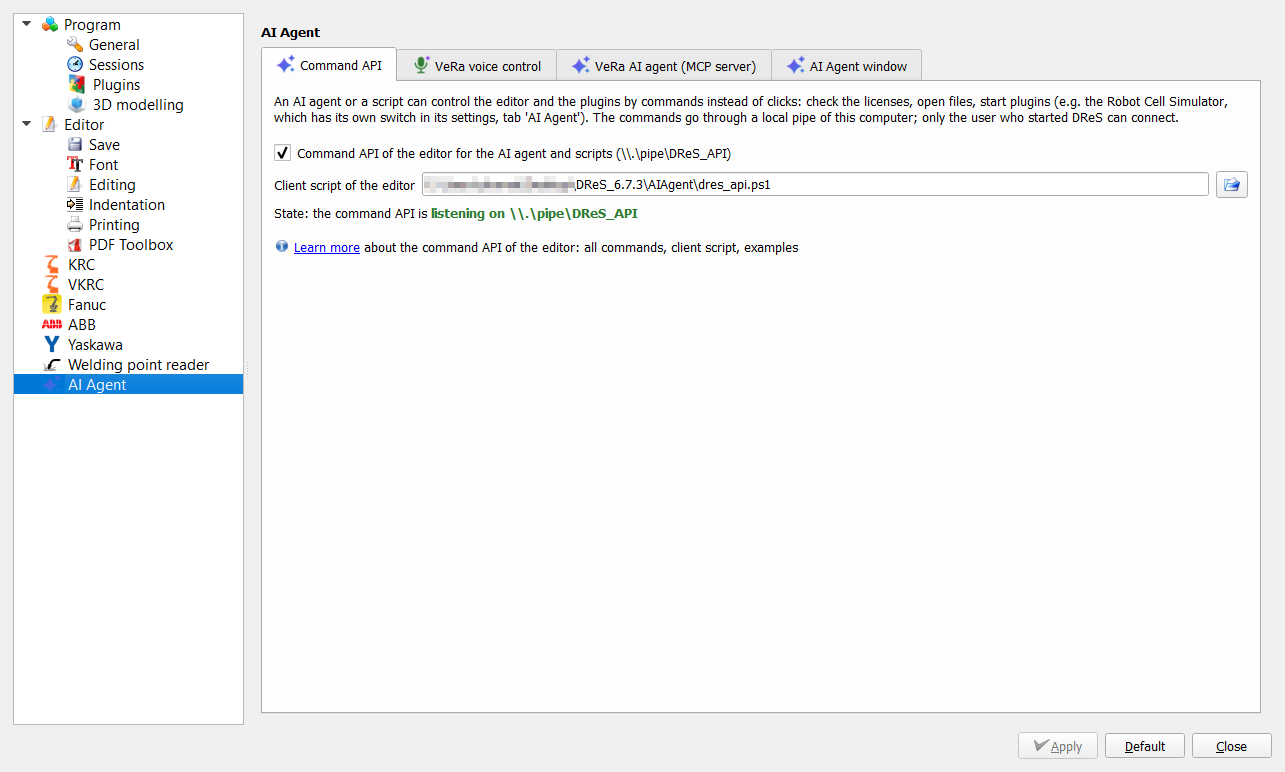
When Settings > AI Agent > Command API of the editor is switched on (or with DRES_API=1) DReS itself listens on \\.\pipe\DReS_API (client
AIAgent\dres_api.ps1): license tells whether the license check runs, whether the first reading of the key
has finished (ready) and which licenses are available; plugins lists the plugins of the menus;
run_plugin {name, wait} opens a plugin as soon as the license key has been read; open {file, line} opens a
file; status shows the active file and an open dialog; settings_get / settings_set read and change the settings of the editor and the plugins, e.g. RCS_Group/Automation_Api = true before run_plugin, so that the agent switches on the API of the simulator itself.
AIAgent\dres_api.ps1 '{"cmd":"license"}'
AIAgent\dres_api.ps1 '{"cmd":"settings_set","key":"RCS_Group/Automation_Api","value":true}'
AIAgent\dres_api.ps1 '{"cmd":"run_plugin","name":"Robot Cell Simulator"}'
Client script
template\RCS\AIAgent\rcs_api.ps1 (PowerShell) sends one command and prints the answer; -WaitIdle waits until the
simulator is idle (no loading, no preparing, no simulation).
template\RCS\AIAgent\rcs_api.ps1 '{"cmd":"status"}'
template\RCS\AIAgent\rcs_api.ps1 '{"cmd":"load","file":"C:/cells/station_folge81.xml","newScene":true}' -WaitIdle
template\RCS\AIAgent\rcs_api.ps1 '{"cmd":"fast_run","program":"folge125"}' -WaitIdle
template\RCS\AIAgent\rcs_api.ps1 '{"cmd":"run","folge":81,"loops":10,"speed":400,"sps":true}' -WaitIdle -TimeoutSec 900
template\RCS\AIAgent\rcs_api.ps1 '{"cmd":"run","up":42,"loops":1,"sps":false}' -WaitIdle
template\RCS\AIAgent\rcs_api.ps1 '{"cmd":"sim_action","action":"pause"}'
template\RCS\AIAgent\rcs_api.ps1 '{"cmd":"report","file":"C:/reports/variant_c.html","pdf":true,"compareFile":"C:/reports/original.rcsrun.json"}'
template\RCS\AIAgent\rcs_api.ps1 '{"cmd":"zones","programs":["folge81"]}'
template\RCS\AIAgent\rcs_api.ps1 '{"cmd":"check_interlocks"}'
Example: variant of a station
Load the original station, run Folge 81 ten times with the SPS program of the station, save the report; load the changed copy of the programs, run it the same way and save a report with the comparison to the original (compareFile = the .rcsrun.json of the first report). The same sequence for several variants gives a table of cycle times without a single click. The speed of the simulation does not change the measured times (400 % gives the same cycle times as 100 %).