
Work Zones > Check interlocks compares the interlocks programmed in the Folgen and UPs of every robot with the shared areas of the work zones and checks the signals of the interlocks (VW standard: request A81..A96 = EIN + SPSMAKRO20, release A41..A56 = EIN, input E41..E56 in FB PSPS). This page lists every check: what the program does wrong, an example and how to correct it. The same rules are used by the collision matrix (signal logic) and - without the geometry - by the command line test tool; the command API returns them with check_interlocks.
Long texts (descriptions of E41..E56 / A41..A56 / A81..A96) are the valid source of the partner robot of an interlock; the comments above the points are descriptions - a difference is a warning, not an error.
1. Interlocks and work zones | 2. Signal logic | 3. Comments and long texts | 4. Online condition, partner, simulation run | 5. Robot names
1. Interlocks and work zones (geometry)
These checks need the work zones (Work Zones > Calculate) of the checked programs.
| Check (code) | Severity | What is wrong in the program | Example | How to correct |
|---|---|---|---|---|
| No interlock MISSING | error | The robot moves in an area it shares with a partner robot (work zones calculated from the paths) without any interlock against this partner. | UP42 P10..P14 in the area of R03, no A8n = EIN before | Request an interlock in the last exact point before the area, release it after the area (Insert interlocks). |
| Requested too late LATE | error | The interlock is requested only after the robot has entered the shared area. | A84 = EIN in P7, the area starts with the motion to P6 | Request it in the last exact point before the area. |
| Released too early EARLY | error | The interlock is released (A4n = EIN) while the robot is still in the shared area. | A44 = EIN in P20, the robot leaves the area only after P23 | Release it in the first point after the area. |
| Released inside the area GAP | warning | Inside the shared area the interlock is released and requested again - for some points the robot moves unprotected. | A44 = EIN in P15, A84 = EIN in P17, area P12..P20 | Keep the interlock over the whole area. |
| One-sided interlock ONESIDED | warning | Only one robot of the pair protects the shared area; the partner moves in it without interlock. | R03 requests zone 4 against R06, R06 never requests a zone against R03 | Request the same interlock in the programs of the partner. |
| Other partner PARTNER | warning | The interlock is described for one robot, but in this part of the path the robot meets only another one. | Interlock 3 "mit 0001R05", the path meets only 0001R04 | Check the long texts and the comment of the interlock and the wiring of the partner. |
| Not needed UNNEEDED | info | While the interlock is held the robot never moves in an area shared with the partner. | The interlock may be removed - check it with the zone parameters (link radius, tool). | |
| Held too long LONG | info / warning | The interlock is held at least 3 points longer than the motion in the shared area. After a simulation run it is a warning when the partner really waited for this zone (number and seconds). Without an exact point between the request and the area the suggestion says so. | zone 4 held UP48 P5..P25, area only P19..P24, R06 waited 10 x, 216 s | Request later (last exact point before the area) / release earlier (first point after it) - never on a process path. |
| Stop on the process path PATHSTOP | error / warning / info | An interlock request in a point reached with a path motion (LIN, CIRC, KLIN, KCIR, KPTP ...) or a WARTE BIS in a technology motion - the robot can stop on the path. Error on KLIN / KCIR / KPTP, warning on LIN / CIRC, info in the VW service programs (UP101-163, UP201-210, Folge 120 / 123-125). UP90-99 (MAG) are process programs. | A83 = EIN + SPSMAKRO20 in a KLIN point of the brushing path | Request the interlock in the last exact point reached with PTP before the path. |
2. Signal logic (order of request, Makro20, release)
Shown in Check interlocks as Signal logic and in the collision matrix.
| Check (code) | Severity | What is wrong in the program | Example | How to correct |
|---|---|---|---|---|
| Released again without request R_RELEASE_AGAIN | warning | A release A4n = EIN without a request A8n (or taking the zone) since the last release in the program. | A43 = EIN in P5 and again in P20, no A83 = EIN between | Remove the second release or add the missing request (A8n = EIN, SPSMAKRO20 = EIN, E4n in FB PSPS). |
| Makro20 without request R_M20_NO_REQUEST | warning | SPSMAKRO20 = EIN is called but no interlock is requested in the point. | SPSMAKRO20 = EIN in P8 without A8n = EIN | Remove the Makro20 call or add the request in the same point. |
| Makro20 later than the request R_M20_LATER | warning | The request A8n = EIN and Makro20 are in different points - the standard requires the same point (possible for synchronization). | A84 = EIN in P3, SPSMAKRO20 = EIN in P5 | Call Makro20 in the point of the request. |
| Request never activated R_M20_MISSING | error | An interlock is requested but Makro20 is not called until the end of the program - the robot never waits for the grant. | A85 = EIN in P2, no SPSMAKRO20 | Call SPSMAKRO20 = EIN in the point of the request. |
| One Makro20 for the same robot R_M20_SAME_NEIGHBOUR | info | One Makro20 activates several requests to the same partner robot - from KS 24.20 the standard requires Makro20 after each of them. | A81, A85 = EIN (both to 0001R03), one SPSMAKRO20 | Call Makro20 after each request to the same robot (depends on the standard of the station). |
| Release cancels the request R_RELEASE_CANCELS_REQUEST | error | The Folge requests an interlock and calls a UP that releases it again in its P1 - the UP runs without the interlock. | Folge81 P2: A84 = EIN, UP42 = EIN; UP42 P1: A44 = EIN | Remove the release from P1 of the UP (the request moved to the Folge). |
| Leaves Grundstellung without release R_HOME_NOT_RELEASED | warning | The robot leaves Grundstellung (A15 = AUS) without releasing an interlock it uses in the Folge - the SPS keeps the zone taken. | A15 = AUS in P2, A44 = EIN missing before | Release the interlock before A15 = AUS (A4n = EIN in point 2 or Makro45). |
| A15 = AUS not in point 2 R_A15_NOT_POINT2 | warning | In a Folge started in Grundstellung, A15 = AUS belongs in the second point and only there (or it is missing). | A15 = AUS in P4 | Set A15 = AUS in the second point, after releasing the interlocks. |
| UP called in Grundstellung R_UP_CALL_AT_HOME | warning | A UP that requests interlocks is called in a point of the Folge with the position of Grundstellung - the robot waits for the zones far from the station. | R06 Folge81: P1 = P2 = P3 = HOME, UP42 called in P3, waits in UP42 P5 for zones 1 / 4 (21.6 s per cycle) | Check whether the robot can safely move closer to the station before the call (or before the request) - an exact point just before the shared area, the request there. |
| UP called from several Folgen R_UP_MULTI_FOLGE | info | A UP that requests interlocks is called from several Folgen - a change of its interlocks has to fit every one of them. | UP42: folge81, folge83 | Check the change for every listed Folge (Import AI proposals shows the same note). |
3. Comments above the points and long texts
The comments are recognized in the languages of the countries with VW plants - German (Verriegelung / Roboterverriegelung / Verr.), Spanish (Anticolision, Libera, enclavamiento), Portuguese (intertravamento, colisão), Czech (blokování, kolize, uvolnění), Slovak (blokovanie, kolízia, uvoľnenie), Polish (blokada, kolizja, zwolnienie), Hungarian (reteszelés), Chinese (互锁, 干涉, 释放), Russian (блокировка), English, French, Dutch, Italian - and with the words of the own templates. Settings > Interlock comments: up to three templates for a request and three for a release (e.g. a German, a Spanish and an English line above the same point); placeholders %E interlock number, %EE input 41..56, %A output, %R1 / %R2 robot names, %K1 / %K2 short robot numbers; examples in 12 languages. The interlock number is read from "Verriegelung 7", "7/8", "(A44)", "A47" or the input / output number (in Chinese also before the word); the partner from the robot named after it (the robot itself never).
| Check (code) | Severity | What is wrong in the program | Example | How to correct |
|---|---|---|---|---|
| Request / release without comment R_REQUEST_NO_COMMENT / R_RELEASE_NO_COMMENT | warning | Above a point that requests (A8n = EIN) or releases (A4n = EIN) an interlock there is no comment naming the interlock. A description in the UP header or at another point does not count. Not reported: commands in a makro, bulk releases (3 or more in one point, initialization). | UP48 P14 (KLIN): A41 = EIN, no comment above | Insert missing comments in Check interlocks - text from Settings > Interlock comments, partner from the long texts. |
| Comment does not match the program R_COMMENT_MISMATCH | warning | A comment "Verriegelung n ... EIN" / "Anticolision n ..." without the request A8n in the point, or a release comment ("Libera ...", "... AUS") without the release A4n (old standard: A4n = AUS - taking the zone - matches too). State notes ("bereits EIN") are not checked. | "Anticolision 5 con 0001R03 (A45) EIN" above P1, A85 = EIN only in P2 | Check whether the command is missing / moved or the comment is old; correct the program or the comment. |
| Comment differs from the long texts R_COMMENT_LONGTEXT | warning | The comment names another partner robot for interlock n than the long texts of E4n / A4n / A8n. The long texts are valid, the comment is only a description. | "Verriegelung 4 mit 0001R05 EIN", long text E44 "... zu 0001R03" | Correct the comment. |
| Program header of another robot R_HEADER_ROBOT | warning | The program header names another robot than the archive - a copied program; its comments and partners may be wrong. | "** 0001R05 **" in a program of 0001R04; "Station B 0002R03" in up101 of 0001R05 | Check the comments and the interlock partners of the copied program. |
4. Online condition, partner check, simulation run
| Check (code) | Severity | What is wrong in the program | Example | How to correct |
|---|---|---|---|---|
| Online condition ONLINE | error / warning | An active interlock without its input E4n in the online condition (FB PSPS) of the point - error when the motion is in the area shared with the partner. Collective merkers in makros are expanded (Settings > Simulation). | zone 4 requested in P5, FB PSPS = M30 & E8146 in P8 without E44 | Add E4n to the FB PSPS condition of the point. |
| Partner of the interlock PARTNERCHECK | error / warning / info | Each used interlock needs exactly one partner robot that names this robot back on the same interlock number (long texts E4n / A4n / A8n of both robots) - the same check as Robot Collisions Analyzer (To / Checked / Remarks). | interlock 3 of R01 - to ???: NOK | Complete the long texts of both robots so that they name each other. |
| Wait chain CHAIN | warning / info | Only after a simulation run: a robot waits for a zone of a partner while the partner itself waits - for another zone or for a condition (WARTE BIS, FB PSPS) - and keeps holding the first zone. | R03 waits in UP48 P2 for zone 4 of R06, R06 holds it since Folge81 P2 and waits in UP42 P17 for zone 3 of R05 | Request the zones together (one Makro20), take the zone only after the wait, or release it before the wait. |
| Requests at the same moment RACE | warning | Only after a simulation run: two partners request the same zone closer than the race window (Plugin settings > Simulation, default 1 s) and one of them waits. The order on the line is random - unless the SPS gives the zone in a fixed order (in the simulation: SPS block Interlock priority); it shows only in the station test at 100 %. | R03 (UP48 P2) and R06 (Folge81 P2) request zone 4 0.001 s apart | Request the zone one exact point earlier in the robot that got it first in the simulation - the robots run together at 100 %, the order is then fixed. Variant B (the other robot first): SPS block Interlock priority or raceOrder in the Robustness test. |
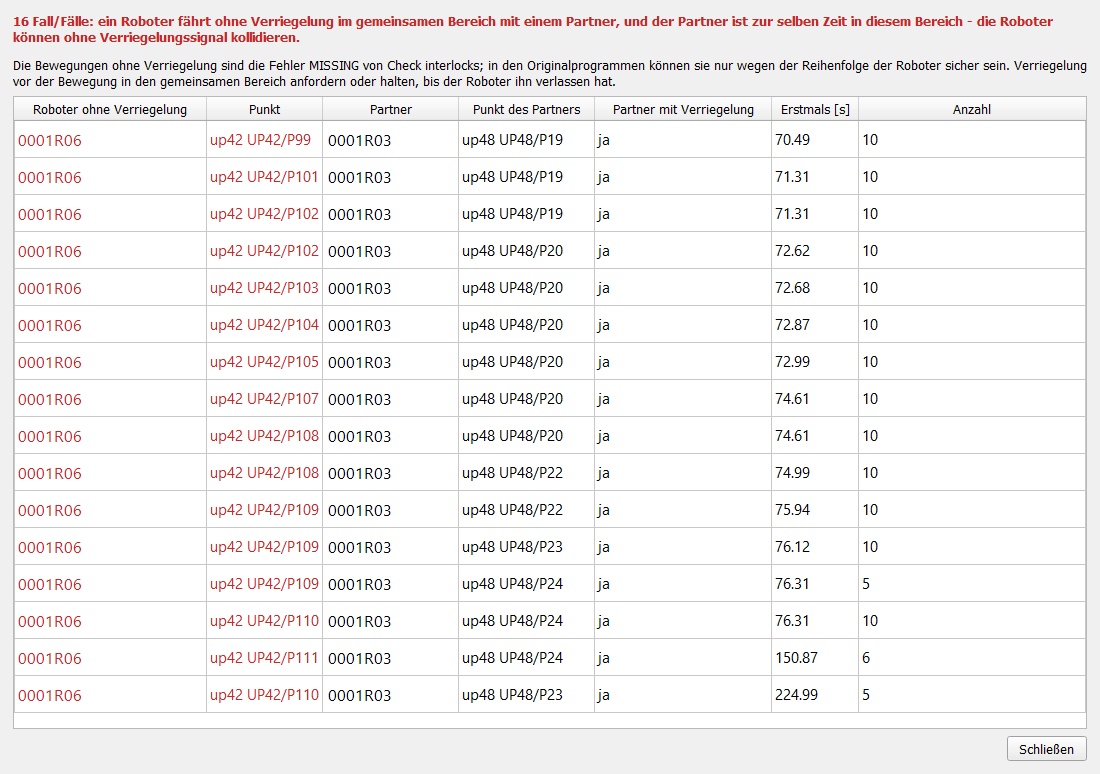
| Collision risk in the run COLLISION | error | During the simulation of the station: a robot moves without interlock in an area shared with a partner (MISSING of the work zones) while the partner is in this area at the same time - the robots can collide without any interlock signal. Motions without interlock are often safe only because of the order of the robots; after a change of the programs (order of the points, interlocks moved) they become a collision. Before the start the work zones of the programs of the run are checked (not calculated, programs changed, called UPs missing) and calculated again. Shown at once in the console, in a window after the simulation, in the cycle time report (Collision risk) and in Check interlocks after the run. | R06 (UP42 P99 .. P111, zone 4 released already in P35) welds while R03 brushes the second time (UP48 P19 .. P24) | Request the interlock before the motion into the shared area, or keep it until the robot has left the area. |
5. Robot names
The full name of a VW robot, e.g. KDA4G1214460R01, consists of the station (KDA4G1), the Arbeitsgruppe (ARG, one digit: 2), the Schutzkreis (SK, one digit: 1) and the robot number 4460R01 (four digits, R and two or three digits). Only the robot number identifies the robot - comments and long texts often write ARG + SK + number (214460R06). Fixtures have V01.. (Vorrichtung), not R.
When a simulation file is loaded, RCS compares the robot number of every robot in the file with the robot name of its archive and with the archive folder; another number gives a warning in the console ("check that the archive belongs to this robot") and in the command API (status: robotNameWarnings).