

 DReS Robot Cell Simulator - Simulate the Whole Cell: All Robots, Real Time, Motion Planner (YouTube, English)
Run on all robots Simulation
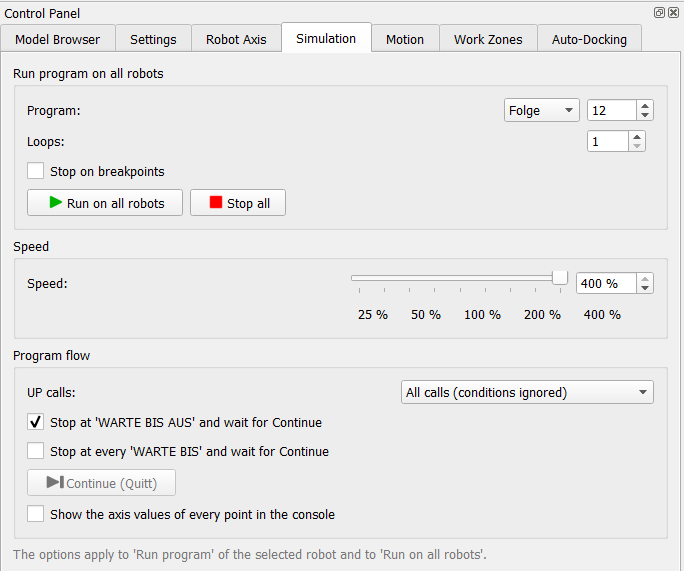 |
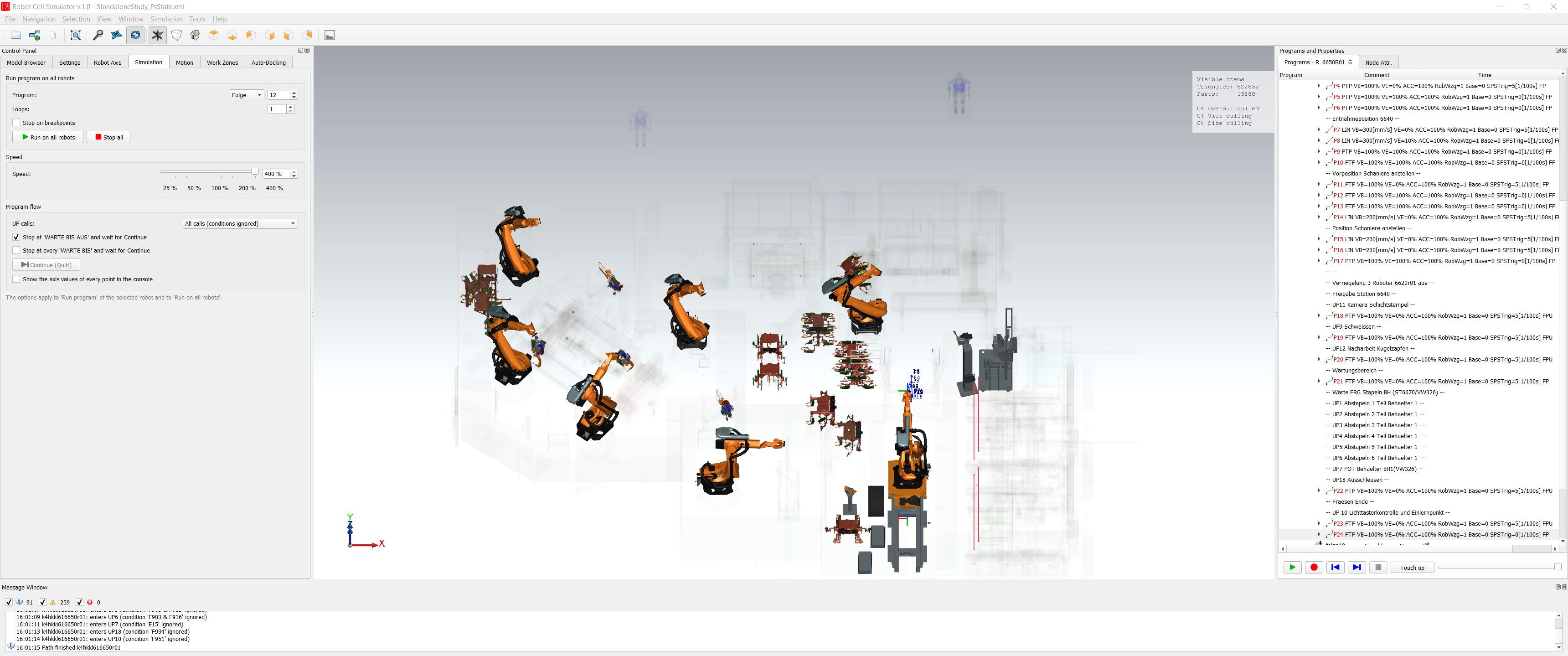
The Simulation tab starts the same program (e.g. Folge 12) on all robots of the cell at the same time. Loops repeats the run, Stop on breakpoints uses the breakpoints of the programs (see Program flow), Stop all stops all robots. The same command is in Simulation → Run program on all robots.... Program: type Folge or UP and the number (1..9999). Loops: 1..999. With the SPS program the field is locked and shows the cycles of the Start block of the SPS program. During the run the loop counter next to it shows n / m (the robot that is furthest behind). Speed: 0..400 % of real time, with the slider, the field and the buttons 25 / 50 / 100 / 200 / 400 %. 0 % = pause. The button Pause sets the speed to 0: the robots, the stops at commands and the clock of the station stand. Resume (the same button) continues with the speed before the pause. Start in two phases: the robots first prepare the run (the motion planner computes the path of the first loop and the start of the next ones), the simulation clock stands meanwhile; when all robots are ready, the clock starts and all robots move together (console: All robots are ready ... preparation x s, not counted in the simulation time; SmartPad: Preparing the motion / Ready). Preparation in the background: after loading a study or a simulation, changing the SPS program or the program of this tab, the programs the robots will run (Folge and the UP called from it) are parsed in the background, one file after the other, while the scene stays usable (console: Preparing the simulation ..., a small window with a progress bar in the corner). The start then takes them from the memory (console: Robots prepared in x s: n program(s) from the memory, m parsed now); a program changed in the SmartPad or in the editor is parsed again, macros at the start. Up to 12 robots at the same time; every robot runs in its own thread, so the computer needs at least robots + 1 logical processors – see Running, processor and accuracy. The green SPS button runs the cell with the simulated station PLC: Folgenstart, releases of the station and cycles come from the SPS program – see Station PLC (SPS) and SmartPad. Fast Run – under the SPS button a row of buttons that start a given program on all robots at once, with a given number of loops and without the SPS program (the SPS button and the fields of the tab stay unchanged; the next Run on all robots works with the SPS again). Typical use: Folge 125 to bring all robots to HOME before the simulation with the SPS (after loading a cell the robots are never in HOME). The buttons are defined in template/RCS/fast_run.xml of DReS, one element per button: <FastRun version="1"> <Button program="folge123" loops="1"/> <Button program="folge125" loops="1" text="HOME" tooltip="All robots to HOME"/> </FastRun> program – Folge or UP with its number (folge125, Folge 125, up42), loops – number of loops (default 1), text / tooltip – optional. The row wraps to the next line when the buttons do not fit; without buttons it is hidden. A changed file is read again at once; right click on the row: open the file / reload the buttons. The options of the tab (interlock signals, program rules, speed) apply as for Run on all robots. Fast Run always runs without the SPS program, also when the SPS button is on; Stop on breakpoints applies to it. |
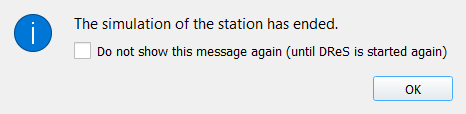
End of the simulation: when a station simulation ends, the message Simulation finished says The simulation of the station has ended. The window is not modal – the scene, the console and the other windows stay usable while it is open. With Do not show this message again (until DReS is started again) it does not come again in this session; after the next start of DReS it is shown again. When the run found request races, the window Request race found comes instead (see Request races: proposal and simulation of both orders). Only one window Simulation finished is open at a time: when the next run ends while it is still open, its text is replaced (before, two or three windows could be open at once).
Runs started through the command API (since 2026-10-25): a run, a robustness test or a simulation of both orders that a script or the AI agent started – or stopped – through the command API ends without the windows Simulation finished, Collision risk in the simulation, Request races, Request race found and the result of the simulation of both orders; their text is in the console and in the API (status.lastRunMessages, run_data). Before, 50 runs and stops through the API left about 90 windows. A simulation file loaded through the API does not open Load simulation – Not restored either. Runs started with the buttons of the window show the windows as before. The pause at a collision risk (option Stop the simulation at a collision risk) opens its window with Continue also for a run of the API.
Closing DReS during a simulation (since 2026-10-25): DReS asks only once – the window of the simulator asks The simulation is running. Do you really want to stop the simulation? (default No; with No DReS stays open with its licenses). The question Plugin important result of DReS comes only when the window of the simulator is closed (hidden) and a simulation or a robustness test still runs. When DReS is closed while a file is loaded, the closing waits until the load has finished (message in the console) and DReS then closes itself. The clock of the simulation (simTime in the API) stands while no simulation runs, also after the opening of the simulator.
How the robots run in the simulation
- The same Folge on all robots. Every robot runs the program of the field Program (e.g. Folge 81). With the SPS program the Folge comes from the station block of the robot (0 = the Folge of the field); a robot on several stations has the same Folge number on all of them. There is no run with Folge 81 on one robot and Folge 82 on another.
- Start and order. Without SPS all robots start together (with Start all together at 'Warte auf Folgenstart' again in every loop). With SPS the station gives the Folgenstart like on the line (station time, Wait blocks, a Wait after a robot block delays only this robot). After the start every robot runs its program on its own; the order of the robots in a shared area follows from the motion and process times and, with Respect interlock signals, from the interlocks (a robot waits until the partner releases the area). The simulation shows one order – the one that results from these times.
- UP calls. UP calls: All calls runs every UP called in the Folge, the condition of the call is not evaluated; Only = EIN only the unconditional calls; Do not execute none. The Program rules Exclude UP / Exclude MAKRO leave out the given programs (e.g. service programs such as tip dressing) – the console names the call and its condition.
- Work zones (collision map) are calculated from all motions of the Folge and of all UPs called in it (up to 3 levels, conditions ignored, also the excluded ones) – independent of the order of the robots. The collision check of the run compares the motions of the run with these zones.
- Robustness test. It uses the same Folge and the same SPS program; every step is a new run with other speeds, stops or delays, so other orders of the motions of the same Folge occur. The option All UP calls of the test runs every UP of the Folge in every cycle (rules Exclude UP ignored, the settings of this tab are not changed), the delay test (MISSING) checks every motion without interlock against every partner – How the robots run in the robustness test.
Fanuc programs in the simulation
A Fanuc robot (VW standard, see Fanuc robots) runs in the simulation like a KUKA robot: when the archive is loaded, its .ls programs are translated into substitute KUKA programs in the cache folder, and these run with the same options, SPS program, interlocks and reports. The .ls files of the archive are not changed.
| Fanuc | In the simulation |
| FOLGEnnn, UPnnn, MAKROnnn | Folge n, UP n, Makro n (e.g. FOLGE31 → Folge 31, UP031 → UP 31) |
| motion programs MOTNnnn | subprograms with a free UP number (the console lists the numbers) |
| DO[n], DI[n], F[n], M[n] | output A n, input E n, flag F n, marker M n |
| DO[n]=PULSE | Puls |
| TC_ONLINE (...) | motion condition: the first one as FB ONL, the following ones as FB PSPS (see FB PSPS) |
| WAIT (condition) / WAIT x(sec) | WARTE BIS / WARTE ZEIT |
| TIMER[n]=RESET, TIMER[n]=START, TIMER[n]=STOP, ... (TIMER[m]) | program timers of the VW standard (reset, start, stop, read), counted by the simulation clock (since 2026-10-21) |
| WAIT (signal OR TIMER[m]>=x) | WARTE BIS signal – the robot waits for the signal; the time limit is not simulated (warning in the console of the load) |
| RTCP motion to a point without its RTCP position (RX..RR) | simulated to the exact end point (warning in the console of the load); since 2026-10-21 |
| CALL UPnnn, IF (condition),CALL UPnnn | UP call (with the condition) |
| CALL MAKROnnn | SPSMAKRO n; MAKRO020 activates the interlock requests |
| interlocks | as with KUKA: request DO[81..96], release DO[41..56], permission DI[41..56] in TC_ONLINE |
| MAKRO050 / MAKRO057 | marker macros: initialise the markers at the program start |
| J ... % / L ... mm/sec | PTP % / LIN mm/s (cm/min, mm/min and inch/min converted; max_speed = 2000 mm/s) |
| CNT, ACC | approximation, acceleration |
| ... Offset,PR[n] | the point shifted by PR[n] in the user frame (UF) of the motion – when PR[n] has a Cartesian value in the backup (POSREG.VA) |
| ... Tool_Offset,PR[n] | the point shifted by PR[n] in the tool frame (UT) – when PR[n] has a Cartesian value in POSREG.VA |
Not simulated – always reported in the console of the load as an error or a note, never left out silently:
- motions with Offset without a PR in the line (the offset of an OFFSET CONDITION), Offset / Tool_Offset on joint points or with a PR without a Cartesian value, points not taught (*****), PR without data, positions out of reach or without a solution with the CONFIG of the point – the robot stays in the previous point there,
- LBL / JMP, registers R[], GO[], other TIMER lines, PAYLOAD, CALL VW_USER and other lines appear in the program as comments -- FANUC: ... --,
- motions with Skip,LBL[] run to the end point (note),
- points outside the axis limits read from the archive are simulated with a note.
Options of the run Simulation
- Start all together at 'Warte auf Folgenstart' (on by default) – a robot at Warte auf Folgenstart waits until all robots are there, then all start together, in every loop. Only for Loops > 1 and without the SPS program (with the SPS the Folgenstart comes from the SPS program).
- Check interlock map – a table of the interlock zones used in the program on all robots: descriptions (long texts), partner robot and whether the partner names the zone back. Green = OK, red = missing.
- Show collision map – a line between every two robots with common interlock zones, with the release
inputs above the line. Green = all zones free, red = a zone is taken; the arrow points from the robot holding the
zone to the robot it blocks. Position: on the floor, on the top (under the state lamps) or at the robot base.
The zone labels are written along the line and always stay readable (never upside down); their size follows
the thickness of the line on the screen – smaller when you zoom out, at most the normal size when you zoom in,
hidden when they would be smaller than 7 px; View > Signal label size... makes them larger or smaller
(30..300 %, Default = 100 %). A line that would run past a third robot or overlap another almost
parallel line is drawn as a gentle horizontal arc away from the obstacle; the label and the arrows follow
the arc.
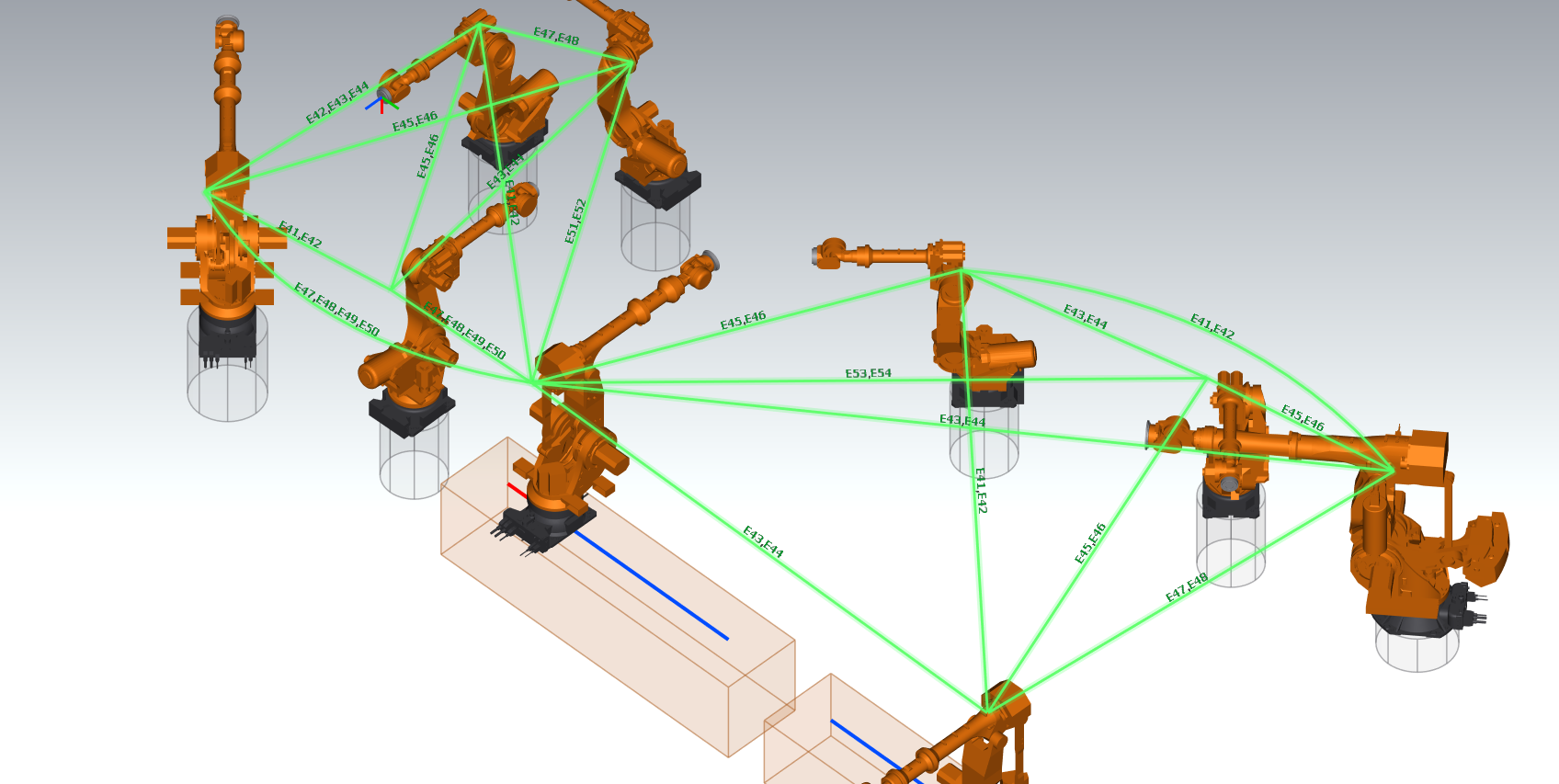 Collision map of a Fanuc cell: interlock zones written along the lines, lines past a third robot drawn as arcs; front left a robot on a travel track
 - Show the program state above the robots – a lamp above every running robot: by default green = moving or Warte auf Folgenstart, orange = process time at a command, red = waiting. State lamp... sets the colors (available only while the option is on).
- Free run - ignore all conditions (SPS, interlocks, WARTE BIS, FB, collisions) (off by default) – all robots run their programs without waiting for anything: no SPS program, no interlock signals, no common start at Warte auf Folgenstart, WARTE BIS and the motion conditions FB PSPS / FB ONL pass at once, and the simulation does not stop at a collision risk. Timed waits (WARTE ZEIT) and the motions stay. For looking at the motions of a station whose sequence is not known yet – the times and the collisions are not realistic. A warning in the console reminds of the option. API: sim_options key freeRun; saved in the simulation file (attribute freeRun of Options).
Before the run. The collision check of the run needs up-to-date Work Zones. When they are missing or old, the simulator asks: Calculate and run or Run without collision check (the command API calculates them; since 2026-10-25 the calculation runs in the background, the window responds and Cancel works, see Work Zones). With Respect interlock signals an incomplete interlock map asks: Show the map or Run anyway.
During the run the options of the tab are locked. These work also while the simulation runs: the axis values in the console, the collision map, the state lamp, Console messages..., Collision risks..., the speed, Pause and Continue (Quitt).
Collision risk in the run Work Zones
Stop the simulation at a collision risk (on by default): when a robot moves without interlock into an area shared with a partner while the partner is in this area, the simulation pauses at once. The simulator takes a screenshot of the scene, writes the axes of all robots and opens the window of the collision risks. Off: the run goes on, the risks are written to the console and to the report.
The button Collision risks... opens this window, also during the run. In the window: Ignore (the case does not pause the simulation any more), robots to the points, programs in the editor, save as HTML / PDF. Neighbouring points of the same place are one case by default (see Plugin settings > Collision report). The small buttons in the table (robots to the points, program in the editor) keep their size, also in the last column. Where the risk is in the cell is shown by the places of collisions in the scene.
Robots to the points (only when the simulation is stopped or paused): for a collision risk from the work zones both robots move to the points of their programs. For a contact of the 3D models (COLLISION (3D models)) both robots move to their axes at the first place of contact of the row (the axes are saved by the Live 3D check). One row can hold several places of contact (see Places of collisions): every further click of the button moves the robots to the next place of the row, after the last one it starts again with the first. The console names both robots, the place and the simulation time, e.g. contact 2 of 6 of this row (7.34 s); the red sphere with the same time lies on the touching parts. The button of a 3D row with more than one place shows the number of places (e.g. 6), after a click the place shown (e.g. 2/6).
For a row of the work zones (violet) the simulator also checks the 3D models once in this pose of the program points (the same models as Live 3D: robot links, CAD tool model with grippers / guns, fixtures, dummy tool). If they touch, an orange sphere marks the place (label 3D contact in the program points R2 / R1) and the console warns: in the run the robots were not there at the same time, but another timing (speed, waiting, SPS) makes it a real collision – keep the interlock until the area is free. Otherwise the console writes that the models do not touch and the closest distance with the parts. The first check takes a few seconds (the models are read), later ones are immediate. The orange sphere disappears at the next Robots to the points or at the start of the simulation.
A blue line below the table says what the 3D view shows after the last click, e.g. Shown: contact 2 of 6 at 7.30 s - R2 to UP142/P2, R1 to UP142/P2 (the red sphere with this time) or Shown: program points - ... with the result of the check of the pose. The tooltips of the columns Point / Partner point explain the notation: P2-P5 = the range of points P2 to P5, P2, P12 = the two points P2 and P12.
API: {"cmd":"collision_case","key":"...","action":"points"} (a repeated call = the next contact), the answer contains point ([x, y, z] mm, the sphere of the shown contact), place / places (3D rows) and shown (the text of the blue line); for a work zone row the result of the check of the pose comes about 0.2–6 s later in the console.
Live 3D collision check Collision 3D
The option Live 3D collision check checks the 3D models during the simulation of the station (Run on all robots, Fast Run, robustness test, run from the command API – not the run of a single robot). At every check the simulator compares:
- the robots – the triangles of their links,
- the tools – the tool model on the flange, or the dummy tool: a sphere in the TCP and a body (capsule) from the flange to the TCP. The body is used only when the TCP is less than 1 m from the flange.
| Field | Default | Range | Meaning |
| cell | 30 mm | 10..100 mm | accuracy of the check: smaller = more exact and slower |
| dummy tool body R | 60 mm | 10..300 mm | radius of the body from the flange to the TCP of a dummy tool |
| distance up to | 200 mm | 50..1000 mm | the smallest distance of each pair of robots is measured up to this value. At the end of the simulation the console shows the closest approach of every pair with the parts: base / carriage, link A1..A6, tool model, dummy tool, body of the dummy tool from the flange to the TCP |
| warn below | 30 mm (new settings; 0 = off) | 0..500 mm | safety distance: a closer approach without contact goes to the window Collision risks as 3D proximity (console: PROXIMITY (3D models)); the simulation does not pause |
| contact up to | 5 mm | 0..50 mm | contact threshold: the closest points of the two models at most this far apart = COLLISION (3D models). Farther = 3D proximity, also when the models share a cell of the check (see below) |
| check in its own thread | on | the check runs in its own thread, independent of drawing the scene, windows and SmartPads. Off: the check runs in the GUI thread – only for comparisons | |
| use several processor cores for one check | on | the points of the robots and the pairs of robots of one check are calculated at the same time on half of the logical processors (2..8); the results are the same, a check takes less than half of the time | |
| fixed step: the simulation clock waits for every check | on | the robots are checked exactly every step of simulation time: the clock of the station does not go past the next step until all robots are checked there. The result does not depend on the simulation speed and on the computer – a slow computer only makes the run longer. Off: a check whenever the computer manages it (at 400 % about every 0.2–0.3 s of simulation time) | |
| step | 20 ms | 10..500 ms | step of the fixed check in simulation time (see the recommendation below) |
| redraw the scene | 16 ms | 16..1000 ms | how often the moving robots are drawn: less often = less work for the processor and the graphics card (long tests over night); the times and the checks do not change |
The fields of the check can be changed only while Live 3D collision check is on; fixed step needs check in its own thread, and step needs fixed step.
Collision and proximity. Every check measures the smallest distance between the surface points of the two models (the points lie about 0.6–0.7 × cell apart, 18–21 mm at 30 mm). The result is one of two kinds:
| Kind | When | Report |
| 3D collision (contact) | closest points at most contact up to (default 5 mm) | console COLLISION (3D models) … closest points x mm (error), red sphere, the simulation pauses like at a collision risk (not in the robustness test – the cases go to its report). Finds real contacts also in areas protected by interlocks. |
| 3D proximity | no contact: the models share a cell of the check, or they come closer than warn below | console PROXIMITY (3D models) … closest points x mm (warning), smaller yellow sphere, no pause; column Kind of the window 3D proximity (x mm) |
Why: a common cell of 30 mm with the closest points 10–26 mm apart depends on the moment of the check – in a test (2026-10-25) the same pass of the guns was reported mostly as a proximity, in single runs as a contact, with every format of the tool models (see Tool model formats). Real collisions show 0–3 mm. When a proximity of the same two robots in the same points becomes a contact during the run, the case is a collision (one row; the occurrences of the proximity are counted with it).
Older simulation files and agents. A simulation file without live3dContact uses 5 mm; its live3dWarn stays as saved (often 0 = off – then only the common cells without contact are proximities). The borderline cases that were reported as COLLISION before 2026-10-25 are now proximities: they do not pause the simulation and are warnings in Check interlocks. Close to the old behaviour: contact up to 50 mm (then every approach below 50 mm is a collision, also without a common cell).
Places of collisions (spheres)
After a run with Live 3D collision check and / or the check of the work zones, the 3D scene shows a sphere at every place where the check found a problem. The menu View > Show the places of collisions switches them on and off (on by default, kept in the settings). A work zone case has one sphere. A 3D contact case keeps up to 4 places of contact that are more than 400 mm apart (e.g. the guns touch first, later the arm touches the forearm); each place has its own red sphere, time and robot axes. The label above a sphere names the robot, the partner and the simulation time of that place.
View > Show the labels of the collision places (on by default, kept in the settings) switches the texts above the spheres; off = only the spheres, useful when many labels hide the robots. Both switches are also in the context menu of the 3D view. API: {"cmd":"view","collisionPlaceLabels":false}.
| Sphere | Label | Meaning |
| red (default #ff0000, radius 60 mm) | 3D contact R2 / R1 7.1 s | the 3D models (robot links, tool CAD model or dummy tool) really touched at this time in the run. The sphere is in the middle of the closest points of both models at the deepest contact of this place – it lies on the touching parts. |
| yellow (default #ffc000, radius 45 mm) | 3D proximity R2 / R1 17 mm 7.4 s | a 3D proximity: the models came close without contact (common cell of the check or below warn below); the sphere is in the middle of the closest points of the closest approach of this case. |
| violet (default #e000e0, radius 90 mm, more transparent) | zones R2 / R1 7.7 s | a collision risk from the work zones: both robots were in their shared area at the same time without an interlock. The sphere is the centre of the cell (voxel) where both work zones meet. It does not mean that the models touched – the work zones are an approximation of the robot and its tool (mode triangles or cubes, see Work Zones). |
| orange (#ff9800, radius 70 mm) | 3D contact in the program points R2 / R1 | only after Robots to the points of a work zone row: in this pose of the program points the 3D models touch. In the run the robots were not there at the same time – another timing (speed, waiting, SPS) would make it a real collision, so keep the interlock until the area is free. Removed at the next Robots to the points or the start of the simulation. |
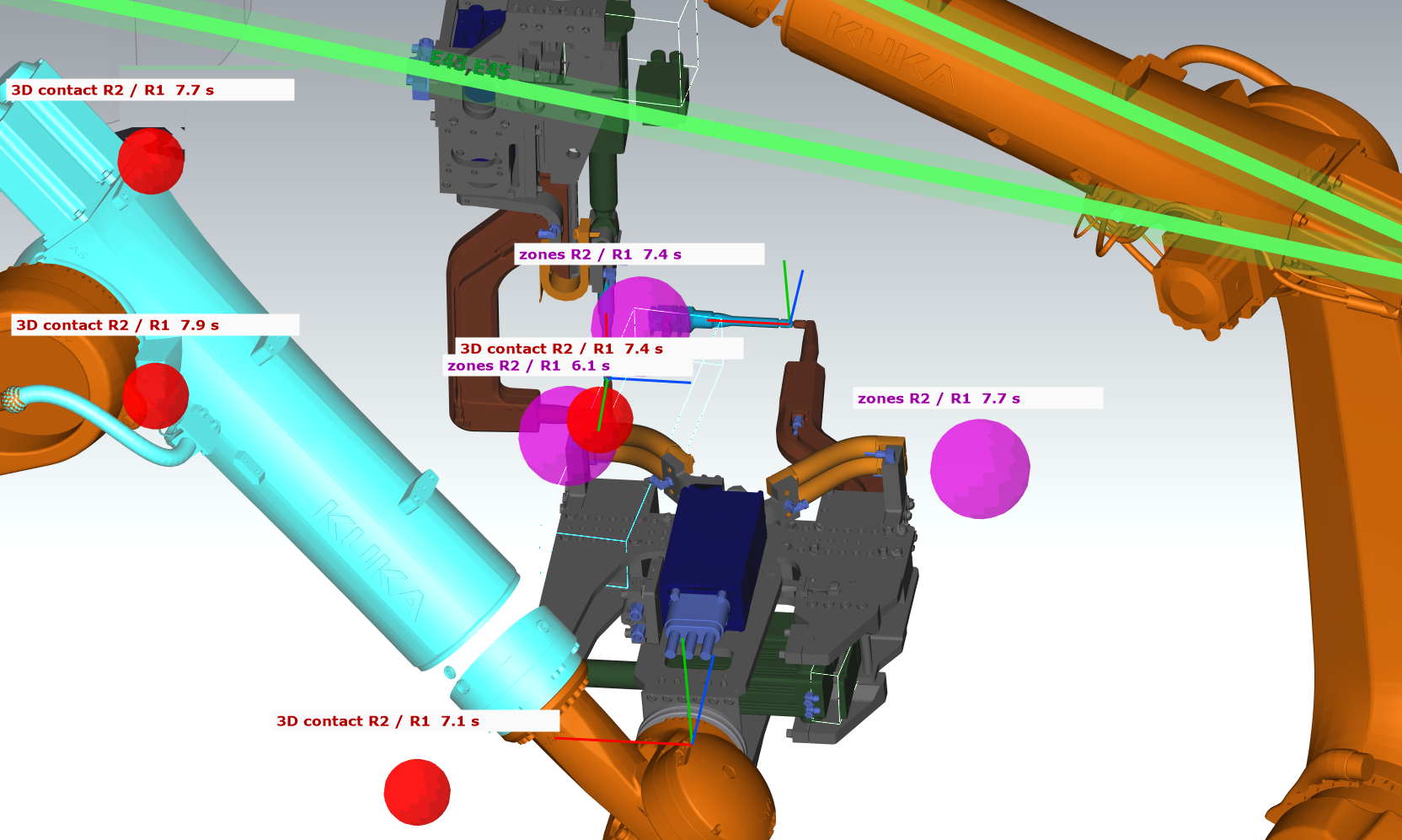
The spheres are drawn on top of the models, so they are visible also through a robot or a tool. Cases set to Ignore in the window Collision risks are not shown. The spheres stay after the end of the run and are removed at the start of the next run.
The colors are set in View > Colors of the collision places... (Restore Defaults sets red, violet and yellow back). API: {"cmd":"view","collisionPlaces":true}, {"cmd":"view","collisionPlaceColor3D":"#ff0000","collisionPlaceColorZone":"#e000e0","collisionPlaceColorProximity":"#ffc000"} (see Command API).
More spheres than rows. The window Collision risk in the simulation groups the cases of one robot pair in following points into one row (e.g. UP142/P2-P5; the column Count is the number of checks that found it; the column Kind says 3D collision, 3D proximity or work zones, with the closest distance of the models in brackets; a proximity row is orange, not red). The scene shows a sphere for every place of every case, so there can be more spheres than rows – in the picture above four red spheres (7.1, 7.4, 7.7 and 7.9 s) belong to one row.
Stepping through the places of a row. Robots to the points (green play button) of a 3D row moves both robots to their axes at the first place of contact of the row. Every further click moves them to the next place of all cases of the row; the console writes e.g. 'R2' and 'R1' at the contact 2 of 6 of this row (7.34 s) - the red sphere with this time marks the place; click again for the next contact. After the last place it starts again with the first. The red sphere with the same time then lies on the touching parts.
Rows of the work zones. Robots to the points of a work zone row puts both robots at the points of their programs. This pose may never happen at the same time in the run (e.g. both robots at their weld points, while in the run one of them was already gone), so it is correct that no red sphere is there: the red spheres mark only contacts that really happened in the run. Whether the models would touch in this pose shows the check of the pose: an orange sphere and a warning in the console, or the closest distance (see Collision risk in the run).
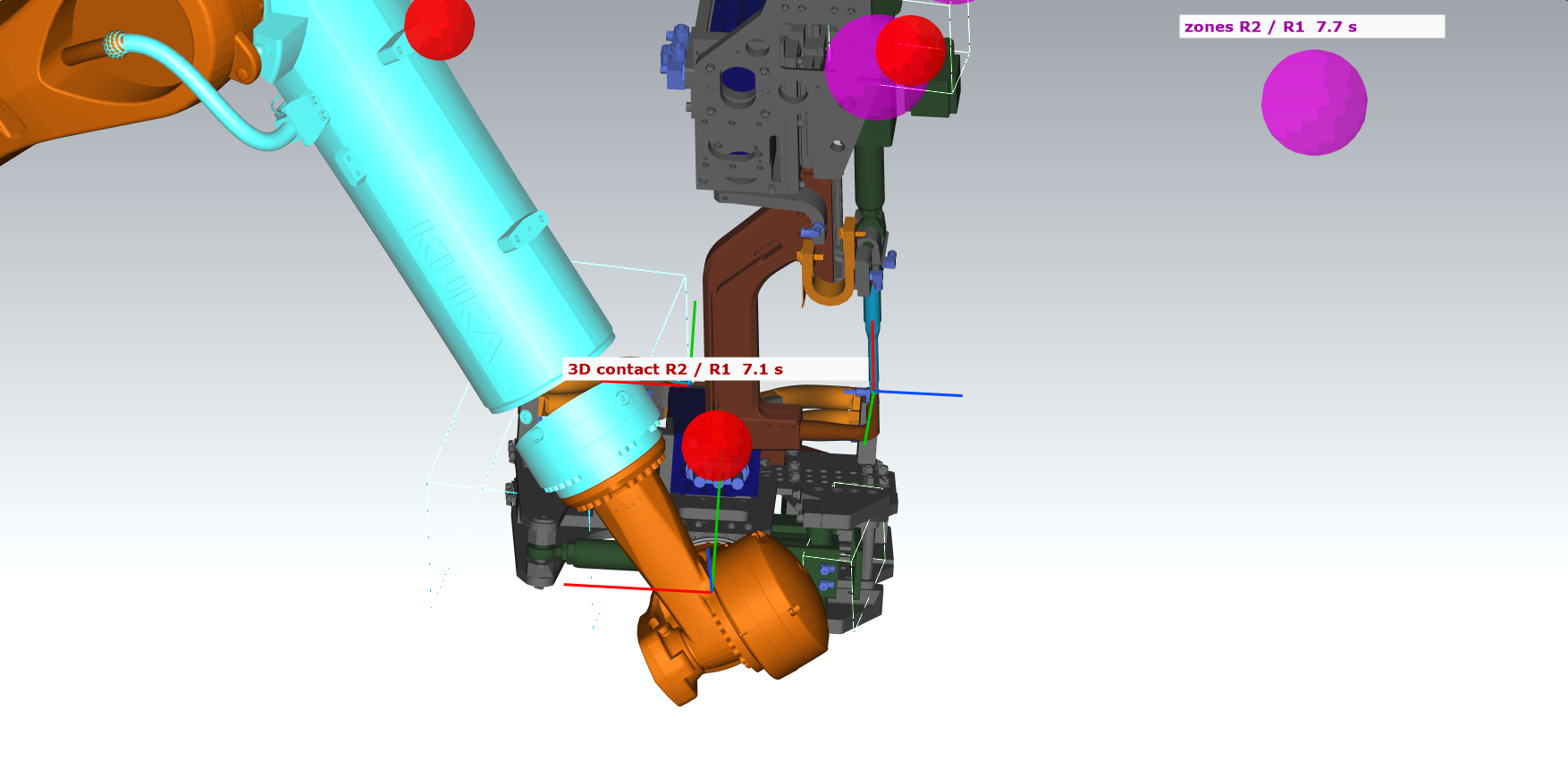
API: {"cmd":"collision_case","key":"...","action":"points"} does the same (a repeated call = the next place; or the key of one contact) and answers point [x, y, z] mm of the shown contact. To look at the place: {"cmd":"view","target":[x, y, z],"zoom":6} and scene_shot.
Accuracy: how far a robot moves between two checks
A contact shorter than the time between two checks can be missed. What counts is not the time, but how far a point of a model moves between two checks while the robot is near a partner (closer than distance up to) – fast motions in free space do not matter. After every run the console writes:
- the number of checks, the mode, the time of one check (median and 95 %), the gap between the checks,
- the largest move of a point of a model between two checks near a partner (robot, time) and the 95 % value,
- how long the simulation clock waited for the checks,
- a recommendation for this station and this computer: the step at which every point near a partner moves at most cell + warn below (at least cell + 20 mm) between two checks, and up to which simulation speed the clock does not wait for the checks.
The same values are in the API (live_check → stats) and, for every run of a robustness test, in its log and report. One run with the Live 3D check on a new station or a new computer is enough to get the settings.
Measured (station A: 5 robots + SPS program, 10 cycles = about 720 s of simulation, cell 20 mm, laptop i7-8750H)
| Mode | Speed | Duration | Time of one check | Gap between checks (largest) | Largest move near a partner | Contacts of the 3D models found |
| own thread, several cores, no fixed step | 400 % | 194 s | 17 ms | 0.13 s (0.57 s) | 483 mm | 2 |
| fixed step 50 ms, several cores | 400 % | 502 s | 17 ms | 0.05 s (0.05 s) | 153 mm | 3 |
| fixed step 50 ms, several cores | 200 % | 706 s | 16 ms | 0.05 s (0.05 s) | 153 mm | 3 |
| fixed step 20 ms, several cores | 400 % | 835 s | 19 ms | 0.02 s (0.02 s) | 65 mm | 3 + close approaches below 50 mm |
- With the fixed step the result is the same at 200 % and 400 % – the speed only changes the duration.
- Several cores: a check takes 17 ms instead of 42 ms, the results are the same. Since 2026-10-25 the cores work in a fixed set of threads for the whole run (no memory growth during the run, faster 3D view – see Load of the computer).
- A step of 20 ms keeps every move near a partner below cell + safety distance (70 mm) and finds close approaches a step of 50 ms misses. On this computer the clock then waits for the checks – a run at 400 % runs at about 85 % in effect.
- Redrawing the scene only every 1000 ms: 6 % shorter, half of the load of the graphics card.
Interlock signals between the robots Simulation
With Respect interlock signals (A8n / Makro20 / A4n) the robots of Run on all robots exchange the interlock signals of the VW standard as the PLC does:
- A(80+n) = EIN in a point requests zone n,
- SPSMAKRO20 = EIN in the same point waits until no partner robot is in zone n, then the robot takes the zone,
- A(40+n) = EIN (first point after the shared area) releases it, A(40+n) = AUS takes it without waiting.
The partner robot of a zone comes from the descriptions of the signals E(40+n), A(40+n) and A(80+n) in the long texts of the robot archive (Longtexts) and from the comments Verriegelung n ... 0001R03 in the programs; a zone without a description is shared with every robot that uses the same zone. For Fanuc robots the descriptions come from the signal comments of the controller in DIOCFGSV.IO (DI n = E n, DO n = A n, e.g. DI 41 "L.Ant.1>R1" = release from the partner robot R1), see Fanuc robots. At the start the console shows the interlock map (zone - partner) of every robot.
During the run the console reports every wait: waited 16.38 s at folge12 P17 for interlock 3, 5 (taken by ...) (simulation time). At the end it shows the waiting time per robot - the points where the cycle time is lost. A robot that ends its program with a zone still taken (no A(40+n) = EIN) is reported as an error, and if all robots wait for each other the run stops with a deadlock message.
The simulation follows the program order and the motion planner; it shows where robots wait, not whether the zones are released at the right place geometrically - for that use Work Zones and Check interlocks.
Program flow
Without the station PLC (SPS) the controller inputs and the PLC are not simulated (except the interlock signals above, when switched on), so the conditions of the programs are evaluated as follows:
- Stop on breakpoints – the robot ends its run at a breakpoint set in its program tree (right click on a point – Add breakpoint). Every robot keeps its own breakpoints, also when another robot is selected; only points of the main program (Folge) count, not points in the UPs. Useful for one robot or for robots without the SPS program, to check a program up to a point (position, reachability, interlocks up to there). With the SPS program the option is locked: the robot would end its run and the station would wait for it in HOME,
- UP calls – Do not execute, Only unconditional calls (= EIN) or All calls (conditions ignored) (default). All calls executes every subprogram called in a point, other options limit the calls. Macros SPSMAKRO<n> = EIN (without a condition) run like UPs from KRC\R1\Makros\Makro<n>.src; macros with a condition are skipped (the start message counts them); Makro20 and Makro45 work as interlock commands. A UP call with a condition (e.g. UP101 = F12, tip dressing every few cycles): a condition on flags set in the program is calculated (AUS = the UP is not called); a condition on inputs E or on signals not set in the program depends on the SPS – the UP runs in every cycle and the cycle time report says so. A UP call in a fold with a space after the semicolon (; FOLD UP71 = F901) is executed too (since 2026-10-20; before it was ignored). The same holds for every command written as ; FOLD with a space (older archives, makros): when it is a VW command form (%CVW_SPS, not TECH) it is simulated like ;FOLD; structural folds stay ignored,
- Jumps GOTO Label n = condition (e.g. the brushing UP48: Label 1 at the start, F935 = F934, F934 = AUS, at the end GOTO SPSLabel 2 = F935, F934 = EIN, SPSLabel 2, GOTO Label 1 = F934 – the UP runs twice): the simulation follows the flags, outputs and markers set in the program in the order of execution, also the jumps GOTO SPSLabel inside a point, and repeats or skips the points (at most 20 passes); a flag read before any assignment counts as AUS (program start). A condition on inputs E or on signals not set in the program cannot be calculated without the SPS – the program runs once and the cycle time report shows a red row Program flow (GOTO Label): the simulated cycle contains a repetition that cannot be estimated without the SPS. The run data (run_data) have the same rows in programFlow. REPEAT UP101 N= 999 STOP= !F298 (cyclic call) repeats the UP until the STOP condition is fulfilled (from the flags of the program, at most 20 passes); a UP excluded by a rule is reported with its call condition (whether the station would call it),
- Call trace – the cycle time report lists for every robot the programs called in the simulation in the order of execution, e.g. folge81 → UP42 → UP43 → 2× UP48 → (UP101 excluded) (2× = REPEAT or a loop GOTO Label, in brackets the calls not executed); one row when all cycles were the same, otherwise every cycle. Import AI proposals compares the times before / after only for the same Call trace and marks a robot whose Call trace differs (run data: callTrace),
- Program rules – Exclude UP and Exclude MAKRO skip the calls of the given numbers (one number or a list with ranges, e.g. 80, 84-85, 89), Wait at command stops the robot for the given time at a point with the command (e.g. SERVOZANGE 1200 ms; the program times in the program tree include these stops), Custom command – the same with a regular expression for the command (case-insensitive, the visible text of the command without the step number; spaces and tabs in the command count as one space, so one space in the expression is enough - no \s+ needed, e.g. ^TECH1\.EZ/SP/KE .*P1=10 or SERVOZANGE|ZANGE AUF); while typing, the frame of the editor is green for a valid expression and red for an error (the error in the tooltip), the text in the table green / red; a rule with an invalid expression is skipped with a message, Exclude FB PSPS – see FB PSPS. Process time of Wait at command / Custom command: PrAct – the output Prozess aktiv of the robot (default A4039, plugin settings > Simulation) is EIN while the process runs; the SPS program of the station and the SmartPad see it. Mode – solo: the robot stands for the whole time; before: the process starts Overlap ms before the robot reaches the point; after: the process ends Overlap ms after the robot left the point (also when the robot waits there, e.g. at WARTE BIS) – the robot stands only the time minus the overlap (e.g. SERVOZANGE 1200 ms, after 400 ms: stop 800 ms, PrAct 1200 ms); reload (e.g. Bolzen Nachladen 2 s): the time runs from the end of the process at the point while the robot moves on – at the next point with the same command the robot waits only for the rest (motion shorter than the reload time). Import POT times... takes the process times of the POT macro (VW Makro40) into the rules – see Import of the POT process times,
- Stop at WARTE BIS: (default E23) – conditions separated by ;, e.g. E23; E80 & E76 (the order of the signals in & does not matter; the button ... offers the WARTE BIS conditions of the programs). A robot at WARTE BIS with one of these conditions stops and waits for Continue (Quitt) – like the release of the station from the SPS. With the SPS program the conditions are taken from the signals of the SPS. once per cycle – the release stays valid until the next Folgenstart: a second WARTE BIS with the same condition in the same cycle passes at once (off with the SPS program),
- Continue (Quitt) – continues all robots waiting at WARTE BIS. Quitt if all robots wait presses it automatically when all running robots wait and at least one waits at WARTE BIS (off with the SPS program),
- Stop at 'WARTE BIS AUS' and wait for Continue (on by default) – the robot waits at the end-of-cycle wait and continues with Continue (Quitt),
- Stop at every 'WARTE BIS' – every wait for an input stops the robot until Continue,
- Ignore motion conditions (FB PSPS / FB ONL) (off by default) – the robots do not wait for the motion conditions FB PSPS / FB ONL (before, during and after the motions). For testing the motions of a program, e.g. of one robot without its partners; the interlocks and the times are then not realistic. The console notes the first skipped condition of the run (robot, condition and place); further ones are skipped without a message. To run one robot without any waiting: uncheck Respect interlock signals, clear the list Stop at WARTE BIS, uncheck Stop at 'WARTE BIS AUS' and wait for Continue and Stop at every 'WARTE BIS' and switch this option on. API: sim_options key ignoreMotionConditions; saved in the simulation file (attribute ignoreMotionConditions of Options),
- Console messages... – which messages of the robots are written (program loops, entering a UP, stops at commands, WARTE BIS, Warte auf Folgenstart, interlock waits, unknown values, motion times, SPS program, program timers, the axis values of every point for checking positions) and how often: the messages are collected and written together every 200 ms (adjustable), with at most 40 information lines per write; errors and warnings are always written. Only the important ones keeps the interlock waits, unknown values and the SPS program. Fewer messages give a smoother simulation with many robots; the settings work also during the simulation. DEBUG writes diagnostic messages (every step of the cycle, interlock zones requested / taken / released with the robot holding them, Folgenstart, changes of the signals, WARTE BIS on the SPS, macros and UPs) to the log file of DReS (dres.log) instead of the console – for the analysis of a simulation; it slows the simulation down, switch it off for normal work.
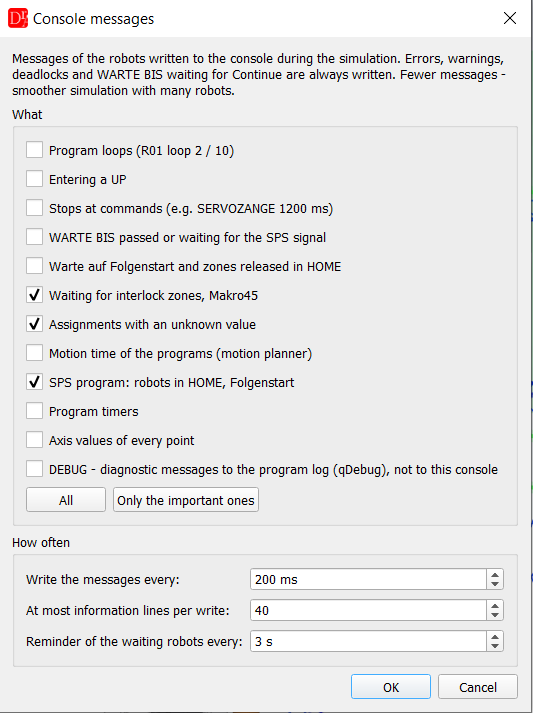
The options apply to the single program run and to Run on all robots.
Import of the POT process times (Makro40) Simulation
POT = Produktion ohne Teil (ghost run): the test mode of the station without parts, in which the robot waits the process times of the POT macro instead of the real process – the same situation as in the simulation. The button Import POT times... under the table Program rules takes these times into the simulation. The import runs automatically – you only open the window and confirm the suggestions:
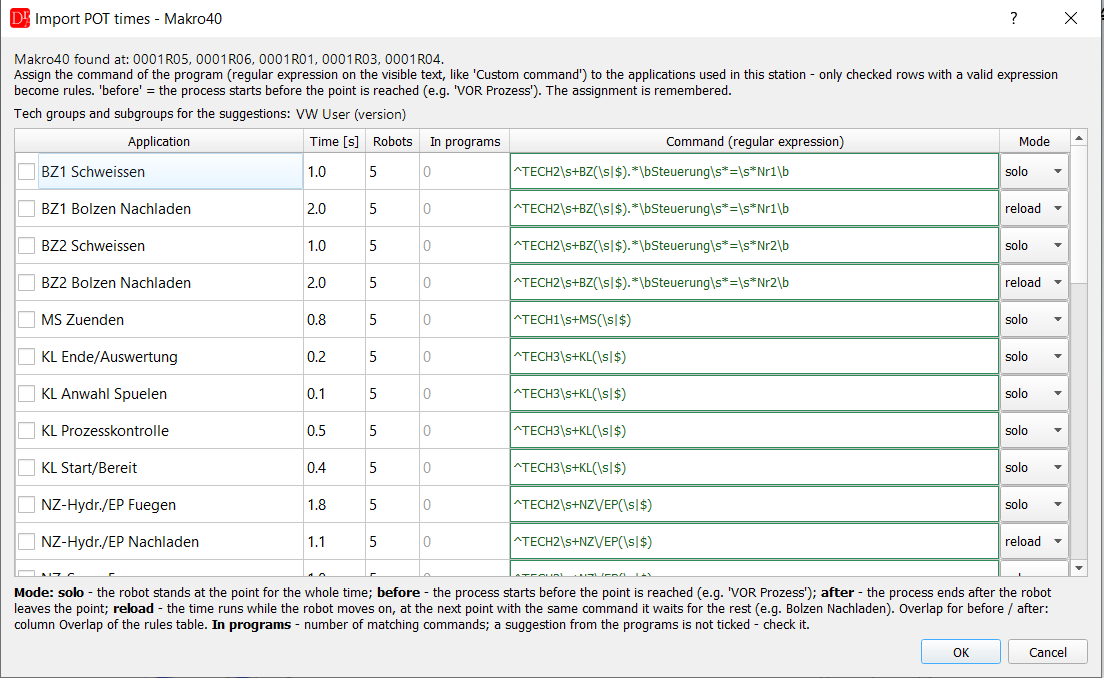
- The simulator reads the POT macro from the archive of every robot (VW: Makro40 POT Prozesszeiten setzen, the number of the macro is asked, default 40) and takes all applications with their process times, e.g. BZ1 Schweissen 1.0 s, BZ1 Bolzen Nachladen 2.0 s. Different times in the robots – the longest one (details in the tooltip of the time).
- From the archive it reads the VW User version of the robot (VW_User\vw_usr_s.src, e.g. KS26.01.98_20260419) and from this version the tech groups and subgroups (the same definitions as the Tech command editor, all formats of the tech user). The version is shown in the window; a version that is not in DReS is marked and the groups of the default version are used.
- For every application the command of the program is built automatically as a regular expression: the group and the subgroup at the beginning of the command, the number of the application as Steuerung, e.g. BZ1 → ^TECH2\s+BZ(\s|$).*\bSteuerung\s*=\s*Nr1\b, STP → ^TECH2\s+STP(\s|$), KL → ^TECH3\s+KL(\s|$), NZ → ^TECH2\s+NZ\/EP(\s|$). The group is not called TECHn in every VW User version (older versions e.g. Tech_, TECH2_) – it is taken from the version of the robot.
- Column In programs shows how many commands of the programs of the robots (Folgen, UPs, macros) match – you see at once which applications the station really uses (0 = not used). The lines of the POT macro itself are not counted.
- The mode is preset: reload for the reload applications (... Nachladen), otherwise solo. reload: the time runs while the robot moves on; when the motion to the next point with the same command is shorter, the robot waits there only for the rest. before for processes before the point (VOR Prozess, e.g. MS Zuenden, KL Start/Bereit), after – the process ends after the robot leaves the point. The meaning of the modes is shown under the table.
- The ticked rows become rules Custom command with PrAct (output Prozess aktiv, default A4039). The suggestions are not ticked – check them and tick the rows. Rules entered by hand for the same commands (e.g. Wait at command SERVOZANGE 1200 ms) would count the process time twice – after the import the window lists them and removes the ticked ones. The assignment is remembered and suggested at the next import.
Markers, flags and FB PSPS Simulation
The robot program is interpreted like on the controller: the inline forms of the VW standard (the text shown in the folds, not the KRL code generated inside them) and simple expert code outside the folds (see below). The commands of a point run in the order of the program: a WARTE BIS, an interlock (Makro20) or an FB PSPS holds the next commands of the point until it is fulfilled – e.g. A80 = EIN, WARTE BIS E80 & E76, A80 = AUS: the handshake output A80 stays EIN while the robot waits and goes AUS only after the wait. Commands after a UP call run after the UP.
- Markers M – every M32 = E42 & E56 ... in the Folge, a UP or a macro is a definition: the value of the marker is computed all the time from the signals of the definition, also through other markers (M32 = M30 & E80, M30 = E14 & E24 ...; a loop of definitions gives an unknown value). The last definition that ran is used. The markers of the initialisation at the program start are read from the macros started in KRC\R1\VW_User\vw_usr_r.src (fold Merker und Timer Initialisierung: SELECT(#MAKRO,50 ...), usually Makro50 and Makro57); macros without points and macros with a condition (SPSMAKRO7 = F277) are read too – their assignments run when the condition is EIN,
- Flags F and outputs A – the value is taken when the line runs (F12 = E3 & M4); the SmartPad shows the last assignment,
- WARTE BIS with markers, flags or timers is computed from the simulation (with the SPS program always, without it when the condition has no inputs E after the markers are expanded); a value unknown in the simulation (e.g. a flag nothing sets) lets the robot pass. The console shows the condition, in brackets the same with the markers expanded, and what is missing, e.g. WARTE BIS E42 & M32 (E42 & (E56 & E44)) - waits, missing: E56 EIN; (?) marks a signal without a value,
- FB PSPS (motion condition, "online") is always checked: the last FB PSPS of a point is the condition of the next motions – before the motion to the next point the robot waits until it is fulfilled; an FB PSPS as the first command of a point is checked at once and the next commands of the point wait. The rule Exclude FB PSPS in Program rules switches it off. The special marker __EVERY__ (filled in automatically for an empty value) ignores every FB PSPS; any other value is a condition and only the FB PSPS with the same logical condition are ignored – the order of the signals, of the operands of & / + and the brackets do not matter (E24 & M95 & E14 ignores FB PSPS = E14 & E24 & M95, but not E14 & M95); the value may be copied together with FB PSPS =. The tooltip of the rule and of its value describes this as well,
- FB ONL = condition (old TPVW standard, the first subfold of a point fold, written ;FOLD FB ONL = ... or ; FOLD FB ONL = ...) is a motion condition exactly like FB PSPS (before it was not recognized): the robot waits before the motion until it is fulfilled, it is checked during the motion, and the rules Exclude FB PSPS apply to FB ONL as well. The summary in the console after loading says n point(s) with FB PSPS / FB ONL (motion condition),
- FB PSPS during the motion – like on the robot, the motion condition is also checked while the robot moves, every FB PSPS check during the motion of the simulation clock (plugin settings > Simulation, default 100 ms; only before the motion = 0). When it is no longer fulfilled (e.g. an input switched AUS in the SmartPad or by the SPS), the robot stops on the path where it is – the console shows FB PSPS ... (during the motion to UP42/P25 - stops on the path) - missing: E76 EIN – and goes on from there when the condition is fulfilled again. The stop counts as waiting (Gantt), not as motion time. The braking distance is not simulated: the robot stops at once (within one step of the animation, 16 ms), the real robot brakes on the path. A smaller interval is closer to the robot (12 ms cycle) and needs a little more processor time. On a process path (LIN, CIRC, KLIN, KCIR, KPTP, SLIN, SCIR, spline – brushing, laser, gluing, MAG) such a stop is not allowed at VW: with the option No stop on the process path (plugin settings > Simulation, on by default) the console shows an error R1: stop on the process path at UP48/P17 (KLIN) - stopped 2.4 s on the path (also for a wait before a path motion that follows a path motion), once per point in a program run – see No stop on the process path,
- Expert code outside the folds of the inline forms is read as well: $OUT[n] = ... (output An), $FLAG[n] = ... (flag Fn), $CYCFLAG[n] = ... (marker Mn, a definition) and WAIT FOR ... (like WARTE BIS) with conditions of $IN, $OUT, $FLAG, $CYCFLAG, $TIMER_FLAG, TRUE / FALSE, NOT, AND, OR and brackets – e.g. WAIT FOR $IN[23] AND NOT $FLAG[5] = WARTE BIS E23 & !F5. The line belongs to the point before it and runs in the order of the program. Other KRL (motions, IF, loops, variables, comparisons) is not executed; local subprograms after the END of the program are ignored,
- WARTE ( EIN ) ZEIT n [1/10Sek] (also WARTE ZEIT = n) – the robot stops at
this point for n divided by the unit ([1/10Sek]: n/10 s, [1/100Sek]: n/100 s, without a unit:
n s) and then runs the next commands of the point. The time is counted by the simulation clock: it is scaled with
the simulation speed and stops while the simulation is paused. The robot state is process time at a command;
the console shows R1: P25 WARTE ( EIN ) ZEIT 15 [1/10Sek] - waits 1.5 s with the console option Stops at
commands. A line jumped over by GOTO does not wait. A WARTE ZEIT before the first point of an UP or a
makro is simulated too (since 2026-10-21). While the robot waits, the SmartPad
shows the waiting time; the Gantt chart shows WARTE ZEIT in its own colour, the cycle steps
of the report have the column WARTE ZEIT [s] and run_data gives robots[].zeitPerCycle (the
WARTE ZEIT per cycle in s).
WARTE ( condition ) ZEIT n (e.g. WARTE ( E12 & !M5 ) ZEIT 50 [1/10Sek]): the robot waits while the condition is true, at most n divided by the unit – the console shows R1: P25 WARTE ( E12 ) ZEIT 50 [1/10Sek] - waits while E12, at most 5 s. A condition false at the start means no wait (console condition ... is false, no wait); without the SPS program a condition with station signals is unknown and the robot does not wait (console not known in the simulation (no SPS), no wait). WARTE ( EIN ) ZEIT waits the full time, WARTE ( AUS ) ZEIT is never active, WARTE ( !condition ) ZEIT is the negated condition.
A fixed wait is not usual in a production line, so every active WARTE ZEIT is a warning: in the console at the start of the simulation (robot, program, point, time) and in the report, section 3. What to check (all uses with their times; with a condition wait time up to n s while ... is true). The command API lists them with wait_times (also during the run), - a robot waiting for a flag, a marker or a signal of the SPS (WARTE BIS, FB PSPS / FB ONL conditions) counts as waiting for Quitt if all robots wait (Auto Quitt).
Markers built from signals the simulation does not have (air, water, current of the gun, sensors of the tool – e.g. M95 Sicherheiten EZ1/SP1) get a fixed value in the signals file or with Force always EIN in the SmartPad.
Motion planner Simulation
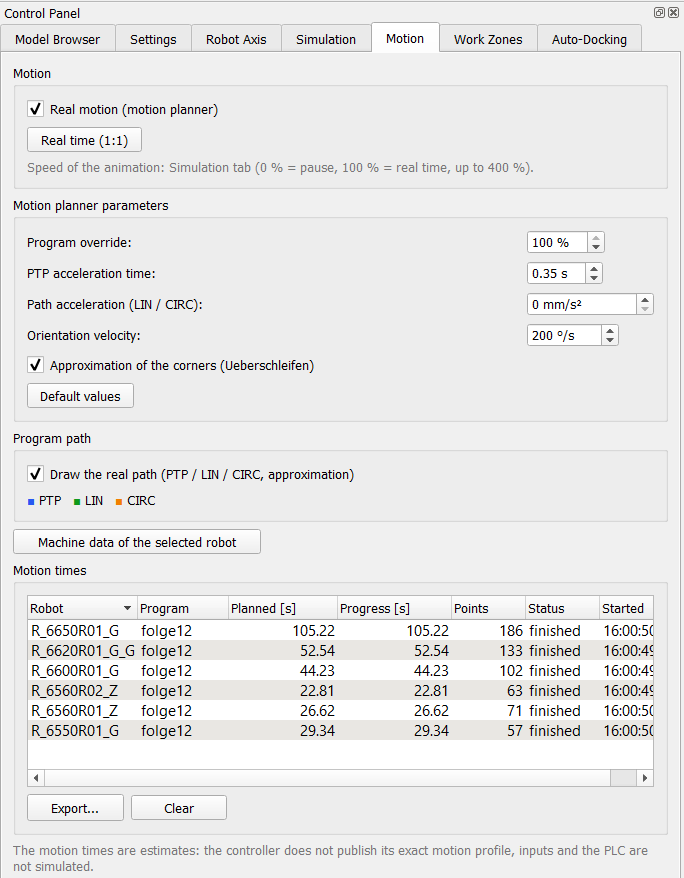 |
With Real motion (motion planner) the robots move like the controller: PTP synchronized in the axes, LIN and CIRC along the path, with acceleration and approximation of the corners. Real time (1:1) sets the animation speed to 100 %. The parameters adjust the estimate: program override, PTP acceleration time, path acceleration (from robot archive = DEF_ACC_CP of $config.dat), orientation velocity and approximation. Default values restores them. Draw the real path draws the planned path instead of straight lines between the points. Search (LIN SUCHEN): the robot moves with VB of the search fold and the last part before the point with the reduced velocity Vred – the longest case, the part at the end point of the search (plugin settings > Simulation: Search: distance with Vred, default 120 mm). A search longer than Search: longest time (default 12 s, VW Gantt) gives a warning in the console, e.g. search (LIN SUCHEN) to P5 takes 3.63 s. Machine data of the selected robot writes the axis velocities read from the machine data to the console. |
Motion times Simulation
The table Motion times collects the planned time, the progress, the number of points, the status and the start time of every program run per robot; click a header to sort. Export... saves a CSV file (opens in Excel) with the table and the time of every point (program, point, step such as UP81/P3, motion type, time from the previous point and from the start). Clear empties the table.
How realistic the simulation is (simulation clock, robot controller, where the differences come from, comparing variants) – see Running, processor and accuracy.
Cycle time report and its hints Simulation
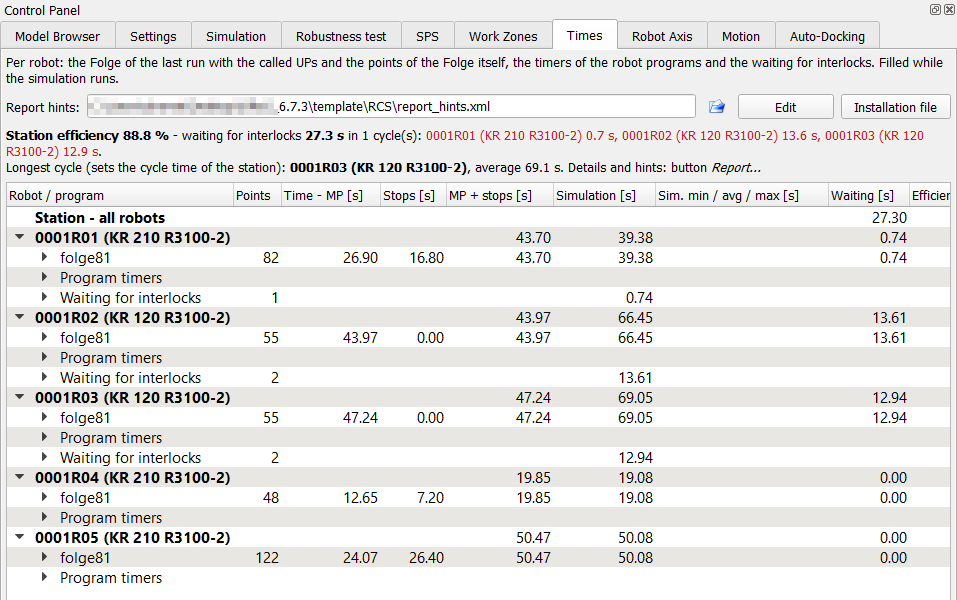 Times: station efficiency, the longest cycle and the times of every robot |
After Run on all robots the button Report... of the Times tab saves a readable report (opens in the browser or the PDF viewer when Open a saved report (HTML, PDF) in the default program is on): which robot sets the cycle time of the station, who waits for which interlock zone and how long, which partner holds the zone between which points. Section 3. What to check contains hints for the programmer, e.g. move points with process time to a robot with reserve or release zone n (A(40+n) = EIN) right after the shared area. 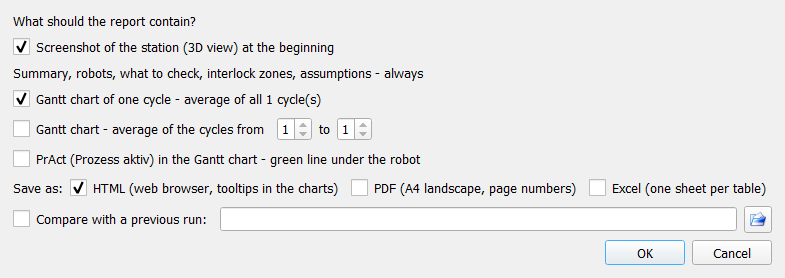 Report - options Before saving, the window Report - options asks what the report contains:
The report also lists the waiting for interlocks in the first cycle (who holds the zone and since which point) and warns when the simulation speed was not 100 % or was changed during the run – only at 100 % without changes the motion planner gives times close to the real robot. The table Robots (also the sheet Robots of the Excel file) has the column Tool (3D): the body on the flange used for the work zones and the 3D collision check – CAD model of the tool: name (JT model of the real tool), dummy tool (approximation) (sphere / box) or no tool; additional elements on the flange (e.g. tool changer) follow with +. The section 5. Assumptions of the simulation reminds that with a dummy tool the work zones and the 3D collision check are an approximation of the real tool. The API command robot gives the same as toolKind (cad / dummy / none) and toolText. The sections about the request races and the interlock priority of the run are described in Request races. |
The texts of the hints and their limits are in an XML file, so they can be changed for another standard or another language without a new version of the plugin. The file is set in the row Report hints of the Times tab:
| Control | Function |
| file name | the hints file used by the next report (red = file not found, the report uses the built-in hints) |
| folder icon | selects another hints file; the file is checked before it is used and stored in the settings |
| Edit | opens the hints file in the DReS editor |
| Installation file | back to <DReS folder>\template\RCS\report_hints.xml (the default) |
The file is read at every report – save the file in the editor and click Report... again, no restart of DReS is needed. Section 5 of the report shows which file was used. Tip: copy the installation file to your own folder before changing it, an update of DReS overwrites the installation file.
| Element / attribute | Meaning |
| <Hint id="..."> | one hint; the id is fixed (list below), a hint missing in the file uses the built-in text |
| enabled="false" | switches the text of the hint off (the rest of the box stays) |
| threshold="..." | limit at which the hint appears (unit in the table below) |
| <Text lang="en"> / lang="de" | text in the language of the plugin (Help → Language); a missing language uses the English text. HTML is allowed inside <![CDATA[ ... ]]> |
| {name} | value filled in by the report, e.g. {robot}, {wait}; the names of every hint are in the comment above it in the file |
| id | When the hint appears | threshold (default) |
| bottleneck | always – the slowest robot sets the cycle time | – |
| cycleSplit | split of its cycle: motion, stops at commands, waiting, rest | – |
| processStops | stops at commands (process time) of the slowest robot above the limit | % of the cycle (30) |
| bottleneckWaits | the slowest robot waits for interlocks above the limit | s per cycle (0.5) |
| robotWaits | a robot waits for interlock zones at least the limit – box with its zones | s per cycle (0.5) |
| reserve | the waiting robot is not the slowest one – it uses up its reserve | – |
| zoneWait | one line per zone the robot waited for | – |
| zonePartner | the partner holding the zone: release earlier, request later | – |
| noWaiting | robots waiting less than the limit; the same limit colours the waiting column of the robot table | s per cycle (0.05) |
Request races Simulation
Two robots that request the same interlock zone within the time window (Plugin settings > Simulation, default 1 s) make a request race. In the simulation the robot that requests a few milliseconds earlier always wins; on the line the order is random, because the robots never run exactly like in the simulation. Then the other robot may get the zone first – the station runs another order, the cycle time changes, and a motion without interlock can meet the partner in a place the simulation never showed.
At the end of a station simulation the console writes a warning for every race: the zone, both robots with the points, the smallest time difference, how often it happened and which robot won. The same races are in the times report (Times > Report), in Check interlocks (code RACE), in the run data (requestRaces) and in every step of the Robustness test. With Window with the request races ... in the settings a window lists them at the end.
The simulation never changes the SPS program by itself. The console says it with the races: n request race(s): the SPS program is not changed - at the end of the simulation you can add protection blocks ('Interlock priority') or simulate both orders (API race_study). What you can do at the end is described in Request races: proposal and simulation of both orders.
With Keep the order of the robots at a request race during the run (on by default) the simulation keeps the order it found in every next cycle of the same run, while both requests come within the window. A robot that comes later than the window (slower, disturbed) lets the other go – the order changes like on the line and the console tells it. This is only a rule of the run: the SPS program is not changed. In the Robustness test a race found in one step keeps its order for all next steps of the test.
The times report (Times > Report) has the section Requests at the same moment (request races) with the window, both points, the winner and the smallest / largest difference, and the section Interlock priority in this run with all rules of the run (source SPS, plan, API, test or auto with the race it comes from; test and auto are rules of the run only, not blocks in the SPS program) and every use of a rule – an order change because a robot came later than the window is red.
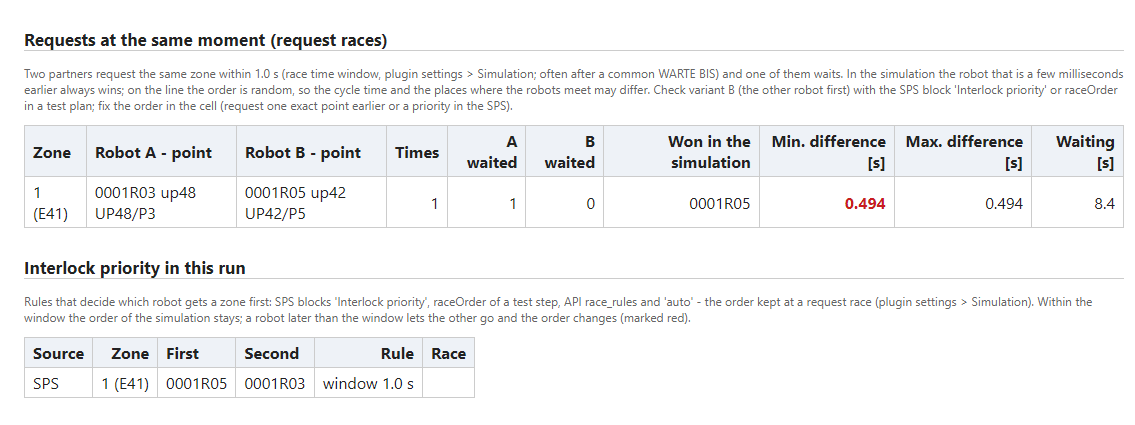
What to do with a race:
- Variant B – simulate the other order: the easiest way is Simulate both orders in the window at the end (see below, API race_study). By hand: SPS block Interlock priority with the other robot first, or raceOrder in a step of the Robustness test, or the API command race_rules. If variant B gives another cycle time or a collision, the race matters. For variant B use the rule Order in every cycle ("mode": "order"): the other robot is then always first, also when it is late because it waits for other zones. Priority within a time window lets the second robot wait at most the window from its own request (since 2026-10-17) – when the first robot comes later, the order changes like on the line; this rule only keeps the order at requests at almost the same moment.
- Fix the order in the cell – either request the zone one exact point earlier in the robot that should get it first (the robots run together at 100 %), or let the SPS give the zone in a fixed order (a priority in the collision management of the SPS) and simulate it with the same block.
- A larger window finds more races (also those caused by small speed differences); 0.5 s finds only the very close ones.
Request races: proposal and simulation of both orders Simulation
A request race: two robots request the same interlock zone almost at the same moment – within the Request race of a zone - time window (Plugin settings > Simulation). On the line the order of the two robots is random. The simulation finds the races, but it never changes the SPS program by itself. You decide at the end what to do.
Window at the end (title Request race found): when a station simulation or a Robustness test ends with races, this window comes instead of Simulation finished. It shows the text of the end (cycles, time) and a table of the races:
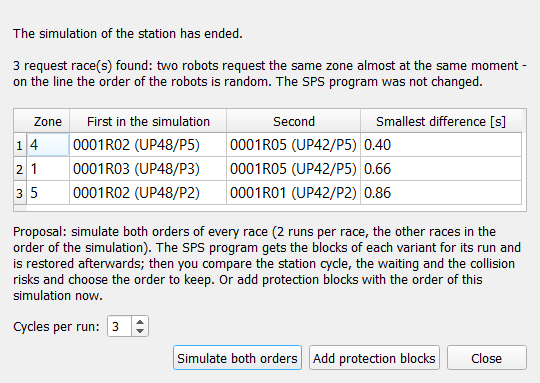
| Column | Meaning |
| Zone | the interlock zone of the race |
| First in the simulation | the robot (and point) that got the zone first in this simulation |
| Second | the robot (and point) that waited |
| Smallest difference [s] | the smallest time between both requests in the run |
Below the table: the field Cycles per run: (1..20, default 3) and the buttons:
- Simulate both orders – for every race RCS runs the station twice: A = the order of the simulation, B = the two robots swapped (the other races keep the order of the simulation). For each run RCS puts the Interlock priority blocks of the variant into the SPS program (the examined race with the mode Order in every cycle, the other races with the time window), runs the station with the given number of cycles and restores the SPS program afterwards. It uses the engine of the Robustness test: the progress and the log are on the Robustness test tab, the report is written in Documents\RCS_Robustheitstest\race_study. Needs the license module Simulation (not Robustness) and an active SPS program.
- Add protection blocks – adds Interlock priority blocks with the order of this simulation to the SPS program, with a comment about the race. When you save the simulation you are asked whether to keep or remove them (see Simulation file).
- Close – nothing is changed.
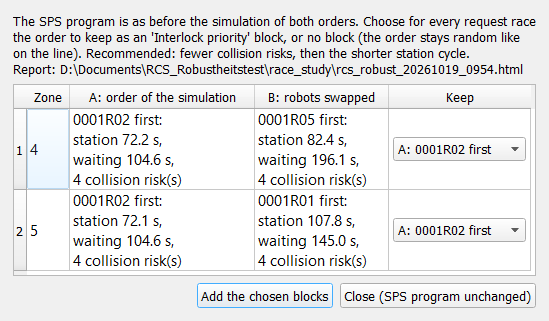
Window after the simulation of both orders (title Simulation of both orders - result): the SPS program is as before. The table has one row per race:
| Column | Meaning |
| Zone | the zone of the race |
| A: order of the simulation | result of variant A: station x s, waiting y s, n collision risk(s) |
| B: robots swapped | the same for variant B |
| Keep | choice A: R1 first, B: R2 first or no block. The recommended variant is preselected: fewer collision risks, then the shorter station cycle |
Add the chosen blocks puts the chosen Interlock priority blocks into the SPS program, each with a comment with the results of both variants; an older block of the same pair of robots in the zone is replaced. Close (SPS program unchanged) closes the window without a change. The console and the log write one line per race, e.g. Simulation of both orders: zone 1: A 0001R05 first - ...; B 0001R03 first - ...; recommended A.
API: command race_study (actions status, add_blocks, start, stop, apply).
Simulation file
Simulation → Save simulation... / Load simulation... store and load the options of the Simulation tab together with the cell (see also Save and load). Since 2026-10-16 the file also keeps Stop the simulation at a collision risk and all fields of the Live 3D collision check (element Options: stopAtCollisionRisk, live3d, live3dCell, live3dCapsule, live3dRange, live3dWarn, since 2026-10-25 live3dContact – a file without it uses 5 mm). The conditions of the manual synchronization (WARTE BIS, e.g. E80 & E76) are stored in the element SyncWaits; a file without this element leaves the field as it is (it is not cleared). The API command sps_program with file also reads the SPS program (element Sps) from such a file.
For a Fanuc robot the element ArchiveRobot keeps the path of the Fanuc archive, not of the translated archive in the cache; the translation is made again at every load.
Archive from a ZIP file (since 2026-10-21): when the archive of a robot was extracted from a ZIP file, the simulation file and the session keep the ZIP file too; when the extracted folder in the cache is gone (cache cleared), the ZIP is extracted again at the load. Robots of a Process Simulate study find their archive folder or ZIP file named like the robot next to the study (archive icon with a tooltip in the tree, see Insert robots at study positions). The API command robot answers archive and archiveZip.
Recent simulations (since 2026-10-18): Simulation → Recent simulations lists the last
15 loaded simulation files (also those loaded through the API), the newest first; only files that still exist are shown.
A click loads the simulation like Load simulation..., without the file dialog. The menu is disabled while the
simulation runs or when the list is empty. API command recent_files (reading, no license needed): answer
{"ok":true,"simulations":[...],"studies":[...],"current":"<Simulation_File>"} – simulations
= this list, studies = the recent studies / cells (File → Recent files), current = the simulation
file loaded now. The AI agent finds a file named by the user in this list.
Tool model from a JT, glTF, STL or STEP file (since 2026-10-22, glTF / STL / STEP since 2026-10-25): a tool model mounted with the robot menu Tool model (JT / STEP / STL / glTF)... or the API tool_model is saved in the element Docked (attributes robot, tool, position and jtFile = path of the model file - the attribute keeps its name also for .gltf, .glb, .stl, .stp and .step, so older simulation files stay valid); the session saves it in attached[].file. At the load the model file is inserted again and the model is mounted on the flange with the saved position (a dummy tool of the robot is removed). Relative paths are resolved from the folder of the simulation file, so a moved simulation package finds its tool models; a model that cannot be mounted is listed in the Message Window with the reason.
Tool model formats in the Live 3D check. Tool models converted from the JT™ data format to glTF or STL give comparable results in the Live 3D collision check. The conversion does not change the accuracy of the calculation: the converted model has the same triangles as the most detailed level of the JT™ model, and the collision check and the work zones use exactly these triangles. Test: two welding guns (R1, R2) in one station, original JT™ models, glTF and STL, 100 / 200 / 400 % speed: the same three contacts (1–4 mm) were found in every run with every format. A borderline pass at 20–30 mm was reported as a proximity, in single runs as a contact – this depends on the moment of the check, not on the format; use a fixed check step of 10 ms for such places. Work zones from triangles: JT™ 14 s, glTF 9 s, STL 7 s.
| Format | Contacts | Borderline proximity | Work zones |
| JT™ | 3 in all runs | 21–24 mm (once a contact of 4 mm) | 14 s |
| glTF | 3 in all runs | 25–30 mm (once a contact of 2 mm) | 9 s |
| STL | 3 in all runs | 22–30 mm | 7 s |
Interlock priority blocks from request races: when the SPS program is saved with the simulation and Interlock priority blocks for request races were added at your choice (button Add protection blocks or Add the chosen blocks, or the API race_study) and are not confirmed yet, Save simulation asks about them and lists the blocks:
- Save with the blocks – the SPS program is saved with them,
- Save without the blocks – the blocks are removed from the SPS program (also from the SPS editor and the settings), then the file is saved without them,
- Cancel – nothing is saved.
After the answer the question does not come again for these blocks. Without the SPS program in the file there is no question. API command save: "raceBlocks": "keep" (default) or "remove", no question; the answer gives raceBlocks (none = no such blocks, kept, removed) and raceBlocksCount. race_rules and race_study give pendingBlocks – the blocks still waiting for this decision.
JT models as glTF (automatic conversion)
Since 2026-10-25 the simulator converts the models in the JT™ data format that it needs by itself and loads the converted glTF 2.0 model (.glb, parts and colors) instead of the JT file – at the same place, with the same mounting on the flange and the same offsets from the study (the glTF model keeps the coordinate system of the JT model; test 2026-10-25: mounting Z 38 mm on the flange identical for JT and glTF). The conversion is made by the independent program modelconv (one welding gun with 0.5–0.8 million triangles takes about 1 s).
- Which models: the tools and fixtures mounted on the robots of a study (File → Insert robots at study positions, full opening of a study – components selected in Available objects), the tool models of a simulation file (Docked) and of a session, and a JT file chosen in Tool model... / API tool_model. In the variant with the JT reader the robots of a study (links k1..k9) and the components with a mechanism (Robcad file .m next to the JT file, e.g. a linear unit) stay JT. A whole JT file inserted with File → Insert is loaded as JT.
- Variant without the JT reader (Qt3D view, since 2026-10-25): the robots of a Process Simulate study and the components with a Robcad mechanism .m (grippers, fixtures with moving parts / clamps, tip dressers, tool changers, turntables, linear units, human models) are converted to glTF as well and loaded with the node tree of the JT model (names of the links k1..k9 and of the mechanism links as in the JT model tree). The robot has its axes and moves as in the variant with the JT reader, the tools are mounted on the flange, a linear unit gets its length from E1. Before, these components were not loaded in this variant (no converted glTF model ... the component is not loaded). The window Available objects (panel JT models as glTF) and the API model_cache count in this variant all JT files needed (also robots and mechanisms). Since 2026-10-25 a frame of the simulation updates only the parts that moved; the texture of the texts in the view (labels of the robots) is painted again only when the camera or the texts change; closing a large scene or New scene frees the 3D parts of each component at once (the tree and the view are cleared together). The console shows once the graphics card of the 3D view (3D view: graphics card <renderer> / <vendor> / OpenGL <version>, in both variants; API status.glRenderer).
- Where: <name of the JT file>.glb and <name>.glb.json next to the JT file (default) or in a common folder (%LOCALAPPDATA%\DrAmaT\RCS\Models, file name with a short key of the JT folder). Without write access next to the JT file the common folder is used automatically and the Message Window says so.
- Used again while the .glb exists, is not older than the JT file and its .glb.json has the size and the date of the JT file – a changed JT file is converted again.
- Modes (Plugin settings > Simulation): Auto (default) converts missing models without asking; Ask shows one window: N JT models are not converted yet (X MB). Estimated time: about Y s. with Convert and load / Load without them, the place of the converted models and Do not ask again (convert automatically); Never loads the JT files directly as before.
- Estimated time (since 2026-10-25): one modelconv process takes an overhead per file (default 0.3 s) plus seconds per MB of the JT file (default 0.25 s/MB); the processes run in parallel (min(cores / 2, 4)); the whole time is never shorter than the longest file. Both factors learn from the times of the jobs of the last conversions on this computer (settings keys JT_Convert_JobSecPerFile, JT_Convert_JobSecPerMB; the old JT_Convert_SecPerMB is not used any more).
- At the place of the decision: the window Available objects of a study has the panel JT models as glTF (convert yes / no, place of the converted models, number of models of the selected components to convert, MB and the estimated time); the settings are its default values. The window is always shown whole on the screen: a geometry remembered with another arrangement of monitors is moved / made smaller to the screen (the same for the other RCS windows with a remembered geometry).
- Conversion: in the background, up to half of the processor cores (at most 4) at the same time, with a progress bar JT models that can be cancelled (the cancelled models are loaded from the JT files); since 2026-10-25 it closes right after the conversion (before, it stayed at 100 % until the end of the loading). The Message Window shows a line per model (time, triangles) and a summary. Without the converter: a clear message with the setting to change, then the JT files are loaded directly – never silently. The progress window Loading ... shows Free GPU memory only when the view gives this value (not in the variant without the JT reader).
- JT file the converter cannot read (since 2026-10-25; e.g. ...ALLCATPART V3.jt next to the right JT file of the component in the .cojt folder; modelconv exit code 2 – the JT reader finds no model: damaged file or a JT variant not supported): a clear message in the console with the header of the file (JT version); when the component has another JT file: the JT file '...' is skipped ... The component is shown from its other JT file. In this run of the program the file is not converted again (until the file changes); the estimate shows N JT file(s) could not be read by the converter earlier and are skipped, API: unreadable in model_cache estimate, state failed with error in status.modelConversion.models.
- Model tree: the tooltip of a converted model shows the path of the .glb and converted from <JT file>.
- Simulation file: Docked links the converted model (jtFile = .glb) and keeps the source JT file in sourceJt. Loading such a simulation needs neither the JT file nor the converter when the .glb exists; when the JT file is there and changed, it is converted again.
API: load, open, insert_study_robots and package_open take convert ("auto", "ask" = like auto without windows, "never"); the result is in status.modelConversion (converted, reused, failed, skipped, seconds, models); model_cache reads and sets the mode and the place and estimates the models to convert of a simulation or study file without converting (see API reference); for a study (.xml) next to estimate (tools on the robots) also estimateAll – all components of the study with a 3D model, as File → Open with all objects. open takes objects ("all" or a selection file .ini saved in Available objects).
Simulation package (*.rcsz)
File → Save simulation package (*.rcsz)... saves one ZIP file with everything needed to open the simulation on another computer: the simulation file, the SPS program and the settings in it, the converted tool models (.glb + .glb.json; a tool loaded as JT is converted now) and the data of the robots. All paths inside are relative; the manifest rcsz.json keeps the format version, the date, the DReS version, the list of files, the files of every robot and the source JT files only by their names (no paths of the customer).
- Include robot data (default on): only the data the simulation reads, not the whole archive, in the folder structure of the archive (KRC\R1\..., C\KRC\...). KUKA: am.ini, ArchiveInfo.xml, the whole folder KRC (Folgen, UPs, Makros, System with $config.dat – tool and base data, MADA with $machine.dat / $robcor.dat, VW_User, TP, STEU with $config.dat and Mada), the machine data folders Mada under C\KRC\..., the long texts (Longtexts*, Langtext*) and a WorkVisual project (*.wvs); not the log files, the registry and the other system files (station PSZ: about 8 MB per robot instead of 25–30 MB). Fanuc: the .ls programs and the .va, .dg, .io, .dt, .txt, .csv, .xml, .ini files (no binary .tp / .vr / .sv). Off: the package keeps the archive paths of this computer.
- Self-contained package: the package never contains the study file and points to no file outside of it (no system root, no archive folders of this computer). The cell components loaded in the scene and the tools and fixtures mounted on the robots (also those of the study) are stored as converted models with their positions; opening the package never opens the cell of the study. Before the package is written its files are searched for paths of this computer; a package that would point outside is refused and the paths are listed in the console.
- Include the original model files as source (default on, setting Simulation_Package_Source): the original model files are stored in the folder models_src only as source, in case the models must be converted again; the simulation always opens the converted models. Off: the package is smaller (station PSZ with 5 robots and 10 tools: 75 MB with the sources, 26 MB without). The window shows the estimated size of the parts (models, sources, robots and settings, total; uncompressed, so the file is smaller); API package_save with dryRun: true gives the same.
- If no robot appears in the cell 10 s after opening a package, a warning is written to the console.
Mounted elements. The robot menu Mounted elements lists the tool and the fixtures on the robot; each has Hide / Show (the model is not drawn; saved with the simulation and the package) and Remove from the robot (a model from a file is deleted from the scene, an element of the study stays hidden). A hidden model stays in the collision checks (3D, work zones, interlocks); only a removed one is no longer checked. The same model is never mounted twice on a robot (the same name, or a name that starts with the other name at an underscore): when loading a simulation, a package or a session, after Insert robots at study positions and with the robot menu Remove duplicate models only one is kept (the element of the study before a model from a file, a fixture before a tool). A dummy tool exists only for a robot without a 3D model of its tool; mounting a model removes the dummy, and a dummy in an older package or simulation is not loaded when the robot has a model. API: tool_info, tool_remove, tool_hide, tool_show, tool_model (replace).
File → Open simulation package..., File → Open, Load simulation... and the recent files accept .rcsz: the package is extracted to %LOCALAPPDATA%\DrAmaT\RCS\Packages\<name>_<key> (the same file again: no new extraction) and its simulation is loaded – the robots from the folder of the package, without the original archives. Example: the PSZ station with 5 robots and 2 welding guns as glTF (45 MB) gives a package of about 20 MB. API: package_save (file, includeRobotData, includeSource, dryRun) and package_open (file).
The package also contains the briefing file AGENTS.md of the station at the root of the ZIP (refreshed before saving when Simulation > Update AGENTS.md automatically is on; absent when the option is off and there is no file); opening the package reads it back. See AGENTS.md.
Plugin settings > Simulation
Tools → Settings..., tab Simulation:
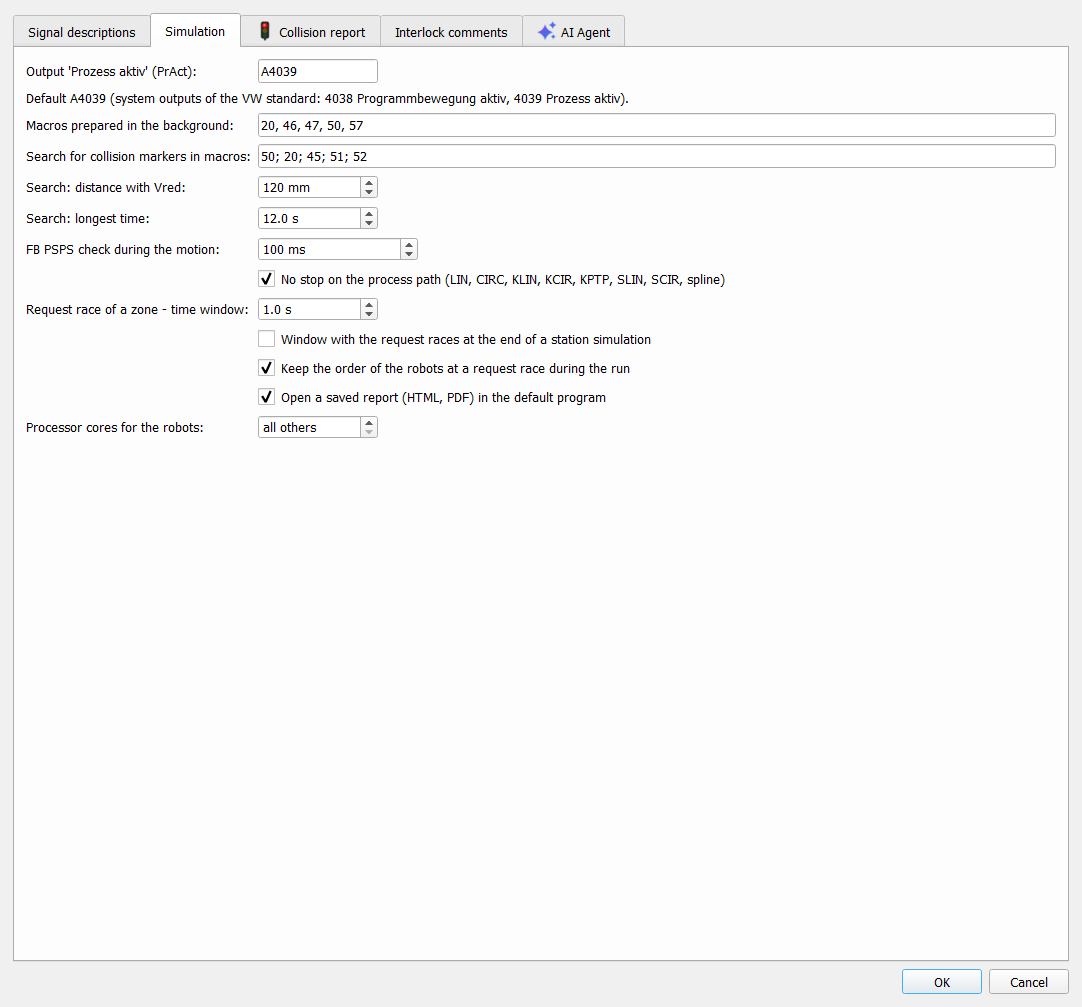
| Setting | Meaning |
| Output 'Prozess aktiv' (PrAct) | output of the robot set EIN while a process runs (rules with PrAct, see Program rules); default A4039 |
| Macros prepared in the background | macros parsed in the background with the programs, default 20, 46, 47, 50, 57 – see Preparation in the background |
| Search for collision markers in macros | macros with the collision markers (e.g. M8 = E41 & E43 & E45), numbers separated by ; or ,. The markers are replaced by the inputs E41..E56 when FB PSPS and WARTE BIS are checked (Check interlocks, collision matrix). The same setting as in Robot Collisions Analyzer; empty = every program |
| Search: distance with Vred / Search: longest time | LIN SUCHEN, default 120 mm / 12 s – see Motion planner |
| FB PSPS check during the motion | default 100 ms, 0 = only before the motion – see FB PSPS during the motion |
| No stop on the process path | on by default – see FB PSPS during the motion and No stop on the process path |
| Deduce the direction of the travel track (axis 7) of a robot that has one | on by default. For Fanuc robots with an integrated travel track the direction comes from the controller position in SYMOTN.VA; when that gives no direction (E1 near 0, axis angles and stored position from different moments), from the controller configuration $SCR_GRP[1].$EXT_XYZ_MAP (1 = X, 2 = Y, 3 = Z, positive direction), and only when that is missing, from the robot type in the Process Simulate study (e.g. ..._7ACHSE_Y+). Every such case and every disagreement between controller position, controller configuration and study is written to the console as anomaly: .... Off: only a direction confirmed by the controller position is used, otherwise the robot is inserted not simulated. Takes effect when the robot is loaded again. API: settings_set with key Deduce_Rail_Direction (group RCS_Group) and value true / false |
| Request race of a zone - time window | two robots that request the same interlock zone within this time (simulation time, default 1 s, 0.1..5 s) are a request race – see Request races |
| Window with the request races at the end of a station simulation | off by default; the console always shows them |
| Keep the order of the robots at a request race during the run | on by default: within a run the order of the simulation is kept in every next cycle while both requests come within the window; a robot later than the window lets the other go. The SPS program is not changed – protection blocks only on your choice, see Request races: proposal and simulation of both orders |
| Open a saved report (HTML, PDF) in the default program | on by default: a report saved from the program opens in the default program of Windows (web browser, PDF viewer). Applies to the times report (Times > Report), the Robustness test report and the collision risk report. Off: the file is only saved, nothing opens – recommended when an AI agent or a script makes the reports. The API command report never opens a browser. API: report_open (see API reference) |
| Model converter (JT to glTF) | path of modelconv.exe, an independent program (GNU GPL v3, source code on request) that converts files in the JT™ data format into glTF 2.0 with the parts and colors, and also into STEP and STL. Empty = automatic: <program folder>\RuntimeTools\modelconv\modelconv.exe – when the installer installed the converter (installer section modelconv), the path is set by itself. The folder button selects another file, Default clears the field (automatic). Next to it the state: found / not found. The simulator uses it to convert the JT models at the load. API: model_converter (see API reference) |
| JT models: use converted glTF models | Auto (default) – missing glTF models are converted without asking; Ask – one window with the number of models, the size and the estimated time before converting; Never – the JT files are loaded directly. API commands work like Auto without windows. See JT models as glTF. API: model_cache convert |
| Save converted models | Next to the JT file (default) or Common folder (empty = %LOCALAPPDATA%\DrAmaT\RCS\Models). API: model_cache mode ("nextToJt" | "folder"), folder |
| Processor cores for the robots | see Processor cores |
Plugin settings > Collision report
Tools → Settings..., tab Collision report, one option:

| Setting | Meaning |
| Neighbouring points of the same place as one case (e.g. UP48/P23-P25) | on by default: when a robot meets the same partner at the same place in several neighbouring points of one program, the collision risk window and the saved reports (HTML / PDF, also of the Robustness test and of the API command collision_report) show them as one case, e.g. UP48/P23-P25 instead of three rows for P23, P24 and P25. Off: one row per point. |
Command API
Every option of this tab can also be read and set by a script or an AI agent: run, fast_run, sim_options, sim_action (Pause / Resume, Continue, Check interlock map), live_check and collision_ignore; the settings of the request races with race_rules, the proposal and the simulation of both orders with race_study, the option Open a saved report ... with report_open, the model converter with model_converter, the conversion of the JT models with model_cache, the simulation package with package_save / package_open, the recent simulations with recent_files (load with load) – see Command API.
JT is a trademark of Siemens Industry Software Inc. Other trademarks belong to their respective owners.