
How the simulation runs
- One thread per robot – every robot of Run on all robots runs in its own thread, the SPS program of the station in one more thread, so all robots move at the same time like in the real cell.
- The GUI on its own core – during the simulation the GUI (drawing the 3D scene, SmartPad, console, tables) runs on the first processor core and the robots and the SPS on the other cores, so the scene does not take time from the robots and the robots do not block the scene. After the simulation the GUI uses all cores again. The console shows the assignment, e.g. Processor: GUI on core 1 (2 logical processor(s)), robots and SPS on 5 core(s) (10 logical processor(s)) of 6.
- Own simulation clock – the simulator computes with its own clock, independent of the computer: the same run gives the same cycle times at 100 %, 200 % and 400 % and on 2 or 5 cores. A computer that is too slow only makes the animation slower than the set speed – the clock waits for the robots, the times do not change. During the simulation the system timer runs with 1 ms (Windows), so the robot threads wake up on time independent of other programs.
- Start in two phases – first all robots plan their motion (the clock stands), then the clock starts and all robots move together; the preparation is not counted in the simulation time (see Run on all robots).
- Program timers (t1 (EIN) = 0[1/10Sek]) run like on the robot: once started they count on the clock of the station until t1 (EIN) = STOP – also while the robot is paused, at a lower speed, after the end of the Folge and after a block selection in the running station; only a new start of the simulation sets them to zero.
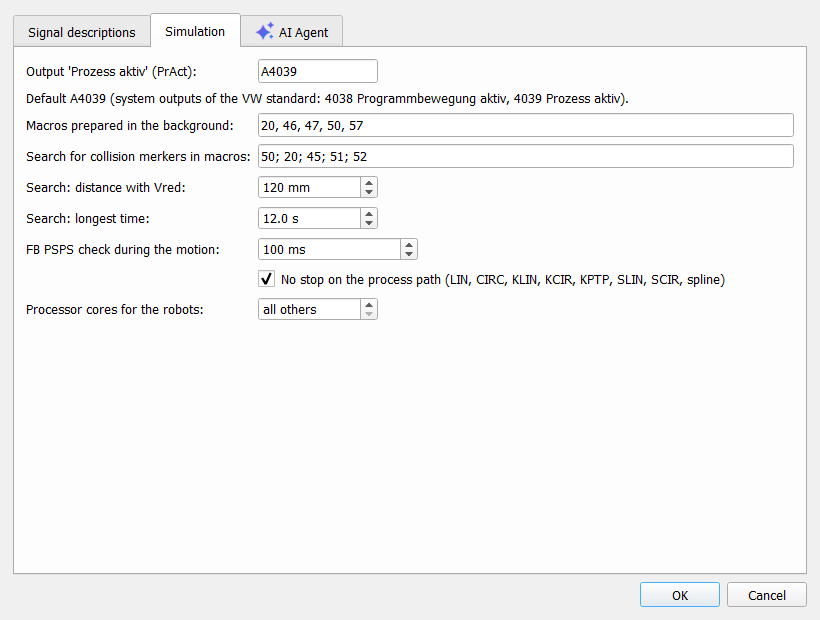
Processor cores for the robots (plugin settings > Simulation): all others = all cores except the GUI core; a number limits the cores of the robots, e.g. for a test how the simulation runs on a smaller computer.
Preparation in the background
After loading a study or a simulation, changing the SPS program, the program of the Simulation tab or the Program rules, the simulator prepares the run in the background, one step after the other, while the scene stays usable (console: Preparing the simulation ..., a small window with a progress bar in the corner):
- the programs of the robots (Folge and the UP called from it, the macros of the plugin settings, default 20, 46, 47, 50, 57) are parsed once and kept in memory – a program changed in the SmartPad or in the editor is parsed again,
- the step lists of the robots (UP calls, WARTE BIS, interlocks, rules) are built and kept with the options they depend on,
- the descriptions of the interlock zones and their partner robots (interlock map) are read from the archives.
The start takes everything from the memory (console: Robots prepared in 0.4 s: 5 program(s) from the memory, 0 parsed now, step lists of 5 robot(s) from the memory); what changed in the meantime is prepared at the start. Station A, 5 robots, Folge 81: start 7 s → 0.4 s.
Start from HOME
After loading the cell the robots are not in HOME (the position of point 1 of the Folge). Run Folge 125 (or the HOME program of the station) once without the SPS program before the simulation – the robots move to HOME and the first cycle of the simulation is then counted correctly.
Rendering
The scene is drawn in the GUI thread (OpenGL). The robot threads only store the new position of their robot; a timer of the GUI draws all moving robots together. Drawing therefore never slows down the simulation clock – with a weak graphics card the animation is less smooth, the times stay the same. Settings of the graphics card and the limits: GPU and limitations.
Measured
Station A, 5 robots + SPS program, Folge 81, 10 cycles, 400 %, laptop Intel i7-8750H (6 cores, 12 logical processors), robots started from HOME:
| 5 cores for the robots | 2 cores for the robots | |
| Station efficiency | 84.1 % | 84.1 % |
| Waiting for interlocks | 272.3 s | 272.3 s |
| Longest robot (R5) min / avg / max | 72.17 / 72.25 / 72.30 s | 72.17 / 72.22 / 72.29 s |
| Duration of the run (real time) | 186 s | 186 s |
The times do not depend on the number of cores (differences below 0.1 s). With 5 robots and the SPS program the simulation used on average less than one logical processor – the robot threads mostly wait for the clock, the interlocks and the signals of the station, so even 2 cores keep up with 400 %.
Load of the computer
Station A (anonymised real station): 5 robots + SPS program, Folge 81, 10 cycles (about 720 s of simulation time), work zones from the triangles of the 3D models, laptop Intel i7-8750H (6 cores, 12 logical processors, 16 GB):
| 100 % | 400 % | 400 % + Live 3D (fixed step 20 ms, several cores) | |
| Duration of the run (real time) | 752 s | 188 s | 835 s |
| Processor, average (one logical processor = 100 %) | 73 % | 72 % | 373 % |
| Processor, share of the whole computer | 6 % | 6 % | 31 % |
| Memory (working set), maximum | 623 MB | 617 MB | 640 MB |
- Memory: plugin open 445 MB, station loaded 546 MB, work zones calculated 613 MB; the simulation itself adds almost nothing.
- Processor: without Live 3D the simulation needs about one logical processor. The Live 3D check calculates every check on several cores (here 6 threads) – the rest of the computer stays usable.
- Live 3D with the fixed step (default 20 ms): the result does not depend on the speed and the computer; the run is longer when the computer cannot keep up with the checks (here: 835 s instead of 188 s, every move near a partner below 70 mm). Measurements of all modes and the recommended settings: Live 3D collision check.
- Recommendation: searching for contacts with the fixed step at any speed (400 % = shortest duration); without Live 3D for cycle times.
How realistic is the simulation?
What it is for. The Robot Cell Simulator is not a digital twin of the station. A digital twin would need the real SPS program of the station running together with the original software of the robot controllers and a complete model of the cell – that is not possible without the running SPS program, and it is not the goal. The simulator helps to optimise the station in a simple way, in one tool: from the robot archives and the study the robot programmer sees which robot sets the cycle time, who waits for which interlock zone and where process times or zone releases can be moved – without detailed knowledge of CAD modelling or SPS programming.
The simulation clock. The simulator computes with its own clock, independent of the computer: the same run gives the same cycle time at 100 %, 200 % and 400 % simulation speed. A slower computer only makes the animation slower, not the times different. The preparation before the start (programs, motion planner) is not counted in the simulation time (see Start in two phases).
The robot controller. The KUKA controller works deterministically (interpolation cycle 12 ms); its fluctuations are in the range of milliseconds and do not need to be simulated.
Where the differences come from:
- Motion planning – the planner uses the machine data of the robot (axis velocities and accelerations) and the motion parameters of the program, but the controller does not publish its dynamic model: the accelerations depend on the load (e.g. tools of 200–400 kg). Typical difference of the motion time: 5–15 %.
- Signals and SPS – the SPS program of the station is a simplified model (Folgenstart, Freigabe, inputs in HOME); the cycle of the real SPS, the field bus and the handshakes are not modelled exactly.
- Process times – welding, gun, clamps and other stops at commands come from the Program rules: the result is as good as the entered times.
- Stops on the path – when the FB PSPS (motion condition) is no longer fulfilled during a motion, the simulated robot stops at once where it is; the braking distance is not simulated (the real robot brakes on the path and needs a moment to start again). The condition is checked every 100 ms of the simulation clock (plugin settings), the controller every 12 ms.
Comparing variants (before / after a change of the program, the order of the robots or the zone releases) is reliable also without measurements, because the same deviations apply to both variants. For absolute cycle times the simulation can be compared with measured values of the real station – cycle times recorded in the SPS and a KUKA trace (axis positions with time stamps) of a few robots; with such measurements the estimate can be calibrated.