
 DReS Robot Cell Simulator - Programs and Paths: Folgen, UPs, Paths of All Robots in 3D (YouTube, English)
Program tree
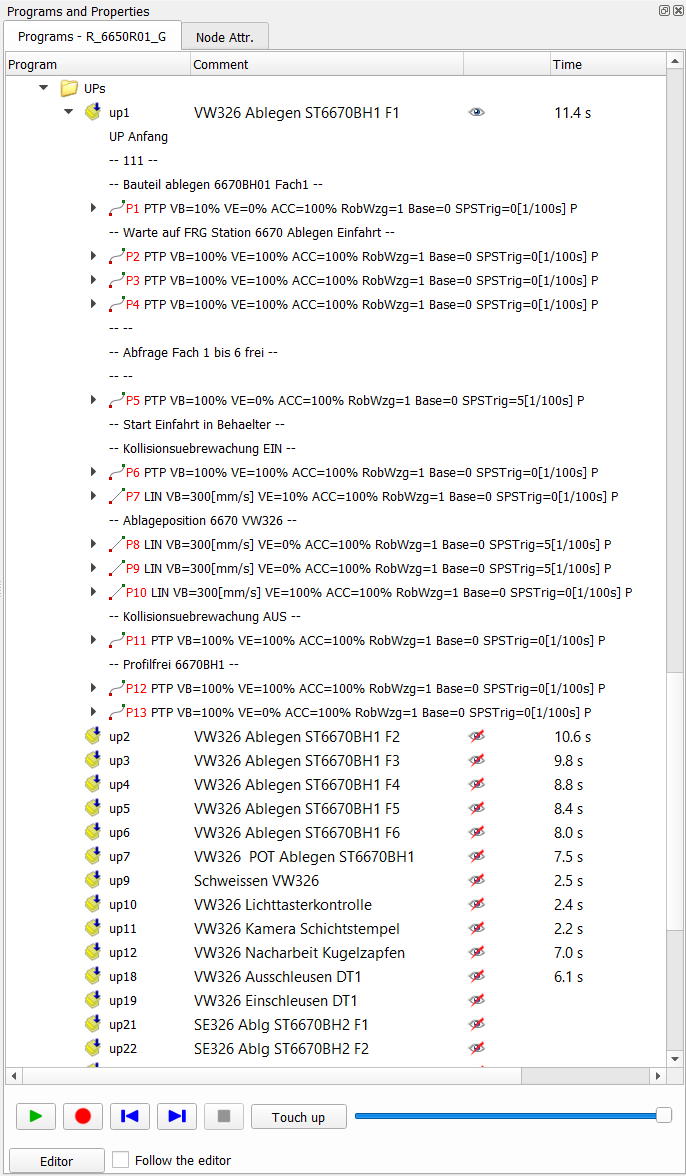 |
The Programs panel shows the Folgen and UPs of the current robot from its archive. An expanded program lists its points with motion type, velocity, approximation, tool, base and trigger, and the comments of the program (folds, interlocks, subprogram calls). For a Fanuc robot the tree shows the programs translated for the simulation (FOLGE31 → Folge 31, UP031 → UP 31, motion programs MOTNnnn as UPs with a free number); Fanuc lines that are not simulated are shown as comments -- FANUC: ... --. The .ls files of the archive are not changed. The column Time shows the last motion time of the program calculated by the motion planner (estimate): a Folge = the whole run with the called UPs, a UP = its last call. Hover a point: the tooltip shows the motion time from the previous point and from the start of the program. Context menu:
|
Paths
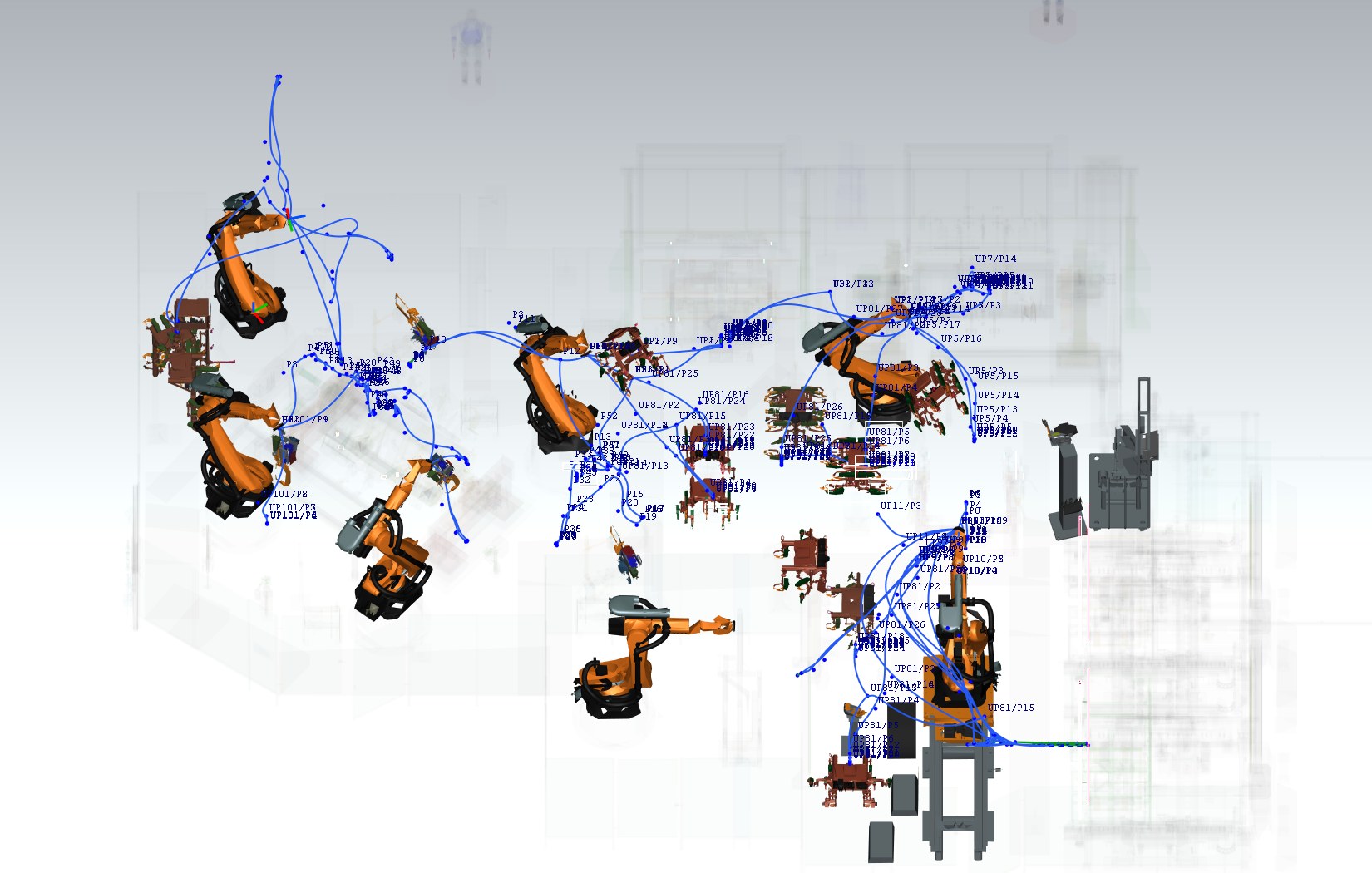
The eye icon next to a program draws its path in the 3D view – with the motion planner (Motion tab) as the real path: PTP blue, LIN green, CIRC orange, approximated corners included. Point labels (P7, UP81/P3) can be switched on or off.
Simulation → Show Folge path for all robots... (or Show UP path...) draws a program with the given number for every robot of the cell, optionally with the subprograms called in its points.
Show paths (context menu of the 3D view and of the program tree; the menu entry has a tooltip) shows the path
and the points of the program of every robot: during and after a run the program of the run (with the called UPs),
without a run the program selected for the robot. Before 2026-10-25 it showed only the program selected in the tree of the
current robot. When all robots have the same program (e.g. Folge 81), the set is saved in the simulation file like
Show Folge path for all robots. Hide all paths is unchanged. API: view with
"programPaths": true / false (API).
Show point frames (context menu of the 3D view, next to Show point labels; off by default,
kept in the settings; the menu entry has a tooltip) draws a coordinate frame (X red, Y green, Z blue, 100 mm) at every
point of every shown program path, in the orientation of the point in the program. Without a shown path nothing is drawn;
the frames disappear with the paths. The labels of the points stay under Show point labels. API: view with
"pointFrames": true / false (API).
Running a program

| Button | Function |
| ▶ | runs the selected program of the current robot (continuous mode) |
| ● | records the TCP and the tool position during the motion (View → Show robot recorded path) |
| |◀ ▶| | selects the previous / next point and moves the robot there (single step) – the cursor always stays on the point where the robot stands |
| Move | moves the robot to the selected point; the cursor stays on this point |
| ■ | stops the program |
| slider | speed of the animation |
| Editor, Follow the editor | Editor opens the selected point in the DReS editor; with Follow the editor the robot moves to the point under the editor cursor (see below) |
The subprograms called in the points (UP calls) are executed according to the Program flow options in the Simulation tab; the console lists every entered UP and every ignored condition. Without the simulation license a single program is moved with axis interpolation.
View → Show the tool TCP during simulation draws the TCP frame of the tool of the last program point (e.g. the tip of the fixed electrode of a spot welding gun) – while a program runs, and also when the robot stands or is moved to a point by hand (Move, |◀ ▶|). Only the TCP frame of the tool is drawn at the robot: it is computed from the same axis values as the drawn robot model, so it never stays behind the robot or shows the target position in advance; in the build without the JT reader it follows the robot in every frame (like the robot labels). The former frame of the program point / target next to it is removed (both builds) – the frames of the points are shown with Show point frames. The bounding box drawn for a tool part whose mesh is not loaded moves with the robot.
Breakpoints
Breakpoints are set in the context menu of a point. A running program stops at a breakpoint; in the Simulation tab Stop on breakpoints applies them also to Run on all robots.
Touch up
Touch up writes the current position of the robot (jogged in the Robot Axis tab or reached by a program) to the selected point, in the tool and base of the point. Before anything is written a dialog shows the old and the new position, the distance and the .dat file that will be changed – the default answer is No.
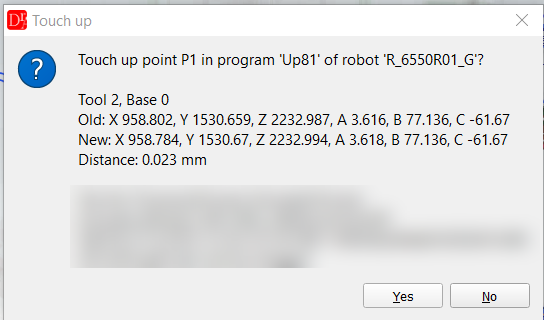
The console logs the new value and the previous value of the point, so a change can be reverted by hand.
Point in the editor, Follow the editor
- Editor (below the program tree) – opens the program of the selected point in the DReS editor and puts the cursor on the fold of the point (a selected program is only opened).
- Follow the editor – when the cursor in the DReS editor moves to a point of a program of a robot in the cell (folder Folgen / UP of the robot archive), the robot moves to this point (inverse kinematics with S / T of the point). The console names the robot and the point. The point data are read from the saved file – save the program after changing coordinates. Nothing happens while a program runs.