
- What the export is for
- Starting the export
- Export options
- Structure of the archive
- Loading the archive on the robot
▲ What the export is for
The export creates a ZIP file with the same folder structure as an archive created by the robot (KRC/R1/Folgen, KRC/R1/UPs, KRC/R1/Makros, ...). Every program is placed in the folder it belongs to on the robot, so all changed Folgen, UPs and Makros can be loaded on the robot in one operation - load archive - instead of copying the files one by one.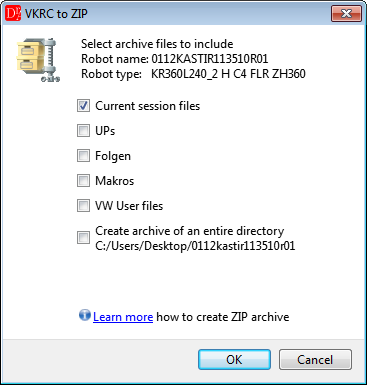
Export options (robot opened from an archive).
▲ Starting the export
VKRC » More » Export to VKRC archive or the button in the VKRC toolbar.
The option is active when a VKRC program is the current window.
button in the VKRC toolbar.
The option is active when a VKRC program is the current window.
The same export is started with the
button in the Robot toolbar
(next to Compare files). It exports for the robot type of the current program; if no robot program is open,
for the active robot project in the project tree. Without an open program and without an active robot project the
editor asks to set a robot project as active (context menu Set active robot) or to open a program.
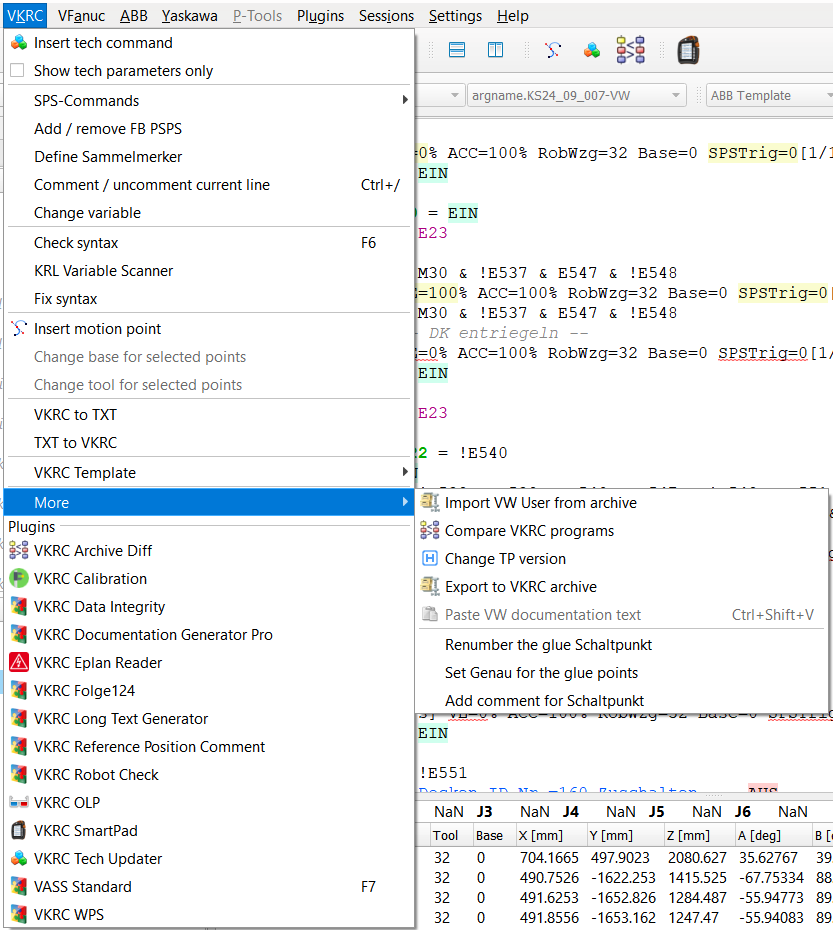
The export in the menu VKRC » More » Export to VKRC archive.
Before the export save all programs that are open in the editor - the export works on the files
on the disk. If a program has unsaved changes, the editor activates it and stops the export.
If the robot was opened as a project (through cell.src / $config.dat or by extracting
the robot archive), the editor shows the options below. Without a robot project all files open in the
editor are exported (option Programs open in the editor).
▲ Export options
| Option | What is put into the archive |
| Programs open in the editor | all files open in the editor. Folgen go to KRC/R1/Folgen, UPs to KRC/R1/UPs (both with the matching *.dat), Makros to KRC/R1/Makros; other files to the root of the archive |
| UPs | all up*.src / up*.dat from KRC/R1/UPs of the robot |
| Folgen | all folge*.src / folge*.dat from KRC/R1/Folgen |
| Makros | all makro*.src from KRC/R1/Makros |
| System files | all files from KRC/R1/System. The machine data (KRC/R1/Mada) are added only after a confirmation - see the warning below |
| VW User files | the whole KRC/R1/VW_User folder (with subfolders) and C/KRC/Roboter/Init/VW_Use*.ini, VW_USR_*.ini |
| Create archive of an entire directory | the complete robot archive folder (full backup); all other options are disabled |
Machine data. KRC/R1/Mada contains data of one particular robot
(calibration, serial number, axis data). Loading them onto another robot damages its configuration.
When System files is selected the editor asks whether the machine data should be included - the default
answer is No. The option Create archive of an entire directory always contains them:
restore such an archive only on the same robot.
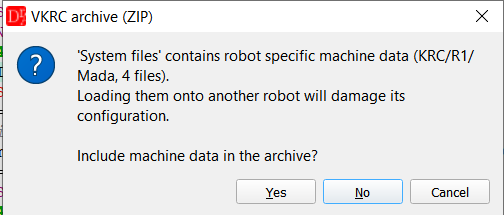
Confirmation for the machine data (default: No).
After the export
The editor shows a summary with the number of files in the archive. Show Details... lists every file of the archive with its path, the files that were skipped and why (another robot, machine data, file not found) and the notes of the export.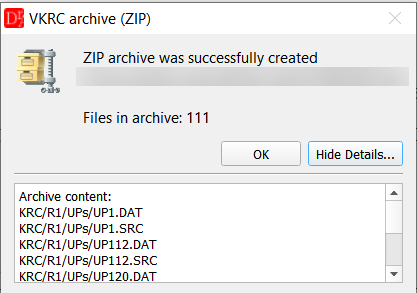
Summary after the export - Show Details... lists the content of the archive.
The archive is written to a temporary file first and replaces the target file only when it is complete - if something goes wrong (disk full, file open in another program), no half-written ZIP is left on the disk. Two different files that would end up under the same name in the archive stop the export with a list of the conflicting files. The same file selected twice (e.g. open in the editor and part of a selected folder) is simply added once.
The selected options are remembered for the next export.
▲ Structure of the archive
Example - two open programs, options Programs open in the editor and VW User files:Robot.zip └ KRC/R1/Folgen/folge12.src └ KRC/R1/Folgen/folge12.dat └ KRC/R1/UPs/up3.src └ KRC/R1/UPs/up3.dat └ KRC/R1/VW_User/... └ C/KRC/Roboter/Init/VW_User.ini
▲ Loading the archive on the robot
- Copy the ZIP file to a USB stick (or to the archive path of the robot on the network).
- On the robot switch to the user group Experte, operating mode T1 and deselect the program.
- Load the archive with the load archive function of the robot. Only the files contained in the ZIP are written - all other programs of the robot stay unchanged.
- Check the loaded programs (e.g. select them and check for errors) before starting the robot.
Make an archive of the robot before loading the new files, so that you can go back to the previous state.
See also the export for the other controllers: KRC, VFanuc, ABB, Yaskawa