This page shows examples for the AI Agent window of the editor: real prompts and what the agent did with them, complete checks with the full text of the answer and the report of a VKRC robot check of five robots. The functions of the window, its commands, the knowledge files and the settings are described on the page AI Agent window (editor). The agent answers in the language of the prompt.

 DReS Editor: Teach Your AI Agent - Your Own Knowledge Files for KUKA VKRC Robot Checks (YouTube, English) – with Example 5 (Makro45)
Prompt examples
Real prompts and what the agent did with them – one sentence in plain words, the agent finds the way and the commands itself. All results below come from real runs; the names of robots, stations and plants are replaced (R01, R02 … or the example station 0001R01 … 0001R05). Click a picture to see it in full size.
Collision map of a whole station from robot archives
- opened all robot archives of the folder in the editor, one after another (16 Fanuc robots);
- read every Folge and UP: the requests
DO[80+n]withCALL MAKRO020, the release inputsDI[40+n]inTC_ONLINE, the releasesDO[40+n]and the markers ofMAKRO050; - found the partner of every zone in the comments and long texts and checked that both robots of a pair use the same zone number;
- drew the map: robots, lines with the zone numbers – green consistent, orange wrong comment / partner, red error in the code, grey partner outside the archives – with a panel listing every finding with program and line.
TC_ONLINE, comments
naming the wrong partner robot, zones held to the end of the UP.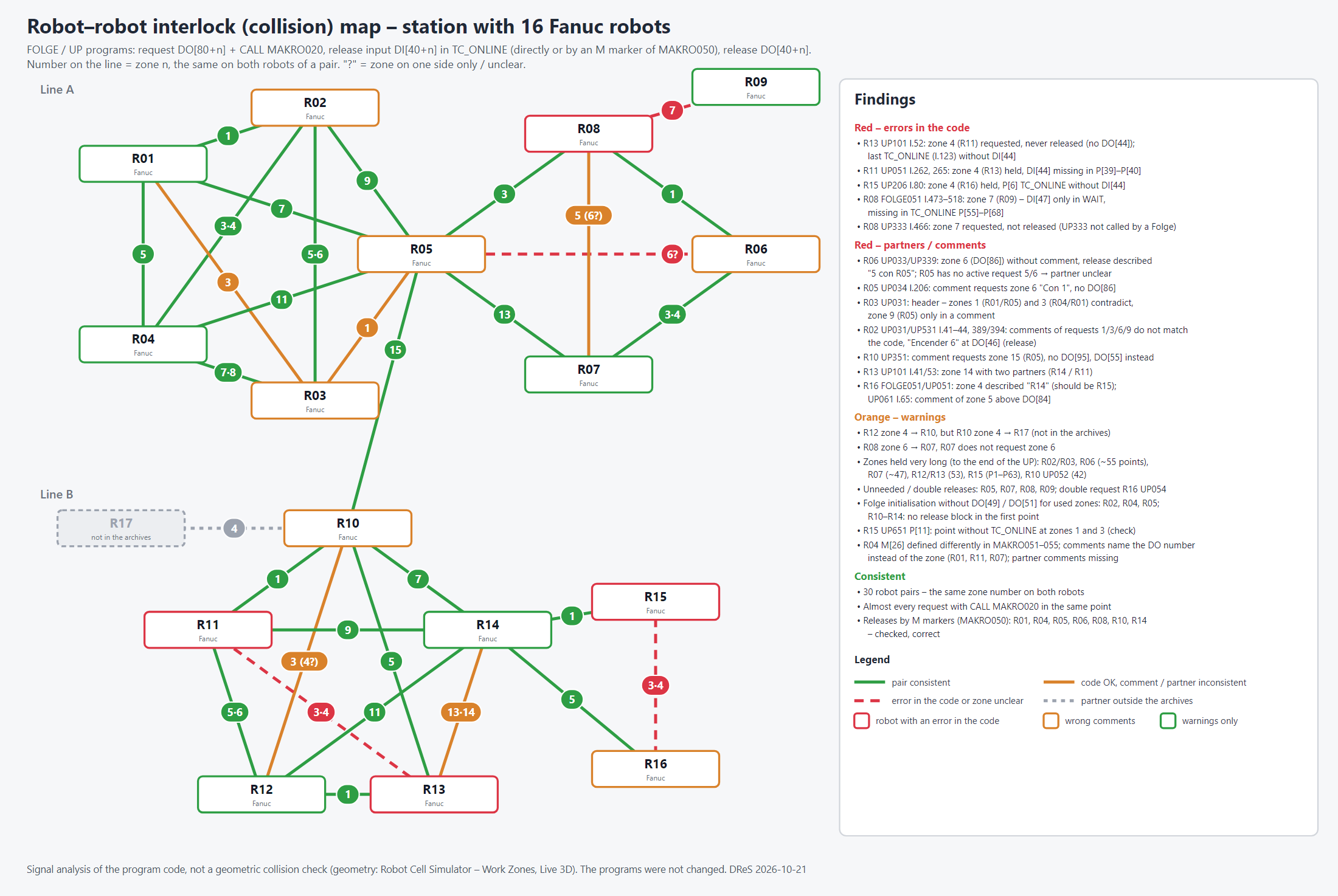
collision_map build the same map for KUKA VKRC and Fanuc
stations in one step – picture, HTML / PDF report and CSV / Excel tables. It is a signal analysis of the programs; the
geometry is checked in the Robot Cell Simulator (work zones, Live 3D).Points of the Folgen and of the UP calls
Spot welds: SERVOZANGE parameters
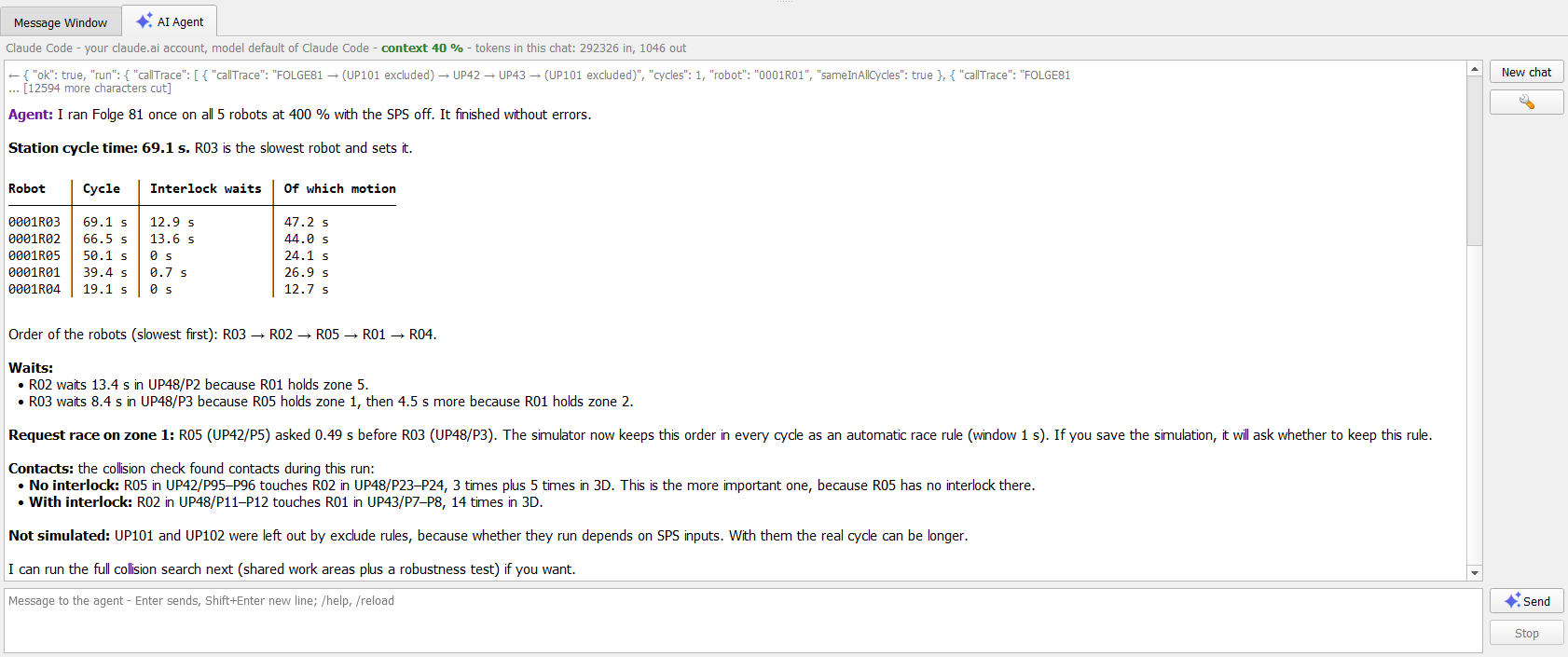
Robot Cell Simulator: cycle times and waits
Robot Cell Simulator: all possible collisions of a station
| Test | Time | Collision places found |
| fixed plan (engineer) | 18 min | A, B, D |
| random generator | 45 min | B, E |
| plan of the AI agent | 10 min | A, B, C, D, E |
Examples: one prompt – a complete check
The two examples below were made on an anonymized example station with five robot projects (0001R01 to
0001R05). Each shows the prompt as it was typed, the editor with the answer and the full text of the answer.
The answer text contains the markers {red}…{/red} and {green}…{/green}:
the chat shows these parts in color (see Colors); in the text below they are left as they are.
Example 1 – points of the Folgen and of the UP calls
Check whether points 1, 2 and the last one in every Folge have the same coordinates, and whether the first point of every UP has the same coordinates as the point where the UP is called. The difference may be max. 2 mm. Show me the programs where this condition is not met.
The agent says that this takes a moment and runs one points call over the Folgen of
all robot projects (fileMask ["folge*"]) with the checks samePoints
([["1","2"],["1","last"]]) and callStart, tolerance 2 mm. DReS computes the distances itself; points
with different bases and the same tool are compared in world coordinates (bases from $config.dat), points with
different tools are reported as not comparable. It takes about 1.5 minutes (about 2 s per program).
Result: 38 Folgen of 5 robots – 76 point checks, 0 failed; 118 UP calls, 2 failed: in 0001R05 FOLGE81 and Folge83 call UP42 at P2, and the first point of UP42 differs by 5.0 mm (compared in world coordinates, Base 0 against Base 1). Because both Folgen show the same difference, the agent concludes that UP42 itself (its P1 or the definition of Base 1) is the likely cause. Nothing was changed. (In this example station one point was moved by 5 mm on purpose to show how a difference is found.)
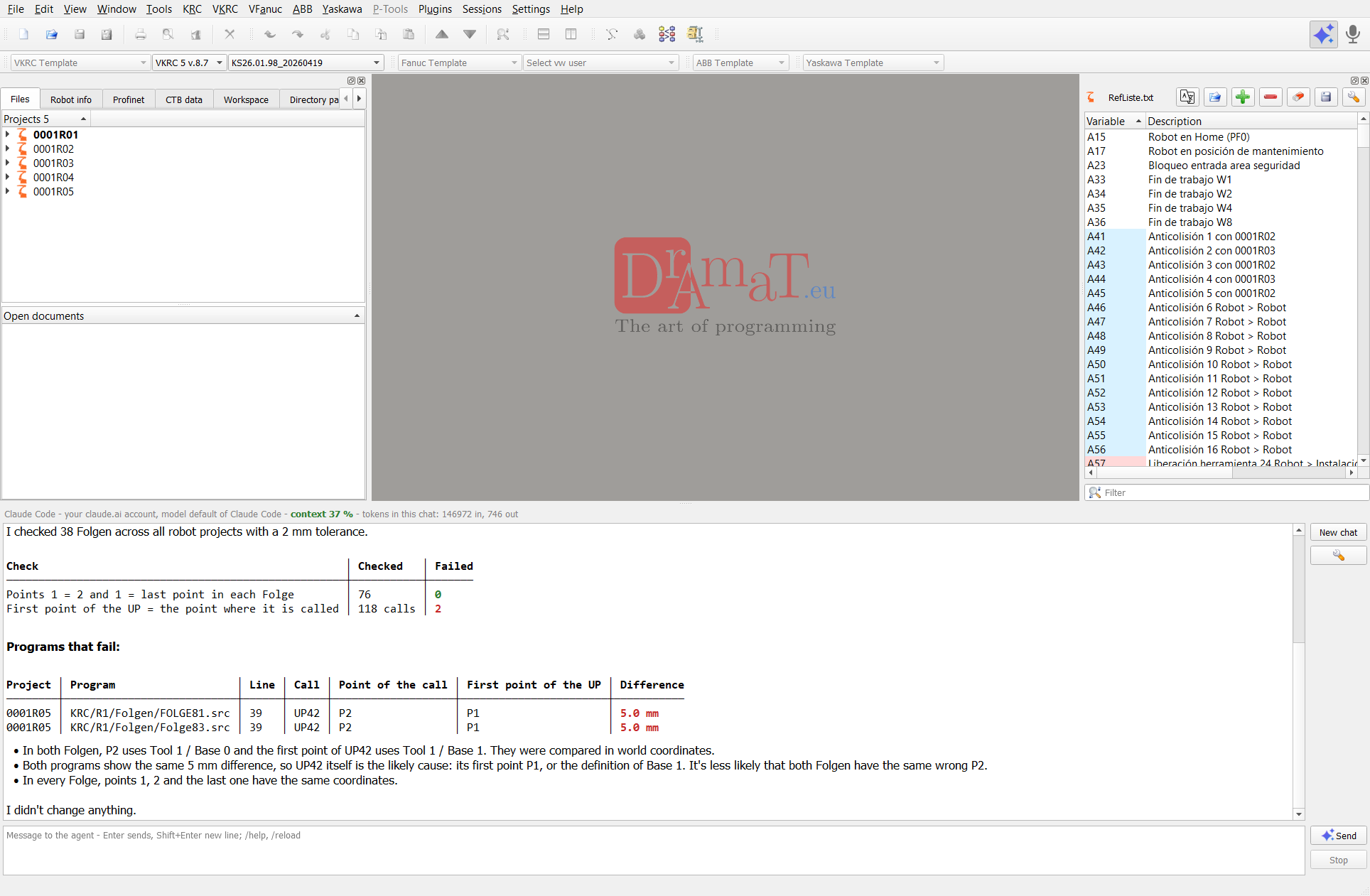
Full answer (as in the chat):
Example 2 – spot welds (SERVOZANGE)
Find the SERVOZANGE commands and show me all used Programmnummer, Punktnummer and FahrzeugTyp. Check if Offset is greater than 0, only in UP programs. Mark the values 0 in red.
The agent runs tech list with scope projects, fields (Programmnummer,
Punktnummer, FahrzeugTyp, Offset) and fileMask ["up*"]. It reads the files from the disk –
nothing is opened, nothing is changed – and gets a summary of the used values with their counts, so even hundreds
of spot welds fit into a short answer.
Result: 143 SERVOZANGE commands in the UP programs of 0001R01, 0001R04 and 0001R05, of them 98 Schweissen: Programmnummer 99 everywhere, FahrzeugTyp 6 or 7; Offset 30 only in 0001R01 (48 welds), Offset 0 (red) in 0001R04 and 0001R05 (50 welds). The service commands Setzhub, Fraesen and Service have FahrzeugTyp 0. The agent also noticed by itself that some Punktnummer are used in two robots and asks to check them. At the end it offers a CSV export or a change of the Offset values (with a preview first).
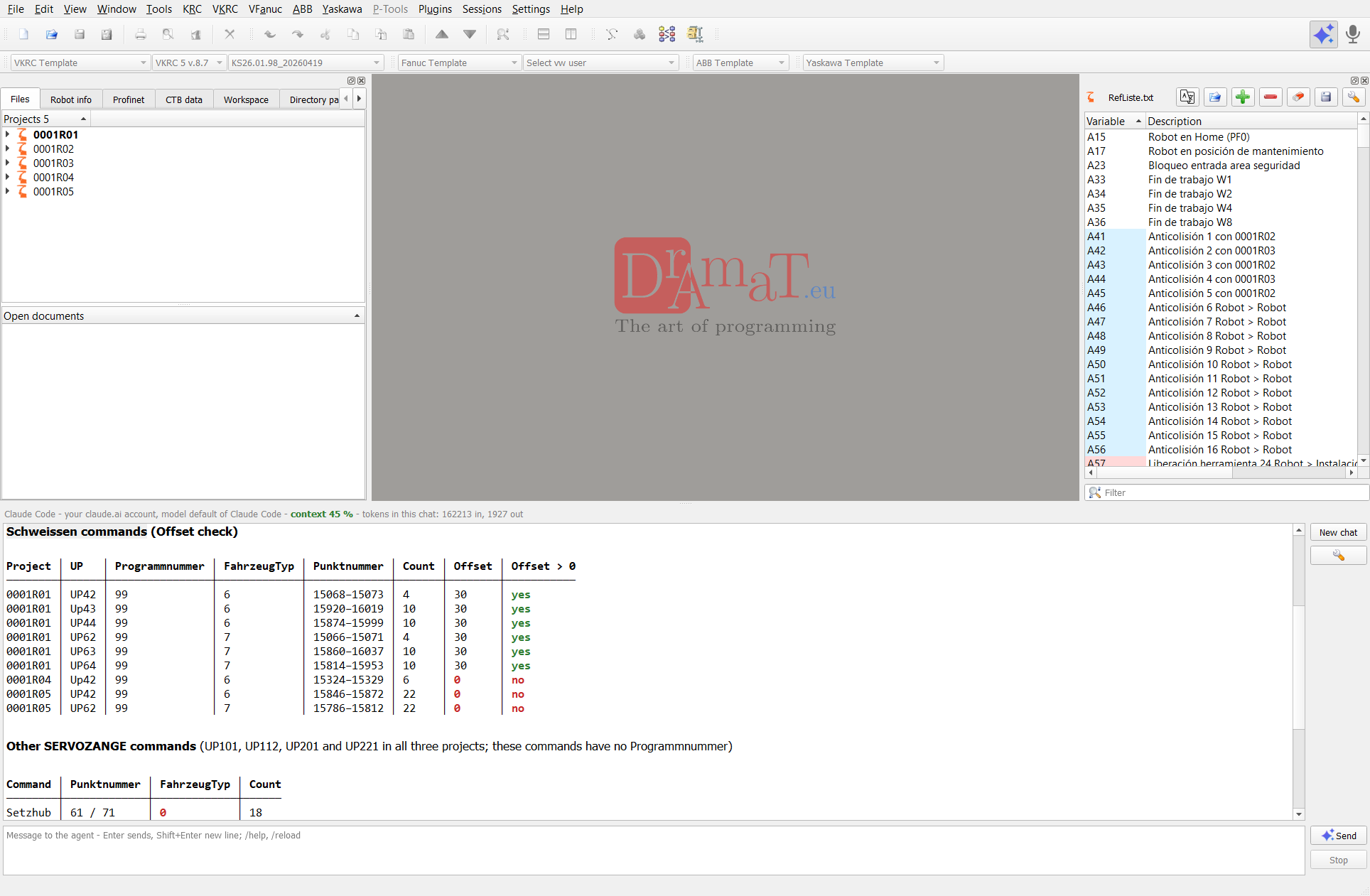
Full answer (as in the chat):
Further examples of messages:
- Show the robot projects and set R03 as active
- Open folge81 of R03 at line 40 and check its syntax
- Show the VW user, software version and IP of all robots
- Which tools and bases are used in the Folgen and are they all defined in the robot data?
- Set FahrzeugTyp to 2 in all spot welds of all robot projects – first show me what would change
- Save all modified files and start the Robot Cell Simulator
Example 3 – VKRC robot check of 5 robots
The agent checks the robot data of five VKRC robot projects of one session like the plugin VKRC Robot Check and more: called but missing Makros and UPs, tools, bases and loads, calibration and the software limit switches including the 7th axis – and writes a report with a comparison of the robots. It only reads the robot data; it does not change or delete files.
Do a VKRC robot check of all robot projects in this session: Makros, UPs, tools, bases, loads, calibration and software limit switches (also the 7th axis), and write a short report with what the programmer must correct, with a comparison of the robots.
The report of the agent – scroll in the frame or open the report (PDF written by the agent). On request the agent saves it as a PDF, HTML or Excel file (e.g. Save it as PDF on the desktop).
More about the check and other prompts: VKRC Robot Check > Robot check with the AI agent.
Example 4 – VFanuc robot check of 4 robots
The same check for Fanuc backups in the VW standard: Folgen, UPs and Makros (called but missing, never called, programs only as .TP without .LS), tools UT and user frames UF used in the points, payload schedules (PAYLOAD[n]) against the rated payload of the robot, mastering (SYSMAST.VA), the software limit switches and the travel track E1 with the points outside its limits, points not taught. The agent reads VERSION.VA, SYMOTN.VA, SYSFRAME.VA, SYSMAST.VA and the LS programs; a missing file is named in the report.
Do a VFanuc robot check of the active Fanuc project: Makros, UPs, tools UT, user frames UF, payloads, mastering and software limit switches (also the travel track E1), and write a short report with what the programmer must correct.
For several robots: ... of all Fanuc robot projects in this session ... with a comparison of the robots.
The report of the agent for 4 Fanuc robots of one session – prompt:
Do a VFanuc robot check of all Fanuc robot projects in this session: Makros, UPs, tools UT, user frames UF, payloads, mastering and software limit switches (also the travel track E1), and write a short report with what the programmer must correct, with a comparison of the robots.
Scroll in the frame or open the report (PDF written by the agent).
Example 5 – writing a program: Makro45 with the collision releases
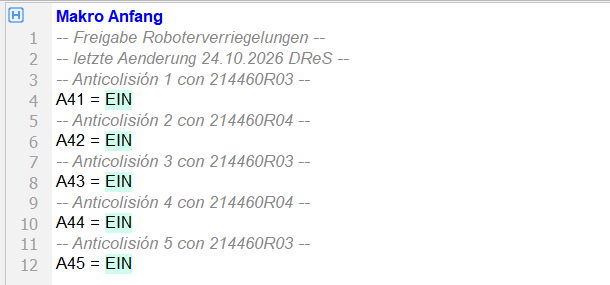
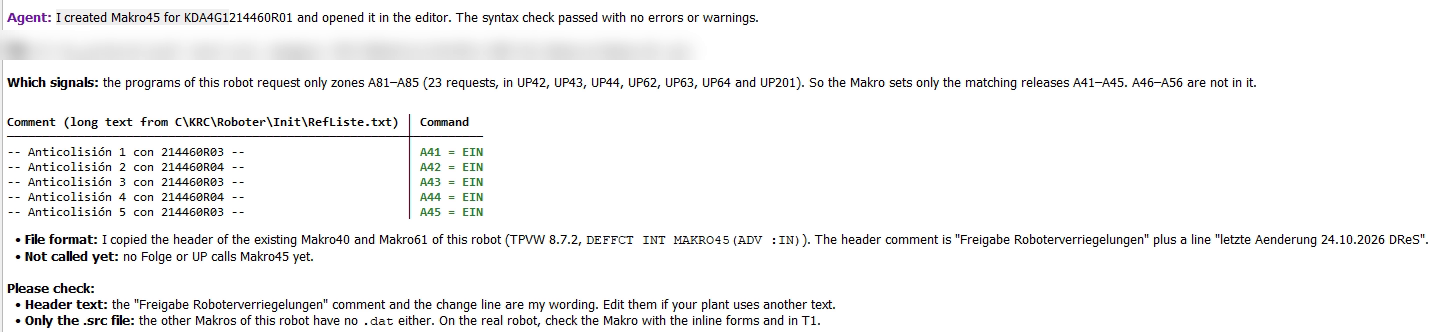
The agent does not only check programs – it also writes them. In this example it creates the Makro45 of a KUKA VKRC robot with the releases of exactly those collision areas that the robot requests in its programs, and writes the long text of every signal as a comment above the command.
Create Makro45 for robot KDA4G1214460R01 with only the signals of the collision areas the robot uses in its programs (A41-A56 for its requests A81-A96) and set them to EIN; above every command add a comment with the long text of the variable.
- searched the programs of the robot for the requests A81–A96 and found only A81–A85 (23 requests in UP42, UP43, UP44, UP62, UP63, UP64 and UP201) – so the Makro sets only the matching releases A41–A45, A46–A56 are not in it;
- took the header and the format from the existing Makros of the robot (Makro40, Makro61; TPVW 8.7.2,
DEFFCT INT MAKRO45(ADV :IN)); - read the long texts of A41–A45 from the robot data (RefListe.txt) and wrote Makro45 with
A41 = EIN…A45 = EINand a comment with the long text above every output; - opened the Makro in the editor and checked its syntax (check_syntax – no errors or warnings); like the other Makros of this robot it has only a .src file;
- told what to check: the header text written by the agent and that no Folge or UP calls Makro45 yet.