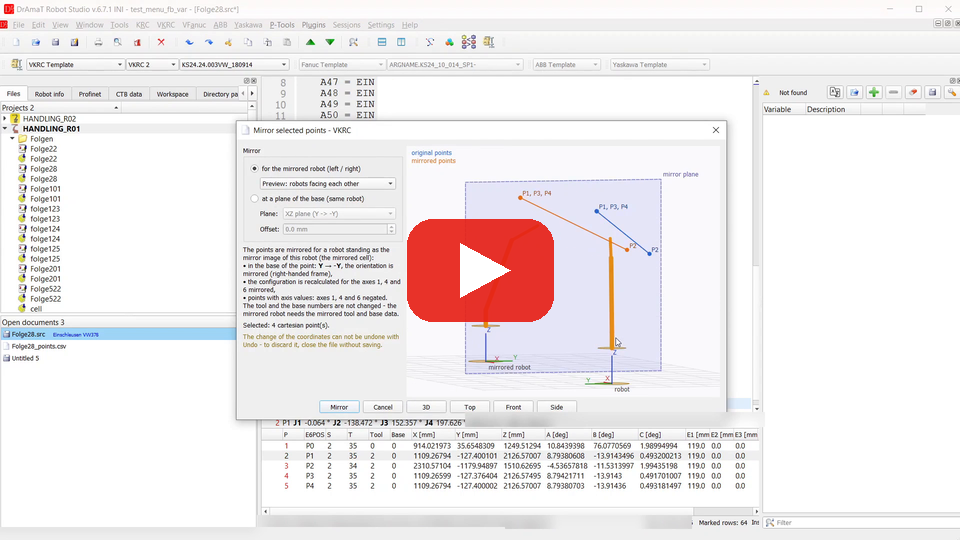
 DReS - Point Tools: Reverse Path, Mirror for the Left/Right Robot, CSV Export and Import (YouTube, English)
 DReS - Punkt-Werkzeuge: Bahn umkehren, Spiegeln (links/rechts), CSV-Export und -Import (YouTube, Deutsch)
- Reverse order of selected points - all robots
- Mirror selected points - all robots, with a 3D preview
- Export points to CSV / XLSX, Import points from CSV - all robots
- Renumber & clear points - all robots (menu of the robot), also automatically on save
- Transform selected points - all robots, with a 3D preview and a reachability check
- Match configuration (S/T) of selected points - all robots
- Rename points - KRC, ABB (menu of the robot)
- Tool / base usage - all robots (menu of the robot)
- Change user frame / work object / tool for selected points - Yaskawa, ABB (menu of the robot); Set equal ... for selected points - context menu of the point table
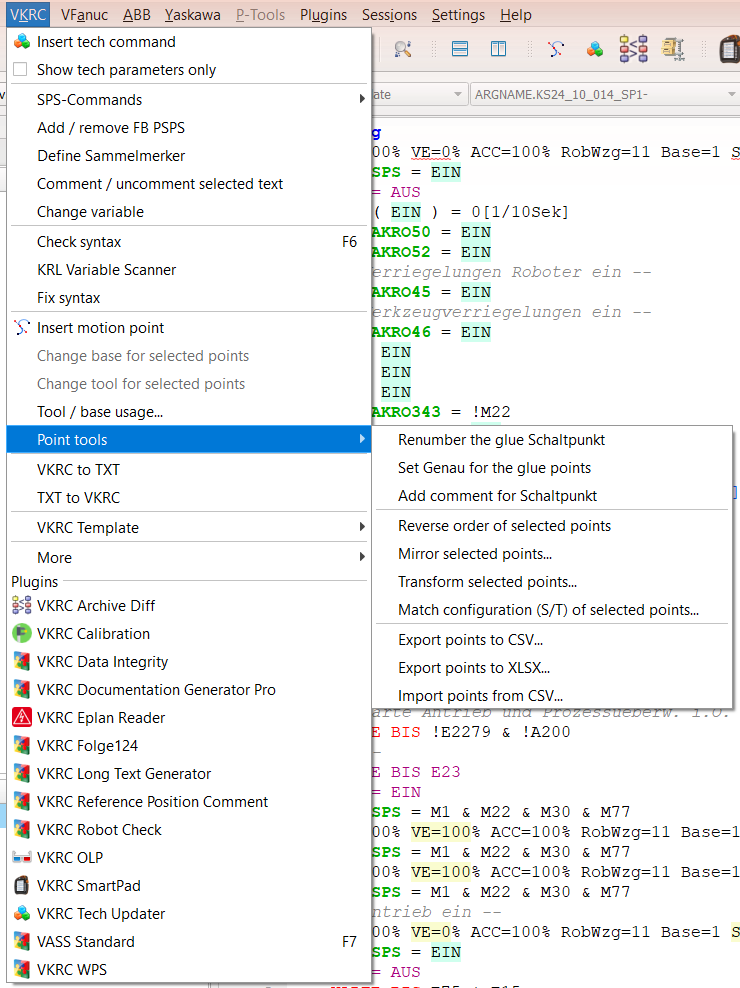
Functions for selected points work on the selected lines of the program text (not on the point table). Without a selection the message explains how to select:
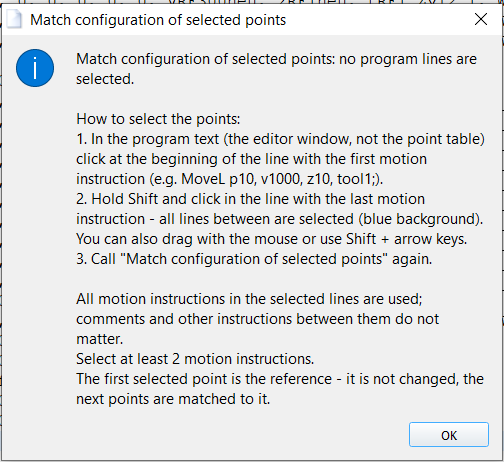
Message without a selection – how to select the points (Match configuration of selected points, ABB).
▲ Reverse order of selected points
Select the motion points (whole lines are taken, a point is taken with all its lines) and choose Point tools » Reverse order of selected points. The points are put into the reverse order - e.g. to create the way back of a path from a copy of it.
- Every point keeps its own motion data (motion type, velocity, approximation, tool, base) and its sub lines (SPS sub folds in VKRC, the lines up to ------ ; in VFanuc).
- Lines between two points (comments, outputs, waits) stay between the same two points and keep their order. Lines before the first and after the last selected point keep their place.
- Not possible for: circular motions (CIRC, KCIR, C, MoveC, MOVC - the auxiliary point belongs to the motion before), control structures (IF, LOOP, FOR, WHILE ...), labels and jumps, DEF / END and NOP / END lines. The program is not changed and a message shows the line.
- VKRC and VFanuc use the same mechanism as Cut + Paste with Swap points; the clipboard is not changed. In VKRC the reversed points keep the names of the selection (P1, P2, ... in the new order). In VFanuc the points get new numbers P[n] - use Renumber & clear points to number them in the order of the program again.
- ABB and Yaskawa: one step for Undo. KRC, VKRC, VFanuc: the undo history is cleared (programs with point data).
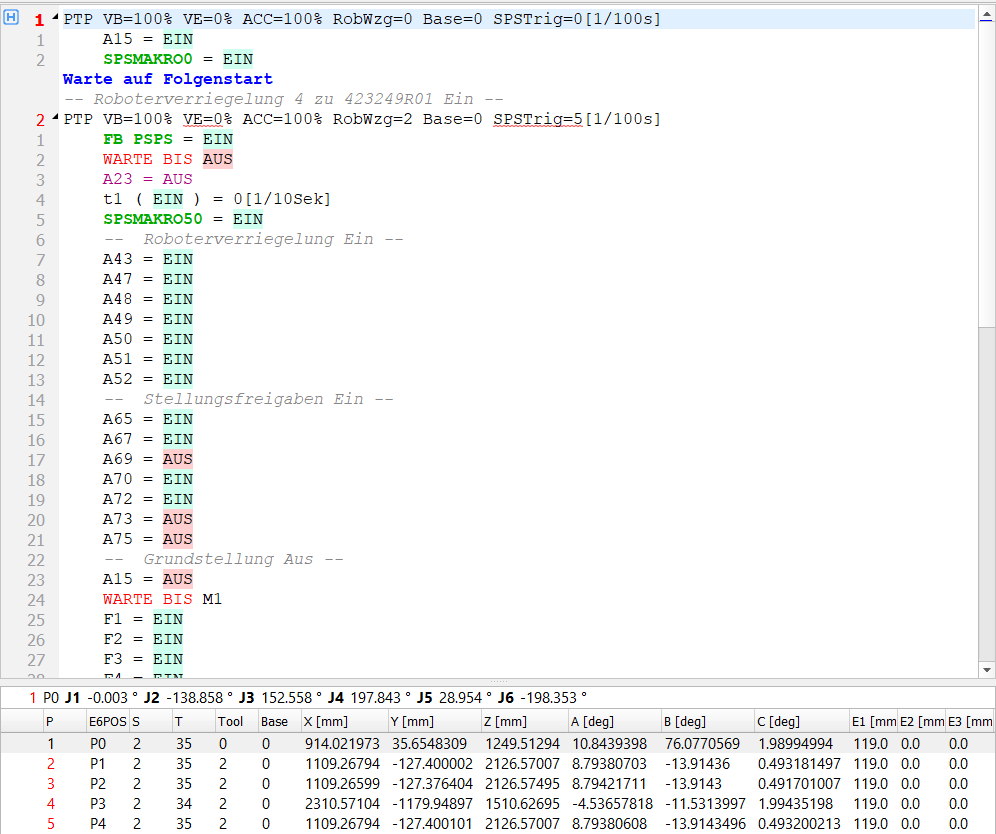
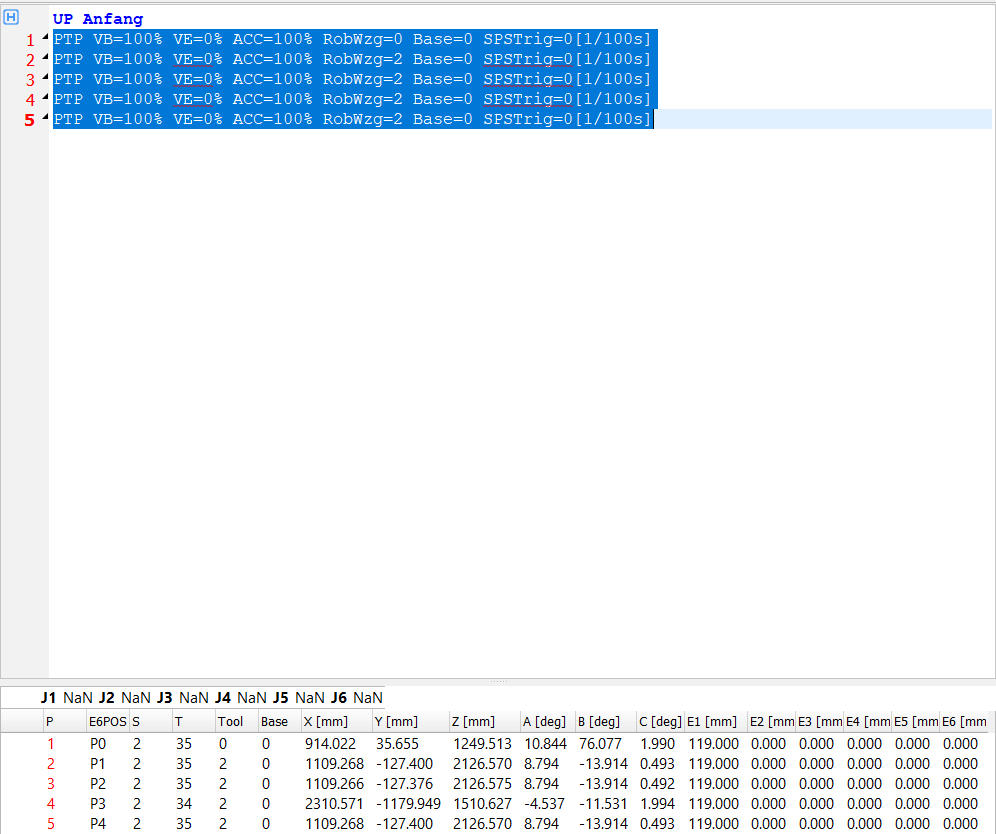
Before
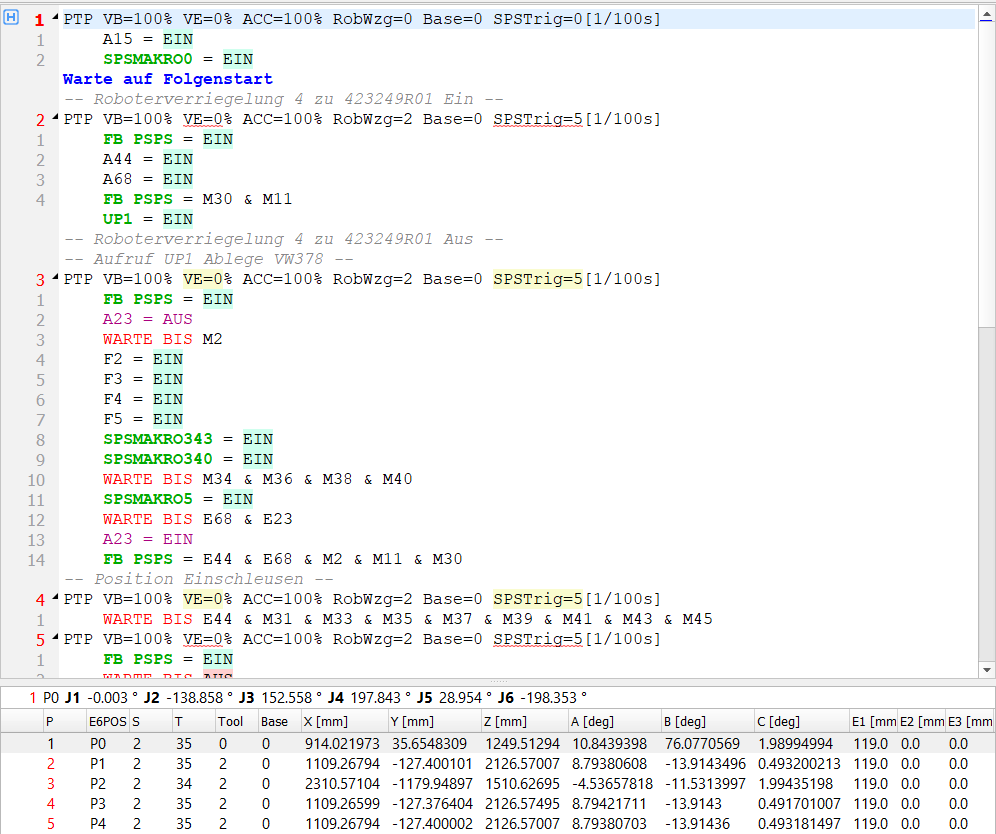
After: the coordinates and the SPS commands in the reverse order, the names P1 - P4 are kept
▲ Mirror selected points
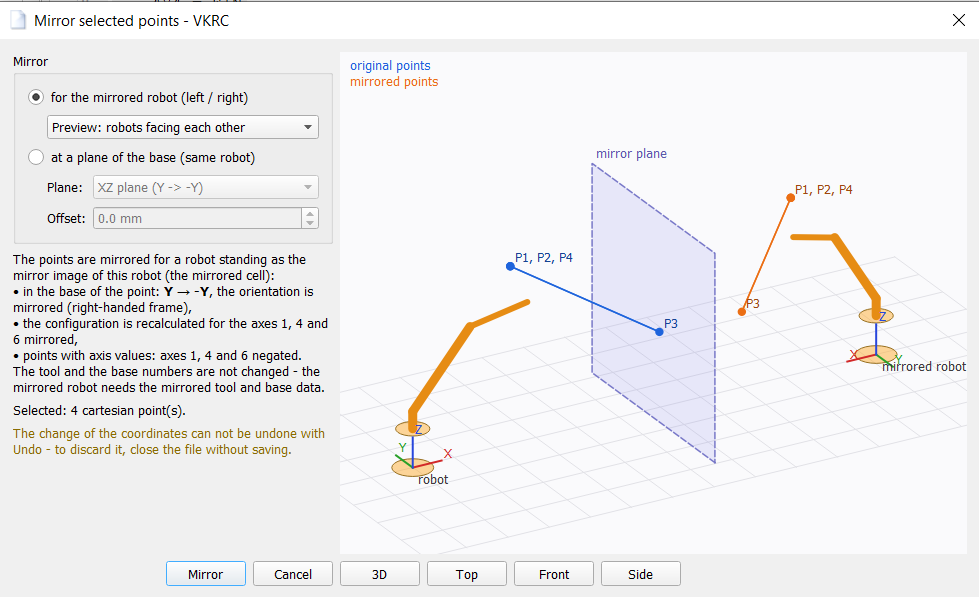
Point tools » Mirror selected points... mirrors the coordinates of the motion points of the selection. The function needs the basic licence of the robot type. The dialog shows a 3D preview: the robot, the mirror plane, the original points (blue) and the mirrored points (orange). Drag with the mouse to rotate the view, the wheel zooms; buttons 3D, Top, Front, Side.
| Mode | Description |
|---|---|
| for the mirrored robot (left / right) | The cell is mirrored at a plane between two robots - e.g. the program of the left robot for the right
robot. In the base (user frame, work object, coordinate system) of the point:
Y → -Y, the orientation is mirrored so that the frame stays right-handed.
The configuration is recalculated for the axes 1, 4 and 6 of the mirrored robot:
|
| at a plane of the base (same robot) | The points are mirrored at a plane of their base for the same robot, e.g. for a symmetric part: plane YZ (X → -X), XZ (Y → -Y) or XY (Z → -Z) and its offset. Position and orientation are mirrored, the configuration is not changed - check the reachability and the configuration of every point. Points with axis values are skipped. |
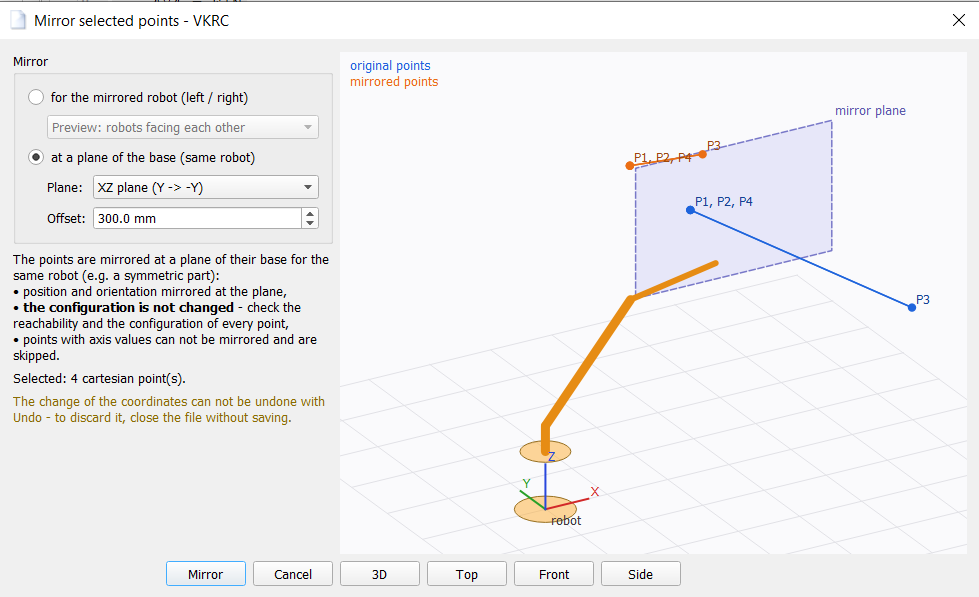
- Points whose configuration can not be calculated (no robot model or tool / base data) are not changed and are listed in the message.
- KRC: global points ($config.dat) are not changed. ABB: only targets declared in the module of the program.
- The change of the point data can not be undone with Undo (ABB: one step) - to discard it, close the file without saving.
▲ Export points to CSV / Import points from CSV
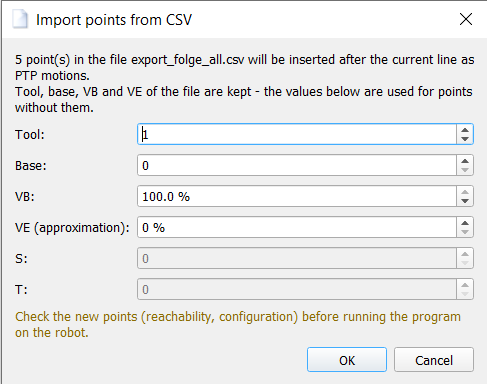
KRC / VKRC / VFanuc / ABB / Yaskawa » Point tools » Export points to CSV... saves the motion points of the selection - or of the whole program, when nothing is selected - in the order of the program. Import points from CSV... inserts the points of a CSV file as new joint motions after the current line: PTP (KRC, VKRC), J (VFanuc), MoveJ (ABB), MOVJ (Yaskawa). Both functions need the licence of the robot editor (KRC, VKRC, VFanuc, ABB or Yaskawa). Export points to XLSX... saves the same table as an Excel workbook (one sheet named after the program, bold and frozen header, numbers as number cells) - with the same licence as the CSV export. Axis points are converted to X, Y, Z, A, B, C with the forward kinematics, the message says how many.
| Robot | Columns of the export |
|---|---|
| VKRC | Point; Motion; X; Y; Z; A; B; C; S; T; E1..E6; Tool; Base; VB; VE - a circular motion gives two rows (auxiliary point ..._AUX and end point) |
| VFanuc | Point; Name; Motion; Type; X; Y; Z; W; P; R; Config; UF; UT; E1..E3 - Type C = cartesian, J = axis values (J1..J6 in the columns X..R) |
| KRC | Point; Motion; X; Y; Z; A; B; C; S; T; E1..E6; Tool; Base; Vel; Cont; Apo_Dist; Ipo_Frame - local and global points; axis points (E6AXIS) are converted with the kinematics of the robot (without the robot configuration they are skipped with a message); a circular motion gives two rows |
| ABB | Point; Motion; X; Y; Z; Q1..Q4; Rx; Ry; Rz; CF1; CF4; CF6; CFX; EAX_A..EAX_F; Tool; Wobj; Speed; Zone - robtargets of the motions (Rx, Ry, Rz = Euler angles ZYX of the quaternion, as in the point editor); motions with jointtargets (MoveAbsJ) and targets not declared in the module are skipped with a message |
| Yaskawa | Point; Motion; Group; X; Y; Z; Rx; Ry; Rz; RCONF; Tool; User; Frame; VJ; V; PL; External - RECTAN positions as written, PULSE positions converted with the kinematics of the robot; points that cannot be converted (no kinematics data, TOOL frame, robot on a base axis) are skipped with a message |
- files with a header (column names, case does not matter; W, P, R and RX, RY, RZ are read as A, B, C; UT, UF as Tool, Base) - other columns are ignored,
- files without header: [name;] X; Y; Z; A; B; C [; S; T],
- the separators ;, TAB and ,; with ; or TAB also a decimal comma.
| Option | Description |
|---|---|
| Tool / Base, UT / UF | Tool and base of the new points without Tool / Base (UT / UF) in the file. |
| VB / Speed | Velocity of the new PTP / J motions without VB (Speed) in the file. |
| VE / Termination | Approximation (VKRC) or termination FINE / CNT (VFanuc) of the points without VE (Termination) in the file. |
| S, T / CONFIG | Used only for points without S / T or CONFIG in the file. The default values come from the motion point next to the cursor. |
| KRC | Tool, Base, velocity [%] and approximation (exact stop or CONT C_PTP) of the new PTP motions, S / T. The points get the next free number n; the names of the declarations in the .dat of the program follow the motion point next to the cursor (e.g. PTP P5 ... PDAT5 → XPn, FPn, PPDATn; also the variants P5 and PP5 for the motion data). Without such a point the names of the KUKA standard are used: Pn with the motion data PDATn. |
| ABB | tooldata, wobjdata, speeddata and zonedata of the new MoveJ instructions and confdata (cf1, cf4, cf6, cfx) of the points without it. The robtargets are declared at module level in the style of the module (e.g. LOCAL CONST robtarget). |
| Yaskawa | Tool, user frame (or robot frame), VJ [%], PL and RCONF of the new MOVJ lines. The points are declared as RECTAN positions Cnnnnn; jobs with more than one control group are refused. |
- open the program, select the points (or nothing for all points) and choose Export points to CSV...,
- create a new program with File » New (e.g. VKRC4 UP / VFanuc UP),
- place the cursor in the line after which the points are to be inserted and choose Import points from CSV....
▲ Transform selected points
Point tools » Transform selected points... moves and rotates the motion points of the selection (or of the whole program, when nothing is selected) - e.g. when a fixture or a part has been moved by a few millimetres. In the window enter:
- the coordinate system of the change: BASE of the points (the change is described in the base), TOOL (the points move and rotate about the TCP) or WORLD (available only when the data of all bases of the selected points is known),
- the shift X, Y, Z and the rotation (KUKA A, B, C; Fanuc W, P, R; ABB and Yaskawa Rx, Ry, Rz),
- optionally the pivot of the rotation (in BASE / WORLD); the button Centre of the selected points takes the centre of the selection.
Before the change the inverse kinematics of the robot checks every point. Points which are not reachable or reachable only with another configuration (e.g. reachable with S 2, T 3) are listed and you choose Transform all, Only points without problems or Cancel - the configuration is never changed silently. Axis points (E6AXIS / AXIS, Fanuc J, ABB jointtarget, Yaskawa PULSE) are converted with the forward kinematics, transformed and calculated back with the solution nearest to the old axes. Points whose tool or base is not defined in the archive, points with an external TCP and global points (KRC $config.dat) are not changed; they are named in the message. The function needs the licence of the robot editor.
| Robot | Remarks |
|---|---|
| KRC, VKRC | Points of a robot on a linear unit (ERSYS E1) are supported. Save the program afterwards. |
| VFanuc | UF:F / UT:F, remote TCP and frames which are not set in the backup are skipped. |
| ABB | The new confdata is calculated from the axes. A moving work object (ufmec) and a stationary tool (robhold) are not supported. All changes are one Undo step. |
| Yaskawa | Pulse points are calculated back to pulses with the parameters of the controller. |
▲ Match configuration (S/T) of selected points
Point tools » Match configuration (S/T) of selected points... sets the configuration of the selected points (KUKA S and T, Fanuc CONFIG, ABB cf1 / cf4 / cf6 / cfx, Yaskawa RCONF) so that the robot moves from point to point with the smallest motion of the axes - for example after points have been mirrored or imported, or when an axis 4 or 6 turns by 360 degrees between two points. The first reachable point (in KRC also an axis point) is the reference. A point keeps its configuration when it is reachable with it and the motion of the axes is not larger than with another one. When no point can be the reference, the message names the reason for every point (e.g. a tool or base which is not set in the archive).
The window shows a table: point, old and new configuration, the largest motion of an axis with the old and with the new configuration, and remarks. Only changed rows have a check box - uncheck the points which must keep their configuration. A change of the main configuration (KUKA S, Fanuc N/F U/D T/B, ABB cfx, Yaskawa l, m, n) is highlighted in yellow with a red warning above the table, because the robot then reaches the point with another arm posture. If nothing has to be changed, the window says so (0 of n). The coordinates X, Y, Z, A, B, C are not changed; the new configuration is written to the program files when the program is saved.
▲ Rename points (KRC, ABB)
KRC » Rename points... and ABB » Rename points... give the points of a program new names. The table shows the name, the new name (double click to edit) and the type / use of every point. A pattern with a counter {n} (start, step, number of digits, e.g. P_{n} = P_010, P_020 ...) can be applied to the selected rows (Apply to selected, without selection to all); Reset restores the old names. The preview lists every line which will be changed - it is made by the same function which then changes the files. Rename is enabled only when all new names are valid: rules of the identifier, reserved words, duplicates and collisions with other names (upper and lower case does not matter).
| Robot | What is changed |
|---|---|
| KRC | Local points of the .dat file (not GLOBAL). A point of an inline form is shown with its name (e.g. PICK for XPICK / FPICK). The declarations X... and F..., the motion data which is named after the point (PPICK → PNEW; PDAT5 and DEFAULT stay), the text and the %P list of the fold header, and all identifiers in the code are changed; comments and the names Tool[n]: / Base[n]: stay. Maximum 24 characters with the prefix X. The function works on the saved files (it asks to save a modified program), makes backup copies and loads the program again; the rest of the files stays byte by byte unchanged. |
| ABB | robtarget / jointtarget of the module. Declarations without LOCAL which are used in other modules are locked (reason in the tooltip). The changes in the module are one Undo step; strings and comments are not changed. |
▲ Tool / base usage (all robots)
KRC / VKRC / VFanuc / ABB / Yaskawa » Tool / base usage... shows which tools and bases (frames, work objects) are used by the programs of the robot. The backup directory is searched upwards from the open program and all programs of the robot are read. The tree lists every tool and base with its name from the backup, the number of points, of other uses and of programs, and below them the programs which use it. Tools and bases which are defined in the backup but not used by any program are shown in grey (not used). A double click on a program opens it in the editor. The window only reads the files; backup copies of DReS (~name) are skipped. Use it before a tool or base is changed: you see at once which programs have to be checked.
| Robot | Backup directory | Points | Other | Names |
|---|---|---|---|---|
| KRC | with System\$config.dat | motion points: TOOL_NO / BASE_NO of the FDAT data (local, GLOBAL, $config.dat) | $TOOL=TOOL_DATA[n], $BASE=BASE_DATA[n], BAS(#TOOL / #BASE, n) | $config.dat |
| VKRC | with System\$config.dat | motion folds: RobWzg (or ExtWzg, shown as Tool Ext n) and Base | as KRC, in the code of macros and programs | $config.dat |
| VFanuc | with SYSTEM.VA | positions of the program: UT and UF of group 1 in /POS | UTOOL_NUM=n, UFRAME_NUM=n | comments of the tool and user frames of the backup |
| ABB | with system.xml | instructions with a tooldata argument (MoveL, MoveJ, TriggL, own motion routines ...); the work object from \WObj, wobj0 without it | assignments and other uses of the names | declaration (PERS / CONST / VAR) and module |
| Yaskawa | with SYSTEM.SYS | robot positions C of the job: ///TOOL before the positions, the user frame ///USER only for positions in user coordinates | TOOL#(n), UF#(n) in the instructions | TOOL.CND, UFRAME.CND |
▲ Change user frame / work object / tool for selected points (Yaskawa, ABB)
Yaskawa » Change user frame / tool for selected points... and ABB » Change work object / tool for selected points... are in the same place as Change base / tool for selected points of VKRC, KRC and Fanuc (before Renumber & clear points). The dialog asks for the new number (Yaskawa) or name (ABB) and has the option Recalculate the coordinates (the robot keeps its positions).
| Robot | What is changed |
|---|---|
| Yaskawa | RECTAN positions are recalculated with TOOL.CND / UFRAME.CND. PULSE positions keep their axis values, only the tool number changes (a user frame does not apply to PULSE). The //POS declaration gets the ///TOOL, ///USER, ///POSTYPE lines it needs. User frame 0 = ROBOT frame. The main menu uses the selected lines of the job. |
| ABB | The tool or the \WObj argument of the selected instructions (\WObj:= or a positional argument of user procedures) and, with recalculation, the robtargets (one-line declarations in the module, literals). Targets used also by other instructions or with other frames are not changed. If the instructions would not be recognized after the change, the whole change is undone. |
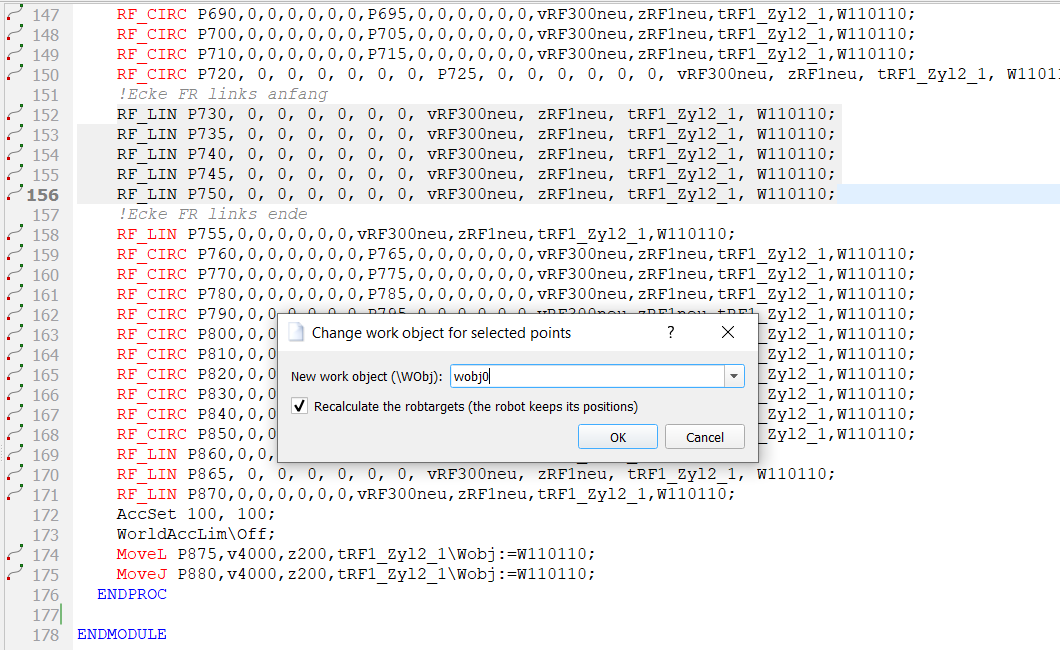
ABB: Change work object for selected points – five RF_LIN instructions selected; the robtargets are recalculated so that the robot keeps its positions.
Without recalculation the robot goes to other positions - check the program in T1 / at reduced speed.
Set equal ... for selected points (context menu of the point table)
- Yaskawa: Set equal Tool/User value for selected points... on the columns Tool / User - the same dialog as above.
- ABB: Set equal <column> value for selected points on the number columns (X..E6 of robtargets, A1..E6 of jointtargets; one-line declarations) and Copy selected coordinates as plain text.
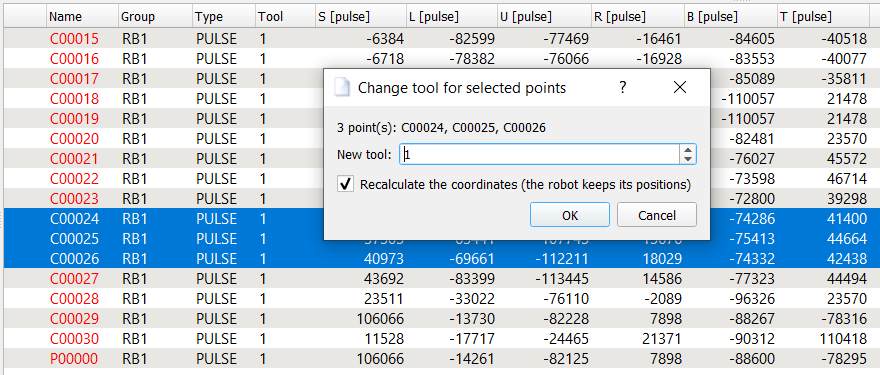
Yaskawa: Set equal Tool value for selected points – the same dialog as Change tool for selected points in the Yaskawa menu.
▲ Renumber & clear points
After many changes (inserting, copying, reversing, deleting motions) the point numbers of a program are mixed and the point data of deleted motions stays in the program. Renumber & clear points in the menu of the robot (VFanuc, KRC, ABB, Yaskawa - next to the other point functions) puts it in order:
- the points get new numbers in the order of their first use in the program; a point used by more than one motion keeps one number,
- the point data which is not used by the program is removed.
| Robot | What is renumbered and removed |
|---|---|
| VFanuc | The positions P[n] of the motion lines get the numbers 1, 2, 3 ...; the name of a position (P[3:APPROACH]) is kept. The position data not used by a motion line is removed. |
| KRC | Points declared in the .dat of the program as XPn (E6POS, E6AXIS, POS, AXIS) get the numbers P1, P2, P3 ...
Their frame data FPn and the motion data of their folds follow with the naming of the file (KUKA
standard PDATn / CPDATn, also Pn and PPn); shared motion data such as
DEFAULT is not renamed. The headers of the motion folds (shown text and the inline form data) are
changed too, so the folds can still be opened in the inline form.
Declarations of points, FDAT, PDAT and LDAT in the .dat which are not used in the .src are removed.
Not changed: points with other names (XHOME, XPICK ...), GLOBAL declarations, FRAME data. The function works on the saved files: a modified program has to be saved first (the program asks). The .src and the .dat file are both changed on the disk - backup copies of both are created - and the program is loaded again. |
| ABB | Module robtargets whose name matches the point name template of the point editor (template,
counter, step and width - default p0010, p0020 ...) get new names in the order of use. Module
robtargets and jointtargets not used by the module are removed. Other names (pHome) are kept.
Names in comments and in strings are not changed.
Declarations without LOCAL are visible to all modules of the task: when a module of the same directory uses such a target, it is neither renamed nor removed (listed in the message). One step for Undo. |
| Yaskawa | The teach positions C, BC and EC get the numbers 00000, 00001 ... in the order of
their first use between NOP and END. Unused positions are removed; the //POS section is written again in
ascending order with the ///TOOL, ///USER, ///POSTYPE, ///RECTAN /
///PULSE and ///RCONF lines every point needs, and ///NPOS is updated. Comment lines
are not changed. The position variables P, BP and EX are global and are not changed.
When the job uses a position which is not declared in //POS, nothing is changed and the message names the position. The motion lines can be restored with Undo; the //POS section (not shown in the editor) only by closing the job without saving. |
Clear and renumber points on save
The automatic renumbering and clearing can be switched on and off in the settings - separately for every robot type: Settings » Configure » VKRC / KRC / Fanuc / ABB / Yaskawa » General » Clear and renumber points on save (below the options for the syntax check). When the option is switched on, the same is made automatically every time the program is saved - without the confirmation window:
- VKRC: switched on by default (the behaviour of the VW standard). Switched off, the motions keep their point numbers and the unused points stay in the .dat file; VW_NEXT_FREE is the number after the highest point.
- VFanuc, ABB, Yaskawa: switched off by default. Switched on, the points are renumbered and cleared in the editor just before the file is written.
- KRC: switched off by default. Switched on, the saved .src and .dat files are renumbered and cleared (with backup copies) and the program is loaded again.