
- Overview
- What is read from the controller backup
- Project tree
- Robot info
- CTB data: tools, frames, soft limits, interference areas
- Long texts: I/O and variable names (IONAME.DAT, VARNAME.DAT)
- Parameter files (*.PRM)
▲ Overview
DReS opens Yaskawa Motoman jobs (*.JBI, INFORM language of the NX100 / DX100 / DX200 / YRC1000 controllers) directly from a controller backup. Besides a syntax-aware text editor it reads the configuration of the controller from the backup and uses it everywhere a job needs it: control groups, tools, user frames, soft limits, interference areas, variable names, macros and I/O names. With the geometry of the robot (YaskawaGenericKinematics.xml) and the gear data of the controller the points can be edited in degrees and in Cartesian coordinates, with a 3D preview of the robot.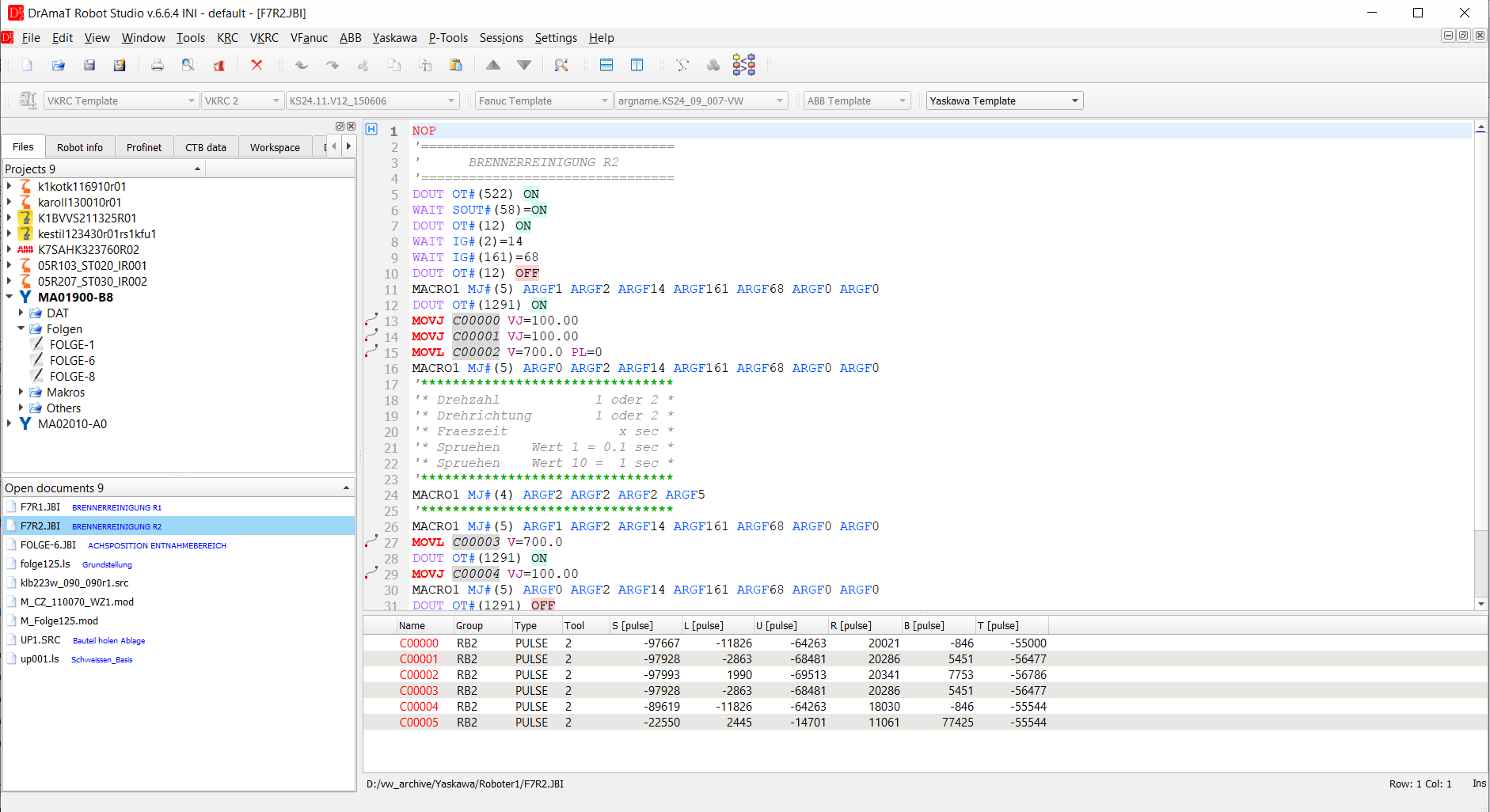
Job F7R2.JBI with the CTB data of the controller (left) and the point table (bottom).
Everything works offline, on a copy of the backup - the editor never connects to the robot.
▲ What is read from the controller backup
A project is a directory with the backup of one controller (the files as saved by the controller, e.g. CMOS / ALL backup). A job opened from such a directory automatically uses the configuration of its controller, even if another project is active.| File | Content | Where it is used |
| *.JBI | jobs: header (//POS), instructions | viewer, point table, point editor |
| SYSTEM.SYS | system and parameter version, application, language, control groups (//ROBOT NAME: R1..R8, B1..B8, S1..S24 with model and axis mask), version information, time counters (control power, servo power, playback, moving, operating, energy time) | Robot info, model of the robot for the kinematics, control group of every point |
| TOOL.CND | tool data: TCP X, Y, Z, Rx, Ry, Rz, centre of gravity, weight, moment of inertia | CTB data, TCP in the point editor and in 3D |
| UFRAME.CND | user frames: name, tool and taught points ORG / XX / XY (pulses), resulting frame (BUSER) | CTB data, frame of the Cartesian tab, user frames in 3D |
| SC.PRM | pulse soft limits of every axis of every control group (S1CxG400..415) | CTB data, marking of points outside the limits (point table, motion editor, point editor) |
| CUBEINTF.CND | interference areas: cubes (X, Y, Z in µm) and axis interference (pulses), control group, name | CTB data |
| RC.PRM, SV.PRM | gear ratio (RC<g>G) and encoder resolution (SV<g>G) of every axis | pulses per degree of every axis - axis values in degrees |
| VARNAME.DAT | names (comments) of the global variables B, I, D, R, S, P, BP, EX | tooltips, the long-text column of the viewer, long text window (editable) |
| VAR.DAT | values of the global variables at the time of the backup, global position variables P / BP / EX | tooltips ([backup: value]), global positions in the point table (read only) |
| MACRO.DAT | macro definitions: macro number, MJ number, macro job and names of its arguments | tooltip of MACROn MJ#(m), Go to the macro job |
| IONAME.DAT | names of the inputs and outputs | tooltips, the long-text column, long text window (editable; setting IO names file) |
The files of the backup are only read. The jobs (*.JBI) you save and,
on request, the I/O and variable names saved from the long text window
(IONAME.DAT, VARNAME.DAT) are the only files the editor writes.
▲ Project tree
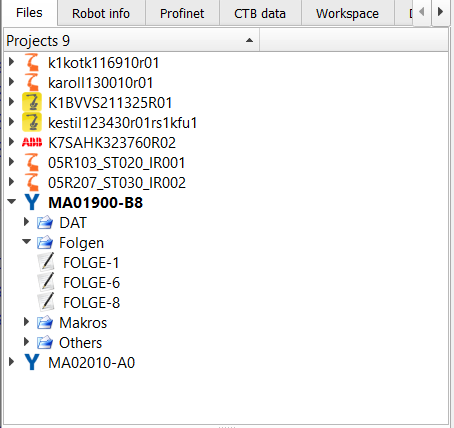
A Yaskawa project is shown in the tree of the Files tab with the name of the robot (model of R1 from SYSTEM.SYS) and the files sorted into folders.Both layouts of a backup are supported. Open the file SYSTEM.SYS (File > Open robot project, or drop the backup folder or ZIP on the editor):
- flat archive - SYSTEM.SYS, jobs (*.JBI), parameters (*.PRM), conditions (*.CND) and data (*.DAT) in one folder;
- backup of DX200 / YRC1000 with folders such as JOB, PARAMETER, SYSTEM_DATA (SYSTEM.SYS), FILE and IO_DATA. The editor scans the backup once and finds the folders with jobs and the data files (TOOL.CND, SC.PRM, IONAME.DAT, VARNAME.DAT ...) by itself, whatever the folders are called. The tree shows the folders as in the backup; the binary file CMOS.BIN is skipped.
▲ Robot info
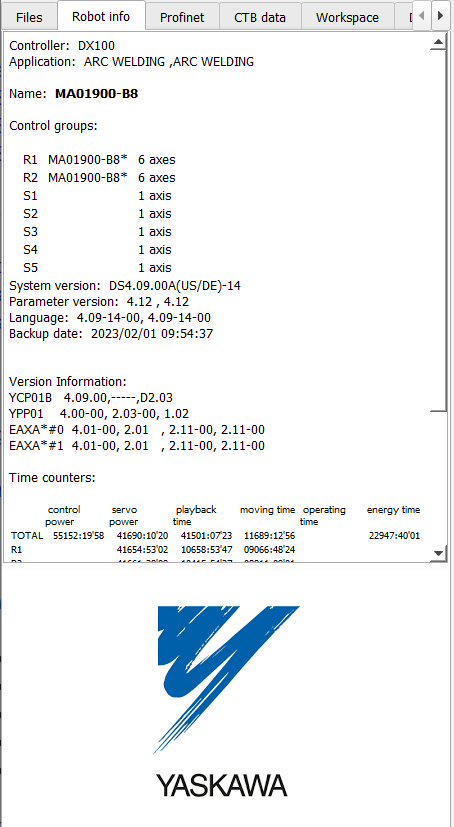
The Robot info tab shows the data of SYSTEM.SYS of the active project:- controller type (derived from the system version: NS = NX100, DS = DX100, DN = DX200, YAS = YRC1000) and application,
- control groups - every robot, base axis and station with its model and number of axes,
- system version, parameter version, language, date of the backup,
- version information of the controller boards,
- time counters (control power, servo power, playback, moving, operating and energy time) for the whole controller and for every group and tool,
- a link to open SYSTEM.SYS itself.
▲ CTB data: tools, frames, soft limits, interference areas
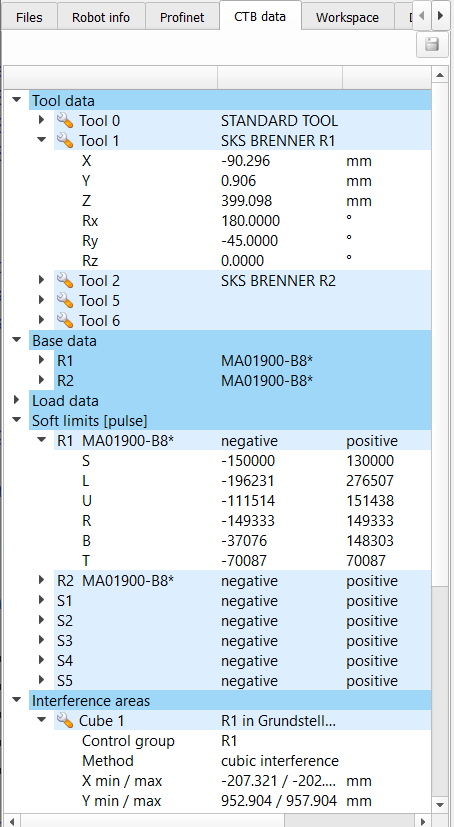
The CTB data tab shows the configuration data of the controller as a tree:| Node | Content |
| Tool data | every defined tool (TOOL 0..63) with its name; expanded: X, Y, Z [mm], Rx, Ry, Rz [°] |
| Base data | user frames grouped by robot (R1, R2 ...): name, tool used for teaching, taught points ORG / XX / XY, resulting frame |
| Load data | tools with a load: weight [kg], centre of gravity [mm], moment of inertia [kg·m²] |
| Soft limits [pulse] | negative and positive pulse limit of every axis of every control group (SC.PRM) |
| Interference areas | cubes (method, control group, X / Y / Z min–max in mm) and axis interference areas (pulse range of the axes) with their names from CUBEINTF.CND |
▲ Long texts: I/O and variable names (IONAME.DAT, VARNAME.DAT)
When a Yaskawa project becomes the active controller, the long text window (the same window as for VKRC, KRC and Fanuc signal lists) is filled with the names of the controller:- inputs and outputs from IONAME.DAT (setting IO names file) - IN1, OT5 ... for named signals; signals with the default name of the controller (IN017) are listed with an empty description,
- global variables B, I, D, R, S, P, BP, EX from VARNAME.DAT,
- the value at the time of the backup from VAR.DAT, added as [backup: value] (also for variables without a name).
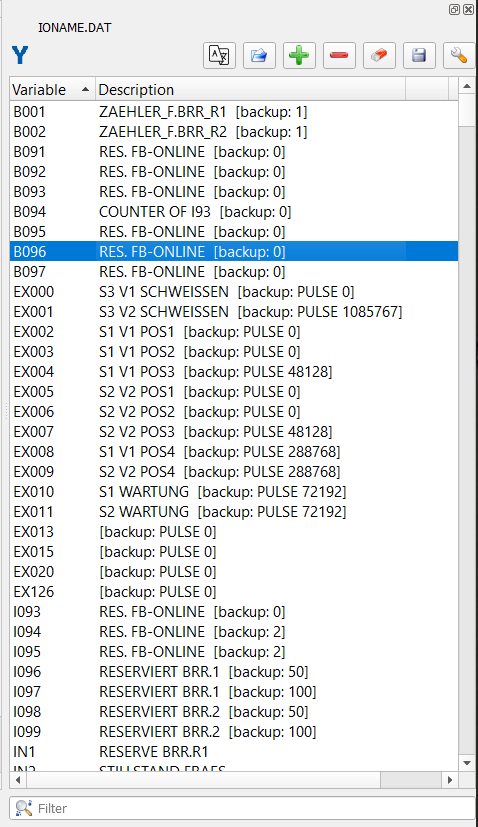
Long text window of a Yaskawa controller: variable names with the backup values, I/O names.
The descriptions can be edited in the table (double-click); the tooltips of the viewer show the changed
text immediately. The filter under the table finds signals and variables by name or text.
Saving the names
The export button of the long text window writes:| Format | Content |
| Yaskawa IONAME.DAT | the I/O names in the format of the controller - the layout of the IONAME.DAT of the backup (/IONAME, //IN, //OUT ..., four names per line) is kept, only the changed names are replaced; an empty description keeps the default name or leaves the name empty |
| Yaskawa VARNAME.DAT | the variable names in the format of the controller - changed names are replaced in place, removed names leave an empty line, new names are added at the end of their section (0500 1,0,NAME); the header and the number of lines of every section (///SHARE) stay as they were |
| Text file (*.txt), Text CSV (*.csv) | VARIABLE text / VARIABLE;text - for translation or documentation |
Loading names
Load file of the long text window accepts:- Yaskawa I/O names IONAME.DAT - also a renamed copy (recognized by its /IONAME header); VARNAME.DAT and VAR.DAT of the same directory are read with it,
- Yaskawa variable names VARNAME.DAT - variable names (and backup values) only,
- Yaskawa Long Text CSV / TXT - a list exported before, e.g. translated: the descriptions of the signals and variables already in the table are replaced (the [backup: value] of a variable stays), the others are added. Save it afterwards as IONAME.DAT / VARNAME.DAT to take the translation to the controller.
Typical use: export the names to CSV, translate them (e.g. German to English), load the CSV back, check the
jobs with the new names in the tooltips and save IONAME.DAT and VARNAME.DAT for the controller.
▲ Parameter files (*.PRM)
The parameter files of the backup (ALL.PRM, SC.PRM, RC.PRM, SV.PRM ...) open in the text editor with their own highlighting (yaskawa_prm.xml, chosen automatically for *.PRM): the file header (//SC DX), the sections (///S1C1G) and the values - zeros are grey, so that the values that are set stand out.A sticky header above the text always shows where the first visible line belongs: the file header (//SC DX - in ALL.PRM the file the section comes from), the section with its line number and the address of the first value of the first visible line (e.g. S1C1G400). A click on the section goes to its line.
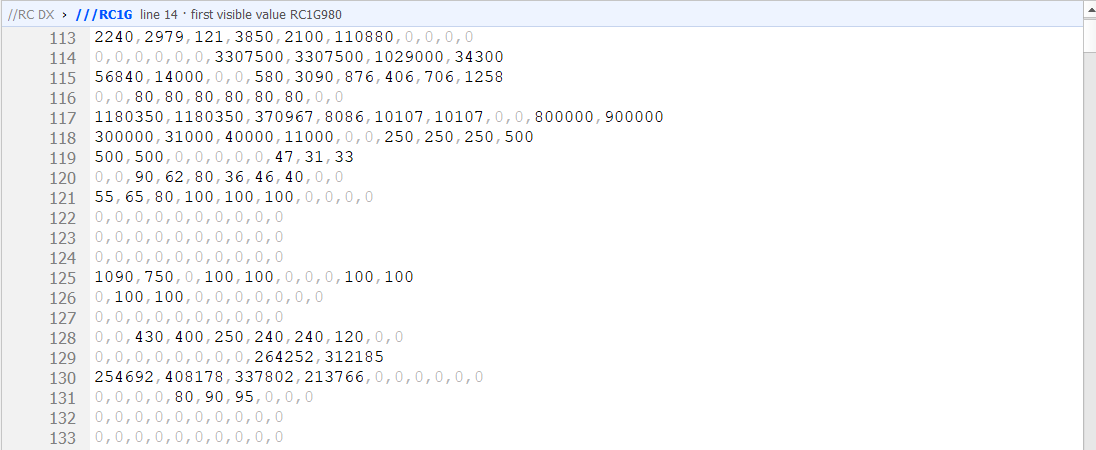
ALL.PRM: the sticky header shows file RC, section RC1G (line 14); line 113 starts with RC1G980, the gear ratio numerators.
A value is identified by its address: the section and the position of the value in the section,
counted from 0 over all lines of the section (ten values per line). The tooltip of a value shows the
address, the value and, for the parameters DReS reads itself, the meaning:
| Address | Meaning |
| S1CgG400 .. 407 | positive soft limit of axis 1..8 of control group g [pulse] (SC.PRM) |
| S1CgG408 .. 415 | negative soft limit of axis 1..8 [pulse] (SC.PRM) |
| RCgG972 .. 979 | gear ratio denominator of axis 1..8 (RC.PRM) |
| RCgG980 .. 987 | gear ratio numerator of axis 1..8, the sign gives the motor direction (RC.PRM) |
| SVgG24 .. 31 | encoder pulses per motor revolution of axis 1..8 (SV.PRM) |
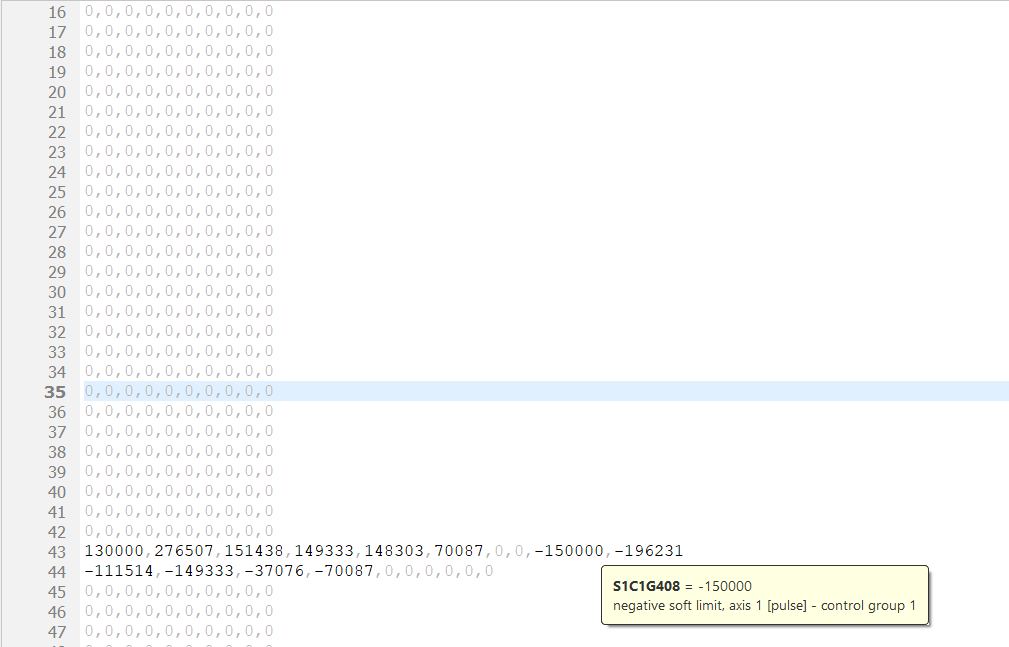
SC.PRM: zeros in grey, tooltip of the negative soft limit of axis 1 (S1C1G408).
Besides these, about 110 parameters of SC.PRM have a short meaning after the parameter chapter of the Yaskawa DX200
manual: speeds and positioning zones (S1CgG000 ..), operation and mode settings (S2C195 ..), cube and
interference areas (S2C001 .., S3C000 ..), relays (S4C327 ..). Most numbers are the same on DX100 and YRC1000, but
this is not guaranteed - check the manual of the controller before changing a parameter.
The application parameters of AP.PRM (A1P .. A8P, one section per application) mean different things depending on the application set in AxP000 (0 = arc welding); the tooltip lists the variants of the manual, e.g. A1P003: arc welding - first start condition file of power source 2, handling - output of the F2 key, spot welding - maximum number of power sources.
Without the Yaskawa licence the address and meaning (tooltip, sticky header) are shown for the first 100 lines of a parameter file. The whole file stays readable and highlighted; further on the sticky header shows the file header and the section as usual, and in place of the address a warning icon with the information that the address and meaning of the parameters require the Yaskawa licence. The comparison of parameter files value by value (Archive Diff) always requires the licence.
The addresses are the ones used in the Yaskawa manuals and on the teach pendant (e.g. S1C1G400); other parameters show the address and the value only.