To ensure you're always running the latest version of our program and have access to the latest component data,
we recommend taking advantage of our
Software Maintenance Agreement - a one-time, annual fee.
If you would like us to perform this service for your license, please contact us for a quote.
Customers who do not purchase an annual SMA subscription can continue to use old versions of our editor without any restrictions.
Changes in the version 6.7 (29.09.2026)
Highlights
KUKA KRC:
- New KRC point editor: Cartesian and joint views, external axes, 3D preview, editing of motion parameters
- "Insert motion point" now available for KRC, with all .dat declarations created automatically
- "Go to definition": jump from a call to its definition anywhere in the robot archive
- New "Compare KRC programs" (KRC Diff) with point coordinate comparison and PDF export
- New KRC ANTLR Validator: bulk syntax and fold check of files or whole directories
- KRC Robot 3D View: "Touch up" and "Add point" implemented
ABB:
- New ABB Robot 3D View (OLP): 3D robot, path, Touch up and Add point
- New ABB Diff and ABB Archive Diff, including point coordinate comparison
- Point table: distance, copy/assign coordinates and marking of unused points
- Point edits keep exact values, formatting, comments and the taught arm configuration
Yaskawa:
- New Yaskawa Diff and Yaskawa Archive Diff, incl. parameter (*.PRM) and condition (*.CND) files
- New point table, point editor and motion instruction editor with 3D robot preview
- New Yaskawa Robot 3D View (OLP) with Touch up and Add point
- Controller data from the backup; I/O/variable names editable; parameter value meanings in tooltips
- IF/WHILE/SWITCH/FOR blocks: highlighting, folding, syntax check; navigation to JUMP labels
Others:
- VKRC and Fanuc Archive Diff: new check of interlocks, collision requests and technology points
- New "Path (TCP)" tools: path length, motion time, arc info, insert point on path
- Export to ZIP archive for all robot types, with new toolbar button
- Search in all robot projects of the same type; "Find calls" for every robot type
- New "Show TCP" option showing the real tool tip in the 3D views
Show all 165 changes in version 6.7
KUKA KRC
Editor and navigation
- KRL command catalog (.kfd/.kop) is read from the robot; new KRC menu with these commands and a command completer in the code viewer
- New "Protect Folds" option (menu and settings) protects fold and subfold content from accidental editing
- "Go to definition" in the context menu: jumps to subprogram, function, global variable, signal, STRUC or ENUM definitions anywhere in the archive
- The background symbol index behind "Go to definition" can be switched off in the settings, with a file size limit
- Jumps from "Go to definition" and the KRL Variable Scanner now land on the correct line and open collapsed folds
- Warning about unbalanced ;FOLD/;ENDFOLD has a "Don't show this message again in this session" checkbox
KRL Variable Scanner
- Detects conflicting global variable declarations, searches *.src files (now by default), exports to CSV and XLSX
- New "Routine" tab listing subprograms and forward declarations with parameters; detects GLOBAL subprograms defined in several files
Validator
- New KRC ANTLR Validator plugin: checks the active file, all open *.SRC files or a directory for fold balance, KRL syntax and optional warnings
Comparison
- New "Compare KRC programs" (KRC Diff): point coordinate comparison, PDF export/print, movable annotation boxes
- Configurable distance and angle tolerances for KRC point coordinate comparison
Point editor
- New KRC point editor (double-click a point fold or "Edit point coordinates"): Cartesian, joint (with sliders), external axes and 3D preview
- Global points are written to their .dat file immediately, with a warning naming the file to be overwritten
- Plain PTP/LIN/CIRC folds and technology point folds (e.g. "Swi Spotpoint PTP") now open in the point editor
- Motion parameters editable: type, point name, CIRC auxiliary point, approximation, velocity, tool, base, extTCP, ACC/APO_DIST
- Only the parts of a fold that depend on changed parameters are rewritten; everything else stays untouched
- Renaming a point renames position, frame and motion data together; PTP/LIN switch changes PDAT/LDAT accordingly
- Points stored as axis values (E6AXIS) keep axis values; Status and Turn are now calculated correctly
- The message panel names the missing CAD model, catalog and archive when the dummy kinematics is used
- New documentation page for the KRC point editor; "Basic functions" page reorganised and extended
Point table, copying and assigning
- Status and Turn of the selected position shown; copying an axis point puts its real S/T on the clipboard
- New options blocking XYZABC assignment to global JOINT HOME positions and point type changes of global points
- Copy/Assign coordinates respect the point type (XYZ or JOINT) and offer conversion or a deliberate type change
- Copy/Assign also available for unused .dat points and in the joint table context menu
- Assigning to an axis point no longer asks about tool/base recalculation
- Fixed: after "Yes, recalculate" the point got the wrong tool/base number and moved
- Unused points with the "PPP" motion data naming now show velocity and acceleration
Inserting points
- "Insert motion point" works for KRC: complete PTP fold, position/frame/motion data declarations, next free number, file naming convention kept
- Asks whether the new point is XYZABC (E6POS) or JOINT (E6AXIS)
- Declarations of new points use the same number formatting as the rest of the file
- Closing the point editor without Apply undoes the whole insertion
Robot 3D View
- "Touch up": the selected point takes the current robot pose (local/global, E6POS/E6AXIS, CIRC points)
- "Add point": inserts a new PTP motion after the selected point, starting from the current robot pose
KUKA VKRC
- Improved changing of multi-variable Geanu parameters for gluing points
- "Check in *.DAT" now really searches *.dat files
- Fixed "Find ... calls in the robot's project" finding nothing in VKRC projects
- Point editor: external axes E2..E6 in a separate "External axes" box, as in KRC
- Point table context menu no longer shows the wrong point number in "Copy"/"Assign coordinates" labels
- Copying a point with undefined Status/Turn no longer puts an invalid value on the clipboard
- New point number is the highest used number + 1 (could duplicate an existing number)
- Cancelling a point insertion no longer leaves a blank line behind
- "Set equal value" and "Switch E<n> value" no longer round values to 6 digits and skip unreadable rows
- Fixed a possible crash when right-clicking the point table with no row selected
- Opening and closing the point editor without Apply no longer marks the program as modified
- Robot 3D View "Add point": no crash without a selected point; correct new point number
- ZIP export fixes: crash after OK, wrong VW_User paths, false duplicate-name message, machine data only after confirmation
Fanuc
- Improved detection of the Fanuc VW User version from usersdat.va
- Changing UT/UF of a joint point no longer changes its position; UT/UF fields disabled for such points
- Point table builds much faster in programs with thousands of positions
- "Insert motion point" asks whether the new point is XYZWPR or JOINT
- Motion numbers in the margin no longer restart at 1 after inserting or deleting a motion
- Robot 3D View: "Add point" implemented, starting from the current robot pose, UF/UT and E1
- Opening and closing the point editor without Apply no longer marks the program as modified
- "Clear selected Name values" moved to the end of the context menu and asks for confirmation
ABB
New functions
- New ABB Robot 3D View plugin: 3D model, path of motion commands, axes and E1, Cartesian position, TCP, work objects, axis limits
- ABB Robot 3D View: compare with another module, "Touch up" and "Add point" from the current robot pose
- New "Compare ABB programs" (ABB Diff) for *.mod/*.sys with robtarget/jointtarget comparison and new tolerance settings
- New ABB Archive Diff plugin: compares two ABB backups, reports missing files, compares point coordinates
- Point table in Diff windows is read-only
- Point table context menu: distance between two points, "Copy coordinates" and "Assign coordinates"
- Copy puts the whole declaration on the clipboard; Assign warns when points use different \Tool or \WObj
- Point table marks unused LOCAL points (grey italics, warning icon), as in KUKA and Fanuc
- New point starts from the neighbouring motion with its tool and work object, keeping its confdata
Point data accuracy
- Editing a quaternion component no longer destroys the orientation; quaternion is renormalised, all-zero refused
- Values no longer silently rounded by the point table; configured precision used for all numbers incl. orientation
- Editing a point (table or point editor) rewrites only the changed numbers; spacing, comments and semicolon kept
- Invalid coordinates are refused instead of being written as zero
- Point table shows numbers as written in the file; unconnected axes written and shown as 9E+09
- Saving reports an error when the file could not be written (e.g. full disk, lost network share)
Kinematics and configuration
- Points shown and saved in the arm configuration (confdata) they were taught in
- Fixed wrong "optimal" IK solution and wrong joint angles (radians shown as degrees, 90-degree "corrections")
- Valid IK solutions no longer rejected; matched solution marked with a star in the solutions list
- Linear unit (E1) limits now read from MOC.cfg: correct E1 range, track in 3D and in the documentation generator
- Unconnected E1 handled correctly; no false "Invalid E1 value" on robots without a linear unit
- Tool and work object data declared in program modules are now found
- Missing tool or work object data no longer locks Apply in the point editor
Editor and point table fixes
- New motion point: declaration placed at module level, not inside the routine; one undo step
- "Edit point" from the context menu works on motion command lines
- Next/Previous in the point editor no longer mixes up named and inline targets
- "Copy homogeneous matrix" and "Copy joints values" now work (right-click no longer overwrites the clipboard)
- Fixed sorting by LOCAL/CONST/PERS, selection after refresh and editable configuration columns
- "Quaternions as RPY angles" now matches the checkbox
- "Joint multi line commands" joins commands split over three or more lines
- Undo/Redo keeps line numbers correct
- Completer entries can be added and removed correctly (no duplicates)
- Fixed possible hangs in "Declare rob/joint target" and new point name generation
- Faster point table refresh and syntax refresh after typing stops, also in large programs
- Profinet device panel no longer empty after "Open recent project"
Yaskawa
Comparison
- New "Compare Yaskawa programs" (Yaskawa Diff) with folds, point coordinate comparison and PDF export/print
- New Yaskawa Archive Diff plugin: compares two backups, reports missing files, compares points and extra files
- Archive Diff compares parameter files (*.PRM) value by value, with meaning, filter table and text diff
- Archive Diff compares condition files (TOOL.CND, UFRAME.CND ...) entry by entry, with meaning
- Point table in Diff windows is read-only
Viewer and editors
- Robot info tab (SYSTEM.SYS) and CTB data tab (tools, user frames, soft limits, interference areas) from the backup
- Tooltips and long-text column with variable names and values, I/O names and macro calls; "Go to" opens the macro job
- New point table: all positions with group, type and tool; soft limit check; editing; copy/assign; distances
- New motion instruction editor (double-click MOVJ/MOVL...): speed, PL, station part and point values
- New point editor: Joint and Cartesian tabs, user frames and tools, RCONF, 3D preview of the robot
- Generic kinematics for about 100 Motoman models; pulses per degree and soft limits from the backup (DX100/DX200/YRC1000)
- Robot configuration (RCONF) shown in teach pendant order
- Robots moved by a base axis (track/gantry) are reported
- IF/WHILE/SWITCH/FOR blocks: matching parts highlighted, Ctrl+click jumps, tooltip shows the condition
- Code folding for IF/WHILE/SWITCH/FOR blocks
- Ctrl+click on called jobs, macros and JUMP labels; "Go to label" and "References" in the context menu
- Syntax check of labels (undefined, duplicate, unused) and of blocks (unclosed, crossing)
- Syntax check on save / while typing options; improved INFORM grammar with reliable open/save round trip
- Syntax markers now update after the last change, e.g. after Ctrl+Z
Long texts
- I/O and variable names can be saved as IONAME.DAT / VARNAME.DAT (backup kept) or TXT/CSV
- "Load file" accepts IONAME.DAT, VARNAME.DAT and previously exported (e.g. translated) CSV/TXT lists
Parameter files (*.PRM)
- Syntax highlighting for *.PRM files
- Value tooltip shows address and meaning (soft limits, gear ratio, encoder, about 110 SC.PRM and AP.PRM parameters)
- Section header stays visible while scrolling; click jumps to the section
Robot 3D View
- New Yaskawa Robot 3D View (OLP): dummy robot, job path, compare jobs, user frames, tools, soft limit check
- Yaskawa Robot 3D View: "Touch up" and "Add point" (new PULSE point with MOVJ/MOVL line)
Licence, installer, documentation
- Saving long texts requires the Yaskawa licence; without it *.PRM meanings are shown for the first 100 lines only
- Installer now includes the kinematics file (fixes "Yaskawa generic kinematics file not found")
- Yaskawa manual split into several pages with new screenshots and a link to the YouTube video
Others
Search and project tree
- Every file belongs to its robot project: "Open all ... files" and "Find ... calls" work for all files of all robots
- "Find ... calls" uses the correct call syntax of each robot type (VKRC, KRC, Fanuc, Yaskawa)
- "Search in current project tree" now also for KRC (*.SRC/*.DAT/*.SUB) and Yaskawa (*.JBI)
- New search scope "Search in all robot projects (same controller type)"
- Search results show a new "Path / Robot" column
- A file opened via a differently written path no longer opens a second copy
- "Open file for all robots" shows the file name; fixed file pattern of "Open all ... files"
Comparison (Diff)
- Expand/collapse all folds (left, right or both) in VKRC, KRC and Fanuc Diff windows
- VKRC and Fanuc Archive Diff: new "Interlocks & tech points" tab, fast text-only check after Compare
- Checks collision requests, Makro20, releases/locks and station interlocks: removed, moved or changed interlock points
- Checks interlock zones (taken later / released earlier) and technology points (spot, glue, process makros)
- New-archive rule violations marked [new], [existing] or [resolved]; double-click opens the line; export to HTML, CSV, XLSX
- Text comparison windows open faster (no unnecessary highlighting)
Point tables and point editors (several robot types)
- New "Path (TCP)" submenu (VKRC, KRC, Fanuc): path length and estimated motion time of selected motions
- Path tools: arc information, point deviation, approximation check, long segments, switch point check
- Path tools: "Insert point on path at distance..." and export of the path to CSV; demo mode without licence
- Points declared in .dat but unused shown in grey italics with a warning icon (KRC option, VKRC, Fanuc)
- New motion point inserted after the whole neighbouring fold, not inside it (VKRC, KRC, Fanuc)
- New motion point starts from the neighbouring motion with its tool/base or UF/UT instead of zeros
- VKRC/Fanuc: closing the point editor of a new point without Apply fully undoes the insertion
- VKRC/Fanuc point editors use the correct CAD model instead of dummy kinematics or another robot's model
- VKRC/Fanuc "Cartesian distance" fixed for coordinates with different signs
3D view
- New "Show TCP" option showing the real tool tip (Robot View plugins and VKRC, Fanuc, ABB point editors)
- New look of the kinematic ("dummy") robot model for KUKA, Fanuc and ABB
- Help of every Robot 3D View plugin opens its own documentation page
Validators
- ANTLR validators (KRC, Fanuc, Yaskawa) write findings to an HTML report with a short summary instead of an oversized window
- Summary and a clickable "Report saved" link in the message panel; warnings-only runs reported correctly
- Fanuc and Yaskawa validators: new "Report warnings as well" option
Editor
- Large files (more than 15000 lines) highlighted in portions with a progress dialog and "Stop highlighting"
- Files open faster: highlighted once instead of twice
- Syntax refresh runs once after typing stops, also after Ctrl+Z/Ctrl+Y; setting changes work without restart
- Ctrl+hover underline covers the whole reference (e.g. job names with "-")
- Syntax check dialog no longer shows a second "Ok" button
- Editor stability fixes in KRC/VKRC/Fanuc (fold visibility, line numbers, undo/redo) after multi-line edits and comparison
- Improved KRL, Yaskawa and Fanuc syntax parsers
- General stability improvements from a code review
Export to ZIP archive
- Export to ZIP archive for all robot types (menu <robot> > More), with remembered options and a result summary
- KRC: open programs with their archive paths, Program folder, am.ini or whole archive; machine data only after confirmation
- VFanuc: open *.LS programs, optionally *.TP, flat for USB stick or with backup structure
- ABB: open modules in backup structure, optional program file (*.pgf) per task
- Yaskawa: open *.JBI jobs, flat for loading from external memory or with backup structure
- Safe writing: no half-written archive after an error, duplicate names detected
- New toolbar button "Export to robot archive (ZIP)"
Menus and plugins
- KRC, ABB and Yaskawa menus got a "More" submenu; "Plugins" moved to the main menu bar
- Saved reports and generated files are clickable links in the plugins' message consoles
Documentation
- New pages: Robot 3D View plugins, ANTLR validators, ABB Diff/Archive Diff, ZIP export, Path (TCP) tools, opening large files
- Documentation for Robot Data Spy
- Documentation Generator Pro (VKRC, ABB, Fanuc): how to solve a Word/Excel automation issue caused by security software
Changes in the version 6.6 (26.01.2026)
KUKA:
- Improved robot VKRC Quick Info
- Obtaining VKRC robot name after exporting ASZ project from PNIODriver configuration if empty
Fanuc:
- Added robot Quick Info for Fanuc
Others:
- Improved VKRC and Fanuc Diff plugins - button to open file from disk works again
- Improved session management
- Improved license management
- Improved management of opening recent files and projects
- Improved console logging messages
Changes in the version 6.5 (10.11.2025)
KUKA:
- Added JS callback script for VKRC-2-TXT export
- Fixed issue with saving commented VKRC BS command
- Improved VKRC Diff plugin - added patience files comparison
Fanuc:
- Added Fanuc KAREL native (without VW program structure and commands) editing to the editor (beta)
- Improved Fanuc Diff plugin - added patience files comparison
Yaskawa:
- Added 'Go to' file in Yaskawa viewer
Others:
- Detecting UP call inside another UP and potential recursive UP call for VKRC and VFanuc
- Improved recalculation of point coordinates after changing tool frame - Kuka and Fanuc
- Improved showing of variable description tooltip
- Fixed issue with extracting multiple ZIP files
- Improved Compare Files plugin - added patience files comparison
- Improved VKRC and Fanuc Archive Diff plugins - faster files comparison
- Faster loading robots' projects from the last session
Changes in the version 6.4 (04.07.2025)
For Fanuc:
- Improved Fanuc source parsing in viewer
- Read Fanuc TCP_SPD_OUT table from config
- Improved reading longtexts for Fanuc from SUMMARY.DG file
- Added OPERAND_MAX_COUNT parameter in fanuc.limits.ini to define allowed number of operands in TC_ONLINE command
- Added 'Define Sammelmerker' for VFanuc
For Others:
- Improved searching text in robot project and directories
- Improved VKRC, Fanuc, ABB Documentation Pro plugin for changes in ActiveX used for communication with Word.Application
Changes in the version 6.3 (28.12.2024)
For KUKA:
- Improved VKRC Tech parsing for names with multiple spaces and dots
- Improved VKRC Tech. The empty subgroup names are set to default value 'SubN'
- Improved saving Makro.src
- Improved saving Kuka files with servogun command
- Improved robot stations' names for VKRC Quick Info and robot's documentation plugins
- Improved commenting/uncommenting text in VKRC viewer
- Improved numbering lines in VKRC viewer
- Improved saving all types of VKRC makros
- Improved checking reference to SPSLabel in VKRC viewer
- Improved setting VKRC motion parameters on file loading
- Multiple operand allwed in VKRC set bin/i command
- Improved showing incomplete point data in VKRC point coordinates browser
- Improved checking compatibility of selected VKRC TP version with file header
- Improved VKRC Tech Updater plugin. Now the plugin can upgrade given tech command to higher version of VW user.
For Fanuc:
- Improved Fanuc Archive Diff plugin - automatically unzipping english.zip file
For Others:
- New button "New search" for dialog with search results
- Improved session management
- Improved loading long texts
- Improved progress bar for VKRC, Fanuc and ABB documentation's plugins
- Showing multiple long texts
- Showing 'red flag' in long text widget if the loaded variable list is not synchronized with current VKRC or VFanuc editor
- Improved search / replace panel
- Improved copy & paste in VKRC and VFanuc viewers
Changes in the version 6.2 (9.07.2024)
- Improved renumbering and cleaning VFanuc points
- Set wider range for external axes in VKRC and Fanuc point editor
- Removed bug for VKRC and Fanuc point editor when changing E1 linear axis value
- Improved KRC point widget
Changes in the version 6.1 (7.05.2024)
For KUKA:
- Fixed important bug for VKRC tech command.
Editor recognized wrong TP version if the header file contains TP > 8.1.0 and TP < 8.3.0
- Remove empty lines in the Kuka file header
Changes in the version 6.0 (26.03.2024)
For KUKA:
- Added VKRC5 v.8.7 controller
- Integrated WoV Script Runner to manually upgrade edited programs to ensure high compatibility with VKRC controller.
Learn more https://dramat.eu/doc/vkrc_manual_upgrade.html
- Added editable VEXPERT fold for VKRC viewer
- Automatically restores original text of VKRC motion command after inline changes.
Any changes to the parameters of a motion point are made only by the point editor.
- Allowes inline point editing in VKRC viewer.
Some of the motion point parameters can be changed now directly in the editor if the suitable setting flag is selected.
To change the parameter value please select first the old value with mouse.
- Shows VKRC PDF documentation for selected command on pressing F1 in SumatraPDF reader
- User can comment instructions (single SPS instruction too) in VKRC programm for TPVW 8.6 and higher
- Improved warning messages on loading langtexts from WVS project
- Improved restoring VKRC file - loading DAT file correctly
- Improved saving backup file
- Improved generating TPVW version string in VKRC SRC and DAT files' headers according to selected TPVW in editor
- Improved renumbering VKRC glue Schaltpunkt parameter. Add/modify comment above point.
- Improved makrostep KRL parser
- Improved VKRC tech editor
- Improved VKRC point editor - set correct VB range
- Improved importing VKRC TXT files and showing in VKRC viewer
- Improved chaning tool/base for selected points in VKRC viewer
For Fanuc:
- Calculates cartesian distance for joint positions in Fanuc points' coordinates widget
- New pattern for Fanuc VW user parameter implemented. Now accepted numeric variables with the range e.g.:
N05 = "No.ValveTerminals":(1~4):'1'
- Added new Fanuc command to the parser: SPOT, Sample Start, Sample End, GUN DETACH, more complex system variable
- Reading lang texts from Fanuc SUMMARY.DG
- Fanuc - parameterizing joining split command on file load.
Point command will be always joined on loading even if it was split in original file.
- Improved Fanuc viewer block formatting
- Improved reading & displaying Fanuc payload data
- Improved Fanuc command 'PAYLOAD[1:C-ZANGE]' - now with description accepted
- Improved geting variable for Fanuc tooltip shown in editor
- Improved loading Fanuc long texts from CSV file
- Improved reordering operands in Fanuc TC_ONLINE - works only for TC_ONLINE with simple AND logic
- Improved reading Fanuc point UT and UF for 2,3,4,5 group
Others:
- On drag & drop of file in Project Tree Widget opens robot project instead of opening file in text mode
- Added action 'Copy as plain text & format' text in viewer.
The copied text can be formatted through JavaScript callback. The formatted text is copied to the clipboard.
- Added 'Next' and 'Previous' buttons to jump to the point in VKRC and Fanuc point editors
- Improved Windows installer
- Improved saving app settings in system register.
Editor can be run now without '-i' option for multi instances except custom VW distribution.
- Improved reloading all files function - now reload even when file is not modified
- Improved cutting text in VKRC and Fanuc viewers
- Improved commenting text in VKRC and Fanuc viewers
- Improved undo/redo in VKRC and Fanuc viewers
- Improved calling PowerShell callback script for VKRC, Fanuc, ABB and Yaskawa
- Improved visible debugging console output
- Improved code highlighting
Changes in the version 5.9 (1.06.2023)
For
Yaskawa:
- Saving Yaskawa JBI files
- Checking INFORM syntax
- New plugins YaskawaAntlrValidator to bulk validating of a large number of files
- Added syntax highlighting for Yaskawa JBI files
- Added Yaskawa settings panel to the global settings
For KUKA:
- New plugin VKRC Data Integrity
- VKRCDocGeneratorPro - added new robot attribute 'used_coll' to insert table with used collisions in UPs and Folgen
- Improved VKRC tech editor for 'num1=Zange=Nr1' - value with two = characters
- Improved VKRC Tech Updater plugin - shows X,Y,Z values for process point and the first comment text above point
- Improved showing VKRC inconsistent point data warning
- Improved VKRC point editor for E1 value
- Allows VB real value for VKRC motion point
- Allows binary value for Kuka S and T E6POS, T 19 corresponds to T 'B010011'
- Asks for VKRC programm comment on file save if empty
- Shows VKRC point's S and T values in coordinates' widget
- Some of Kuka E6POS structure's parameters in DAT file can be omited. For example S,T,E1.
But such point cannot be properly edited or displayed in 3D viewer.
Values X,Y,Z,A,B,C are still mandatory for E6POS.
For Fanuc:
- New plugins FanucAntlrValidator to bulk validating of a large number of files
- FanucDocGeneratorPro - added new robot attribute 'used_coll' to insert table with used collisions in UPs and Folgen
- Improved Fanuc Tech Updater plugin - shows X,Y,Z values for process point and the first comment text above point
- Improved Fanuc parser
- Improved showing points' coordinate widget in Fanuc SUCHL program
- Improved Fanuc tech command for KS28 - additional 3 parameters in the command
- Improved SKIP condition for Fanuc motion point
- Added change tool and base action for all selected points to Fanuc menu
- Added new file type SUCHL to Fanuc viewer
- New documentation for Fanuc Antlr Validator and Yaskawa Antlr Validator plugins
- Reading Fanuc VW user DT file in new format for KS28
- Reads long texts to the Long Text widget from Fanuc csv file
Others:
- Improved showing missing licenses warning
- Improved searching files recursively - added progress dialog
- Improved handling PDF in certain plugins
- Improved sessions' manager dialog
- Improved pasting text in Fanuc and VKRC viewers
- Improved capturing robot image in VKRC, Fanuc, ABB point's editors
- Included lightweight SumatraPDF reader to the installer
- Shows Fanuc/Yaskawa PDF documentation for selected command on pressing F1 in SumatraPDF reader
- Single F6 shortcut to check full syntax in current file for all viewer types
- New attribute 'wildcard' for building robot project tree
- Added action to recent projects - Open All
- Added 'Show viewer settings' action in every viewer context menu
Changes in the version 5.8 (20.01.2023)
For KUKA:
- Shows indicator in the project file comment if VKRC Folge is added to the cell.src and is runnable
- VKRC Documentation Pro plugin has a new attribute for reference table to exclude certain longtexts
- For OLP Process Simulate compatibility do not add space at the beginning of comment with location name.
Writes comment --$$ location_name -- instead of -- $$ location_name -- in the first point's subfold.
- Displays tool name for tool load data in CTB tree
- Improved operands' condition for (SPS)Label
- Improved VKRC Tech editor
- Improved VKRC Robot Check plugin, check tool 32 and base 32
- Reads long texts from WVS project if the modification date is newer as current set and used ASZ project
For Fanuc:
- New VFanuc code parser
- Editabled Fanuc makrostp, motn, makrosp files
- New plugin Fanuc Archive Diff compares robot archives
- FanucDiff and FanucArchiveDiff works with Fanuc makrostp, motn, makrosp files
- Improved long text variables sorting for VFanuc Documentation Pro plugin
- Shows additional information for Fanuc Tech validation on debug console
- Improved Fanuc checking mixed logic
- Added GO as allowed operand to Fanuc PS command
- New documentation for Fanuc tech command
- Reads tool and base names from Fanuc longtext.csv
- Sets default value for an empty Fanuc tech parameter if an empty value is not acceptable
- Improved pasting text into Fanuc program
- Configurable comment character ! or // for Fanuc
- If Fanuc command contains error, the user can configure if the command should be commented or left without changes on saving file
- Improved index for PR[...] Fanuc, PR[ (GPk:) i ] and PR[ (GPk:) i , j ] available
- Improved Fanuc checking mixed logic
- Improved copying and pasting Fanuc points with indirect indexes
- Reads and shows Fanuc points with UF:F and UT:F what means that the coordinate system
of the currently selected tool coordinate system number is used
- Improved processing Fanuc motion points with direct/indirect indexes
Others:
- Faster showing program in VKRC and VFanuc viewer
- Faster loading long text for Kuka and Fanuc
- Prints on debug console all process calls in background
- Adjusted width of find text dialog
- Improved zooming text in the viewer
- Improved Windows installer
- Improved sent event processing
- Improved syntax highlighting for files with incorrect VASS file name
- Improved printing longtexts for VKRC and Fanuc Documentation Pro plugins. User configurable variables' range
- Improved searching text in current robot project
- Improved showing current file name and session name in app title bar
Changes in the version 5.7 (5.05.2022)
For KUKA:
- New plugin VKRC Archive Diff compares robot archives
- Improved checking default value for invisible (inactive) parameters in VKRC technology commands
- Shows tool and base number in VKRC coordinates' widget
For Fanuc:
- Displays cursor tooltip with Fanuc position register from posreg.va
Others:
- Unzipping robot archives with 7za - keeps the original creation and modification date of the file
- Improved VKRC, VFanuc, PlainText Diff plugins
- Improved reloading files in viewer
- Improved VKRC and Fanuc point editor - do not restore 3D preview after crash
Changes in the version 5.6 (23.01.2022)
For KUKA:
- Detecting Kuka *.asz active project
- Opening VKRCDiag zip files and showing it as a VKRC robot project
- Check and compare VKRC TPVW version in header file with current selected in editor on file saving
- Position singularity check on selection in KRC and VKRC point coordinates' widget
- New VKRC documentation template for AUDI projects
- New 'date' tag for VKRC, Fanuc and ABB Documentation Pro plugins to insert current date
- New 'cell' tag for VKRC Documentation Pro plugin to insert structure of programs
- Improved VKRC Tech Updater plugin
- Improved inserting VKRC Schritt and Trigger
For ABB:
- Opening ABB TAR archive and showing it as a ABB robot project
- ABB Documentation Pro plugin can generate documentation from ABB TAR robot archive
- Improved ABB semantic check - shows more detailed error message
For Fanuc:
- New plugin Fanuc Tech Updater
- Reading long texts from Fanuc CSV file
- Improved Fanuc tech editor
- Improved VFanuc Simple Viewer - reading multiple line commands
- Improved Fanuc Doc Generator plugin for new CSV long text file format
Others:
- Used robot name for output directory for unziped robot archive (optional)
- Improved IK for Kuka, Fanuc and ABB
- Improved restoring last session
- Improved showing profinet tree
- Improved buildng tree for workspace directories' structure
- Improved Windows installer
Changes in the version 5.5 (18.08.2021)
- VKRC Tech widget is not blinking any more when saving program
- VFanuc Tech widget is not blinking any more when saving program
- Added comment pattern to the available Fanuc APPL commands and 'repeatable' attribute for the command
- Added "Download CAD library" action to the Help menu
- Improved splitting and saving Fanuc comment text
- Improved loading and saving APPL section in Fanuc program
- Improved setting active groups for Fanuc new file
- Improved 'copy and paste' of commands in VKRC and VFanuc viewers, now the user can copy and paste data between few instances of DReS editor
Changes in the version 5.4.3 (29.07.2021)
- Added configurable default value for invisible (inactive) parameters in VKRC technology commands
- Checking if the value of invisible (inactive) parameter in VKRC tech command is equal with the default value
Changes in the version 5.4.1 (27.07.2021)
- Important update for VKRC tech editor
Changes in the version 5.4 (20.07.2021)
- New plugin VKRC Tech Updater
- Added "Reload" option to the editor context menu
- Added "Remove/add variable long text from/to viewer on opening/saving" to the Fanuc viewer's context menu
- Shows selected text length in editor status bar
- Updated VKRC and VFanuc Calibration plugins - selecting reference point optimized
- Opening VKRC files is not indicating automatically file changes any more
- If the cursor moves over vw user file name in the VKRC reference list file the corresponding file can be opened by mouse click
- Added list of open source libraries and copyrights
- New image rotation angle attribute in VKRC, VFanuc and ABB Documentation Generator Pro plugin
- Improved VKRC tech editor
- Fixed 'Find' and 'Find and replace' actions in context menu of plain text editor
- Fixed crash with syntax highlighting
- Fixed crash on showing tooltip in VKRC viewer when VW user has been imported
- Fixed copy and paste different mime data to the clipboard
Changes in the version 5.3 (5.06.2021)
- 3D visualization of ABB arm position in point editor
- Improved IK for ABB with linear unit axis
- Changed items' indentation in project tree view
- Displays more information about Fanuc robot
- New item sorting and selecting options in context menu for ABB Rename Multi-Point plugin
- Configurable files and directories of Kuka, ABB and Fanuc robot archive to show in project tree
- Improved importing Fanuc VW user
- Update VFanuc 30iB+ tech command text on language version change in tech command editor and through
option in editor context menu
- New option "Deactivate robot" in the project tree context menu for forcing saving tech command
with the selected VW user version instead of current robot project VW user (only for Fanuc)
- New option "Open file for all robots" in the project tree context menu
- Shows folded code in a tooltip
- Select robot project after file selection changed
- Fixed setting the new UT for all Fanuc point's groups
- New option 'Do not inherit' for VKRC and VFanuc 'Add / remove FB PSPS'
- Enabled undo/redo for VFanuc document (experimental)
- Fixed 'Move up/down' selected text in VFanuc document
- Improved ABB Documentation Generator Pro, displays robot collisions, releases and FM's
Changes in the version 5.2 (10.04.2021)
- New Plugin ABB Documentation Generator Pro
- New Plugin ABB Rename Multi-Point
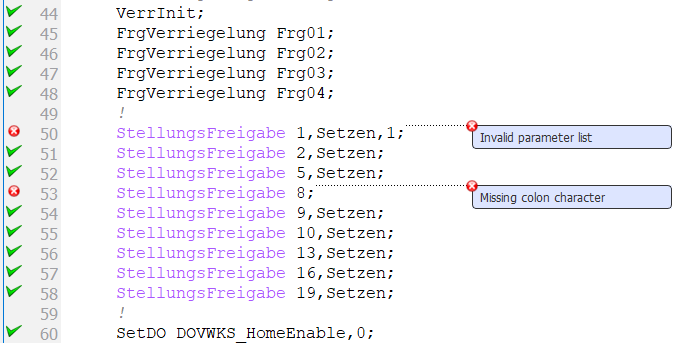
- Semantic check for ABB programs read more
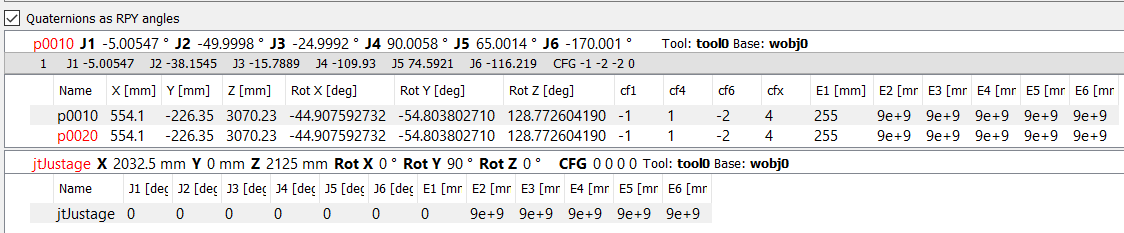
- Forward and inverse kinematics for ABB 6 DOF robot robtarget and jointtarget
- Converts quaternions to rotation angles for ABB point widget
- Displays all available IK solutions for ABB robtarget
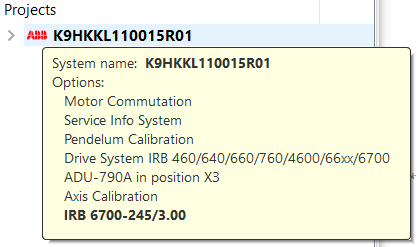
- Displays more information about ABB robot
- Displays real ABB robot image - requires ABB Robot Studio to be installed
- Displays tool and base data for ABB robot
- Displays tooltip with basic information about robot in project view
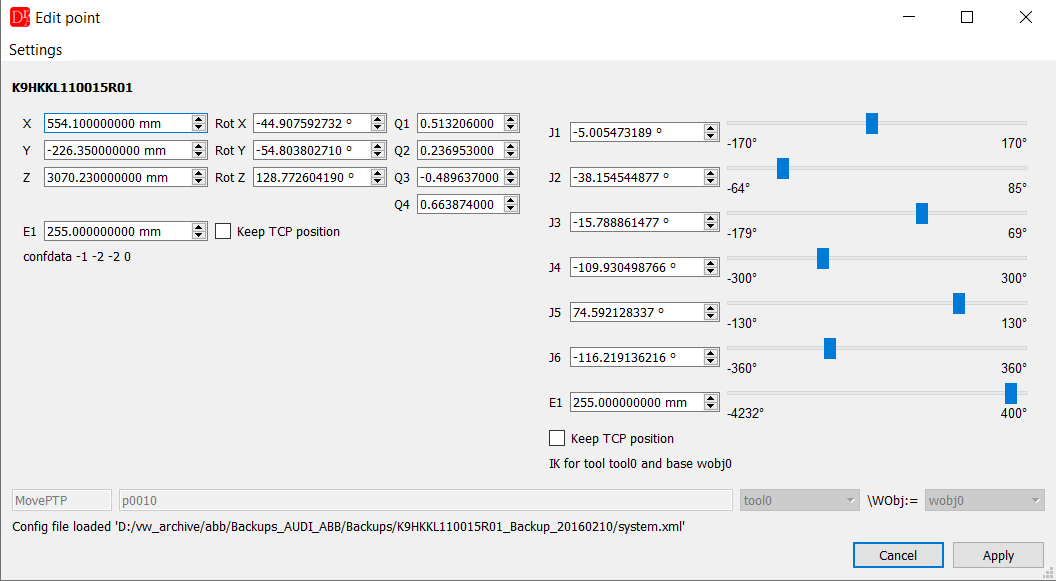
- Displays ABB point editor on jointtarget or robtarget or motion command double click
- Displays procedure information tooltip in ABB viewer for predefined procedures
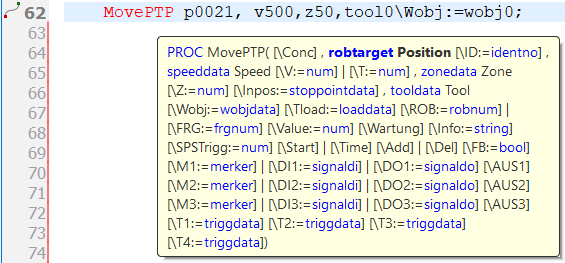
- Indent ABB program
- Joint/split ABB multiline commands
- Define ABB robtarget/jointtarget from direct position in the motion command
- Added progress bar for VKRC and VFanuc Documentation Generator Pro plugin
- Added command autocompleter for ABB
- Added template menu and combobox for ABB
- Added VFanuc template menu
- Undo / redo text changes in ABB viewer
- New ABB code highlighting styles
- New VKRC code highlighting styles to mark invalid values for VE and SPSTrig
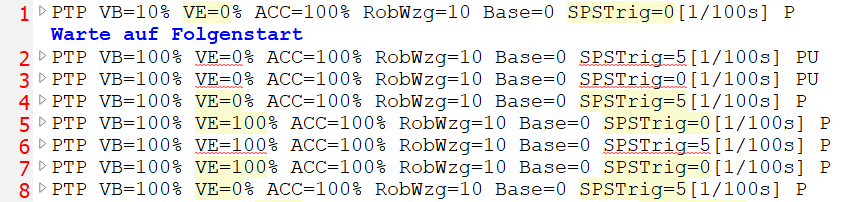
- New Fanuc code highlighting styles to mark invalid values for point termination and TB
- New context menu GOTO M or F assignment in VFanuc viewer
- New option to copy and assign multiple coordinates in VKRC point list widget
- Improved VKRC template menu
- Improved VKRC point editor
- Improved copying and assignment point coordinates in VKRC point list widget
- Improved creating temporary file for VKRC & VFanuc Documentation Generator Pro
- Improved Fanuc point editor, added 3D robot preview
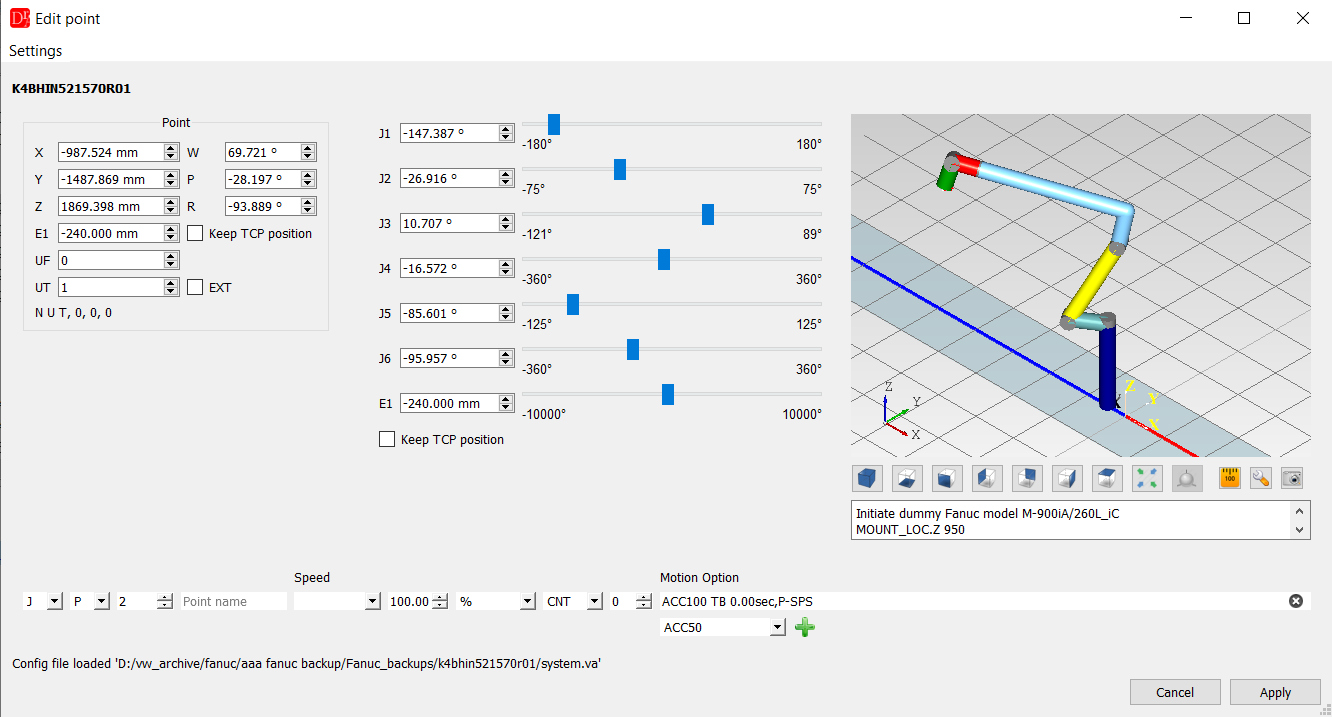
- Updated documentation
Changes in the version 5.1 (10.01.2021)
- Multiline find and replace text
- PowerShell callback script for VKRC, Fanuc and ABB read more
- Find all global/local KRL variables for the current robot project in all DAT files
- Adding custom files and directories to the VKRC project tree from robot archive directory
- Improved KRL code parser
- Improved importing Kuka VW user
- Improved VKRC Documentation Pro plugin - inserts variable translation text for given language from WVS project
Changes in the version 5.0 (29.09.2020)
- New plugin ABB WPS - read more
- New plugin VFanuc WPS - read more
- Improved importing VFanuc VW user for 30iB+ multiple files
- Improved VFanuc VW User tech editor
- Improved renumbering and cleaning VFanuc points
- Improved VFanuc APPL validation
- Improved 'Ok & jump' to the next tech command for VKRC and VFanuc viewer
- Acceptable scientific notation for VFanuc point coordinates
- Fixed parser syntax for VKRC LIN SUCHEN
- Fixed 'Save selected' files on closing editor
Changes in the version 4.9 (20.07.2020)
- Added VKRC controller v.8.5
- Optional removing variable long text from the command in Fanuc viewer on file opening
- Optional adding variable long text to the Fanuc viewer on file saving
- Calculating forward kinematics for Fanuc points
- Shows Fanuc robot preview image on the robot info tab
- Set allowed length of Fanuc variable longtext - if exceeds mark item with red background and tooltip
- Improved longtext highlighting
- Improved text and points highlighting for VKRCDiff and VFanucDiff
- Improved Fanuc variable description shown in statusbar
- Improved simplifying TC_ONLINE for Fanuc
- Improved recognition of file type for auto highlighting style
- Improved A33 plan reader
Changes in the version 4.8 (28.04.2020)
- Process Simulate PSZ file viewer read more
- KRC-2-VKRC path converter plugin
- Opens KRC archive, shows file in the KRC viewer with syntax highlighting
- Checks KRL syntax (limited)
- 3D visualization of Kuka joints position for KRC programs
- Improved calculation of VKRC inverse kinematic for robot with linear axis
- Improved VKRC SmarPad
- Improved VKRC tech widget (escape tech version name with special QRegExp characters)
- Improved VKRC Long Text plugin - search for EA's files (*.xml *.csv) recursively, load VASS6 long text templates
- Improved VKRC point editor - linear axis visualization
- Improved VKRC Robot View plugin
- Shows tooltip with VW user tech command for VKRC program
- Faster opening of multiple VKRC robot archive
- Shows debug output on the program console
- Sets the last active file as current file after start
- Tile windows horizontally and vertically
- Drag & drop a file for VKRCDiff and VFanucDiff plugins
Changes in the version 4.7 (4.01.2020)
- Enabled undo/redo for VKRC viewer (experimental) read more
- User configurable VKRC variables' limits in templates/kuka.limits.ini file
- Improved importing Kuka VW user
- Improved VKRC2TXT
- Added custom comment box in the VKRCDiff window, accessible in the context menu over document
- Shows VKRC process parameter value in tooltip and variable description
- Implemented VW User for VFanuc 30iB+
- Add / remove TC_ONLINE for VFanuc program
- Check VFanuc program comment's length
- Saving VFanuc point with register index R[]
- Sorting VFanuc point options according to defined rules
- New VFanuc code highlighting style
- Improved VFanuc parser, check L and C point syntax
- New actions in Tools menu for text manipulation: uppercase, lowercase and capitalize
- Additional highlighting styles for longtext widget, accessible in the context menu
- Improved PlainTextDiff, VKRCDiff and VFanucDiff
- Improved text search
- Printing highlighted text
- Updates long text array on variable name/description change
Changes in the version 4.6 (7.08.2019)
- VKRC Calibration plugin
- Fanuc Calibration plugin
- Copy selected points in the VKRC coordinates' widget as plain text to the clipboard
- Added change tool and base action for all selected points to VKRC menu
- New section APPL in VFanuc viewer
- Add APPL commands in the VFanuc -> Commands -> APPL menu
- Set active groups for current VFanuc program
- Export long texts from selected VFanuc files
- Add / remove variable description in selected VFanuc files
- Selection box with VFanuc vw user in toolbar
- Template combobox for VFanuc viewer
- Edit and jump to the next VFanuc tech fold
- Added command autocompleter for VFanuc viewer
- Import VFanuc vw user from argname.dt file
- Set custom background for long text variables
- Improved VKRC and VFanuc documentation pro plugins - new 'comment' attribute for filelist
- Ctrl+R shortcut for Windows to find & replace
- Ctrl+Shift+W shortcut to close all files
- Disable warning for FB PSPS with + sign
- Improved VKRC templates
- Improved VFanuc syntax parser
- Improved GOTO Label / Label / GOTO SPSLabel / SPSLabel in VKRC viewer
Changes in the version 4.5 (13.6.2019)
- VKRC E-Plan reader plugin
- Draw box with debug message in the editor
- Improved restoring last session
- Show/hide quick information on workspace tab for robot projects
- Drag & drop directory on the file and project view indicates search for all
zip files recursively and open all valid robots' archives
- Scalable image size for recursiveimg tag in all VKRC and VFanuc documentation plugins
- Close all messages for interrupted HASP session with one button
- Fixed bug with LIN SUCHEN point type in VKRC point editor
Changes in the version 4.4 (16.04.2019)
- Save makrostep[N].src and makrosps[N].src
- Add padding zero characters to the UP and Makro call for VFanuc programs
- Split VFanuc comment into multiple lines if text length exceeds given number of characters
- Improved SmartPad plugin and communication with RF::RobSim from EKS InTec GmbH
- Exportable / restorable highlighting styles
- New hihglighting style for tech and servozange, EIN and AUS
- Improved VKRC viewer
- Improved importing VW User
- Improved VKRC Robot View plugin - new button to add new point to the path and update program in the editor
- Improved VFanuc parser
Changes in the version 4.3 (19.02.2019)
- New tab 'Workspace' shows tree with all files in the workspace directory sorted by stations' names
- Added VW user combo box to the editor toolbar
- Improved importing VW User - new option to compare ini files
- Draggable tabs on the left tabs' panel
- Improved Plain Text Diff - check in binary or text mode
Changes in the version 4.1 (14.01.2019)
- Open Kuka WVS project - accessible files and long text (under Windows only, requires WorkVisual)
- Open Kuka ASZ project - accessible files (under Windows only, requires WorkVisual)
- Improved VKRC Diff, VFanuc Diff, Plain Text Diff
- VKRC Mount Share requires none license any more
- Set path for WorkVisual executable file from Windows registry
Changes in the version 4.0 (19.12.2018)
- Added SERVOZANGE command for VKRC >= 8.3
- New PlainTextDiff plugin available if VKRCDiff license present
- Show tech parameters only instead of readable text in the VKRC viewer
- Making backup file while importing already existing VW user version
- Split VKRC comment into multiple lines if text length exceeds given number of characters
- Added 'Copy full path' and 'Copy file name' actions to the file tree context menu
- Added 'Save copy of file' action to the file menu and file tree context menu
- Close all robot projects when changing session
- Automatically adds code viewer to the backup file
- Compare VKRC file with the backup file
- Restoring file from the backup
- Create ABB file backup on save
- Improved VKRC tech editor
- Improved Fanuc Documentation Pro plugin, new robot attribute: ip, applications
- Improved GOTO Label command, acceptable multi-operands for Kuka system >= 8.3
- Improved override cursor
- Improved points' coordinate widget
- Improved VKRC Documentation Pro plugin